how to prevent DDoS attacks ?
-
hi @phenomlab , recently we are getting a lot of DDoS attacks.
We have nginx rate limits and fail2ban set up as security tools…
https://www.nginx.com/blog/rate-limiting-nginx/
Since cloudflare is not working properly with NodeBB due to connection problems, we are looking for other solutions to help with these attacks…
During all these attacks for several hours forum gives “503 excessive load” error page…
-
hi @phenomlab , recently we are getting a lot of DDoS attacks.
We have nginx rate limits and fail2ban set up as security tools…
https://www.nginx.com/blog/rate-limiting-nginx/
Since cloudflare is not working properly with NodeBB due to connection problems, we are looking for other solutions to help with these attacks…
During all these attacks for several hours forum gives “503 excessive load” error page…
@crazycells have you approached your ISP (the VPS provider) to ask them if they have any mechanisms in place? There are a variety of methods you can deploy to prevent, or at the very least, slow down the attack such as blocking the country of origin.
Mark Cutting also advises organisations as a Fractional CIO, Fractional CISO and Executive Advisor, helping boards improve technology governance, cyber resilience and executive decision making. Learn more at Gratmore Ltd
-
@crazycells have you approached your ISP (the VPS provider) to ask them if they have any mechanisms in place? There are a variety of methods you can deploy to prevent, or at the very least, slow down the attack such as blocking the country of origin.
@phenomlab we use digital ocean, and I have checked their website before, they do not have this service, and they recommend cloudflare for this purpose.
-
@phenomlab we use digital ocean, and I have checked their website before, they do not have this service, and they recommend cloudflare for this purpose.
@crazycells Ok, but do they have a firewall that you can leverage? Depending on if this exists, and how advanced it is, we can use this to drop most of the unwanted traffic at the root.
Mark Cutting also advises organisations as a Fractional CIO, Fractional CISO and Executive Advisor, helping boards improve technology governance, cyber resilience and executive decision making. Learn more at Gratmore Ltd
-
@crazycells Ok, but do they have a firewall that you can leverage? Depending on if this exists, and how advanced it is, we can use this to drop most of the unwanted traffic at the root.
@phenomlab they have firewall but we have to input individual rules, there is no country block.
Additionally, we use UFW and we only allow https.
-
@phenomlab they have firewall but we have to input individual rules, there is no country block.
Additionally, we use UFW and we only allow https.
@crazycells have you seen this?
Mark Cutting also advises organisations as a Fractional CIO, Fractional CISO and Executive Advisor, helping boards improve technology governance, cyber resilience and executive decision making. Learn more at Gratmore Ltd
-
@phenomlab yes, we were checking here yesterday, but we have seen comments about disabled ufw after doing this… so, we have skipped it…
additionally, we see 4-5 countries on the list… and I think the attackers are stubborn people, so the list might become longer after these settings.
-
@phenomlab they have firewall but we have to input individual rules, there is no country block.
Additionally, we use UFW and we only allow https.
@crazycells In addition, if you are using Virtualmin, you can leverage Fail2Ban which is a lot more powerful.
Mark Cutting also advises organisations as a Fractional CIO, Fractional CISO and Executive Advisor, helping boards improve technology governance, cyber resilience and executive decision making. Learn more at Gratmore Ltd
-
@crazycells In addition, if you are using Virtualmin, you can leverage Fail2Ban which is a lot more powerful.
@phenomlab yes, we do have fail2ban set up already, sorry I wrote in the first post, but I did not write the usual way
 Fail2Ban
 -
@phenomlab yes, we do have fail2ban set up already, sorry I wrote in the first post, but I did not write the usual way
Fail2Ban@crazycells There is also a way to do this with
fail2banusinghttps://blog.reinhard.codes/2023/04/02/restricting-access-to-ssh-using-fail2ban-and-geoip/
Obviously, you substitute port 22 (SSH) for port 443 (HTTPS)
Mark Cutting also advises organisations as a Fractional CIO, Fractional CISO and Executive Advisor, helping boards improve technology governance, cyber resilience and executive decision making. Learn more at Gratmore Ltd
-
@crazycells There is also a way to do this with
fail2banusinghttps://blog.reinhard.codes/2023/04/02/restricting-access-to-ssh-using-fail2ban-and-geoip/
Obviously, you substitute port 22 (SSH) for port 443 (HTTPS)
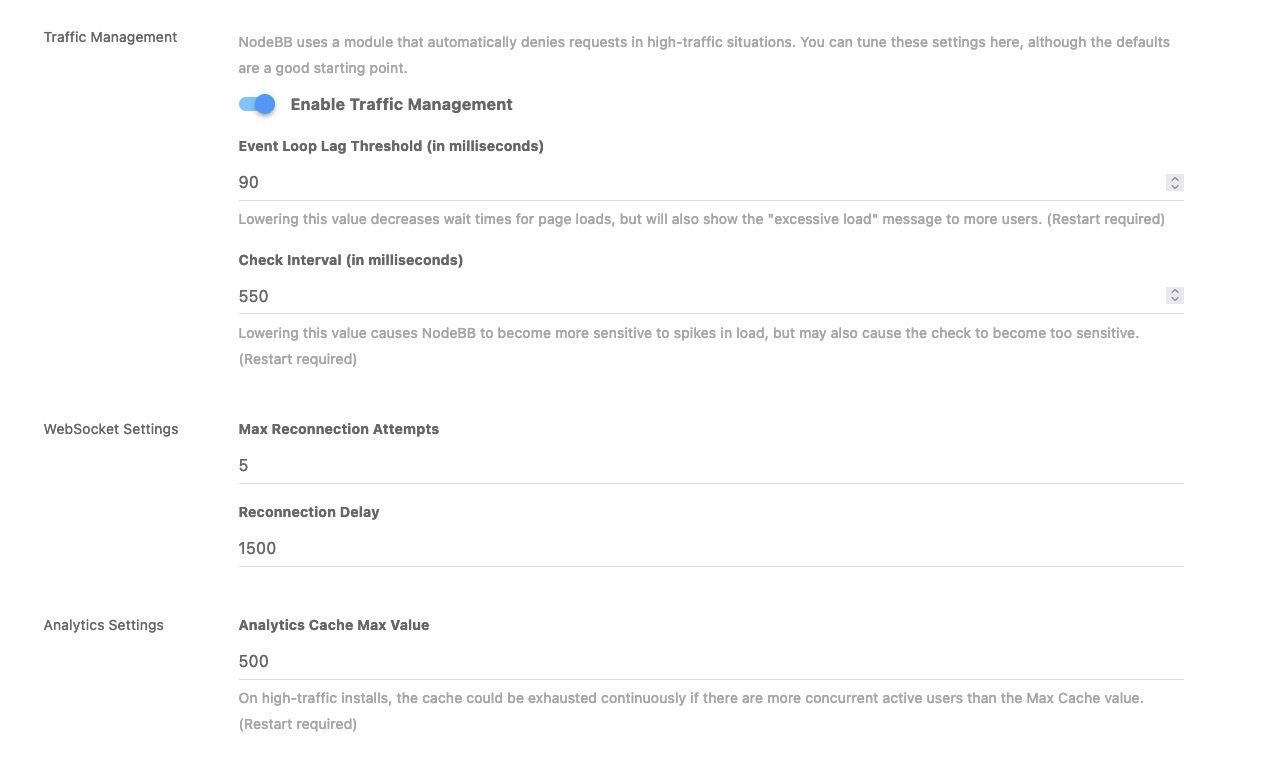
@phenomlab can I ask your values of these settings?
-
@phenomlab can I ask your values of these settings?
@crazycells I’d leave those as they are and handle this much further upstream (at NGINX or OS level)
Mark Cutting also advises organisations as a Fractional CIO, Fractional CISO and Executive Advisor, helping boards improve technology governance, cyber resilience and executive decision making. Learn more at Gratmore Ltd
-
@crazycells I’d leave those as they are and handle this much further upstream (at NGINX or OS level)
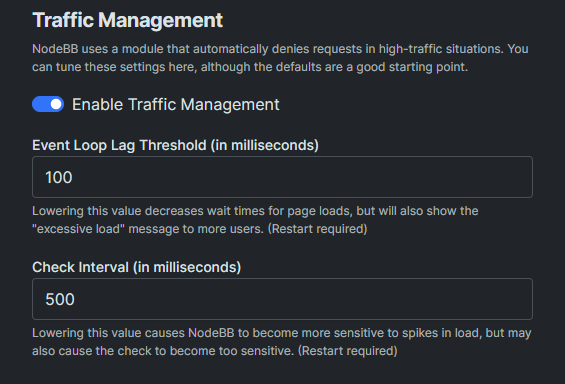
@phenomlab we already have those settings changed before, so it might help if I know the default values…
 I guess you have them unchanged? Can I learn those default values?
 -
@phenomlab we already have those settings changed before, so it might help if I know the default values…
I guess you have them unchanged? Can I learn those default values?@crazycells Of course - see below
-
maybe we should switch to aws, it has a shield for ddos protection…
https://aws.amazon.com/shield/ddos-attack-protection/
which provider do you think is best against ddos attacks?
-
maybe we should switch to aws, it has a shield for ddos protection…
https://aws.amazon.com/shield/ddos-attack-protection/
which provider do you think is best against ddos attacks?
@crazycells Hetzner also has excellent DDoS protection, a stateful firewall, and I have a referral link meaning you get credits for free…

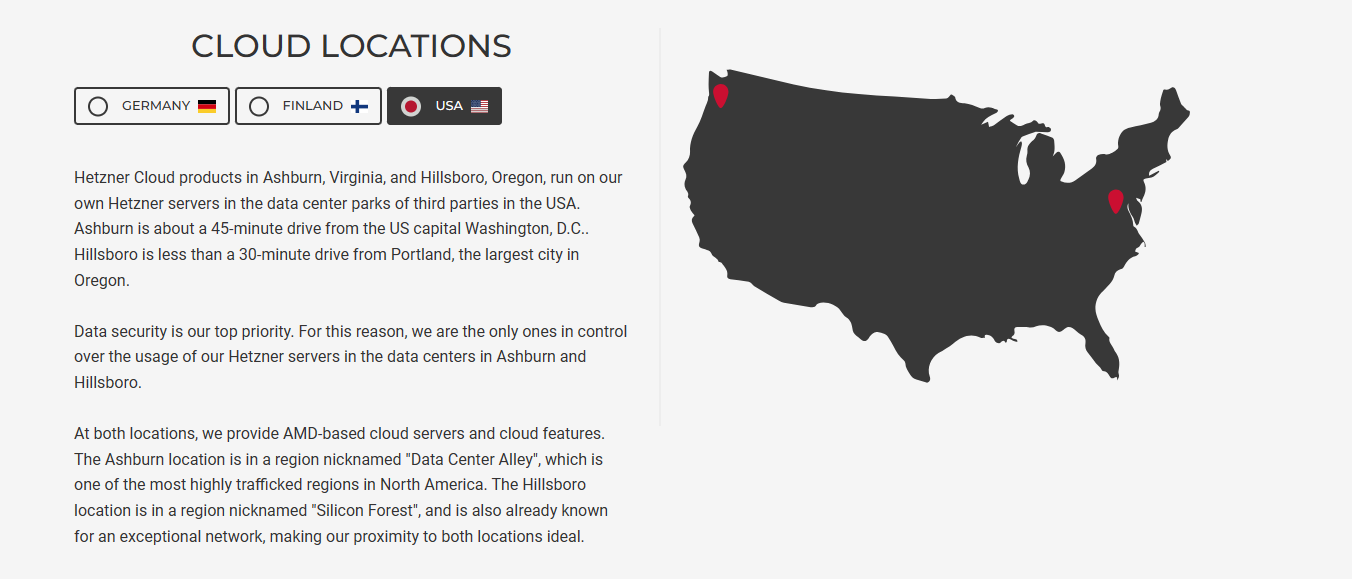
EDIT: Much of this really depends on where you want your server placed. Hetzner are based in Germany, Helsinki, and now the US
Mark Cutting also advises organisations as a Fractional CIO, Fractional CISO and Executive Advisor, helping boards improve technology governance, cyber resilience and executive decision making. Learn more at Gratmore Ltd
-
@crazycells Hetzner also has excellent DDoS protection, a stateful firewall, and I have a referral link meaning you get credits for free…
EDIT: Much of this really depends on where you want your server placed. Hetzner are based in Germany, Helsinki, and now the US
@phenomlab sure, please send me your link. we were considering aws quite some time, but I will send your link to our developer as well, so he can make decision.
in general, we were trying to stay away from europe or european products due to strict laws and requirements. our user base is either from the US or from Turkey, so we prefer to decrease the amount of work we do
-
@crazycells Hetzner also has excellent DDoS protection, a stateful firewall, and I have a referral link meaning you get credits for free…
EDIT: Much of this really depends on where you want your server placed. Hetzner are based in Germany, Helsinki, and now the US
@phenomlab oh I see a link there now, but I believe that is not referral link?
-
@phenomlab sure, please send me your link. we were considering aws quite some time, but I will send your link to our developer as well, so he can make decision.
in general, we were trying to stay away from europe or european products due to strict laws and requirements. our user base is either from the US or from Turkey, so we prefer to decrease the amount of work we do
@crazycells You’d be better placed with Hetzner in the US I think. AWS can get VERY expensive very quickly. My referral link for Hetzner is below.
I personally use Hetzner and also have a “storage box” with 1Tb of storage for backups located in another datacentre for recovery purposes.
-
This might also be useful…
Mark Cutting also advises organisations as a Fractional CIO, Fractional CISO and Executive Advisor, helping boards improve technology governance, cyber resilience and executive decision making. Learn more at Gratmore Ltd


Hello! It looks like you're interested in this conversation, but you don't have an account yet.
Getting fed up of having to scroll through the same posts each visit? When you register for an account, you'll always come back to exactly where you were before, and choose to be notified of new replies (either via email, or push notification). You'll also be able to save bookmarks and upvote posts to show your appreciation to other community members.
With your input, this post could be even better 💗
Register LoginDid this solution help you?
Related Topics
-
Nodebb to Xenforo
Solved Configure -
-
-
-
NodeBB: Consent page
Solved Configure -
-
Fontawesome 5
Unsolved Customisation -