Skip to content

Further Widgets question

Solved Configure
4 2 818 1
  • Continuing my Widgets struggle here as although I asked about it on NodeBB forum, I still have remaining areas of confusion.
    I dont find the menu intuitive. In particular now Ive understood that the global .tpl will apply everywhere, are these Category / Topic settings irrelevant?
    20230526_163355~2.jpg

    Excuse the blurry photo, but what is the point of that
    Category 0
    Topic 0
    If its going to apply globally anyway?

  • Continuing my Widgets struggle here as although I asked about it on NodeBB forum, I still have remaining areas of confusion.
    I dont find the menu intuitive. In particular now Ive understood that the global .tpl will apply everywhere, are these Category / Topic settings irrelevant?
    20230526_163355~2.jpg

    Excuse the blurry photo, but what is the point of that
    Category 0
    Topic 0
    If its going to apply globally anyway?

    @Panda is there any reason not to include a screenshot rather than a photo of the screen? It’s a bit hard to decipher a blurry image 🙂

  • Apologies, was having technical difficulties with laptop with no PrtSrn button!
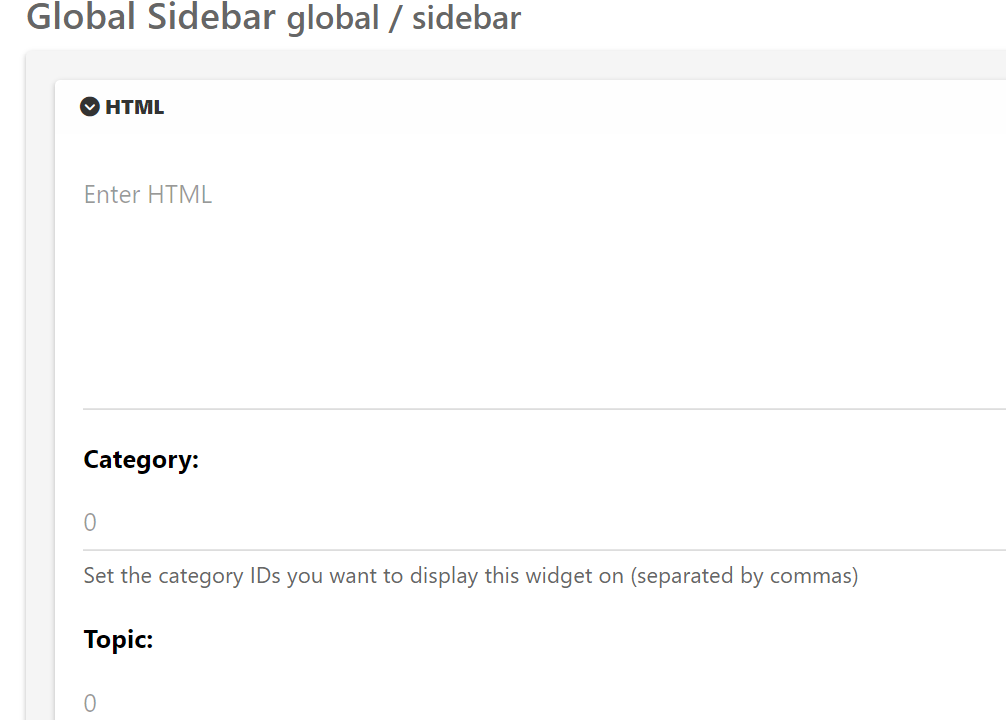
    widget.png

    Update
    There are tpl files for category and categories
    It seems this field works under category.tpl and not categories.tpl

    Im confused what the categories.tpl is for, but the category.tpl is working now, so problem solved

  • Pandaundefined Panda has marked this topic as solved on
  • Apologies, was having technical difficulties with laptop with no PrtSrn button!
    widget.png

    Update
    There are tpl files for category and categories
    It seems this field works under category.tpl and not categories.tpl

    Im confused what the categories.tpl is for, but the category.tpl is working now, so problem solved

    @Panda category is for a category in its own, so for example, “fruit” whereas categories is the page that contains all categories as a list.


Did this solution help you?
Did you find the suggested solution useful? Support 💗 Sudonix with a coffee
If your organisation needs deeper expertise around infrastructure, security, or technology leadership, learn more about Phenomlab Ltd. Many of the deeper technical guides behind Sudonix are published there.

Related Topics
  • Opening links in nodebb widget

    Solved Configure nodebb
    6
    4 Votes
    6 Posts
    2k Views
    A more efficient way of including this would be to not over complicate it and leverage a standard iframe (providing the CSP headers of the remote site permit this) like below <iframe src="https://www.classmarker.com/online-test/start/?quiz=gag66aea7922f0a5" width="700" height="800"></iframe> This works first time every time on your site as intended.
  • 3 Votes
    5 Posts
    951 Views
    @crazycells Agreed. It takes a more sensible approach. Nobody ever upvotes the first post - it’s usually much further down as the conversation progresses.
  • navigation menu panel on mobile

    Solved Customisation nodebb css
    8
    1
    7 Votes
    8 Posts
    1k Views
    @crazycells hmm. That’s odd. I haven’t made any changes from recollection but I could be wrong. I’ll need to check. EDIT - very strange. I honestly don’t recall adding the below CSS block to alter the bottom bar, but you’re right… .bottombar-nav { padding: 0px !important; } I’ve removed this so it reflects stock Harmony.
  • www. Infront stops website access?

    Solved Configure nodebb
    10
    1 Votes
    10 Posts
    1k Views
    @Panda because there is no match for the DNS entry specified. The receiving web server parses the headers looking for a destination hostname to match, and anything the web server is unable to resolve will be sent back to the root.
  • Smart Widgets

    Solved Configure nodebb
    9
    3 Votes
    9 Posts
    1k Views
    @Panda said in Smart Widgets: So why is that, or conversely why would the function to expose username ever be required, as it seems app.user is already an available global object? It is, yes, but not if you are using it outside of a widget. The function I wrote is also historical and comes from the 2.x train
  • 4 Votes
    8 Posts
    1k Views
    @Panda said in Upgrade to NodeBB v3? 2BB or not 2BB, that is the question!: So although thats a plugin it has Widget like element and stopped working on the Theme change Which is normal based on the widgets being reset when you change themes.
  • Adding fileWrite to nodebb code

    Solved Configure nodebb
    16
    1
    5 Votes
    16 Posts
    3k Views
    @eveh this might be a question for the NodeBB Devs themselves. In all honesty, I’m not entirely sure without having to research this myself.
  • NodeBB Design help

    Solved Customisation
    8
    3
    2 Votes
    8 Posts
    2k Views
    @riekmedia I’ve applied some new CSS to your site. Can you reload the page and try again ? For the record, this is what I added #footer { background: #2d343e; border-top: 4px solid #2d343e; font-size: 0.9em; margin-top: 70px; padding: 80px 0 0; position: relative; clear: both; bottom: 0; left: 0; right: 0; z-index: 1000; margin-left: -15px; margin-right: -338px; } The /categories page seems a bit messed up, so looking at that currently EDIT - issued some override CSS in the CATEGORIES widget <!--- CSS fix for overspill on /categories page - DO NOT DELETE --> <style> #footer { margin-right: -45px; } </style> That should resolve the /categories issue.