Which Swatch are you using or prefer?
-
Hi All,
As you know, we now have 10 swatches featuring various colour schematics. I thought it would be useful to run a poll to garner some stats around who is using what.
In addition, I’m interested to gain some insights into why you are using this particular Swatch.
- What do you particularly like about it?
- What would you like to see added or removed?
Many thanks for your input.
Mark Cutting also advises organisations as a Fractional CIO, Fractional CISO and Executive Advisor, helping boards improve technology governance, cyber resilience and executive decision making. Learn more at Gratmore Ltd
-
Hi All,
As you know, we now have 10 swatches featuring various colour schematics. I thought it would be useful to run a poll to garner some stats around who is using what.
In addition, I’m interested to gain some insights into why you are using this particular Swatch.
- What do you particularly like about it?
- What would you like to see added or removed?
Many thanks for your input.
Toss up between Tempest and Facetube for me. I prefer darker themes

Shame that NodeBB does not produce more like this. They have extremely dull and boring ones by default.
-
Toss up between Tempest and Facetube for me. I prefer darker themes
Shame that NodeBB does not produce more like this. They have extremely dull and boring ones by default.
@Sampo2910 have you seen the article they recently released about supporting bootstrap 5 in v3 of NodeBB? This means that they will actively add functional support for bootswatch themes.
Whilst this is a welcome advance, several of these themes look quite ghoulish in my view, and lack creativity - essentially, they are simply recycling existing effort, and not bringing anything new to the table. I understand the approach in the sense that these are ready made and work very well, and why reinvent the wheel, but what would add much more value in my view is a fully skinnable interface where you could keep various iterations of color schemes that you liked.
It’s why I created the swatch engine in the first place.
-
Toss up between Tempest and Facetube for me. I prefer darker themes
Shame that NodeBB does not produce more like this. They have extremely dull and boring ones by default.
@Sampo2910 you should also have a look at the new ones I added today - Twitter, and Anthracite. I’m currently using the latter and love it.
Mark Cutting also advises organisations as a Fractional CIO, Fractional CISO and Executive Advisor, helping boards improve technology governance, cyber resilience and executive decision making. Learn more at Gratmore Ltd
-
@Sampo2910 you should also have a look at the new ones I added today - Twitter, and Anthracite. I’m currently using the latter and love it.
@phenomlab They also look great. I still really like Tempest
I did not see about v3 NodeBB and Bootstrap but hopefully that works out well and I can change the boring theme i have now haha.
-
@phenomlab They also look great. I still really like Tempest
I did not see about v3 NodeBB and Bootstrap but hopefully that works out well and I can change the boring theme i have now haha.
@Sampo2910 you can preview the actual site here
And this from NodeBB themselves
https://nodebb.org/blog/bringing-back-better-bootswatch/
As I mentioned above, it’s a replica of bootswatch, and not a new selection of swatches.
Mark Cutting also advises organisations as a Fractional CIO, Fractional CISO and Executive Advisor, helping boards improve technology governance, cyber resilience and executive decision making. Learn more at Gratmore Ltd
-
@Sampo2910 you can preview the actual site here
And this from NodeBB themselves
https://nodebb.org/blog/bringing-back-better-bootswatch/
As I mentioned above, it’s a replica of bootswatch, and not a new selection of swatches.
@phenomlab Will be interesting to see when it arrives
-
@phenomlab Will be interesting to see when it arrives
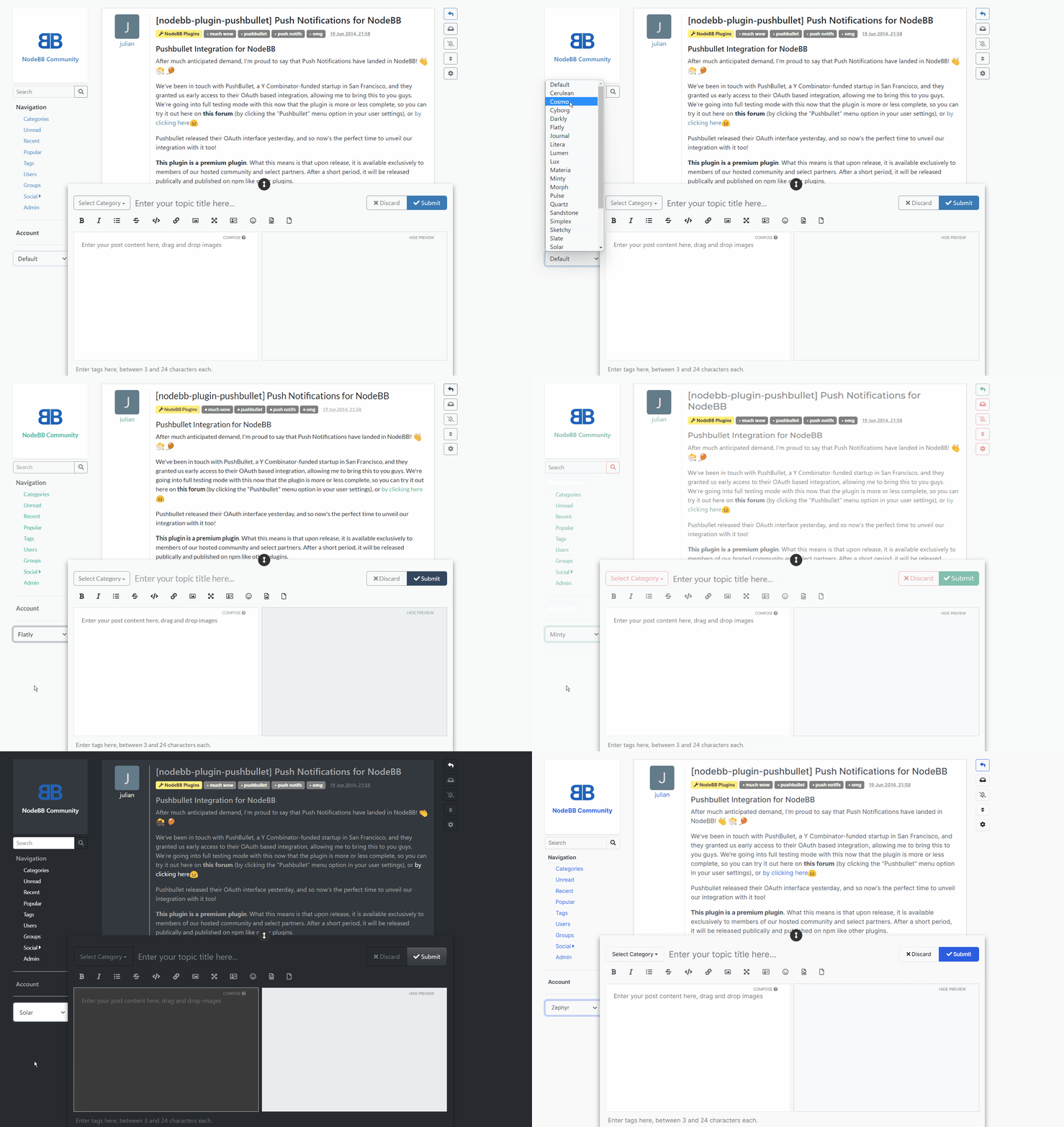
@Sampo2910 Here’s a demo of it from their blog


Hello! It looks like you're interested in this conversation, but you don't have an account yet.
Getting fed up of having to scroll through the same posts each visit? When you register for an account, you'll always come back to exactly where you were before, and choose to be notified of new replies (either via email, or push notification). You'll also be able to save bookmarks and upvote posts to show your appreciation to other community members.
With your input, this post could be even better 💗
Register Login