Skip to content

Clustering for NodeBB enabled
Announcements
22 4 5.3k 1
  • @phenomlab That looks very promising and the performance looks amazing. So after going to the website, this looks like this is basically MS version of Redis and uses most of the same commands and such, but they have been able to make it perform better which is very nice. One of my hesitations would be that it is MS and where is the code that grabs all of your data and information and will they in turn try to monetize this somehow in the future thus having to make a change again? I do like that you are able to use this with what is currently out there for Wordpress and should even work for Nodebb as well according to the documentation. You would just have to double check that the commands that are being used for Redis are being used for Garnet. There was a section about that. Still probably worth checking out and testing out though.

  • I don’t know… Not sure to use it?

    Must test before

  • @phenomlab That looks very promising and the performance looks amazing. So after going to the website, this looks like this is basically MS version of Redis and uses most of the same commands and such, but they have been able to make it perform better which is very nice. One of my hesitations would be that it is MS and where is the code that grabs all of your data and information and will they in turn try to monetize this somehow in the future thus having to make a change again? I do like that you are able to use this with what is currently out there for Wordpress and should even work for Nodebb as well according to the documentation. You would just have to double check that the commands that are being used for Redis are being used for Garnet. There was a section about that. Still probably worth checking out and testing out though.

    @Madchatthew Yes, I admit I had similar reservations, but there is also KeyDB, and Dragonfly

    https://docs.keydb.dev/

    https://www.dragonflydb.io/

  • @Madchatthew Yes, I admit I had similar reservations, but there is also KeyDB, and Dragonfly

    https://docs.keydb.dev/

    https://www.dragonflydb.io/

    @phenomlab Those both look good. If you had to switch from Redis, which one of those options would you use?

  • @phenomlab Those both look good. If you had to switch from Redis, which one of those options would you use?

    @Madchatthew probably KeyDB, but both seem to be strong contenders. Dragonfly also claims to be the fastest.

  • @Madchatthew probably KeyDB, but both seem to be strong contenders. Dragonfly also claims to be the fastest.

    @phenomlab The only thing with Dragonfly is that they have the pricing side, which makes me wonder if that could at some point affect the open-source side. But maybe the pricing is just to have the option to have it on the cloud. But usually when there is money involved like that, at some point it usually affects the free side.

    With that being said though, since they are both Redis forks, it would be pretty easy and seamless to switch from one to the other if needed. I am also wondering what the impact would be of using either of these with a Wordpress site? According to Dragonfly, it should be able to make Wordpress even faster with the faster performance. All of that will also depend on the server of course too and internet connection and what have you, but maybe use up less resources if the throughput is faster and multi-threaded.

  • @phenomlab The only thing with Dragonfly is that they have the pricing side, which makes me wonder if that could at some point affect the open-source side. But maybe the pricing is just to have the option to have it on the cloud. But usually when there is money involved like that, at some point it usually affects the free side.

    With that being said though, since they are both Redis forks, it would be pretty easy and seamless to switch from one to the other if needed. I am also wondering what the impact would be of using either of these with a Wordpress site? According to Dragonfly, it should be able to make Wordpress even faster with the faster performance. All of that will also depend on the server of course too and internet connection and what have you, but maybe use up less resources if the throughput is faster and multi-threaded.

    @Madchatthew I think there’s always that same danger no matter which open source solution you go for. By its very definition, open source comes at significant cost to the maintainer in terms of time, effort, and knowhow, so they often release a paid version of the product as a means of recovering some of that invested time in the form of revenue.

    It’s when the commercial product requires more attention than the open source version that causes conflicts, and that version is often the casualty.

  • @Madchatthew I think there’s always that same danger no matter which open source solution you go for. By its very definition, open source comes at significant cost to the maintainer in terms of time, effort, and knowhow, so they often release a paid version of the product as a means of recovering some of that invested time in the form of revenue.

    It’s when the commercial product requires more attention than the open source version that causes conflicts, and that version is often the casualty.

    @phenomlab said in Clustering for NodeBB enabled:

    @Madchatthew I think there’s always that same danger no matter which open source solution you go for. By its very definition, open source comes at significant cost to the maintainer in terms of time, effort, and knowhow, so they often release a paid version of the product as a means of recovering some of that invested time in the form of revenue.

    It’s when the commercial product requires more attention than the open source version that causes conflicts, and that version is often the casualty.

    This makes sense. Then unless you can get some people to help you maintain and update the code you are doing it all yourself and that takes up time to not being able to implement new features and now you are using more resources because you have more people helping and such. It all multiplies and pretty soon you either have to abandon it or come up with a way to make money to keep everything going.

  • @phenomlab said in Clustering for NodeBB enabled:

    @Madchatthew I think there’s always that same danger no matter which open source solution you go for. By its very definition, open source comes at significant cost to the maintainer in terms of time, effort, and knowhow, so they often release a paid version of the product as a means of recovering some of that invested time in the form of revenue.

    It’s when the commercial product requires more attention than the open source version that causes conflicts, and that version is often the casualty.

    This makes sense. Then unless you can get some people to help you maintain and update the code you are doing it all yourself and that takes up time to not being able to implement new features and now you are using more resources because you have more people helping and such. It all multiplies and pretty soon you either have to abandon it or come up with a way to make money to keep everything going.

    @Madchatthew True. I think this is the reason as to why most Open Source projects are abandoned because they are not sustainable in the long-term.



Related Topics
  • Ch..ch..ch..ch..changes!

    Announcements themes layout
    16
    2
    15 Votes
    16 Posts
    3k Views
    @phenomlab of course, to be recognised is fantastic. @phenomlab said in Ch..ch..ch..ch..changes!: Sadly, no. Web crawlers and scrapers are often JS based and read text only, so styles don’t have any bearing. I’ve read mixed things about this, but no that does make sense, it was something I read a many years back when using Wordpress.
  • Planned sunset of NTFY plugin

    Pinned Announcements push nodebb ntfy
    7
    1
    8 Votes
    7 Posts
    2k Views
    I’ve noticed that I’m the only one subscribed to the push notifications on this site. If you were using NTFY previously, and have noticed that you’ve not had any alerts for a while, it’s because this feature has been disabled. You’ll now need to use the push notification to replace NTFY as mentioned in the first post.
  • ANNOUCEMENT: New NTFY Server

    Announcements ntfy push alerts
    9
    1
    7 Votes
    9 Posts
    2k Views
    @crazycells that’s as good a test as any
  • Theme retirement

    Announcements themes switcher
    21
    16 Votes
    21 Posts
    7k Views
    I relented somewhat here and added another swatch - one I missed, which was previous called “blackout”. This specific one has been adapted to work on the new theming engine, but the others have been reclassified, and renamed to suit. [image: 1693924764891-d7f3a7a1-9702-4238-99bd-5c0e0d53f244-image.png] As a result, the theme you might have had will probably be reflecting something else, so you (might) need to change your themes accordingly. The changes are as follows Light -> No Change Cloudy -> Is now the old “Dim” Dim -> Is now the old “Dark” Dark -> Now a new theme based on the revamped “Blackout”
  • 36 Votes
    46 Posts
    14k Views
    OGProxy : Other Memory Saturation Root Cause & Fix OGProxy was periodically saturating server RAM and swap (up to ~4 GB of arrayBuffers, swap fully consumed), causing multi-minute service degradation. After tracing through several misleading leads, the root cause was identified: OGProxy was downloading entire file-host link bodies into memory when trying to generate previews. On a file-sharing forum, links to file hosts (1fichier, etc.) are everywhere. When OGProxy received a URL like https://1fichier.com/?xxxx, it attempted to “preview” it, but that URL is a direct file download (Content-Type: application/octet-stream, Content-Length: 20.6 GB). OGProxy pulled the file into memory. Critically, neither open-graph-scraper’s downloadLimit nor an AbortController stopped this, verified by reproduction: arrayBuffers climbed ~120 MB/s past 4 GB while the abort timeout was ignored. Diagnostic path (for reference) We instrumented the process with a /debug/mem endpoint exposing process.memoryUsage() + cache size, plus a 30-second sampling trace. This let us correlate memory spikes with nginx access logs. The trace showed arrayBuffers jumping from 0 → 457 → 3669 MB in ~5 minutes, correlated via nginx log to a single GET on a 1fichier link. The cache, EventEmitter listeners, and image links were all ruled out as primary causes (cache stayed at <30 entries during the spike; heapUsed stayed low; only arrayBuffers leaked). A representative slice of the trace at the moment of the spike: 11:24:39 arrayBuffers=0 rss=161 11:25:09 arrayBuffers=457 rss=427 <- jump in one 30s sample 11:25:39 arrayBuffers=884 11:26:09 arrayBuffers=1437 ... 11:30:09 arrayBuffers=3669 No OGProxy fail log line appeared during the spike window, the offending request neither failed nor completed; it was an in-progress, never-ending download. The nginx access log for that minute pointed at the 1fichier GET. Root cause open-graph-scraper (ogs) performs its own internal fetch, and for these URLs: The downloadLimit option does not reliably abort the body download on streamed / chunked responses or on hosts that serve large application/octet-stream payloads. An AbortController passed via fetchOptions.signal does not propagate to the underlying stream read in a way that stops the transfer in time. Result: a single large file-host link could pull multiple GB into arrayBuffers before anything intervened. The fix: bounded streaming fetch The structural problem is that ogs() controls the fetch and we don’t control body consumption. The fix moves the fetch into our own code so we control every byte read: boundedFetch(url, maxBytes, timeoutMs) performs the HTTP fetch itself, then: Re-checks the final host for SSRF after redirects. Rejects any non-text/html / application/xhtml Content-Type before reading the body (aborts immediately). Reads the body chunk-by-chunk via resp.body.getReader(), tracking total bytes, and hard-aborts at 5 MB regardless of what the server claims. The retrieved HTML is then handed to ogs for parsing only: ogs({ html }). This makes the protection structural rather than cooperative: no file host can leak memory regardless of whether it honors HEAD, serves chunked, or misreports headers. Important ogs constraint You must call ogs({ html }) alone. Passing { html, url } together throws: Must specify either `url` or `html`, not both Because url is omitted, ogs cannot resolve relative og:image paths. This is fine here: the ACP client already resolves relative image paths itself (isFullPath() + host + imageUrl), so no client-side change was required. Other hardening applied in the same pass Cache: replaced memory-cache (which creates a per-entry setTimeout that retains the cached object, a secondary leak) with a plain Map using lazy expiry + a single sweep interval. Stored value is slimmed via slimResult(): only error + result + HTML truncated at </head> (preserves <title>, drops the multi-MB body and the undici response object). Cap 300 entries, 30 min TTL, 10 min negative-cache TTL. Negative cache: failed/rejected URLs are cached to prevent re-scrape hammering from the client. SSRF guards (three layers): static host/IP blocklist (private ranges, loopback, link-local, CGNAT, IPv6 ULA/link-local), DNS resolution check, and post-redirect re-validation of the final host. (Also backed at the OS level by systemd IPAddressDeny on the unit.) AbortController + clearTimeout in finally to stop the earlier MaxListenersExceededWarning listener leak on timed-out requests. nginx rate limit: limit_req_zone (10 r/s, burst 50, nodelay, returns 429) on the /ogproxy location. The API key is necessarily exposed client-side (it ships in the ACP JS), so it provides no real protection on its own; the rate limit is the actual abuse mitigation. systemd guard rail: MemoryMax=512M / MemoryHigh=400M so OGProxy can never take the whole box down again, this was the silent hero that kept the server alive throughout diagnosis. Validation Test URL Expected Result https://1fichier.com/?xxxx (20.6 GB) reject, no body read 415, arrayBuffers stays 0 Direct image (pbs.twimg.com/...jpg) reject on content-type 415 https://github.com full preview 200, OG title/image/description, HTML truncated at </head> Process idles at ~100 MB RSS; under load heapUsed oscillates and returns to baseline (no step-up accumulation). Reproduction of the bounded fetch against the 20.6 GB link, confirming zero body is pulled: arrayBuffers AVANT: 0 MB pendant: 0 MB Resultat 1fichier: REJETE: non-HTML content-type: application/octet-stream arrayBuffers APRES: 0 MB Note on dependencies Reproduced on open-graph-scraper 6.1.0 / undici 5.22.1 / Node 24. The unreliable downloadLimit behavior may be version-specific; a newer undici might handle aborts on large streams better. The bounded-fetch approach is robust regardless of the underlying library version, so it is the recommended long-term fix. Appendix A: Full server.js const express = require('express'); const ogs = require('open-graph-scraper'); const cors = require('cors'); const { URL } = require('url'); const dns = require('dns').promises; const net = require('net'); require('events').EventEmitter.defaultMaxListeners = 50; const app = express(); const port = 2000; const apiKey = process.env.OGPROXY_API_KEY || '<API_KEY>'; const REQUEST_TIMEOUT = 12000; const MAX_CONTENT_BYTES = 5 * 1024 * 1024; // 5 MB hard cap on body const CACHE_TTL_MS = 30 * 60 * 1000; const FAIL_CACHE_TTL_MS = 10 * 60 * 1000; const CACHE_MAX_ENTRIES = 300; const MAX_REDIRECTS = 3; // --- Map cache (lazy expiry, no per-entry timers) --- const cacheStore = new Map(); function cacheGet(key) { const e = cacheStore.get(key); if (!e) return null; if (Date.now() > e.expires) { cacheStore.delete(key); return null; } return e.value; } function cacheSet(key, value, ttl) { if (cacheStore.size >= CACHE_MAX_ENTRIES) { cacheStore.delete(cacheStore.keys().next().value); } cacheStore.set(key, { value, expires: Date.now() + ttl }); } setInterval(() => { const now = Date.now(); for (const [k, e] of cacheStore) if (now > e.expires) cacheStore.delete(k); }, 60 * 1000).unref(); function slimResult(results) { if (!results || typeof results !== 'object') return results; let slimHtml = ''; if (typeof results.html === 'string') { const headEnd = results.html.search(/<\/head>/i); slimHtml = headEnd !== -1 ? results.html.slice(0, headEnd + 7) : results.html.slice(0, 8192); } return { error: results.error, result: results.result, html: slimHtml }; } function isBlockedIp(ip) { if (!ip) return true; if (net.isIPv4(ip)) { const p = ip.split('.').map(Number); if (p[0] === 10) return true; if (p[0] === 127) return true; if (p[0] === 0) return true; if (p[0] === 169 && p[1] === 254) return true; if (p[0] === 192 && p[1] === 168) return true; if (p[0] === 172 && p[1] >= 16 && p[1] <= 31) return true; if (p[0] === 100 && p[1] >= 64 && p[1] <= 127) return true; return false; } if (net.isIPv6(ip)) { const v = ip.toLowerCase(); if (v === '::1') return true; if (v.startsWith('fc') || v.startsWith('fd')) return true; if (v.startsWith('fe80')) return true; if (v.startsWith('::ffff:')) return isBlockedIp(v.split(':').pop()); return false; } return true; } function isBlockedHost(hostname) { if (!hostname) return true; const h = hostname.toLowerCase(); return ( h === 'localhost' || h.endsWith('.localhost') || h.endsWith('.internal') || h.endsWith('.local') || (net.isIP(h) && isBlockedIp(h)) ); } async function resolvesToPublicIp(hostname) { try { const records = await dns.lookup(hostname, { all: true }); if (!records || records.length === 0) return false; return records.every(r => !isBlockedIp(r.address)); } catch (e) { return false; } } // Bounded streaming fetch: reads the body chunk by chunk and aborts hard at maxBytes. // Rejects non-HTML content-types before reading any body. Structural protection // against file hosts (1fichier, etc.) - independent of what the server claims. async function boundedFetch(url, maxBytes, timeoutMs) { const controller = new AbortController(); const timer = setTimeout(() => controller.abort(), timeoutMs); try { const resp = await fetch(url, { redirect: 'follow', signal: controller.signal, headers: { 'User-Agent': 'Mozilla/5.0 (Windows NT 10.0; Win64; x64) AppleWebKit/537.36 (KHTML, like Gecko) Chrome/126.0.0.0 Safari/537.36', 'Accept': 'text/html,application/xhtml+xml,application/xml;q=0.9,image/avif,image/webp,*/*;q=0.8', 'Accept-Language': 'fr-FR,fr;q=0.9,en;q=0.8', }, }); // Re-check final host after redirects (anti-SSRF) try { const finalHost = new URL(resp.url || url).hostname; if (isBlockedHost(finalHost) || !(await resolvesToPublicIp(finalHost))) { controller.abort(); return { ok: false, reason: 'redirect to forbidden host' }; } } catch (e) { /* ignore */ } const ctype = (resp.headers.get('content-type') || '').toLowerCase(); if (ctype && !ctype.includes('text/html') && !ctype.includes('application/xhtml')) { controller.abort(); // not HTML: read nothing return { ok: false, reason: `non-HTML content-type: ${ctype.split(';')[0]}` }; } if (!resp.body) { return { ok: false, reason: 'no response body' }; } const reader = resp.body.getReader(); const chunks = []; let total = 0; while (true) { const { done, value } = await reader.read(); if (done) break; total += value.length; if (total > maxBytes) { controller.abort(); // hard cap reached: stop downloading return { ok: false, reason: `body exceeded ${maxBytes} bytes` }; } chunks.push(value); } const html = Buffer.concat(chunks).toString('utf8'); return { ok: true, html }; } catch (e) { return { ok: false, reason: (e && e.name === 'AbortError') ? 'timeout/abort' : (e && e.message) || 'fetch error' }; } finally { clearTimeout(timer); } } app.use(cors({ origin: 'https://YOUR_DOMAIN.EXT' })); app.get('/debug/mem', (req, res) => { const m = process.memoryUsage(); res.json({ rss_mb: Math.round(m.rss / 1048576), heapUsed_mb: Math.round(m.heapUsed / 1048576), external_mb: Math.round(m.external / 1048576), arrayBuffers_mb: Math.round(m.arrayBuffers / 1048576), cache_entries: cacheStore.size, }); }); app.get('/ogproxy', async (req, res) => { let { url } = req.query; const requestApiKey = req.headers['x-api-key']; if (requestApiKey !== apiKey) return res.status(401).send('Unauthorized'); if (!url || typeof url !== 'string') return res.status(400).send('Missing URL parameter'); if (!url.startsWith('http')) { try { url = new URL(url, `${req.protocol}://${req.get('host')}`).href; } catch (e) { return res.status(400).send('Invalid URL'); } } let parsedUrl; try { parsedUrl = new URL(url); } catch (e) { console.warn(`OGProxy reject [${url}]: invalid URL`); return res.status(400).send('Invalid URL'); } if (!['http:', 'https:'].includes(parsedUrl.protocol)) { return res.status(400).send('Invalid protocol'); } if (isBlockedHost(parsedUrl.hostname)) { console.warn(`OGProxy reject [${url}]: forbidden host (static guard)`); return res.status(403).send('Forbidden host'); } const cached = cacheGet(url); if (cached) { if (cached.__ogproxyFail === true) return res.status(500).send('Error scraping Open Graph data (cached)'); return res.json(cached); } if (!(await resolvesToPublicIp(parsedUrl.hostname))) { console.warn(`OGProxy reject [${url}]: resolves to private IP / DNS fail (SSRF)`); cacheSet(url, { __ogproxyFail: true }, FAIL_CACHE_TTL_MS); return res.status(403).send('Forbidden host'); } if (cacheStore.size >= CACHE_MAX_ENTRIES) { cacheStore.delete(cacheStore.keys().next().value); } // Bounded fetch: download the body ourselves, capped at 5 MB, HTML-only. const fetched = await boundedFetch(url, MAX_CONTENT_BYTES, REQUEST_TIMEOUT); if (!fetched.ok) { console.error(`OGProxy reject [${url}]: ${fetched.reason}`); cacheSet(url, { __ogproxyFail: true }, FAIL_CACHE_TTL_MS); const code = (fetched.reason.startsWith('non-HTML') || fetched.reason.startsWith('body exceeded')) ? 415 : 500; return res.status(code).send('Unable to preview this URL'); } try { // Parse the already-fetched HTML (no second fetch). Client resolves relative image paths itself. const results = await ogs({ html: fetched.html }); const slim = slimResult(results); cacheSet(url, slim, CACHE_TTL_MS); return res.json(slim); } catch (error) { const reason = (error && error.result && error.result.error) || (error && error.message) || 'unknown'; console.error(`OGProxy fail [${url}]: ${reason}`); cacheSet(url, { __ogproxyFail: true }, FAIL_CACHE_TTL_MS); return res.status(500).send('Error scraping Open Graph data'); } }); app.listen(port, () => { console.log(`OGProxy server listening on port ${port}`); }); Note: /debug/mem is a temporary diagnostic endpoint. Remove it once the deployment is confirmed stable in production. Appendix B: nginx rate limit Zone definition, placed in /etc/nginx/conf.d/ogproxy-ratelimit.conf (included at the http level; survives vhost regeneration by the panel): # Rate limit zone for OGProxy - 10 MB shared memory (~160k IPs tracked) # 10 requests/second sustained per IP limit_req_zone $binary_remote_addr zone=ogproxy_limit:10m rate=10r/s; Application, inside the reverse-proxy location / of the OGProxy vhost: location / { limit_req zone=ogproxy_limit burst=50 nodelay; limit_req_status 429; proxy_set_header Host $host; proxy_pass http://127.0.0.1:2000; proxy_redirect off; proxy_set_header X-Forwarded-For $proxy_add_x_forwarded_for; proxy_set_header X-Api-Key $http_x_api_key; } burst=50 absorbs the legitimate burst when a user opens a link-heavy topic (the client fires many preview requests at once); sustained hammering beyond that is rejected with 429. Appendix C : systemd unit guard rails Key directives on ogproxy.service: [Service] MemoryHigh=400M MemoryMax=512M Restart=always RestartSec=3 # SSRF egress guard (OS-level backstop to the in-app checks) IPAddressAllow=127.0.0.1 127.0.0.53 127.0.0.54 IPAddressDeny=10.0.0.0/8 172.16.0.0/12 192.168.0.0/16 169.254.0.0/16 100.64.0.0/10 fc00::/7 fe80::/10 127.0.0.1 must stay allowed because nginx reverse-proxies to OGProxy over loopback; blocking all loopback breaks the nginx -> ogproxy hop (504s).
  • NodeBB v3

    Announcements nodebb v3 nodebb
    2
    3 Votes
    2 Posts
    1k Views
    @cagatay JS will work fine - no changes there, and there are no plans to drop support for jQuery. More of an issue is the CSS - for which there are quite a few breaking changes. Keep an eye on sudonix.dev (my development site) where you can see progress in relation to how I am tackling the compatibility issues.
  • Testing out Webdock.io

    Moved Announcements webdock recovery speed
    2
    5
    5 Votes
    2 Posts
    1k Views
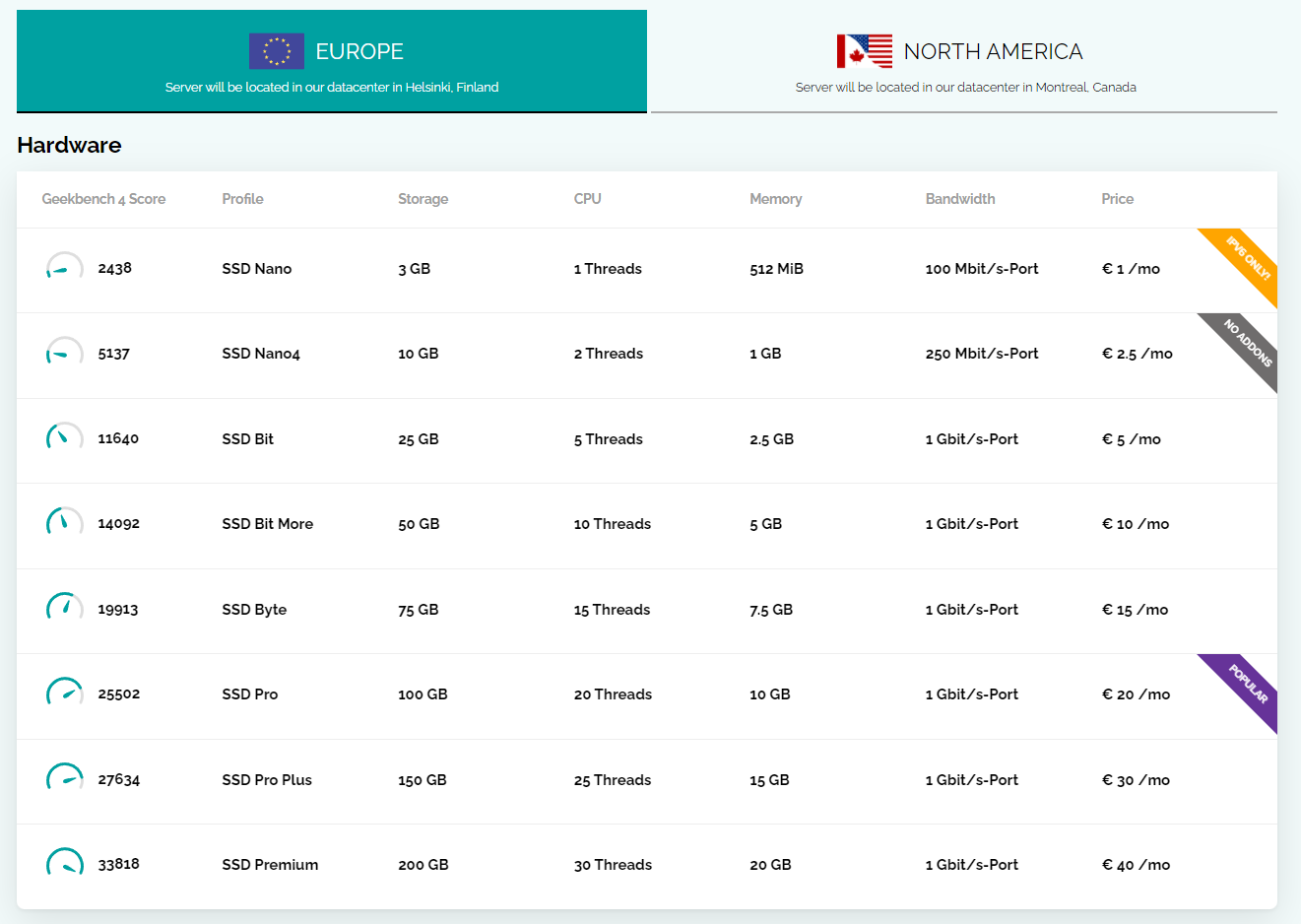
    Just coming back to this thread for review (as I often do), and it looks like Webdock have increased their available offerings - some are extremely powerful, yet very competitive from the pricing perspective. [image: 1692559685163-7cf9a928-ac21-44fe-99c6-90439030d631-image.png] 10 CPU cores, plus 20Gb RAM? Well worth a look (and the asking price) - there’s also a fixed IP which is hugely beneficial. Clearly, this is well beyond what most people will want to spend - it’s more of an example (but interestingly, Sudonix runs on something not too different from the above). However, not all that glitters is gold - just have a walk through the benchmark report I found below and you’ll see a huge difference between Heztner and Webdock https://www.vpsbenchmarks.com/compare/hetzner_vs_webdock That being said, the amount of HTTP requests that Webdock handles in relation to Hetzner is superior - @DownPW you might want to have a look at this - there’s a free 24 hour trial… [image: 1692560710486-5203639b-2f62-47e6-b87b-37580ce5deae-image.png]
  • Fancybox now used for image handling

    Announcements fancybox
    16
    6 Votes
    16 Posts
    4k Views
    And it seems to be less conflicting!