Skip to content

Bug in Nodebb route when clicking title

Moved Configure
3 2 576 1
  • This forum:
    https://aignite.nodebb.com/
    is on v3.2, awaiting upgrade to latest version …

    if you go into a category, then click the forum title
    On Mobile, it doesnt go back to home page, it refreshes and stays in the same category

    On desktop, if you click on the icon (flame image) it will go to the home category list as expected, but if you click on the word (Aignite) it trys to load something, then says page not found!

    Interestingly, Sudonix site doesn’t have this flaw. Not sure if its been fixed in v 3.2.1 or @phenomlab has set something up that I haven’t?

    In Admin the Home Page route is set to Categories, (default setting)

  • This forum:
    https://aignite.nodebb.com/
    is on v3.2, awaiting upgrade to latest version …

    if you go into a category, then click the forum title
    On Mobile, it doesnt go back to home page, it refreshes and stays in the same category

    On desktop, if you click on the icon (flame image) it will go to the home category list as expected, but if you click on the word (Aignite) it trys to load something, then says page not found!

    Interestingly, Sudonix site doesn’t have this flaw. Not sure if its been fixed in v 3.2.1 or @phenomlab has set something up that I haven’t?

    In Admin the Home Page route is set to Categories, (default setting)

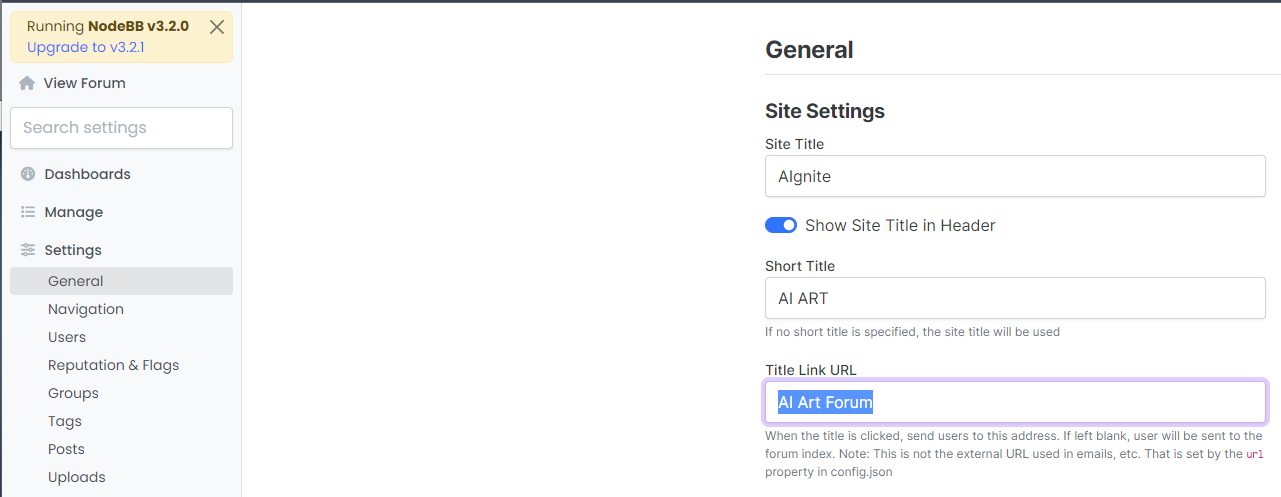
    @Panda That looks to be because of this setting you have
    bd21bcbc-6e6f-4af2-a355-c8cdc5a3b28a-image.png

    Title Link URL cannot be freeform text - it needs to be a hyperlink. If you leave this blank, it will use the siteUrl

  • Ah silly me, thanks for finding that!

  • phenomlabundefined phenomlab moved this topic from Bugs on

Related Topics
  • Nodebb and emails

    Solved Configure nodebb
    27
    5 Votes
    27 Posts
    2k Views
    @Panda it will use SMTP. In all cases, I never use any plugin to send email. I’ll always send it raw.
  • Opening links in nodebb widget

    Solved Configure nodebb
    6
    4 Votes
    6 Posts
    1k Views
    A more efficient way of including this would be to not over complicate it and leverage a standard iframe (providing the CSP headers of the remote site permit this) like below <iframe src="https://www.classmarker.com/online-test/start/?quiz=gag66aea7922f0a5" width="700" height="800"></iframe> This works first time every time on your site as intended.
  • Getting Eror When Started NodeBB

    Solved Configure bug
    7
    1
    2 Votes
    7 Posts
    985 Views
    @phenomlab yes i did. i deleted one of plugin then it started to work normally.
  • 1 Votes
    5 Posts
    1k Views
    @DownPW very useful tip. Thanks
  • Bootstrap Version

    Solved Customisation nodebb bootstrap
    8
    5 Votes
    8 Posts
    1k Views
    @phenomlab That will be nice once they have completed that. It will be interesting to see how long that takes. So for now I will use custom css to make it look the way I want. Frameworks just make things a little faster. Thanks @phenomlab
  • Configure SMTP for Nodebb

    Solved Configure
    14
    5 Votes
    14 Posts
    2k Views
    @marusaky based on the work completed thus far (in relation to PM exchanges), I’m going to mark this completed. Sending email from the server itself works fine without issue, and DNS appears to be clean (valid SPF, DMARC, and DKIM records). It appears that only Gmail marks incoming messages from your domain as spam - perhaps because of the domain age, which there is nothing we can do to prevent this. Mail delivery to all other domains appears to work fine in al of my tests.
  • Detect if user is admin

    General nodebb javascript code
    2
    0 Votes
    2 Posts
    861 Views
    @pwsincd I think you can use userData.isAdmin = isAdmin; if I’m not mistaken - see https://community.nodebb.org/topic/15128/how-to-hide-whitelist-user-field-only-to-owner-or-admin?_=1648802303112 for an example
  • NodeBB 1.19.3

    Solved Performance nodebb 1.19.3 performance
    33
    4 Votes
    33 Posts
    8k Views
    @phenomlab I find the problem Mark The error message indicated this path : http://localhost:4567/assets/plugins/nodebb-plugin-emoji/emoji/styles.css?v=6983dobg16u I change the path url on config.json [image: 1645128773854-47bacc80-f141-41e4-a261-3f8d650cc6f6-image.png] And all it’s good Weird, I didn’t have to change that path before 1.19.3 But this does not prevent the problem from a clean install with Emoji Plugin EDIT: After test, that resolv the problem installation for 1.18.x but not for 1.19.x (I have other error message when I run ./nodebb Setup For resume: NodeJS 16_x with 1.18.x is ok