how to hide "moved" badge with CSS?
-
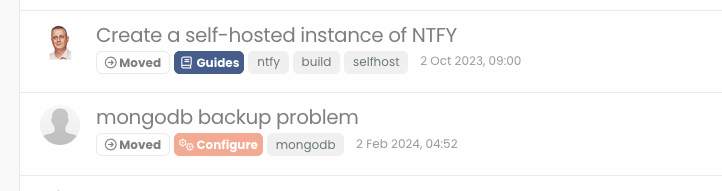
Hi , I am talking about the moved labels with arrows on the badge that is listed on topics list… how can I target them with CSS?
-
@phenomlab hi Mark, my question is for the “harmony theme”, I believe your code is for the “Persona” ? It is not working…
@crazycells no, it was for harmony if I recall correctly. I’ll need to check if not.
EDIT - the below CSS will hide those types of badges from the topic list
span.badge.border.border-gray-300.text-body {
    display: none;
}
The below will hide the same from the topic view
a.badge.badge.border.border-gray-300.text-body.text-decoration-none {
    display: none;
}
It’s important to note that this will target other “action” badges also. If you’d like to target specific text whilst leaving other badges alone, this will likely require custom
JSto do so. The CSS I provided above is active on Sudonix.Mark Cutting also advises organisations as a Fractional CIO, Fractional CISO and Executive Advisor, helping boards improve technology governance, cyber resilience and executive decision making. Learn more at Gratmore Ltd
-
Hi , I am talking about the moved labels with arrows on the badge that is listed on topics list… how can I target them with CSS?
Mark Cutting also advises organisations as a Fractional CIO, Fractional CISO and Executive Advisor, helping boards improve technology governance, cyber resilience and executive decision making. Learn more at Gratmore Ltd
-
@phenomlab hi Mark, my question is for the “harmony theme”, I believe your code is for the “Persona” ? It is not working…
-
@phenomlab hi Mark, my question is for the “harmony theme”, I believe your code is for the “Persona” ? It is not working…
@crazycells no, it was for harmony if I recall correctly. I’ll need to check if not.
EDIT - the below CSS will hide those types of badges from the topic list
span.badge.border.border-gray-300.text-body {
    display: none;
}
The below will hide the same from the topic view
a.badge.badge.border.border-gray-300.text-body.text-decoration-none {
    display: none;
}
It’s important to note that this will target other “action” badges also. If you’d like to target specific text whilst leaving other badges alone, this will likely require custom
JSto do so. The CSS I provided above is active on Sudonix.Mark Cutting also advises organisations as a Fractional CIO, Fractional CISO and Executive Advisor, helping boards improve technology governance, cyber resilience and executive decision making. Learn more at Gratmore Ltd
-
 undefined phenomlab has marked this topic as solved on
-
@crazycells no, it was for harmony if I recall correctly. I’ll need to check if not.
EDIT - the below CSS will hide those types of badges from the topic list
span.badge.border.border-gray-300.text-body {
    display: none;
}
The below will hide the same from the topic view
a.badge.badge.border.border-gray-300.text-body.text-decoration-none {
    display: none;
}
It’s important to note that this will target other “action” badges also. If you’d like to target specific text whilst leaving other badges alone, this will likely require custom
JSto do so. The CSS I provided above is active on Sudonix.hi @phenomlab , this code is removing all badges includes “pinned”, can we specifically target the “moved” label?
-
hi @phenomlab , this code is removing all badges includes “pinned”, can we specifically target the “moved” label?
@crazycells not with CSS as this is a shared class and would likely have an undesirable affect as I mentioned earlier in the previous post.
It should be possible with some custom
jswhich I could easily put together.Mark Cutting also advises organisations as a Fractional CIO, Fractional CISO and Executive Advisor, helping boards improve technology governance, cyber resilience and executive decision making. Learn more at Gratmore Ltd
-
@crazycells not with CSS as this is a shared class and would likely have an undesirable affect as I mentioned earlier in the previous post.
It should be possible with some custom
jswhich I could easily put together.@phenomlab Thanks a lot Mark, let me ask first on nodebb community… I have some reasons but let’s see if I can convince them to add this

-
@phenomlab Thanks a lot Mark, let me ask first on nodebb community… I have some reasons but let’s see if I can convince them to add this
@crazycells ok. No issues. Sharing classes like this was always going to cause issues.
Mark Cutting also advises organisations as a Fractional CIO, Fractional CISO and Executive Advisor, helping boards improve technology governance, cyber resilience and executive decision making. Learn more at Gratmore Ltd
-
@crazycells ok. No issues. Sharing classes like this was always going to cause issues.
@phenomlab @barisusakli has just added a selector for moved topics…
https://github.com/NodeBB/nodebb-theme-harmony/commit/34d7545ab2d58c28f47f088569076c485d97d84d
-
@phenomlab @barisusakli has just added a selector for moved topics…
https://github.com/NodeBB/nodebb-theme-harmony/commit/34d7545ab2d58c28f47f088569076c485d97d84d
@crazycells good, but I think it would have made sense to cover all of them.
Mark Cutting also advises organisations as a Fractional CIO, Fractional CISO and Executive Advisor, helping boards improve technology governance, cyber resilience and executive decision making. Learn more at Gratmore Ltd
-
@crazycells good, but I think it would have made sense to cover all of them.
@phenomlab yeah but I believe they already have their own components…
component=“topic/pinned” and component=“topic/locked” were already exist, just “moved” was missing…
-
@phenomlab yeah but I believe they already have their own components…
component=“topic/pinned” and component=“topic/locked” were already exist, just “moved” was missing…
@crazycells ah, I see. That makes sense.

Hello! It looks like you're interested in this conversation, but you don't have an account yet.
Getting fed up of having to scroll through the same posts each visit? When you register for an account, you'll always come back to exactly where you were before, and choose to be notified of new replies (either via email, or push notification). You'll also be able to save bookmarks and upvote posts to show your appreciation to other community members.
With your input, this post could be even better 💗
Register Login