Hello,
I am wondering if I have using the correct categories when posting. It looks like a lot of the posts I started have a unresolved tag on them. Should I be picking a post to resolve them so there aren’t a bunch of unresolved posts?
Thanks!

Topics from outside of this forum. Views and opinions represented here may not reflect those of this forum and its members.
A world of content at your fingertips…
Think of this as your global discovery feed. It brings together interesting discussions from across the web and other communities, all in one place.
While you can browse what's trending now, the best way to use this feed is to make it your own. By creating an account, you can follow specific creators and topics to filter out the noise and see only what matters to you.
Ready to dive in? Create an account to start following others, get notified when people reply to you, and save your favorite finds.
Register Login
So I was curious about being certified in Linux and found this website. https://www.lpi.org/ - The learning materials are free and so far from what I can see, they have done a good job. You have to pay for the test and it looks like the testing is through Pearson Vue. I am one of those that believes you shouldn’t have to have certifications or degrees to get a job, especially if you have the experience and know how to do the job.
It never hurts to have them and if you are interested in a Linux Certifications, this may be a good place to start. What are all of your thoughts regarding this website and these types of certifications?

I wanted a way to pull videos from YouTube, but have it so that nodebb-plugin-rss did all the heavy lifting, and I only had to provide the RSS. Simple? In theory, yes. In practice? No.
YouTube for a number of years has hidden an RSS link in each channel it hosts, which previously could be used for that exact purpose - an RSS reader - and in our case, the RSS plugin we want to use. However, over time, and because of the ever-increasing monetisation prospects of the platform, the ability to read and parse these feeds has become problematic to say the least.
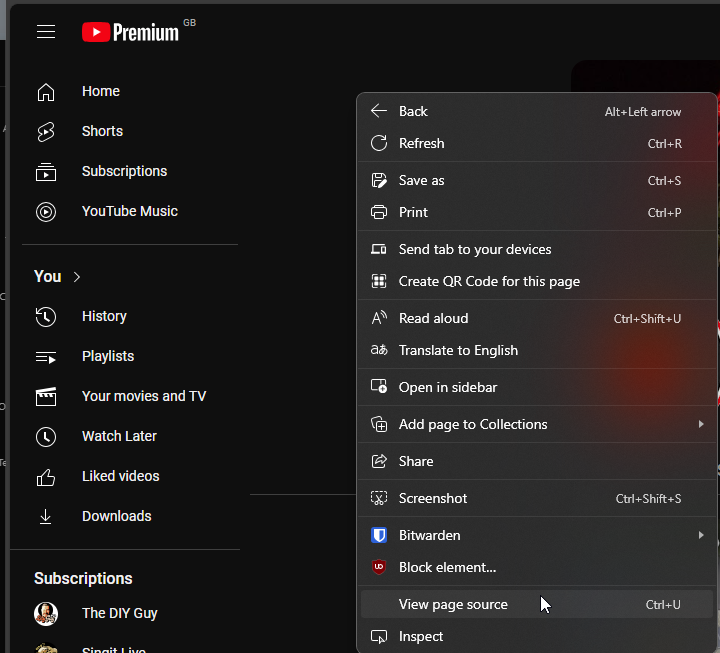
In most cases, they work fine in a browser

But when you try to pull them from the RSS plugin
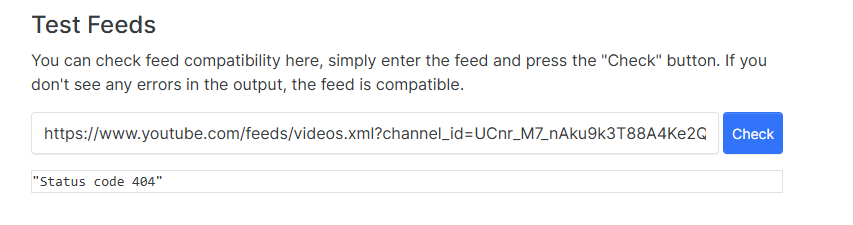
Note the 404 status code. This is happening because the RSS plugin (to my knowledge) does not send an agent string to identify the browser type, and as a result, YouTube sees it as a bot and will reject the request.
The workaround here is to use a utility called RSSHub
https://docs.rsshub.app/routes/social-media#youtube
Essentially, we can leverage the free API of this site to provide a URL that the RSS plugin can work with.


https://rsshub.app/youtube/channel/UCnr_M7_nAku9k3T88A4Ke2Q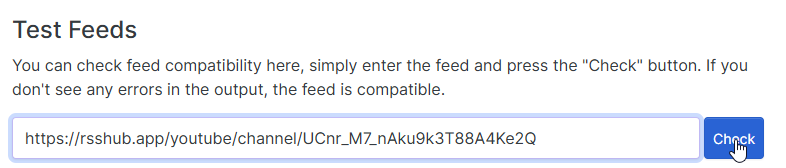
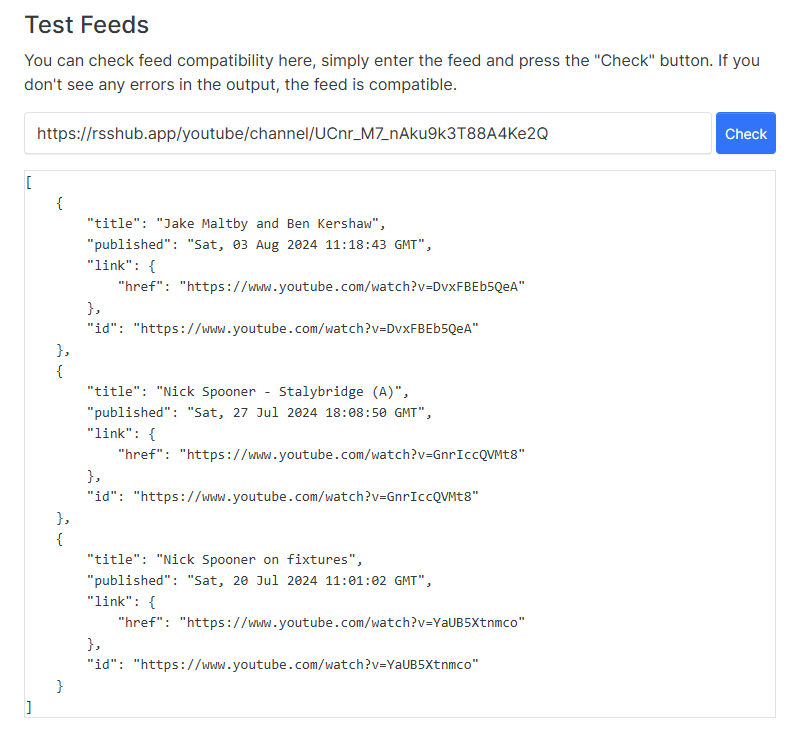
You can now use that same link in the RSS plugin to pull the videos you want 
This is a free API, so will be subject to fair usage policies. For this reason, I strongly recommend you check once per day to keep the session count low, and to prevent RSSHub from blocking your IP.
Bearing in mind the busiest of YouTube channels typically upload content at minimum daily, so this should be fine.
Enjoy.

I used a mixture of https://www.google.com, https://duckduckgo.com and most recently https://www.startpage.com.
I hate the Captcha’s when using Google, as I mostly use a VPN I do sometimes get these, I use DuckDuckGo and a chat on Reddit suggested to use StartPage which I’m enjoying using, a few of the comments suggest StartPage was all above board but is now owned by an advertising company  .
My question is should I stop using it?
Proton have launched a password manager if anyone is interested.
It’s only launched today, so I’ve began testing… So far so good.
So I am posting here because I have come to the decision that I am going to run my VPS using Arch. Why am I doing this you ask? Well there is the old just because you can doesn’t mean you should. I have been doing a bunch of research and have found that anytime you want to upgrade to the new version of whatever server you are using, Debian, Ubuntu, or whatever other flavor, you have to install a fresh new server because if you don’t, well then you will end up doing that anyway. It takes a lot of time and if you want to upgrade or run some of the latest software you can run into some issues with that.
I am currently using Debian with Virtualmin and everntually, maybe years, will have to upgrade my server to the next version. I have been researching Arch and due to it using a rolling release to keep it updated, I potentially would never have to reinstall it when a new version comes out.
Some downfalls to Arch is that virtualmin doesn’t work on it. Webmin will work on it, but in my development environment where I am testing and setting things up using Arch, it actually isn’t that hard to get things setup. Once you get everything initially setup then the part that can be time consuming is setting up a new website on your server. Although, once you do that a few times, it goes pretty quick. Now this is not setting up the email server and such, but that is for another time. I would just set that up to just send emails from the webpages and not worry about receiving at this time.
So for instance, a new version of phpmyadmin came out and when I did a system upgrade, it upgrade my phpadmin to the latest version. Now my plan is to have one or two virtual servers running on my machine and performing those updates on them before running the updates on the production server. There won’t be a graphical interface, it will all be command line.
That is my newly crazy fresh idea that probably isn’t so fresh. I know a lot of people advise against this and that using Debian or one of the others is more stable, but I do kinda like the idea of being the most up to date with patches and the like.
What do you all think? Do you think this is too crazy and I should stick with Debian and Virtualmin or go for it and see how it goes? Not trying to create a distribution war, but just looking to what people really think and if this is something that any of you would actually try.
During an unrelated discussion today, I was asked why I preferred Linux over Windows. The most obvious responses are that Linux does not have any licensing costs (perhaps not the case entirely with RHEL) and is capable of running on hardware much older than Windows10 will readily accept (or run on without acting like a snail). The other seeking point for Linux is that it’s the backbone of most web servers these days running either Apache or NGINX.
The remainder of the discussion centered around the points below;
Linux is pretty secure out of the box (based on the fact that most distros update as part of the install process), whilst Windows, well, isn’t. Admittedly, there’s an argument for both sides of the fence here - the most common being that Windows is more of a target because of its popularity and market presence - in other words, malware, ransomware, and “whatever-other-nasty-ware” (you fill in the blanks) are typically designed for the Windows platform in order to increase the success and hit rate of any potential campaign to it’s full potential.
Windows is also a monolithic kernel, meaning it’s installed in it’s entirety regardless of the hardware it sits on. What makes Linux unique is that each module is compiled based on the hardware in the system, so no “bloat” - you are also free to modify the system directly if you don’t like the layout or material design that the developer provided.
Linux is far superior in the security space. Windows only acquired “run as” in Windows XP, and a “reasonable” UAC environment (the reference to “reasonable” is loose, as it relates to Windows Vista). However, Microsoft were very slow to the gate with this - it’s something that Unix has had for years.
Possibly the most glaring security hole in Windows systems (in terms of NTFS) is that it can be easily read by the EXT file system in Linux (but not the other way round). And let’s not forget the fact that it’s a simple exercise to break the SAM database on a Windows install with Linux, and reset the local admin account.
Linux enjoys an open source community where issues reported are often picked up extremely quickly by developers all over the world, resolved, and an update issued to multiple repositories to remediate the issue.
Windows cannot be run from a DVD or thumb drive. Want to use it ? You’ll have to install it
Linux isn’t perfect by any stretch of the imagination, but I for one absolutely refuse to buy into the Microsoft ecosystem on a personal level - particularly using an operating system that by default doesn’t respect privacy. And no prizes for guessing what my take on Apple is - it’s essentially BSD in an expensive suit.
However, since COVID, I am in fact using Windows 11 at home, but that’s only for the integration. If I had the choice, I would be using Linux. There are a number of applications which I’d consider core that just do not work properly under Linux, and that’s the only real reason as to why I made the decision (somewhat resentfully) to move back to Windows on the home front.
Here’s a thought to leave you with. How many penetration testers do you know that use Windows for vulnerability assessments ?
This isn’t meant to be an “operating system war”. It’s a debate
This is a topic close to my heart, and one of the (many) reasons why I founded sudonix.org in the first place. Below, I set out why forums still have their place in society, and why social media is generally a bad idea in terms of data privacy. Here at Sudonix, you have complete control.
In the fast-paced digital age of 2024, forums continue to hold their ground as significant platforms for online communities, despite the overwhelming popularity of social media. While social media platforms have become the go-to for quick interactions and broad outreach, forums provide unique advantages that maintain their relevance. This article explores why forums still matter today and the pitfalls of social media that forums effectively mitigate.
Focused and In-Depth Discussions
Forums are designed for detailed, topic-focused discussions. Unlike social media, where conversations can quickly veer off course, forums keep discussions organized within threads. This structure allows users to dive deep into specific topics, whether they’re discussing advanced programming techniques, niche hobbies, or troubleshooting technical issues. The depth and focus of these conversations are unmatched by the often shallow and fragmented nature of social media interactions.
Knowledge Preservation and Accessibility
The archival nature of forums ensures that valuable information is preserved and easily accessible. Users can search through years of discussions to find solutions to problems, tutorials, and expert advice. This persistent repository of knowledge contrasts sharply with social media, where content rapidly becomes buried under a constant influx of new posts.
Community Building and Support
Forums foster strong, tight-knit communities. Members often share a common interest, leading to a sense of belonging and mutual support. Whether it’s a forum dedicated to gardening, vintage car restoration, or software development, the sense of camaraderie and shared purpose can be profound. These communities often provide peer support that is more focused and reliable than what is typically found on social media platforms.
Quality Control and Moderation
Effective moderation is a hallmark of successful forums. Dedicated moderators ensure that discussions stay on topic and maintain a respectful tone, significantly reducing spam and off-topic content. This level of quality control creates a more pleasant and productive environment for users, something that is often lacking on social media platforms plagued by trolling and irrelevant posts.
Privacy and Anonymity
Forums often offer users the ability to remain anonymous or use pseudonyms. This can encourage more open and honest discussions, especially on sensitive topics. In contrast, social media platforms frequently require real-name policies and track user activity for targeted advertising, raising significant privacy concerns.
While social media has largely replaced forums for many casual interactions, it comes with notable downsides:
Data Monetization and Privacy Concerns
One of the biggest criticisms of social media platforms is their business model, which heavily relies on the monetization of user data. Personal information, browsing habits, and interactions are tracked and sold to advertisers, often without explicit user consent. This has led to growing concerns over privacy and the ethical use of personal data.
Shallow Interactions
Social media is designed for quick, fleeting interactions. The focus on short-form content and instant gratification can lead to shallow conversations that lack depth. Important discussions often get lost in the noise, and the fast-paced nature of social media can make it difficult to have meaningful, sustained interactions.
Algorithmic Control
Social media platforms use algorithms to control what users see, often prioritizing content that drives engagement rather than what is necessarily valuable or informative. This can create echo chambers, where users are only exposed to information that reinforces their existing beliefs, limiting exposure to diverse perspectives.
Trolls and Toxicity
The relatively low barrier to entry and the anonymity provided by social media can lead to toxic behaviour, trolling, and harassment. While forums are not immune to these issues, their structure and moderation practices often provide a better defence against such negative interactions.
While social media and forums serve different purposes, they can complement each other effectively. Social media is excellent for real-time updates, broad outreach, and casual interactions. In contrast, forums excel in fostering in-depth discussions, preserving knowledge, and building strong communities.
In 2024, forums continue to be relevant because they offer a unique blend of focused discussions, knowledge preservation, community support, and privacy. These strengths address many of the shortcomings of social media, making forums indispensable for many users. As the digital landscape evolves, forums and social media will likely continue to coexist, each serving its unique role in the online ecosystem.
I’ve been a consumer of RSS feeds since the 90’s (yes, I am that old) and find them increasingly useful given my role in information security. Using an RSS aggregator for example enables me to consume data from multiple sources, and only those that I choose. RSS (for me at least, and likely other security professionals) continues to be a mainstay and staple technology in order to gain access to content considered useful and valuable.
From its humble beginnings in the late 1990s to its peak in the mid-2000s and its resilience in the face of challenges, RSS has played a vital role in shaping the way we consume content online. While it may no longer be the dominant force it once was, its enduring presence and potential for future innovation ensure that RSS will continue to be a valuable tool for information dissemination and consumption in the digital age.
I’ve read a number of articles where people consider RSS to be “dead technology”. However, if you look around Github (for example) for RSS feeds relating to information security, you’ll find literally thousands of them. Sadly, many of these have been removed - much to the dismay of those (like me) who appreciate the valuable content they provide.
What’s your view on RSS feeds? Do you use them?
I have to admit, @DownPW gets the credit for this, as I saw something he was working on for his release of v3 and liked it so much I asked him if I could “steal” it for my own site.
I took his original design concept and extended it using the NodeBB API. In Harmony, it looks like this (see resultant menu on the left underneath the categories button).
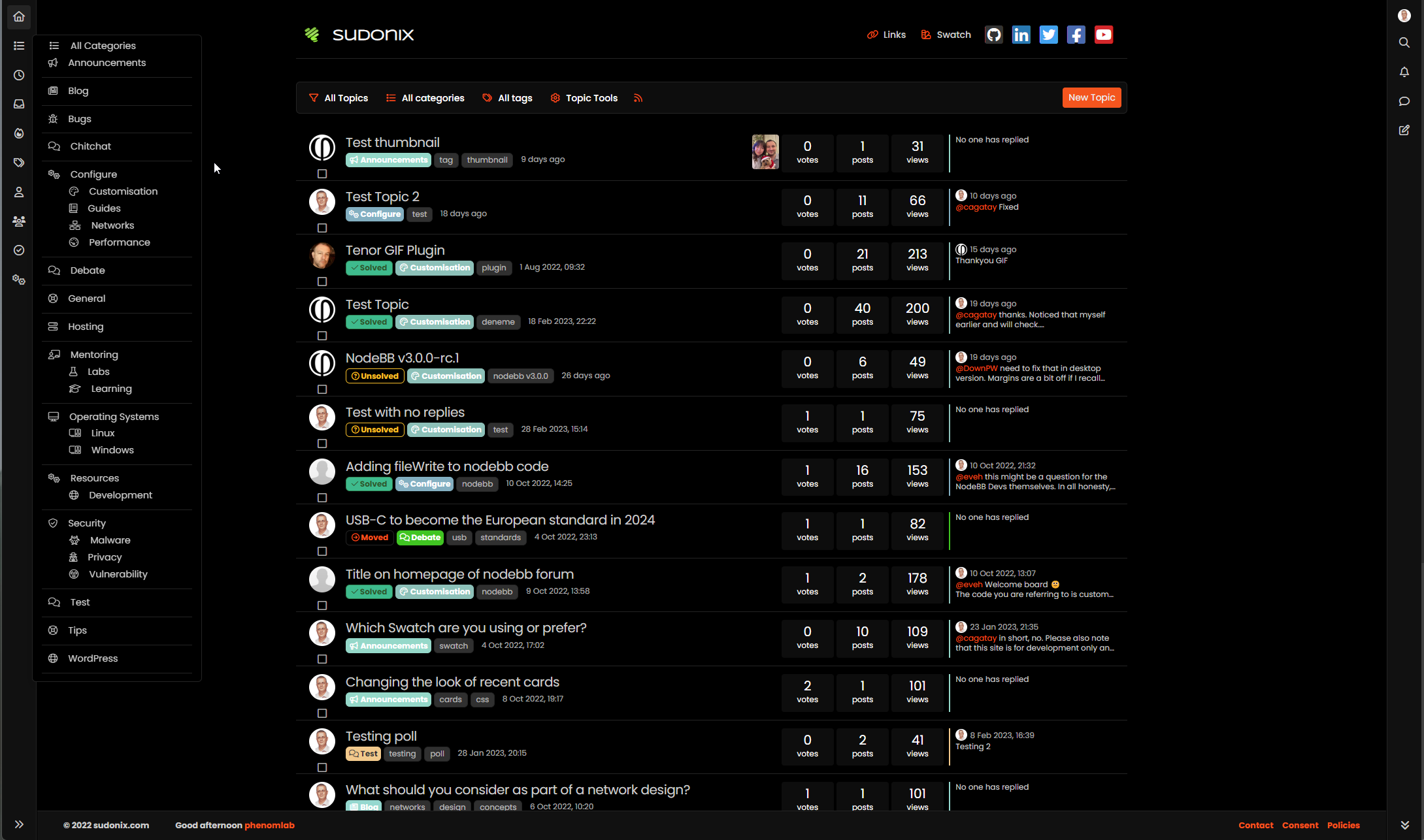
Now I have you salivating I expect you’d like the code to test for yourself? Sure…
Firstly, you’ll need to go to /admin/settings/navigation
Locate the Categories icon as shown below, and enable the “Dropdown” feature
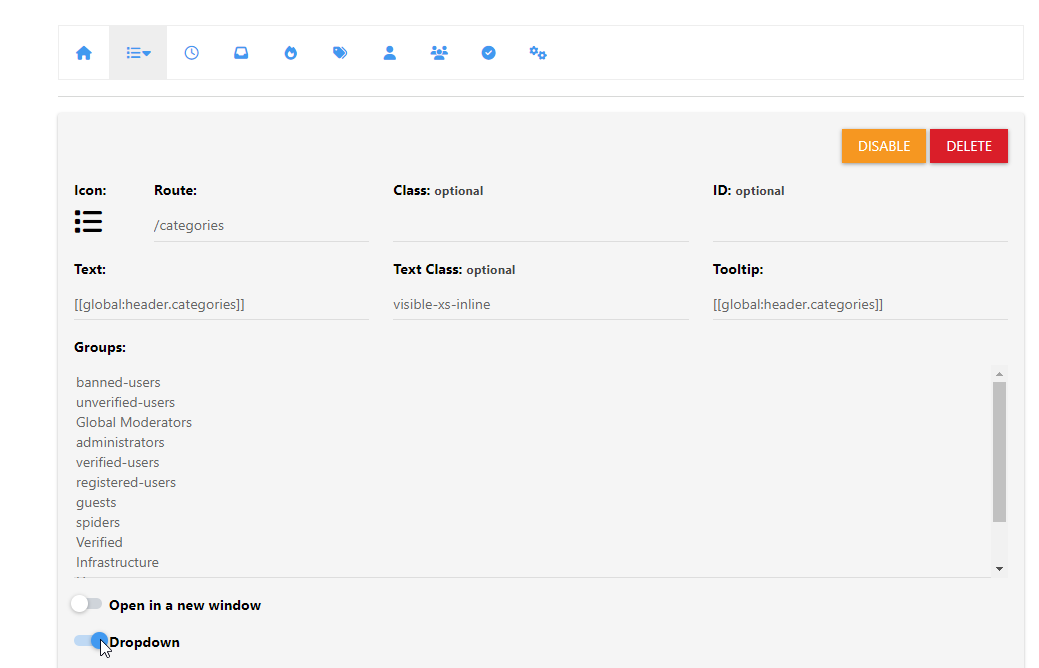
Save
Now add the below code into the section shown
<li id="thecategories"><span class="category-menu"><i class="fa fa-fw fa-list"></i><a style="display: inherit;" class="dropdown-item rounded-1" href="/categories">All Categories</span></a></li>
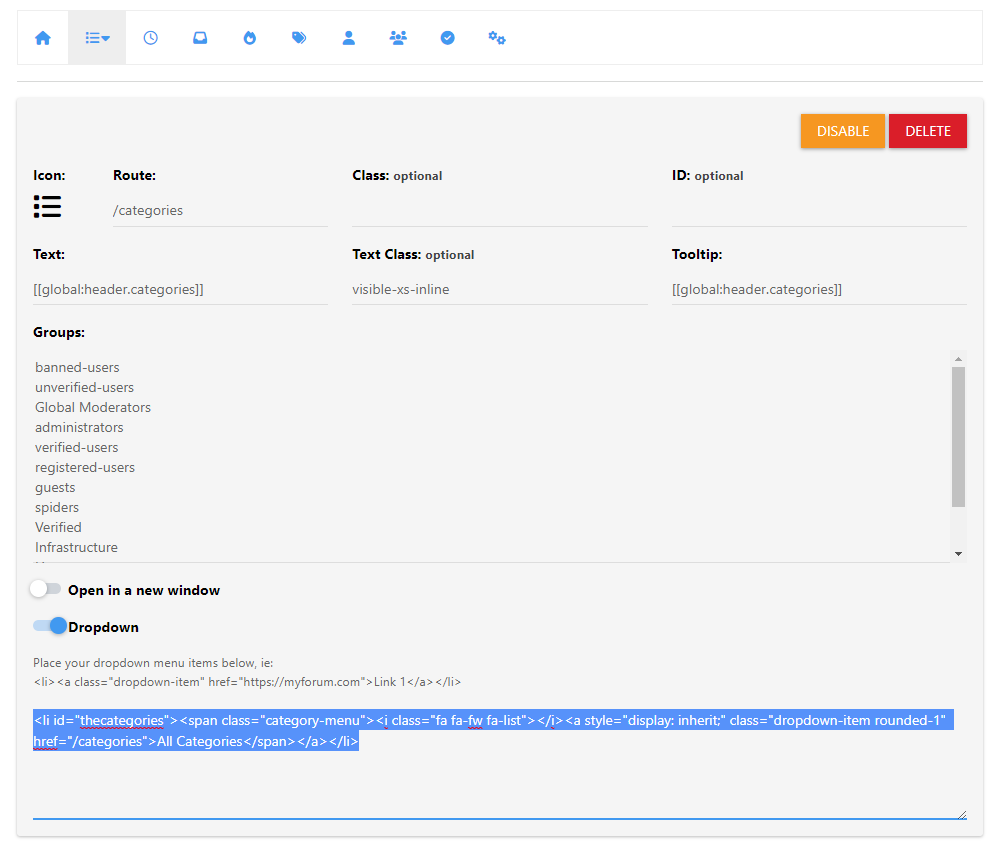
Save your changes
Now to go /admin/appearance/customise#custom-js
Paste this code into the editor
$(document).ready(function() {
    $.getJSON('/api/categories', function(data, status) {
        $.each(data.categories, function(key, value) {
            var categorylist = $(" \
	<li><span class='category-menu'><i class='fal " + this.icon + "'></i><a style='display: inherit;' class='dropdown-item rounded-1' href='/category/" + this.slug + "'>" + this.name + "</a></span></li> \
		<ul style='list-style: none;'>" +
                this.children.map(c => `<li><span class='category-menu'><i class='fal ${c.icon}'></i><a class='dropdown-item rounded-1' style='display: inherit;' href='/category/${c.slug}'>${c.name}</a></span></li>`).join(" ") +
                "</ul><li class='dropdown-divider'></li>"
            );
            if ($(window).width() < 767) {
                $(".bottombar #thecategories").append(categorylist);
            } else {
                $(".sidebar-left #thecategories").append(categorylist);
            }
        });
    });
});
Save the changes
Now go to /admin/appearance/customise#custom-css
Add the below code into the CSS console
li#thecategories {
    min-width: 250px;
    padding-left: 10px;
    font-size: 90%;
    padding-right: 10px;
}
span.category-menu {
    display: inline;
    margin-left: 10px;
    margin-right: 10px;
}
Note, you’ll likely need to adjust this CSS to suit your own site and layout.
NOTES: It’s important to detail here that the JS function does all of the work for you, but will include any icons you’ve defined for categories etc. If you don’t use icons, you should remove the below sections
<i class='fal " + this.icon + "'></i>
Of equal importance is the below if/else
            if ($(window).width() < 767) {
                $(".bottombar #thecategories").append(categorylist);
            } else {
                $(".sidebar-left #thecategories").append(categorylist);
            }
This determines the size of the viewport in use (mobile versus desktop) and then based on the output from the device, determines where to append the dynamic output - either the sidebar or the bottombar). As this is effectively choosing a location, we can use the same id of #thecategories twice as it’s “one or zero” - either one, but not both - in a nutshell, you cannot declare the same ID twice or this will cause you problems.
As this code uses the API, it never needs to be updated - if you remove or add any categories, these are reflected as soon as you reload the browser. So we don’t kill the CPU or the website itself, this code is only called onLoad and does not trigger using any ajax callbacks.
Enjoy.

Reddit users have been reacting with deep gloom to the firm saying it plans to sell shares to the public.
The “beginning of the end”, “good while it lasted”, and “they ruined it”, are just some of the comments made by Redditors, as they are known, since the announcement on Thursday.
The company has said its plans are “exciting” and will offer the business opportunities for growth.
However many users worry the move will fundamentally change the website.
Reddit, which was founded almost twenty years ago, is an online forum where users can post questions and comment on topics that interest them.
Source - BBC News
https://www.bbc.co.uk/news/business-68372755
Whilst I have my own views surrounding this (it’s something I’ve seen before elsewhere where an IPO and rounds of fundraising were attempted) and this fell flat on its face - to the point where the community and ultimately, the brand folded as a result., I think this is certainly worthy of discussion. Think what you may of Reddit, but it’s one of the oldest and largest forums on the planet.
There is also the distinct possibility that the IPO is a step in the direction of attempting to make the platform more appealing to investors - in the form of potentially a sell off.
In a major victory for cybersecurity, international law enforcement agencies have dismantled the notorious 911 S5 botnet. This botnet, which had been a significant player in the cybercrime landscape, was responsible for orchestrating numerous malicious activities, including Distributed Denial of Service (DDoS) attacks, data theft, and financial fraud. The takedown marks a crucial step in the ongoing battle against cybercriminal networks.
The 911 S5 botnet, named after the “911” premium proxy service it provided, was a large and sophisticated network of compromised computers. Botnets like 911 S5 are typically created by infecting devices with malware, which then allows cybercriminals to control these devices remotely. This botnet was particularly notorious for its ability to provide proxy services to other criminals, enabling them to mask their identities and locations while conducting illicit activities.
The botnet’s infrastructure was vast, consisting of tens of thousands of infected devices worldwide. These devices were often unwittingly recruited through phishing campaigns, malicious downloads, or exploitation of software vulnerabilities. Once compromised, the devices became part of the botnet, executing commands from its controllers without the knowledge of their legitimate owners.
The 911 S5 botnet’s primary function was to serve as a proxy network, allowing criminals to reroute their internet traffic through compromised devices. This service was highly sought after in the cybercrime community because it provided an additional layer of anonymity. Criminals could use the botnet to carry out various illegal activities, including:
DDoS Attacks: By overwhelming targeted systems with traffic from numerous infected devices, the botnet could render websites and online services unusable.
Data Theft: The botnet facilitated the theft of sensitive information, including personal data and financial credentials, which could be sold on the dark web.
Financial Fraud: Cybercriminals used the botnet to engage in fraudulent transactions, such as unauthorized online purchases and bank fraud.
The economic impact of these activities was substantial, affecting businesses and individuals alike. The botnet’s operations also posed significant challenges for cybersecurity professionals, who had to constantly adapt to its evolving tactics.
The successful takedown of the 911 S5 botnet was the result of a coordinated effort involving multiple international law enforcement agencies, cybersecurity firms, and researchers. The operation, which took several months of planning and execution, targeted the botnet’s command and control infrastructure.
Key elements of the takedown included:
The takedown operation culminated in the seizure of servers and the arrest of several key individuals believed to be behind the 911 S5 botnet. These actions significantly disrupted the botnet’s operations, rendering it inoperable and cutting off the services it provided to cybercriminals.
The dismantling of the 911 S5 botnet represents a significant achievement in the fight against cybercrime. It sends a strong message to cybercriminals that international cooperation and advanced cybersecurity techniques can effectively combat even the most sophisticated threats, and law enforcement will eventually catch up with the perpetrators of these attacks.
However, the fight against botnets and cybercrime is far from over. As long as there are vulnerabilities in software and systems, cybercriminals will continue to exploit them. The takedown of the 911 S5 botnet underscores the importance of ongoing vigilance, collaboration, and innovation in cybersecurity.
Moving forward, it is crucial for individuals and organizations to adopt robust cybersecurity practices, including regular software updates, employee training, and the use of advanced security tools. Law enforcement agencies and cybersecurity professionals must continue to work together, sharing intelligence and resources to stay ahead of evolving cyber threats.
In conclusion, the takedown of the 911 S5 botnet is a landmark achievement in the battle against cybercrime. It not only disrupts a major criminal enterprise but also serves as a reminder of the importance of vigilance, cooperation, and proactive measures in securing the digital landscape.
Hi all,
Some of you may have already noticed that you can now register and login with LinkedIn on Sudonix. The same applies for Google, but X (formerly Twitter) has been removed - mostly because they want to charge for all sorts these days, and do not have great support (or documentation) for something like OpenID.
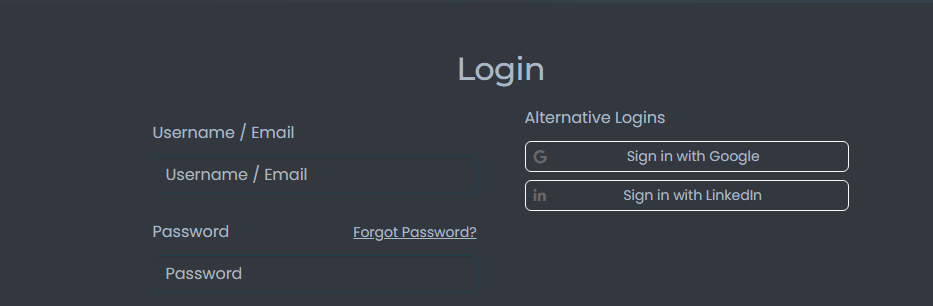
These two new connection types have been fully tested, so not expecting any issues, but if you do encounter any, let me know.

I bought Godaddy hosting few years before and had no issues getting to FileManager.
Bought hosting package today…
Logging in, and avoiding the links to use their ‘site-builder on a 7 day trial’, I found there is no cpanel, and no access to Files!
After some time chatting to support, they set up a cpanel link, which is at mysitename /cpanel.
So its at the website domain; Its not part of godaddy login, and needs another username and password to access.
Is this how things are these days? Is different way of doing it than in past.