Skip to content

NodeBB recent cards customisation

Solved Customisation
3 2 1.3k 1
  • wrote on last edited by
    #1

    Hi Mark,

    I’m trying to customise the nodebb-plugin-recent-cards widget that I have on my forum, I would like it to show … at the end of box so it doesn’t look so untidy, is this something that’s possible?
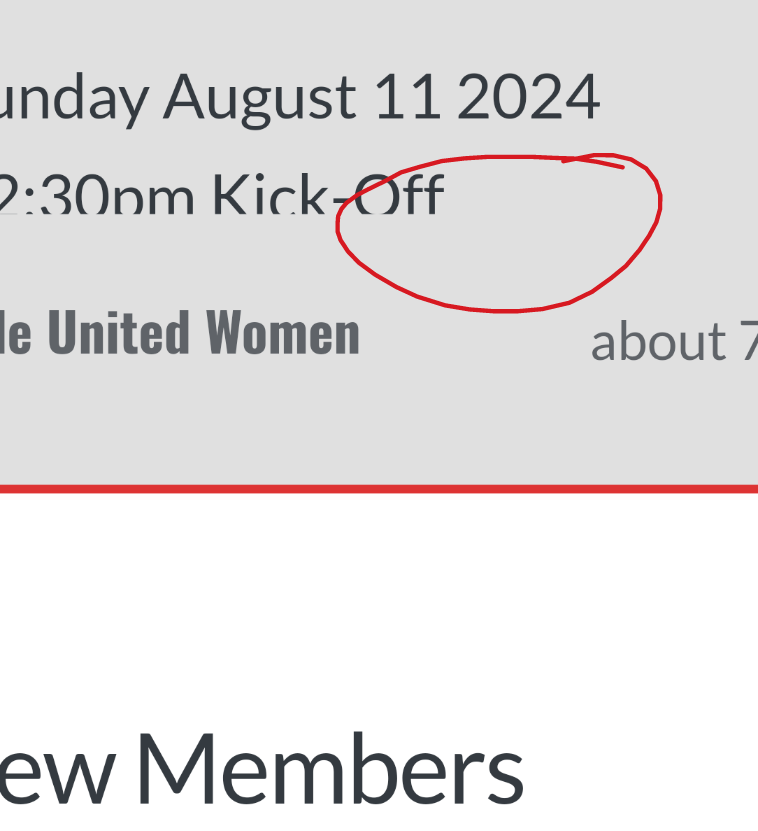
    1000003024.png

    Thanks as always 😃

  • JAC JAC

    Hi Mark,

    I’m trying to customise the nodebb-plugin-recent-cards widget that I have on my forum, I would like it to show … at the end of box so it doesn’t look so untidy, is this something that’s possible?

    1000003024.png

    Thanks as always 😃

    wrote on last edited by
    #2

    @JAC I’ve added this CSS block on your site

    .recent-cards-plugin .topic-info {
        height: 8em;
        display: -webkit-box;
        max-width: 200px;
        -webkit-line-clamp: 4;
        -webkit-box-orient: vertical;
        overflow: hidden;
    }
    

    This yields the below
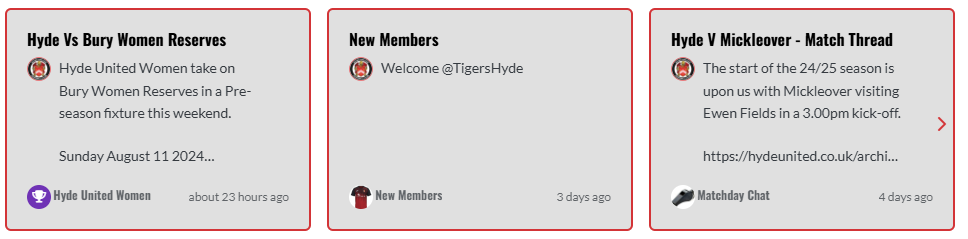
    0da353a7-2d5f-4014-9ab7-aa3a4095b6e4-image.png

  • phenomlab phenomlab has marked this topic as solved on
  • @JAC I’ve added this CSS block on your site

    .recent-cards-plugin .topic-info {
        height: 8em;
        display: -webkit-box;
        max-width: 200px;
        -webkit-line-clamp: 4;
        -webkit-box-orient: vertical;
        overflow: hidden;
    }
    

    This yields the below

    0da353a7-2d5f-4014-9ab7-aa3a4095b6e4-image.png

    wrote on last edited by JAC
    #3

    @phenomlab thank you very much for the assistance Mark, massively appreciated as always.

    The great thing about this is it’s all documented for other NodeBB users that come looking for solutions 😃.

    Looks far better 🤝👍🏻.


Did this solution help you?
Did you find the suggested solution useful? Support 💗 Sudonix with a coffee ☕
If your organisation needs deeper expertise around infrastructure, security, or technology leadership, learn more about Phenomlab Ltd. Many of the deeper technical guides behind Sudonix are published there.

Related Topics
  • Podcast Share NodeBB

    Solved Configure podcast nodebb
    15
    4 Votes
    15 Posts
    5k Views
    phenomlab
    @cagatay You could experiment with nodebb-plugin-ns-embed but I expect the x-origin tag on the remote site to prevent playback.
  • Forum Icons NodeBB

    Solved Customisation icons forum nodebb
    13
    0 Votes
    13 Posts
    5k Views
    phenomlab
    @cagatay That matches what I see [image: 4f0f858d-9812-42b1-9f61-ffb13d31dccd-image.png]
  • Changing Background on NodeBB

    Solved Customisation background image nodebb
    4
    0 Votes
    4 Posts
    2k Views
    phenomlab
    @cagatay You’d target the body tag and use the below line of CSS background: url(/assets/customcss/backgrounds/default/default.png) no-repeat center center fixed; Obviously, you need to change the path to suit where your image is being stored. More info around the background property can be found here https://www.w3schools.com/cssref/css3_pr_background.php
  • 11 Votes
    23 Posts
    10k Views
    phenomlab
    @DownPW No issues. Thanks to the Google Chrome “bug”, it does have some restrictions, but works fine other than that. I have an odd issue where it doesn’t work on Firefox mobile, but works fine on Firefox desktop.
  • NodeBB Footer

    Solved Customisation footer nodebb
    10
    1 Votes
    10 Posts
    4k Views
    JAC
    @phenomlab said in NodeBB Footer: @jac and you. Hope all is well and you recover quickly Thanks pal
  • NodeBB Design help

    Solved Customisation
    8
    3
    2 Votes
    8 Posts
    4k Views
    phenomlab
    @riekmedia I’ve applied some new CSS to your site. Can you reload the page and try again ? For the record, this is what I added #footer { background: #2d343e; border-top: 4px solid #2d343e; font-size: 0.9em; margin-top: 70px; padding: 80px 0 0; position: relative; clear: both; bottom: 0; left: 0; right: 0; z-index: 1000; margin-left: -15px; margin-right: -338px; } The /categories page seems a bit messed up, so looking at that currently EDIT - issued some override CSS in the CATEGORIES widget <!--- CSS fix for overspill on /categories page - DO NOT DELETE --> <style> #footer { margin-right: -45px; } </style> That should resolve the /categories issue.
  • Display tweets in widget [NodeBB]

    Solved Customisation
    29
    4 Votes
    29 Posts
    13k Views
    JAC
    @phenomlab brilliant, many thanks Mark
  • Forum customisation

    Customisation forum customise
    17
    3 Votes
    17 Posts
    6k Views
    JAC
    @jac said in Forum customisation: @phenomlab said in Forum customisation: @jac 100%. Just setting up some free time. I’m on annual leave from work offer the coming 2 weeks so hopefully will have a bit more time then. Not a problem Mark, I don’t wish for you to use all your spare time doing that, just do it when you can, no issues I know you’re busy doing other things but when you get a chance mate I’m happy for this to go ahead along with the RSS script.