Skip to content

NodeBB recent cards customisation

Solved Customisation
3 2 766 1
  • Hi Mark,

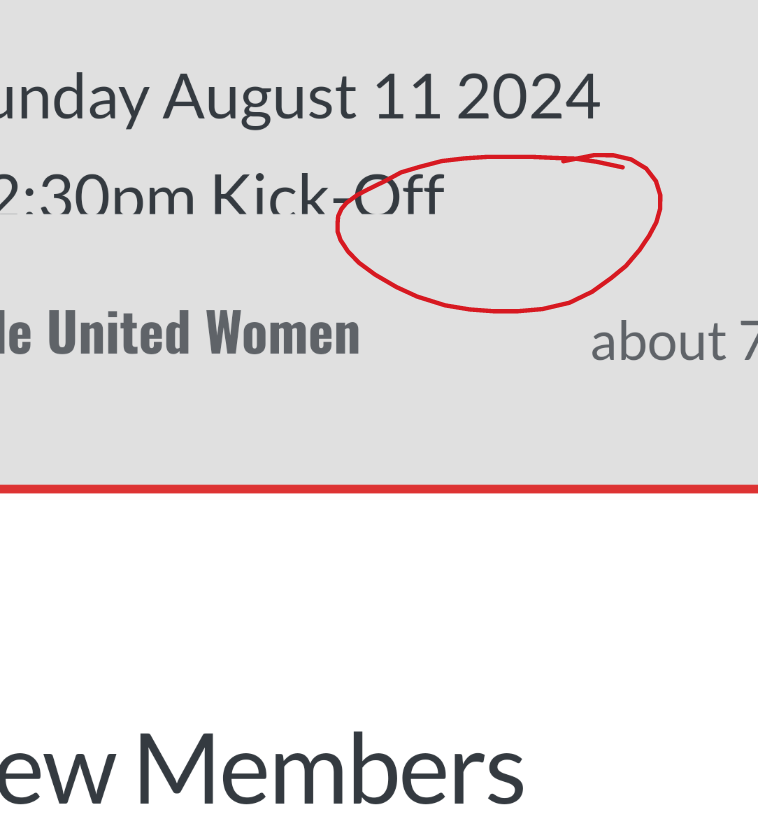
    Iโ€™m trying to customise the nodebb-plugin-recent-cards widget that I have on my forum, I would like it to show โ€ฆ at the end of box so it doesnโ€™t look so untidy, is this something thatโ€™s possible?

    1000003024.png

    Thanks as always ๐Ÿ˜ƒ

  • Hi Mark,

    Iโ€™m trying to customise the nodebb-plugin-recent-cards widget that I have on my forum, I would like it to show โ€ฆ at the end of box so it doesnโ€™t look so untidy, is this something thatโ€™s possible?

    1000003024.png

    Thanks as always ๐Ÿ˜ƒ

    @JAC Iโ€™ve added this CSS block on your site

    .recent-cards-plugin .topic-info {
        height: 8em;
        display: -webkit-box;
        max-width: 200px;
        -webkit-line-clamp: 4;
        -webkit-box-orient: vertical;
        overflow: hidden;
    }
    

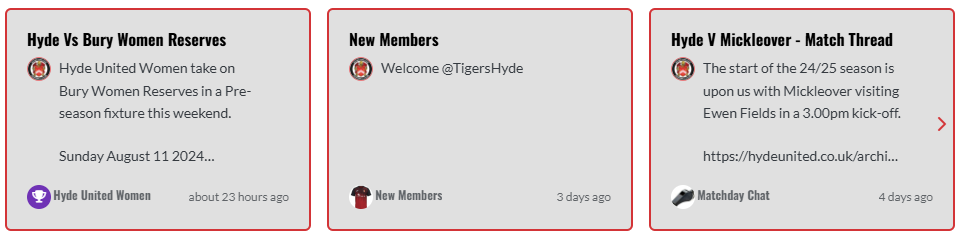
    This yields the below
    0da353a7-2d5f-4014-9ab7-aa3a4095b6e4-image.png

  • phenomlabundefined phenomlab has marked this topic as solved on
  • @JAC Iโ€™ve added this CSS block on your site

    .recent-cards-plugin .topic-info {
        height: 8em;
        display: -webkit-box;
        max-width: 200px;
        -webkit-line-clamp: 4;
        -webkit-box-orient: vertical;
        overflow: hidden;
    }
    

    This yields the below

    0da353a7-2d5f-4014-9ab7-aa3a4095b6e4-image.png

    @phenomlab thank you very much for the assistance Mark, massively appreciated as always.

    The great thing about this is itโ€™s all documented for other NodeBB users that come looking for solutions ๐Ÿ˜ƒ.

    Looks far better ๐Ÿค๐Ÿ‘๐Ÿป.


Did this solution help you?
Did you find the suggested solution useful? Support ๐Ÿ’— Sudonix with a coffee โ˜•
If your organisation needs deeper expertise around infrastructure, security, or technology leadership, learn more about Phenomlab Ltd. Many of the deeper technical guides behind Sudonix are published there.

Related Topics
  • Custom Page - nodebb

    Solved Customisation custom-pages nodebb
    13
    2
    5 Votes
    13 Posts
    484 Views
    Iโ€™m happy to see this
  • www. Infront stops website access?

    Solved Configure nodebb
    10
    1 Votes
    10 Posts
    2k Views
    @Panda because there is no match for the DNS entry specified. The receiving web server parses the headers looking for a destination hostname to match, and anything the web server is unable to resolve will be sent back to the root.
  • Whitespace fixes in Nodebb

    Solved Customisation nodebb
    18
    2
    7 Votes
    18 Posts
    3k Views
    @Panda Just circling back here with something of an update (which I think youโ€™ll like). Iโ€™ve completely restructured the ranking system. There are now less ranks, with a higher point threshold to reach them. More importantly, if you reload the site, youโ€™ll notice that the ranks are now icons. I also removed the โ€œAuthorโ€ badge, and made this a single icon, which (to me) looks much better.
  • Can you adjust Admin settings on your NodeBB?

    Bugs nodebb
    5
    0 Votes
    5 Posts
    1k Views
    @Panda as, yes, now I understand and that makes 100% sense. It means those who get down voted can still have an opinion and use common services. And yes, youโ€™re right. Rather than down vote, just ignore if you donโ€™t agree.
  • NodeBB Theme/Skin Switcher

    Solved Customisation nodebb
    38
    7 Votes
    38 Posts
    8k Views
    @Teemberland great spot ! You should create a PR for that so they can include it in the official repository. Just be aware that any subsequent releases will overwrite your fix without the PR.
  • NodeBB inline videoplayer

    Solved Customisation nodebb
    12
    3 Votes
    12 Posts
    2k Views
    @phenomlab YAY! It works Thanks so much
  • Title on homepage of nodebb forum

    Solved Customisation nodebb
    2
    1 Votes
    2 Posts
    1k Views
    @eveh Welcome board The code you are referring to is custom written as no such functionality exists under NodeBB. However, adding the functionality is relatively trivial. Below are the required steps Navigate to /admin/appearance/customise#custom-header Add the below code to your header, and save once completed <ol id="mainbanner" class="breadcrumb"><li id="addtext">Your Title Goes Here</li></ol> Navigate to /admin/appearance/customise#custom-js and add the below code, then save $(document).ready(function() { $(window).on('action:ajaxify.end', function(data) { // Initialise mainbanner ID, but hide it from view $('#mainbanner').hide(); var pathname = window.location.pathname; if (pathname === "/") { $("#addtext").text("Your Title"); $('#mainbanner').show(); } else {} // If we want to add a title to a sub page, uncomment the below and adjust accordingly //if (pathname === "/yourpath") { //$("#addtext").text("Your Title"); //$('#mainbanner').show(); //} }); }); Navigate to /admin/appearance/customise#custom-css and add the below CSS block .breadcrumb { right: 0; margin-right: auto; text-align: center; background: #0086c4; color: #ffffff; width: 100vw; position: relative; margin-left: -50vw; left: 50%; top: 50px; position: fixed; z-index: 1020; } Note, that you will need to adjust your CSS code to suit your own site / requirements.
  • [NODEBB] Stats

    Unsolved Customisation plugin stats script
    20
    1
    2 Votes
    20 Posts
    4k Views
    @phenomlab said in [NODEBB] Stats: @jac or I land up fixing it I wouldnโ€™t put it past you