[NODEBB] Help for my custom CSS
-
We have create this topic for reference.
–> You will find all stuff to deploy it on your server.
ENJOY
-
hi @phenomlab
I use .category-item:first-of-type css properties for add a border-top on my principal pages like recent, unread etc…
But this properties add a border too on topic header categories name.
It’s possible to disable it just on topic (topic.header) ?

PW and WS Spirit alive
-
hi @phenomlab
I use .category-item:first-of-type css properties for add a border-top on my principal pages like recent, unread etc…
But this properties add a border too on topic header categories name.
It’s possible to disable it just on topic (topic.header) ?
@DownPW possibly with
:notin the css classMark Cutting also advises organisations as a Fractional CIO, Fractional CISO and Executive Advisor, helping boards improve technology governance, cyber resilience and executive decision making. Learn more at Gratmore Ltd
-
@DownPW possibly with
:notin the css classI think I understand but I don’t find the good CSS class
here the code for recent page for example :
.category-item:first-of-type {
	border-top: 1px solid #0a769978 !important;
    border-top-left-radius: 4px !important;
    border-top-right-radius: 4px !important;
}
and I will test this for disable border-top on topic page but don’t work:
.category-item:first-of-type:not(.category-item .inline-block){
	border-top: 0px solid #0a769978 !important;
}
here the html code :
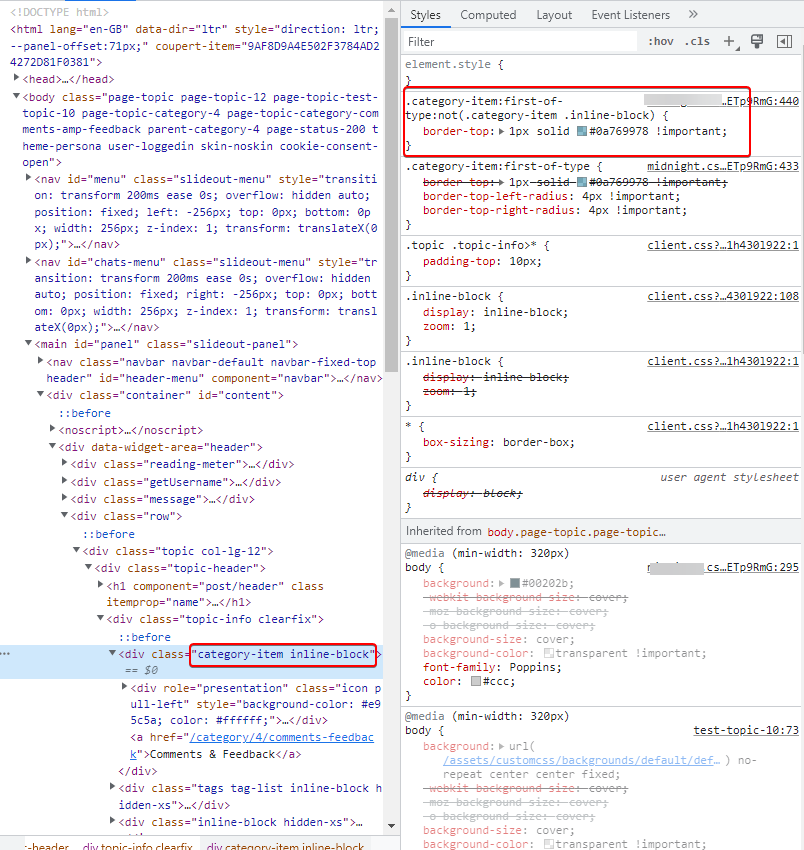
PW and WS Spirit alive
-
I think I understand but I don’t find the good CSS class
here the code for recent page for example :
.category-item:first-of-type {
	border-top: 1px solid #0a769978 !important;
    border-top-left-radius: 4px !important;
    border-top-right-radius: 4px !important;
}
and I will test this for disable border-top on topic page but don’t work:
.category-item:first-of-type:not(.category-item .inline-block){
	border-top: 0px solid #0a769978 !important;
}
here the html code :
@DownPW sorry for late reply. Can you provide me with a url where this issue exists ? PM is fine of course if you don’t want to publish directly here.
-
I think I understand but I don’t find the good CSS class
here the code for recent page for example :
.category-item:first-of-type {
	border-top: 1px solid #0a769978 !important;
    border-top-left-radius: 4px !important;
    border-top-right-radius: 4px !important;
}
and I will test this for disable border-top on topic page but don’t work:
.category-item:first-of-type:not(.category-item .inline-block){
	border-top: 0px solid #0a769978 !important;
}
here the html code :
@DownPW A couple of things here. You are using the
!importantargument twice - one will override the other, meaning they can’t both be set like that - typically, the last marked so will be preferred. Would this not work better ?.category-item.inline-block { border-top: none !important; } .category-item:first-of-type { border-top: 1px solid #0a769978; border-top-left-radius: 4px; border-top-right-radius: 4px; } -
Thanks Mark
I will test that tomorrow and I will tell you if is good or not !
– Other bug i have to resolve my friend :
- When I have plenty of tag on Post, have this :

How to add a top space beetween the tag for a better lisibility ?
Thanks in advance @phenomlab
PW and WS Spirit alive
-
Thanks Mark
I will test that tomorrow and I will tell you if is good or not !
– Other bug i have to resolve my friend :
- When I have plenty of tag on Post, have this :
How to add a top space beetween the tag for a better lisibility ?
Thanks in advance @phenomlab
@DownPW said in [NODEBB] Help for my custom CSS:
– Other bug i have to resolve my friend :
When I have plenty of tag on Post, have this :
How to add a top space beetween the tag for a better lisibility ?
Thanks in advance @phenomlaban idea for that @phenomlab ?
PW and WS Spirit alive
-
@DownPW said in [NODEBB] Help for my custom CSS:
– Other bug i have to resolve my friend :
When I have plenty of tag on Post, have this :
How to add a top space beetween the tag for a better lisibility ?
Thanks in advance @phenomlaban idea for that @phenomlab ?
@DownPW I’ll check and get back to you.
-
@DownPW said in [NODEBB] Help for my custom CSS:
– Other bug i have to resolve my friend :
When I have plenty of tag on Post, have this :
How to add a top space beetween the tag for a better lisibility ?
Thanks in advance @phenomlaban idea for that @phenomlab ?
@DownPW Try this
.tag-list {
    display: inline-block;
    margin-top: 5px;
    line-height: 1.7;
}
Because you are using
inline-blockto float the elements on the same line, you cannot use margins to control the space. In this case,line-heightwill provide what you are looking for. -
-
Hello @phenomlab
I have a odd littlebug only on Smartphone chrome based browsers (chrome, vivaldi, brave) only (it’s ok on firefox mobile)
the right border of categories /topic is not visible
Here a screenshot of the problem on chrome based browsers:
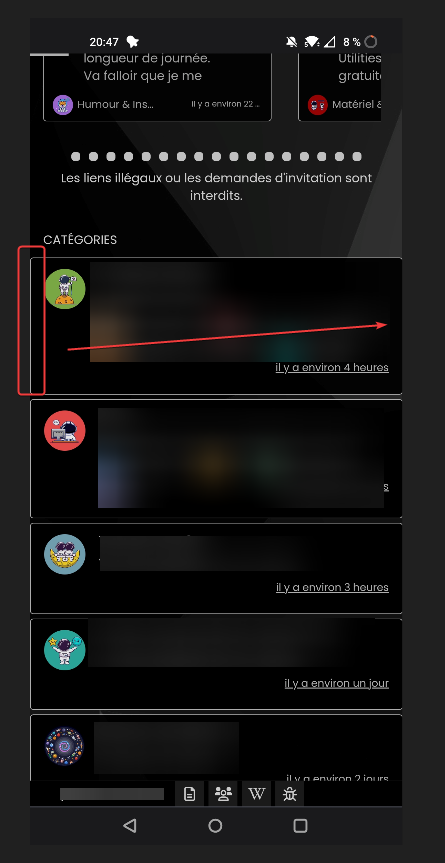
And a good result on firefox mobile (it’s OK) :
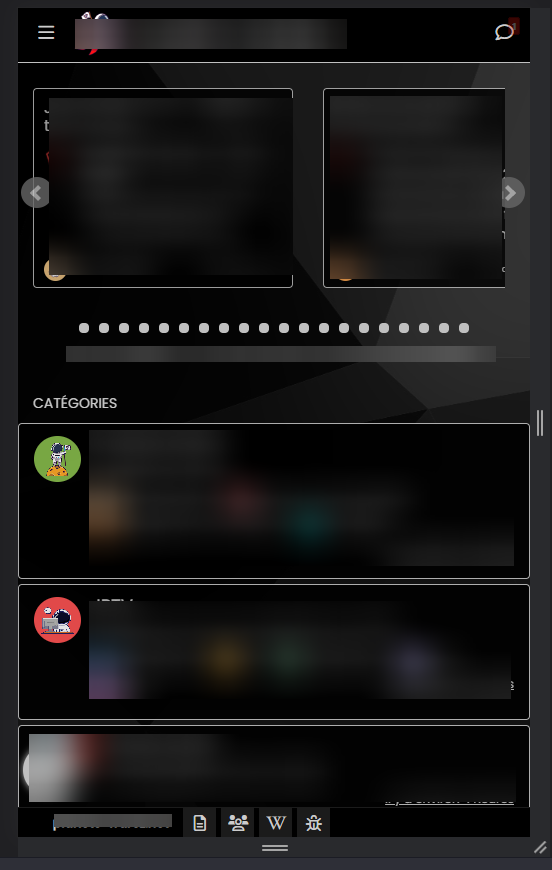
odd

PW and WS Spirit alive
-
Hello @phenomlab
I have a odd littlebug only on Smartphone chrome based browsers (chrome, vivaldi, brave) only (it’s ok on firefox mobile)
the right border of categories /topic is not visible
Here a screenshot of the problem on chrome based browsers:
And a good result on firefox mobile (it’s OK) :
odd
@DownPW odd indeed. Can you send me the CSS you are using for this ?
Mark Cutting also advises organisations as a Fractional CIO, Fractional CISO and Executive Advisor, helping boards improve technology governance, cyber resilience and executive decision making. Learn more at Gratmore Ltd
-
.categories > li, .category > ul > li {
    border: 1px solid silver;
    border-radius: 4px;
    margin-top: 5px;
    background: black;
    opacity: 0.9;
}
PW and WS Spirit alive
-
.categories > li, .category > ul > li { border: 1px solid silver; border-radius: 4px; margin-top: 5px; background: black; opacity: 0.9; }@DownPW change the
silverfor a hex value.Mark Cutting also advises organisations as a Fractional CIO, Fractional CISO and Executive Advisor, helping boards improve technology governance, cyber resilience and executive decision making. Learn more at Gratmore Ltd
-
-
@phenomlab Doesn’t work
@DownPW can you also change background from
blackto#000000 -
yes I have test too…
I have test too to disable all custom CSS on nodebb acp and delete all css code on file css theme with just
.categories > li, .category > ul > li {
active and it’s the same…delete cache too and logout/login
PW and WS Spirit alive
-
yes I have test too…
I have test too to disable all custom CSS on nodebb acp and delete all css code on file css theme with just
.categories > li, .category > ul > li {
active and it’s the same…delete cache too and logout/login
@DownPW is there a URL where I can check this ? Might not be this evening, but definitely tomorrow am.
-



Hello! It looks like you're interested in this conversation, but you don't have an account yet.
Getting fed up of having to scroll through the same posts each visit? When you register for an account, you'll always come back to exactly where you were before, and choose to be notified of new replies (either via email, or push notification). You'll also be able to save bookmarks and upvote posts to show your appreciation to other community members.
With your input, this post could be even better 💗
Register LoginDid this solution help you?
Related Topics
-
-
-
-
-
NodeBB Footer
Solved Customisation -
-
Customising NodeBB
Locked Customisation -