Skip to content

Collapsing blockquotes on Harmony

General
2 2 844 1
  • On Harmony theme blockquotes are not collapsing as it seems. Or am I missing a setting? If there are nested, long quotes it can be a scrolling marathon on mobile devices.

    Does someone have an idea how this could be implemented? I guess it would need some template and css adjustments.

    For example, here there whole screen is filled by quotes:
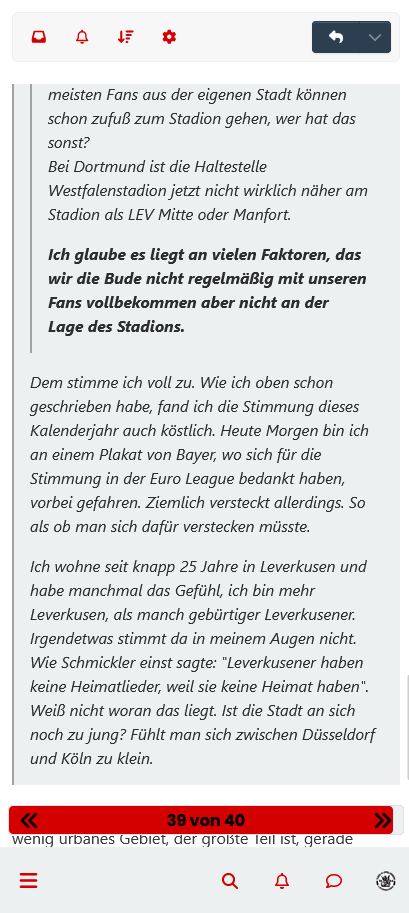
    Screenshot 2023-05-26 at 00-46-26 Stimmung und Support.png

  • On Harmony theme blockquotes are not collapsing as it seems. Or am I missing a setting? If there are nested, long quotes it can be a scrolling marathon on mobile devices.

    Does someone have an idea how this could be implemented? I guess it would need some template and css adjustments.

    For example, here there whole screen is filled by quotes:

    Screenshot 2023-05-26 at 00-46-26 Stimmung und Support.png

    @dave1904 that’s a really good point actually. I know it was there previously on Persona, but you’re right - no such function exists on harmony.

    However, putting something in place to mimick the behaviour of Persona won’t be hard from the js standpoint, although I wonder if perhaps we should ask the NodeBB developers is this feature was overlooked?

Related Topics
  • MogoDB v6 to v7 upgrade

    Solved Configure nodebb
    5
    1 Votes
    5 Posts
    2k Views
    @Panda if you used the Ubuntu PPA, I think this only goes as far as 6.x if I recall correctly.
  • Nodebb icon on google page

    Solved Customisation nodebb
    9
    1
    4 Votes
    9 Posts
    3k Views
    @Panda It’s been raised multiple times, but only for the open source version, and not hosted.
  • Custom html in nodebb to prevent cache

    Unsolved Configure nodebb
    18
    2 Votes
    18 Posts
    4k Views
    @Panda You’ll need to do that with js. With some quick CSS changes, it looks like this [image: 1690796279348-d619844f-fbfe-4cf1-a283-6b7364f6bf18-image.png] The colour choice is still really hard on the eye, but at least you can now read the text
  • Removing blue 'moved' tag from post

    Solved Configure nodebb
    16
    2
    3 Votes
    16 Posts
    5k Views
    @phenomlab Ah, got it working! I reversed the CSS addition to put z index high, and then I could see another error box saying fork title must be at least 3 characters. So made the new fork title longer and button responded.
  • 12 Votes
    47 Posts
    14k Views
    @dave1904 just coming back to this thread as @DownPW and I both experienced issues with other plugins today, and the fix was to use the plugin ordering in the ACP and move the Harmony theme to the very top so it comes before everything else in terms of other plugins. It might be worth at least trying this to see if it gives you a result rather than the previous bulldozer approach. Thinking about it, the previous fix I proposed is along the same lines and disabling plugins does in fact change the order when they are enabled again, so this is definitely worth a try. Let me know how you get on.
  • Title on homepage of nodebb forum

    Solved Customisation nodebb
    2
    1 Votes
    2 Posts
    2k Views
    @eveh Welcome board The code you are referring to is custom written as no such functionality exists under NodeBB. However, adding the functionality is relatively trivial. Below are the required steps Navigate to /admin/appearance/customise#custom-header Add the below code to your header, and save once completed <ol id="mainbanner" class="breadcrumb"><li id="addtext">Your Title Goes Here</li></ol> Navigate to /admin/appearance/customise#custom-js and add the below code, then save $(document).ready(function() { $(window).on('action:ajaxify.end', function(data) { // Initialise mainbanner ID, but hide it from view $('#mainbanner').hide(); var pathname = window.location.pathname; if (pathname === "/") { $("#addtext").text("Your Title"); $('#mainbanner').show(); } else {} // If we want to add a title to a sub page, uncomment the below and adjust accordingly //if (pathname === "/yourpath") { //$("#addtext").text("Your Title"); //$('#mainbanner').show(); //} }); }); Navigate to /admin/appearance/customise#custom-css and add the below CSS block .breadcrumb { right: 0; margin-right: auto; text-align: center; background: #0086c4; color: #ffffff; width: 100vw; position: relative; margin-left: -50vw; left: 50%; top: 50px; position: fixed; z-index: 1020; } Note, that you will need to adjust your CSS code to suit your own site / requirements.
  • Blinking text Effect

    Customisation nodebb text effect css
    3
    5 Votes
    3 Posts
    1k Views
    @phenomlab I love it too @phenomlab said in Blinking text Effect: Has that “broken neon light” look that you see in films. It’s exactly that, kind of old neon signs of bar or pubs a bit cyberpunk too
  • [NODEBB] Welcome Message

    Solved Customisation css html nodebb
    20
    2
    13 Votes
    20 Posts
    8k Views
    @DownPW the ‘js’ code for the banner takes the time from the client, so what it displays really depends on the regional settings for the operating system. I’ve not seen this issue myself but would like to see some examples of screenshots if possible.


