Skip to content

Targeting a disappearing element for its CSS

Moved Let's Build It
2 2 1.1k 2
  • Have you ever tried to target dynamic elements such as as Tooltips under bootstrap only to find that they disappear when you try to inspect them? You’re not alone.

    Fortunately (and inspired by this post), there is a workaround in case you find yourself in a similar boat.

    The Problem

    You locate the popover element you’d like to change, right-click then select Inspect Element and then element itself disappears - along with any hope of you finding the related CSS.

    The Solution

    We need to use a bit of ingenuity here. This is where the browser (in the case of Webkit, such as Google Chrome etc) debug facilities come in handy.

    1. Fire up the page where the element appears that you want to inspect
    2. Press F8 to open the developer tools
    3. Click on the console tab
    4. Paste the below into the console
    setTimeout(function(){debugger;},5000);
    

    Note that 5000 is adjustable (and the inspiration for the Mission: impossible - Rogue Nation sequence 🙂 ) It should look like the below - essentially, 5000 is 5 seconds… Now you see (hopefully) the paradigm.

    4f721beb-9f2f-42b2-8b64-c497df50eb98-image.png

    1. Now press enter
    2. You have 5 seconds before the debugger will launch, which should be enough time for you to active the element you want to target

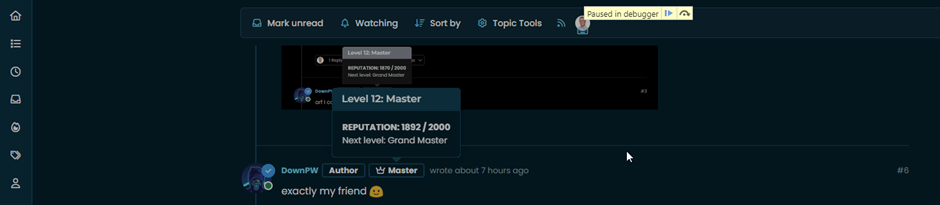
    4741514b-83c0-4195-8d41-e673a8fbf36a-image.png

    1. Wait until the debugger fires

    6c706df4-ebbb-4d84-ae2e-2e25e63f5736-image.png

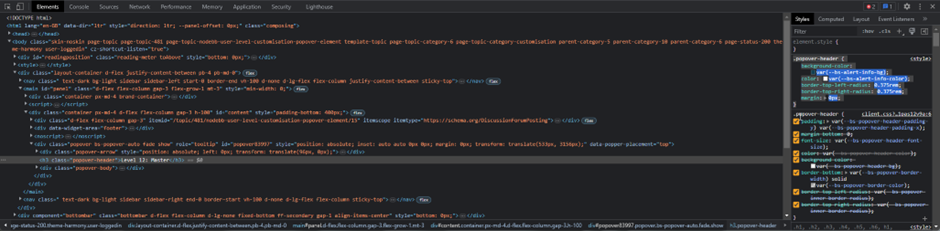
    1. Now select the element you want to inspect in the usual manner
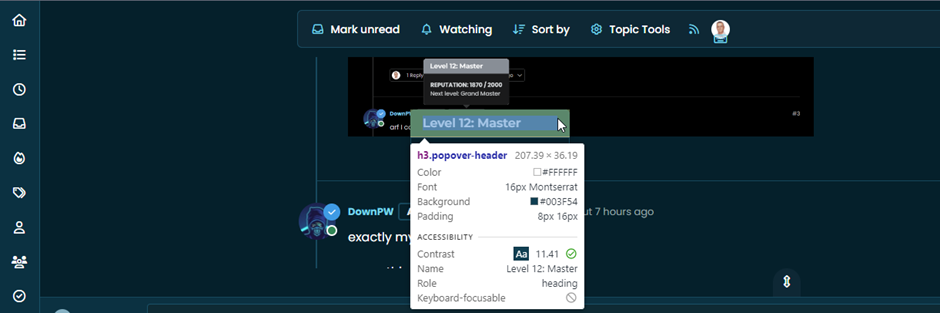
    3d9cd04f-a769-41b7-a4f7-4524deb7e8b6-image.png

    1. Expose the CSS as required

    a55a0a2a-81af-401e-9ac4-69065c2f23d7-image.png

    Customise as necessary 🙂

  • phenomlabundefined phenomlab marked this topic as a regular topic on
  • phenomlabundefined phenomlab moved this topic from Configure on
  • Nice. Very good tips Mark 😁

  • phenomlabundefined phenomlab moved this topic from Guides on
  • phenomlabundefined phenomlab referenced this topic on

Related Topics
  • 3 Votes
    6 Posts
    2k Views
    @kadir-ay-0 marking as resolved based on https://community.nodebb.org/topic/17109/manual-build-a-night-mode-for-harmony/5 Please do not raise requests in two places - here and the NodeBB forums. All this does is create unnecessary load for both parties.
  • navigation menu panel on mobile

    Solved Customisation nodebb css
    8
    1
    7 Votes
    8 Posts
    2k Views
    @crazycells hmm. That’s odd. I haven’t made any changes from recollection but I could be wrong. I’ll need to check. EDIT - very strange. I honestly don’t recall adding the below CSS block to alter the bottom bar, but you’re right… .bottombar-nav { padding: 0px !important; } I’ve removed this so it reflects stock Harmony.
  • hover link effect

    Solved Customisation css link hover
    18
    1
    6 Votes
    18 Posts
    3k Views
    @DownPW Looking at the underlying code, class start is being added on hover by jQuery in this function document.querySelectorAll(".button-gradient, .button-transparent").forEach((button) => { const style = getComputedStyle(button); const lines = document.createElement("div"); lines.classList.add("lines"); const groupTop = document.createElement("div"); const groupBottom = document.createElement("div"); const svg = createSVG( button.offsetWidth, button.offsetHeight, parseInt(style.borderRadius, 10) ); groupTop.appendChild(svg); groupTop.appendChild(svg.cloneNode(true)); groupTop.appendChild(svg.cloneNode(true)); groupTop.appendChild(svg.cloneNode(true)); groupBottom.appendChild(svg.cloneNode(true)); groupBottom.appendChild(svg.cloneNode(true)); groupBottom.appendChild(svg.cloneNode(true)); groupBottom.appendChild(svg.cloneNode(true)); lines.appendChild(groupTop); lines.appendChild(groupBottom); button.appendChild(lines); button.addEventListener("pointerenter", () => { button.classList.add("start"); }); svg.addEventListener("animationend", () => { button.classList.remove("start"); }); }); }) The CSS for start is below .button-gradient.start .lines svg, .button-transparent.start .lines svg { animation: stroke 0.3s linear; } And this is the corresponding keyframe @keyframes stroke { 30%, 55% { opacity: 1; } 100% { stroke-dashoffset: 5; opacity: 0; } } It’s using both CSS and SVG, so might not be a simple affair to replicate without the SVG files.
  • [NODEBB] Scroll Button

    Solved Customisation css javascript html scroll button
    7
    1
    0 Votes
    7 Posts
    2k Views
    @downpw ooops. Forgot that. Thanks for adding.
  • Avatar on Topic Header

    Solved Customisation css avatar header
    9
    1
    0 Votes
    9 Posts
    2k Views
    @jac said in Avatar on Topic Header: @downpw said in Avatar on Topic Header: Great Plugin I make it a bit cleaner via this CSS code: /*------------------------------------------------------------------*/ /*---------------- nodebb-plugin-browsing-users -----------------*/ /*------------------------------------------------------------------*/ /*Space between the avatar and the RSS icon */ .topic [component="topic/browsing-users"] { margin-bottom: -5px; padding-left: 10px; } /*Space between avatars*/ .pull-left { float: left!important; padding-right: 5px; } Do you have a screenshot of how this looks with the CSS change? Just added this change, thanks @DownPW
  • Reading Meter Progress bar

    Locked Solved Customisation css
    15
    1
    9 Votes
    15 Posts
    3k Views
    For anyone else following this thread, please see https://sudonix.com/topic/467/issues-with-progress-bar-on-v3
  • NodeBB Design help

    Solved Customisation
    8
    3
    2 Votes
    8 Posts
    2k Views
    @riekmedia I’ve applied some new CSS to your site. Can you reload the page and try again ? For the record, this is what I added #footer { background: #2d343e; border-top: 4px solid #2d343e; font-size: 0.9em; margin-top: 70px; padding: 80px 0 0; position: relative; clear: both; bottom: 0; left: 0; right: 0; z-index: 1000; margin-left: -15px; margin-right: -338px; } The /categories page seems a bit messed up, so looking at that currently EDIT - issued some override CSS in the CATEGORIES widget <!--- CSS fix for overspill on /categories page - DO NOT DELETE --> <style> #footer { margin-right: -45px; } </style> That should resolve the /categories issue.
  • CSS Help on my Flarum

    Solved Customisation
    5
    2
    2 Votes
    5 Posts
    1k Views
    @mike-jones Yes, you’ll typically see this type of behaviour if there is another style that has higher priority in the sense that yours will be overridden. Using !important will override the higher preference, but should be used sparingly rather than everywhere.