Footer bar add center text

-
very odd, there are a bug :
–> floatright text is invisible only on Firefox and is OK on chromium browser with the same code ?!
Other bug :
On home page. I must scroll down to see the footerbar.
She’s not appear directlyPW and WS Spirit alive
-
Other bug :
On home page. I must scroll down to see the footerbar.
She’s not appear directlyAnd lasts bugs on firefox Mobile (test with a smartphone, not on an develloper view on desktop) :
-
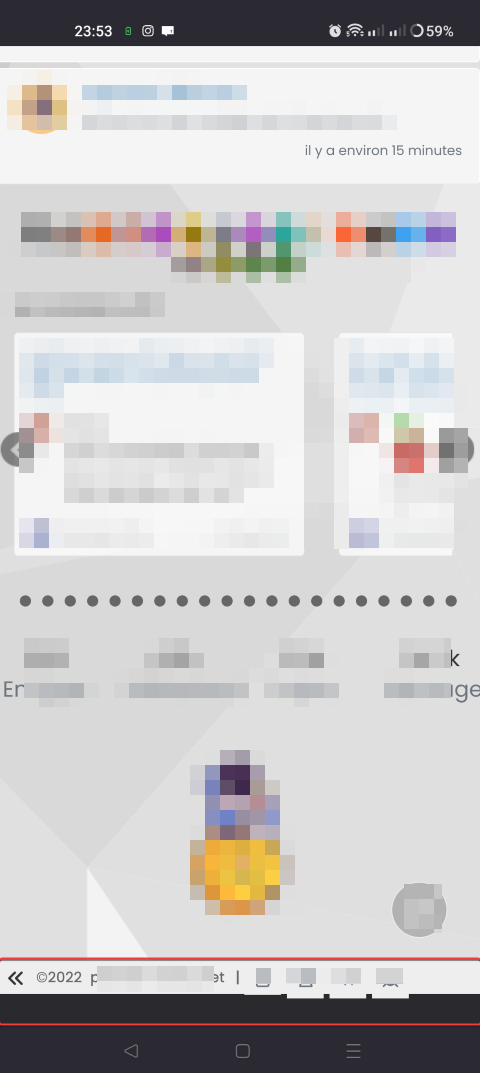
Like on chromium browser smartphone : On home page. I must scroll down to see the footerbar. She’s not appear directly
-
On firefox mobile, I have these when I scroll all the way down and when I scroll up/down:

-
-
 undefined DownPW has marked this topic as unsolved on
-
very odd, there are a bug :
–> floatright text is invisible only on Firefox and is OK on chromium browser with the same code ?!
@DownPW said in Footer bar add center text:
floatright text is invisible only on Firefox and is OK on chromium browser with the same code ?!
Typical Mozilla.
Use this instead
#floatright {
  float: right;
  bottom: 1px;
  font-size: 90%;
  line-height: 2.0;
  display: flex;
  position: fixed;
  right: 10px;
}
You might find that this messes with the alignment of text, so you’ll need to adjust
line-heightaccordingly, or make the difference up with eithermarginorpaddingThe
#console-nav-footerelement disappearing on Firefox is due to a bug - see https://bugzilla.mozilla.org/show_bug.cgi?id=1585254 and https://bugzilla.mozilla.org/show_bug.cgi?id=1760924The issue here is that the
.rowclass used in core is set as below
In Firefox, this has the undesired artefact of pushing other
divsdown because the browser interprets this as outside of the margins. You can prove this theory by removing the tick from themargin-rightclass shown above when in DEV mobile view - you should see the footer appear as soon as you remove themargin-rightvalue from.row- in effect, you are setting the margins back to0meaning the content is rendered correctly.You could write a custom JS function to apply the right CSS to resolve this issue, but in fairness, it’s very easy to fake the Browser String, which could lead to more problems that you set out to solve.
There are other ways to address this specific issue, but if it were me, I’d accept the bug until the Mozilla team actually address it.
Mark Cutting also advises organisations as a Fractional CIO, Fractional CISO and Executive Advisor, helping boards improve technology governance, cyber resilience and executive decision making. Learn more at Gratmore Ltd
-
@DownPW said in Footer bar add center text:
floatright text is invisible only on Firefox and is OK on chromium browser with the same code ?!
Typical Mozilla.
Use this instead
#floatright {
  float: right;
  bottom: 1px;
  font-size: 90%;
  line-height: 2.0;
  display: flex;
  position: fixed;
  right: 10px;
}
You might find that this messes with the alignment of text, so you’ll need to adjust
line-heightaccordingly, or make the difference up with eithermarginorpaddingThe
#console-nav-footerelement disappearing on Firefox is due to a bug - see https://bugzilla.mozilla.org/show_bug.cgi?id=1585254 and https://bugzilla.mozilla.org/show_bug.cgi?id=1760924The issue here is that the
.rowclass used in core is set as belowIn Firefox, this has the undesired artefact of pushing other
divsdown because the browser interprets this as outside of the margins. You can prove this theory by removing the tick from themargin-rightclass shown above when in DEV mobile view - you should see the footer appear as soon as you remove themargin-rightvalue from.row- in effect, you are setting the margins back to0meaning the content is rendered correctly.You could write a custom JS function to apply the right CSS to resolve this issue, but in fairness, it’s very easy to fake the Browser String, which could lead to more problems that you set out to solve.
There are other ways to address this specific issue, but if it were me, I’d accept the bug until the Mozilla team actually address it.
@phenomlab Thanks for the information, after research it seems to firefox don’t like sticky position too

I will test tonight your fix, I’m on the office actually
Thanks
PW and WS Spirit alive
-
@phenomlab Thanks for the information, after research it seems to firefox don’t like sticky position too
I will test tonight your fix, I’m on the office actually
Thanks
@DownPW no problems. Let me know how it goes
Mark Cutting also advises organisations as a Fractional CIO, Fractional CISO and Executive Advisor, helping boards improve technology governance, cyber resilience and executive decision making. Learn more at Gratmore Ltd
-
problem resolv for floatright on Firefox desktop with your last css above. thanks

For information, in my research I have seen this link wit hother fix (not tested) : https://stackoverflow.com/questions/27521676/position-sticky-not-working-in-firefox
–> Now, I search to resolve if possible these 2 smartphone bugs (only on Firefox mobile version, OK on Chromium-based browsers ) :
A- if I collapse the footerbar I end up with black space at the bottom :
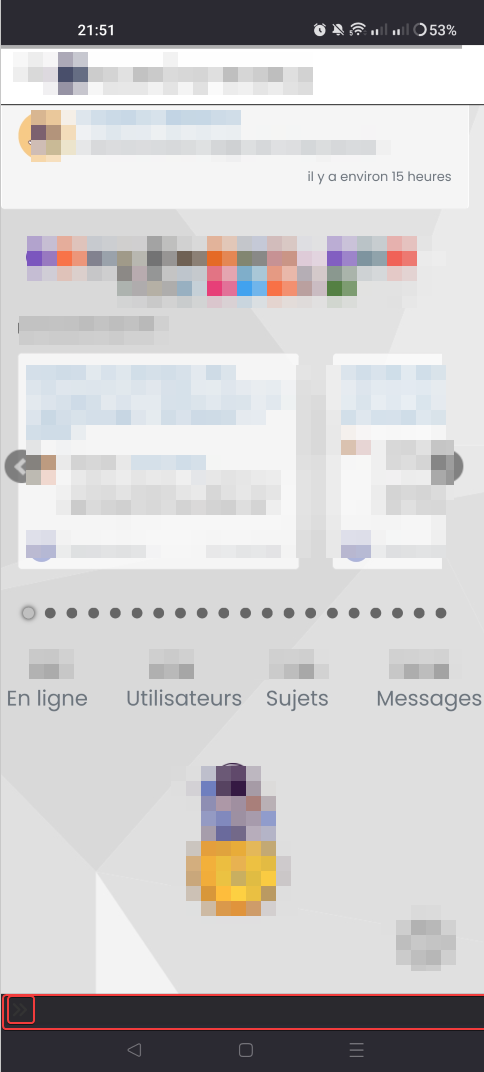
B- In fact, the footerbar remains fixed and does not come down automatically if you zoom in on a page. Ceal works on Chromium-based browsers (vivaldi, brave, etc.)
You have the same bug on sudonix
PW and WS Spirit alive
-
problem resolv for floatright on Firefox desktop with your last css above. thanks
For information, in my research I have seen this link wit hother fix (not tested) : https://stackoverflow.com/questions/27521676/position-sticky-not-working-in-firefox
–> Now, I search to resolve if possible these 2 smartphone bugs (only on Firefox mobile version, OK on Chromium-based browsers ) :
A- if I collapse the footerbar I end up with black space at the bottom :
B- In fact, the footerbar remains fixed and does not come down automatically if you zoom in on a page. Ceal works on Chromium-based browsers (vivaldi, brave, etc.)
You have the same bug on sudonix
@DownPW absolutely another Firefox related bug, so will need to check this. I don’t typically use Firefox myself so I’m not surprised at all that this specific issue manifests itself on sudonix also.
-
undefined DownPW has marked this topic as solved on
-
problem resolv for floatright on Firefox desktop with your last css above. thanks
For information, in my research I have seen this link wit hother fix (not tested) : https://stackoverflow.com/questions/27521676/position-sticky-not-working-in-firefox
–> Now, I search to resolve if possible these 2 smartphone bugs (only on Firefox mobile version, OK on Chromium-based browsers ) :
A- if I collapse the footerbar I end up with black space at the bottom :
B- In fact, the footerbar remains fixed and does not come down automatically if you zoom in on a page. Ceal works on Chromium-based browsers (vivaldi, brave, etc.)
You have the same bug on sudonix
@DownPW I actually am unable to replicate this issue on sudonix.com via Firefox on a mobile. I did find a bug in the tooltip code (I render them slightly differently so that’s my own fault). However, the issue does indeed manifest itself on your site - this can only be an issue with the CSS.
I know there is custom
JSwe developed for the footer bar, but this seems to work as desired. The odd positioning of the footer bar on scroll can only be Firefox’s interpretation ofbottom: 0;when usingposition: fixed;- you might want to trybottom: 0px;instead as Mozilla may not fully understand CSS shorthand.Mark Cutting also advises organisations as a Fractional CIO, Fractional CISO and Executive Advisor, helping boards improve technology governance, cyber resilience and executive decision making. Learn more at Gratmore Ltd
-
@DownPW I actually am unable to replicate this issue on sudonix.com via Firefox on a mobile. I did find a bug in the tooltip code (I render them slightly differently so that’s my own fault). However, the issue does indeed manifest itself on your site - this can only be an issue with the CSS.
I know there is custom
JSwe developed for the footer bar, but this seems to work as desired. The odd positioning of the footer bar on scroll can only be Firefox’s interpretation ofbottom: 0;when usingposition: fixed;- you might want to trybottom: 0px;instead as Mozilla may not fully understand CSS shorthand.@phenomlab Where you see
bottom: 0;?You seem to have not the bug on sudonix but yesterday yes. odd
I don’t know. I can’t find the problem at the moment
PW and WS Spirit alive
-
@phenomlab Where you see
bottom: 0;?You seem to have not the bug on sudonix but yesterday yes. odd
I don’t know. I can’t find the problem at the moment
Mark Cutting also advises organisations as a Fractional CIO, Fractional CISO and Executive Advisor, helping boards improve technology governance, cyber resilience and executive decision making. Learn more at Gratmore Ltd
-
@phenomlab said in Footer bar add center text:
div#console-nav-tab
Ah ok test with
bottom: 0px !important;idem

Hello! It looks like you're interested in this conversation, but you don't have an account yet.
Getting fed up of having to scroll through the same posts each visit? When you register for an account, you'll always come back to exactly where you were before, and choose to be notified of new replies (either via email, or push notification). You'll also be able to save bookmarks and upvote posts to show your appreciation to other community members.
With your input, this post could be even better 💗
Register Login