NodeBB v3 and Harmony Theme
-
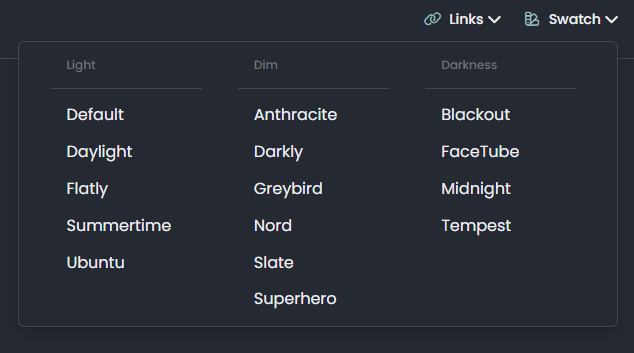
I also see another problem with this selector : he display all the default themes.
We should be able to remove all those present by default and display only those we needin addition as soon as you do a CTRL + F5 or refresh web page with F5, it removes the theme lol
@DownPW yes, I noticed that also. Looks like session data isn’t being retained.
-
@DownPW I’m running Harmony now on https://sudonix.dev
 There is no swatch functionality from what I can see, so the code we developed is still up for the taking.
@phenomlab said in NodeBB v3 and Harmony Theme:
@DownPW I’m running Harmony now on https://sudonix.dev
There is no swatch functionality from what I can see, so the code we developed is still up for the taking.thanks for this one

I could check it more seriously… -
Just looking through my code here, and provided that Persona as a NodeBB theme continues to be maintained, then the conversion of my code to v3 is a relatively simple affair meaning I could continue with my Swatch code without too much effort.
Essentially, the move from v2 to v3 is basically the migration of bootstrap from v3 to v5. I suppose much of this depends on the future of Persona…
EDIT - I’ll just leave this here
https://community.nodebb.org/topic/16908/january-2023-developer-update/15?_=1673947070798Mark Cutting also advises organisations as a Fractional CIO, Fractional CISO and Executive Advisor, helping boards improve technology governance, cyber resilience and executive decision making. Learn more at Gratmore Ltd
-
Just looking through my code here, and provided that Persona as a NodeBB theme continues to be maintained, then the conversion of my code to v3 is a relatively simple affair meaning I could continue with my Swatch code without too much effort.
Essentially, the move from v2 to v3 is basically the migration of bootstrap from v3 to v5. I suppose much of this depends on the future of Persona…
EDIT - I’ll just leave this here
https://community.nodebb.org/topic/16908/january-2023-developer-update/15?_=1673947070798@phenomlab said in NodeBB v3 and Harmony Theme:
Just looking through my code here, and provided that Persona as a NodeBB theme continues to be maintained, then the conversion of my code to v3 is a relatively simple affair meaning I could continue with my Swatch code without too much effort.
Essentially, the move from v2 to v3 is basically the migration of bootstrap from v3 to v5. I suppose much of this depends on the future of Persona…
EDIT - I’ll just leave this hereDo you think I could go through your swatch rather than the one I have?
Because I don’t believe you released your code here. Whether ?
Either way, I know I’ll have to start all over again in these 2 cases
PW and WS Spirit alive
-
@phenomlab said in NodeBB v3 and Harmony Theme:
Just looking through my code here, and provided that Persona as a NodeBB theme continues to be maintained, then the conversion of my code to v3 is a relatively simple affair meaning I could continue with my Swatch code without too much effort.
Essentially, the move from v2 to v3 is basically the migration of bootstrap from v3 to v5. I suppose much of this depends on the future of Persona…
EDIT - I’ll just leave this hereDo you think I could go through your swatch rather than the one I have?
Because I don’t believe you released your code here. Whether ?
Either way, I know I’ll have to start all over again in these 2 cases
@DownPW Yes, of course. However, because of the change of elements, I have to re-write most of it. In addition, only one theme will be supported - either Persona, or Harmony. If we go the Harmony route (which is highly likely) then virtually all of the swatch needs to be re-written including LESS etc.
I don’t want to support more than one theme and would ideally stick to Harmony.
Mark Cutting also advises organisations as a Fractional CIO, Fractional CISO and Executive Advisor, helping boards improve technology governance, cyber resilience and executive decision making. Learn more at Gratmore Ltd
-
@DownPW Yes, of course. However, because of the change of elements, I have to re-write most of it. In addition, only one theme will be supported - either Persona, or Harmony. If we go the Harmony route (which is highly likely) then virtually all of the swatch needs to be re-written including LESS etc.
I don’t want to support more than one theme and would ideally stick to Harmony.
@phenomlab said in NodeBB v3 and Harmony Theme:
Yes, of course. However, because of the change of elements, I have to re-write most of it. In addition, only one theme will be supported - either Persona, or Harmony. If we go the Harmony route (which is highly likely) then virtually all of the swatch needs to be re-written including LESS etc.
I don’t want to support more than one theme and would ideally stick to Harmony.Yes indeed, we have to focus on one main theme and not two. (Persona or Harmony)
I don’t yet have the opinions of the other members of my team but since it’s I who will then develop the themes compatible with Harmony, I think that we will go towards the road of Harmony
If you are ready to share your codes once finished and explain how to use it, it’s really a good thing and I already thank you in advance

PW and WS Spirit alive
-
@phenomlab said in NodeBB v3 and Harmony Theme:
Yes, of course. However, because of the change of elements, I have to re-write most of it. In addition, only one theme will be supported - either Persona, or Harmony. If we go the Harmony route (which is highly likely) then virtually all of the swatch needs to be re-written including LESS etc.
I don’t want to support more than one theme and would ideally stick to Harmony.Yes indeed, we have to focus on one main theme and not two. (Persona or Harmony)
I don’t yet have the opinions of the other members of my team but since it’s I who will then develop the themes compatible with Harmony, I think that we will go towards the road of Harmony
If you are ready to share your codes once finished and explain how to use it, it’s really a good thing and I already thank you in advance
@DownPW said in NodeBB v3 and Harmony Theme:
If you are ready to share your codes once finished and explain how to use it, it’s really a good thing and I already thank you in advance
More than happy to do so. In fact, BS5 makes it so much easier as LESS variables are being used, which we simply target and change. Far LESS (pun intended) work !
-
@phenomlab said in NodeBB v3 and Harmony Theme:
Yes, of course. However, because of the change of elements, I have to re-write most of it. In addition, only one theme will be supported - either Persona, or Harmony. If we go the Harmony route (which is highly likely) then virtually all of the swatch needs to be re-written including LESS etc.
I don’t want to support more than one theme and would ideally stick to Harmony.Yes indeed, we have to focus on one main theme and not two. (Persona or Harmony)
I don’t yet have the opinions of the other members of my team but since it’s I who will then develop the themes compatible with Harmony, I think that we will go towards the road of Harmony
If you are ready to share your codes once finished and explain how to use it, it’s really a good thing and I already thank you in advance
@DownPW I’ve started development work on Harmony in v3 and should have some beta code for you to test soon. Stay tuned!
Mark Cutting also advises organisations as a Fractional CIO, Fractional CISO and Executive Advisor, helping boards improve technology governance, cyber resilience and executive decision making. Learn more at Gratmore Ltd
-
@DownPW I’ve started development work on Harmony in v3 and should have some beta code for you to test soon. Stay tuned!
@phenomlab Oh yeah very good news
-
 undefined phenomlab forked this topic on
-
hello mark
here is my tutorial for install V3.00 but it’s for alpha3.0 like you see in command.
cd /path/to/your/nodebb
git rev-parse HEAD  # save this value in case you need to roll back
git fetch && git checkout bootstrap5
git reset --hard v3.0.0-alpha.3
npm config set legacy-peer-deps true
./nodebb upgrade -mi
./nodebb build
./nodebb start
– My questions :
-
How to know the name of the last version for V3 for install it (here is alpha.3) and adapt cli command above ?
-
How to upgrade the dev environment ? I know when Harmony it’s upgrade, we must upgrade boottrap 5
– Here the command to upgrade bootstrap5 :
git fetch && git checkout bootstrap5Many thanks
PW and WS Spirit alive
-
-
hello mark
here is my tutorial for install V3.00 but it’s for alpha3.0 like you see in command.
cd /path/to/your/nodebb
git rev-parse HEAD  # save this value in case you need to roll back
git fetch && git checkout bootstrap5
git reset --hard v3.0.0-alpha.3
npm config set legacy-peer-deps true
./nodebb upgrade -mi
./nodebb build
./nodebb start
– My questions :
-
How to know the name of the last version for V3 for install it (here is alpha.3) and adapt cli command above ?
-
How to upgrade the dev environment ? I know when Harmony it’s upgrade, we must upgrade boottrap 5
– Here the command to upgrade bootstrap5 :
git fetch && git checkout bootstrap5Many thanks
Mark Cutting also advises organisations as a Fractional CIO, Fractional CISO and Executive Advisor, helping boards improve technology governance, cyber resilience and executive decision making. Learn more at Gratmore Ltd
-
-
Been playing with the user profile page this afternoon. Thought I’d post a video as I’m really pleased with how this came out



Hello! It looks like you're interested in this conversation, but you don't have an account yet.
Getting fed up of having to scroll through the same posts each visit? When you register for an account, you'll always come back to exactly where you were before, and choose to be notified of new replies (either via email, or push notification). You'll also be able to save bookmarks and upvote posts to show your appreciation to other community members.
With your input, this post could be even better 💗
Register Login