nodebb chat roll dice game
-
hi @phenomlab
for respond at your question here :
https://community.nodebb.org/topic/16560/modify-nodebb-plugin-ws-dice?_=1657798694273
When I talk about chat, I’m talking about nodebb’s internal messaging or even better in the globalchat plugin.
Actually I use global chat so all my users all chat together in nodebb
I would like the /roll with result to work in it
@DownPW ok. I’ll install the global chat plugin in DEV and write some code around that. What sort of timeline are we looking at ?
Plus, can you let me know if you just want a “roll dice” button at the top of the chat for everyone to use ? What should happen with the result ?
Mark Cutting also advises organisations as a Fractional CIO, Fractional CISO and Executive Advisor, helping boards improve technology governance, cyber resilience and executive decision making. Learn more at Gratmore Ltd
-
@DownPW ok. I’ll install the global chat plugin in DEV and write some code around that. What sort of timeline are we looking at ?
Plus, can you let me know if you just want a “roll dice” button at the top of the chat for everyone to use ? What should happen with the result ?
no schedule/timeline !!
I’m not in a hurry
the purpose would be exactly the same as the quoted plugin
The user writes the command to throw the dice with the numbers he wants as he sees fit, not necessarily needing a button or else all the game possibilities should be stipulated in it:
/roll 1d4
/roll 4d6
/roll 30d2
etc ....
And the result is given back to him in the chat too like this for example:
/rollBot: User to roll 4d6. Result is 4, 3, 6, 1PW and WS Spirit alive
-
no schedule/timeline !!
I’m not in a hurrythe purpose would be exactly the same as the quoted plugin
The user writes the command to throw the dice with the numbers he wants as he sees fit, not necessarily needing a button or else all the game possibilities should be stipulated in it:
/roll 1d4
/roll 4d6
/roll 30d2
etc ....
And the result is given back to him in the chat too like this for example:
/rollBot: User to roll 4d6. Result is 4, 3, 6, 1@DownPW thanks. I guess I’ll need to see how the existing plugin works first then replicate that.
-
maybe another plugin for help you: https://github.com/NodeBB/nodebb-plugin-dice
The interrest : He have an admin panel with creation of a bot for responce…
And maybe using filter:messaging.save and Messaging.addSystemMessage instead of topic events
PW and WS Spirit alive
-
maybe another plugin for help you: https://github.com/NodeBB/nodebb-plugin-dice
The interrest : He have an admin panel with creation of a bot for responce…
And maybe using filter:messaging.save and Messaging.addSystemMessage instead of topic events
@DownPW Thanks. Will review
-
No problem @phenomlab
I have open an issue on the first plugin official github and that works now on chat/global chat and topic !

He use action:messaging.save if i’m not mistaken
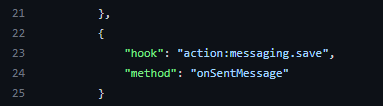
But if you want to check in on JS, why not ?
It’s maybe better than a plugin
PW and WS Spirit alive
-
No problem @phenomlab
I have open an issue on the first plugin official github and that works now on chat/global chat and topic !
He use action:messaging.save if i’m not mistaken
But if you want to check in on JS, why not ?
It’s maybe better than a plugin@DownPW sounds like the plugin author is responsive and open to requests etc. I think taking this route is going to be quicker, but happy to review of you think otherwise.
Mark Cutting also advises organisations as a Fractional CIO, Fractional CISO and Executive Advisor, helping boards improve technology governance, cyber resilience and executive decision making. Learn more at Gratmore Ltd
-
Nope no problem mark @phenomlab
I have another request that should take less time for you.
I open it in another thread.
-
 undefined DownPW has marked this topic as solved on
-
@DownPW sounds like the plugin author is responsive and open to requests etc. I think taking this route is going to be quicker, but happy to review of you think otherwise.
@phenomlab said in nodebb chat roll dice game:
@DownPW sounds like the plugin author is responsive and open to requests etc. I think taking this route is going to be quicker, but happy to review of you think otherwise.
-
hi @phenomlab
Have you got an idea for improve that bug ? :

Hello @oplik0
It’s appear when the result of a roll appear on 2 lines in the timeline (Example: lot of dice roll)
Example here with no bugs on 1 line :

thanks for your futur replies
PW and WS Spirit alive
-
hi @phenomlab
Have you got an idea for improve that bug ? :
Hello @oplik0
It’s appear when the result of a roll appear on 2 lines in the timeline (Example: lot of dice roll)
Example here with no bugs on 1 line :
thanks for your futur replies
@DownPW is there a url where I can see this ?
-
You can test on my VM test as usual
MP -
I have test some CSS code but it’s difficult for me.
I just manage to remove the span time but it also removes it for other system events appearing on the timeline.
span.timeago.timeline-text {
    display: none;
}
I can’t figure out why the username and timestamp display correctly on one line and not on 2. It’s almost the same thing finally

PW and WS Spirit alive
-
I have test some CSS code but it’s difficult for me.
I just manage to remove the span time but it also removes it for other system events appearing on the timeline.
span.timeago.timeline-text {
    display: none;
}
I can’t figure out why the username and timestamp display correctly on one line and not on 2. It’s almost the same thing finally
@DownPW This isn’t going to be a simple fix you can resolve with CSS. The issue here is how the plugin injects new code into an existing HTML structure, but doesn’t provide any means of identifying elements by ID rather than using a shared class name. Based on this, “best effort” is all that can be offered without directly changing any code.
For example
.dice-event-text {
    display: inline-block;
    align-items: center;
    flex-wrap: wrap;
    max-width: 800px;
    width: 800px;
}
This yields
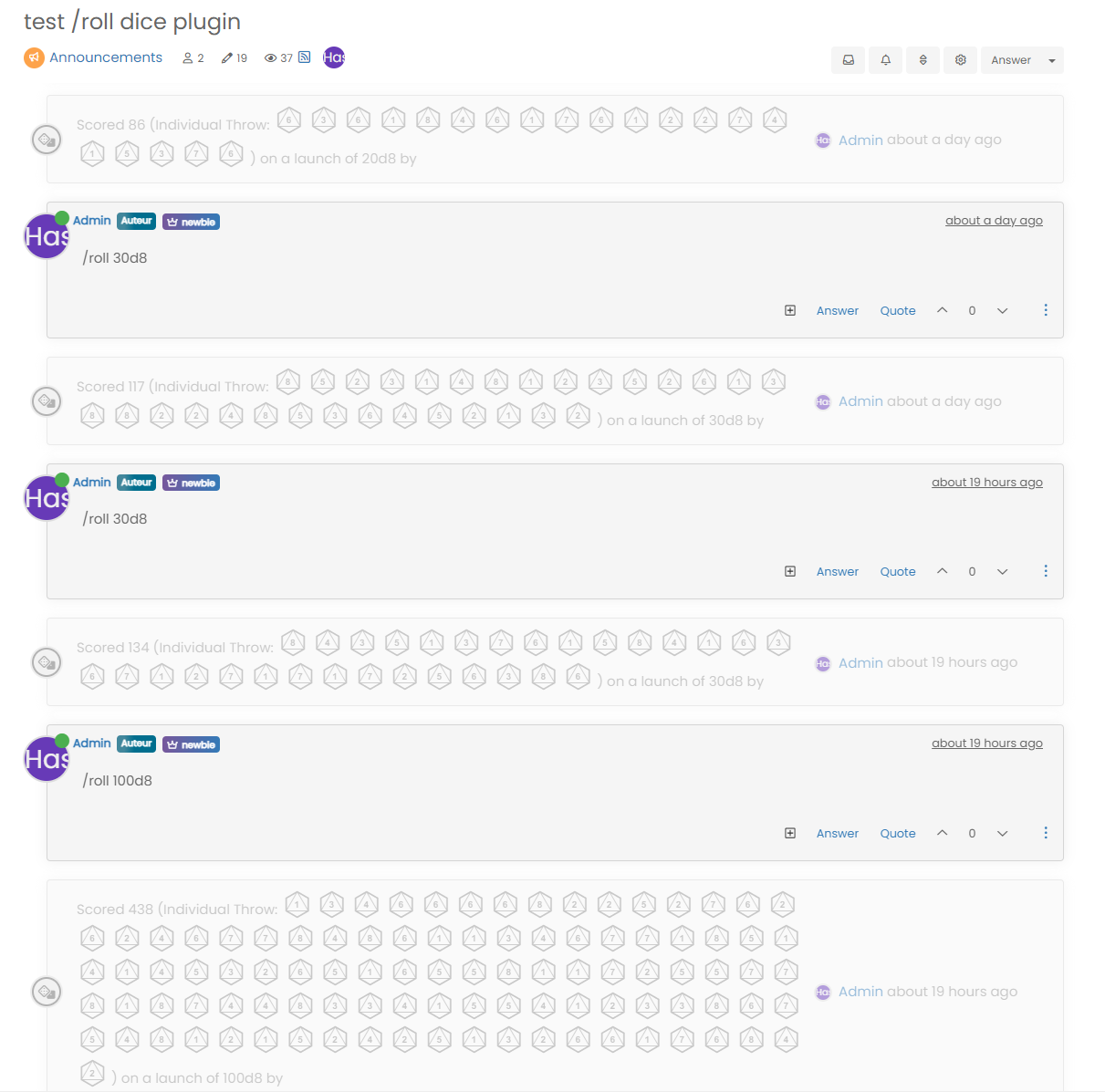
Not perfect of course, but certainly better than what you have.
-
indeed it is better but it also modifies the result on 1 line…
As you say, we can’t do much until the plugin is modified

PW and WS Spirit alive
-
indeed it is better but it also modifies the result on 1 line…
As you say, we can’t do much until the plugin is modified
@DownPW Yes, it’s not very elegant sadly, and there is an impact to other elements. You could write a jQuery function that only modifies the CSS when there are more than x of the same element in that
div… -
Why not @phenomlab but like you know, i’m not a good JS develloper
lol
I have not the skills for that -
-
@phenomlab do you think it is difficult to do?
@DownPW said in nodebb chat roll dice game:
do you think it is difficult to do?
No, but judging by this
https://github.com/NodeBB/NodeBB/pull/10837/commits/e7404fd7c3d401e6adb6246c23e5567cda136dec
It might be best to wait - or if you can’t, you could easily patch that file, or overwrite it (
public/src/modules/helpers.common.js) -
@phenomlab said in nodebb chat roll dice game:
It might be best to wait - or if you can’t, you could easily patch that file, or overwrite it
ok but I don’t understand what the correction do for my problem ?
The interpretation of HTML is better ?
PW and WS Spirit alive

Hello! It looks like you're interested in this conversation, but you don't have an account yet.
Getting fed up of having to scroll through the same posts each visit? When you register for an account, you'll always come back to exactly where you were before, and choose to be notified of new replies (either via email, or push notification). You'll also be able to save bookmarks and upvote posts to show your appreciation to other community members.
With your input, this post could be even better 💗
Register LoginDid this solution help you?
Related Topics
-
-
-
-
-
-
Forum Icons NodeBB
Solved Customisation -
-