Skip to content

Customisation

130 Topics 2.5k Posts

Looking to revamp your site layout?

  • [NodeBB] Welcome Message with logo footer change

    Solved javascript welcome message
    9
    5 Votes
    9 Posts
    4k Views
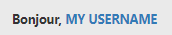
    @phenomlab Very very great Mark Thanks again, It’s perfect now ! –> I share my code that I modified. I’ve added French and English comments. If you see things to change Mark, don’t hesitate. As usual, all the access paths (FA icons, logo) will have to be modified according to your architecture. You can also very well add/remove time slots and change welcome messages to suit your needs. Widgets ACP/HTML Widget Footer Logo <center> <br><br> <img id="thislogo" src="path/to/my/image"> </center> Widget Welcome Message <!-- IF loggedIn --> <div class="getUsername">, <a href="/me"><span class="username"></span></a></div> <!-- ENDIF loggedIn --> CSS – I added the size font-weight: 900; in the CSS because otherwise some FA icon wasn’t displayed correctly and reduce margin : i#thisicon { font-family: "Font Awesome 5 Free"; font-style: normal; margin-right: 8px; font-weight: 900; } .getUsername { padding-top: 20px; text-align: right; } /*Smartphone*/ /*On désactive le message de bienvenue"*/ /*We disable the welcome message"*/ @media all and (max-width: 1024px) { .getUsername { display: none; } } JAVASCRIPT // ------------------------------------------ // Welcome Message avec icône et Footer logo // Welcome Message with icon and Footer logo // ------------------------------------------ $(window).on('action:ajaxify.end', function (data) { //On récupère le username dans le DOM et on l'affiche //We retrieve the username from the DOM and display it function updateUsername() { $('.getUsername .username').text(app.user.username); } if (document.readyState === 'loading') { document.addEventListener('DOMContentLoaded', updateUsername); } else { updateUsername(); } //On déclare les variables principales (themessage & thehours) ainsi que les variables secondaires correspondants aux plages horaires //We declare the main variables (themessage & thehours) as well as the secondary variables corresponding to the time slots var thehours = new Date().getHours(); var themessage; var wakeup = ('Good day'); var morning = ('Good morning'); var lunch = ('Bon appétit'); var afternoon = ('Good afternoon'); var drink = ('Cheers'); var evening = ('Good evening'); var night = ('Good night'); var welcome = ('Welcome'); var matched = false; //On peux ici tester le résultat du code en spécifiant une heure (!!!IMPORTANT: Commenter une fois le script testé!!!) //Here we can test the result of the code by specifying a time (!!!IMPORTANT: Comment once the script has been tested!!!) //thehours = 20 //On déclare les plages horaires avec les icones FA et les logos //We declare the time slots with FA icons and logos path if (thehours >= 0 && thehours < 6) { themessage = night; theicon = "fa-solid fa-moon"; thelogo = "/assets/customlogo/XXX.png"; } else if (thehours >= 6 && thehours < 8) { themessage = wakeup; theicon = "fa-solid fa-mug-hot"; thelogo = "/assets/customlogo/XXX.png"; } else if (thehours >= 8 && thehours < 12) { themessage = morning; theicon = "fa-solid fa-sun"; thelogo = "/assets/customlogo/XXX.png"; } else if (thehours >= 12 && thehours < 13) { themessage = lunch; theicon = "fas fa-hamburger"; thelogo = "/assets/customlogo/XXX.png"; } else if (thehours >= 13 && thehours < 16) { themessage = afternoon; theicon = "fa-solid fa-sun"; thelogo = "/assets/customlogo/XXX.png"; } else if (thehours >= 16 && thehours < 18) { themessage = welcome; theicon = "fa-solid fa-rocket"; thelogo = "/assets/customlogo/XXX.png"; } else if (thehours >= 18 && thehours < 19) { themessage = drink; theicon = "fa-solid fa-wine-glass"; thelogo = "/assets/customlogo/XXX.png"; } else if (thehours >= 19 && thehours < 20) { themessage = lunch; theicon = "fas fa-pizza-slice"; thelogo = "/assets/customlogo/XXX.png"; } else if (thehours >= 20 && thehours < 24) { themessage = evening; theicon = "fa-solid fa-tv"; thelogo = "/assets/customlogo/XXX.png"; } // Si la page active est un topic, on désactive/cache le message de bienvenue // If the active page is a topic, we deactivate/hide the welcome message if (window.location.href.indexOf("topic") > -1) { console.log("This is a topic, so hide the user welcome message"); $('#thisuser').hide(); } // Sinon, on affiche le message en fonction, l'icone FA et son emplacement (prepend) // Otherwise, we display the message in function, the FA icon and its location (prepend) else { $('.getUsername').prepend("<i id='thisicon' class='" + theicon + "'></i>" + themessage); $("#thislogo").attr("src", thelogo); //$('.getUsername').prepend("<img id='thisicon' src='" + thelogo + "'></>" + themessage); } });
  • [NodeBB] [JS SCRIPT/CSS] Theme Switcher

    theme switcher javascript css theme
    8
    4 Votes
    8 Posts
    4k Views
    @DownPW done
  • Want to include Fancybox in NodeBB without a plugin?

    fancybox code
    6
    3 Votes
    6 Posts
    3k Views
    @phenomlab haha!! You are crazy. In a good way, of course It’s a way of saying you’re awesome !
  • creating topic specific widgets

    Solved nodebb
    16
    10 Votes
    16 Posts
    3k Views
    @crazycells said in creating topic specific widgets: Additionally if hide class exists, why are we re-defining it? We’re not 🤭 I misspelled it - it should be hidden
  • Anyone using Ghost ?

    ghost cms
    47
    12 Votes
    47 Posts
    9k Views
    @phenomlab I’m really looking forward to trying out ghost fairly soon. Should I underestimate the fact I’m not a writer? .
  • NodeBB customisation

    Locked
    332
    27 Votes
    332 Posts
    143k Views
    @jac Given your departure away from your previous project, I’m going to close this thread…
  • Adjusting the size of boxes in posts-list class

    Solved nodebb
    3
    3 Votes
    3 Posts
    1k Views
    @phenomlab thanks a lot, this combination works best .posts-list .posts-list-item .content { overflow: auto; max-height: 600px; }
  • RSS parser script [NodeBB]

    nodebb rss script
    47
    9 Votes
    47 Posts
    13k Views
    @phenomlab said in RSS parser script [NodeBB]: @jac Not yet. Sorry. Have some other work commitments I need to prioritise. Hoping to get to this over the weekend. No worries at all mate, thanks
  • [NODEBB] CSS Style Sheets SelectBox

    Locked Solved css
    112
    24 Votes
    112 Posts
    35k Views
    @DownPW as discussed in PM Seems to have been solved with the new JS code that you added allowing the version CSS file change!! Cache problem therefore with the JS of the Switcher theme Based on this, I will close this thread and reference https://sudonix.com/topic/207/nodebb-help-for-my-custom-css/27
  • [NODEBB] Reply Button/arrow answer

    Solved css nodebb
    25
    4
    4 Votes
    25 Posts
    7k Views
    Topic open https://sudonix.com/topic/207/nodebb-help-for-my-custom-css
  • tag icon in front of tags

    Solved css
    5
    3 Votes
    5 Posts
    1k Views
    @phenomlab said in tag icon in front of tags: @crazycells Are you using Font Awesome Free ? If so, try this span.tag:before { content: "\f02b"; font-family: "Font Awesome 5 Free"; margin-right: 5px; margin-left: 5px; font-weight: 900; } yeap, this worked thanks a lot.
  • [NODEBB] Wallpapers BUG on Firefox Mobile ?

    Solved nodebb wallpaper firefox mobile
    9
    1
    0 Votes
    9 Posts
    2k Views
    @downpw I’m inclined to agree with this. There isn’t much else you can do, and provided it works with no odd looking artefacts in other browsers, then ok. The :before and :after are pseudo classes and very well supported across all browsers (except perhaps Internet Exploder, but who uses that these days ?)
  • [NODEBB] Scroll Button

    Solved css javascript html scroll button
    7
    1
    0 Votes
    7 Posts
    2k Views
    @downpw ooops. Forgot that. Thanks for adding.
  • [NODEBB] Stats

    Unsolved plugin stats script
    20
    1
    2 Votes
    20 Posts
    4k Views
    @phenomlab said in [NODEBB] Stats: @jac or I land up fixing it I wouldn’t put it past you
  • Avatar on Topic Header

    Solved css avatar header
    9
    1
    0 Votes
    9 Posts
    2k Views
    @jac said in Avatar on Topic Header: @downpw said in Avatar on Topic Header: Great Plugin I make it a bit cleaner via this CSS code: /*------------------------------------------------------------------*/ /*---------------- nodebb-plugin-browsing-users -----------------*/ /*------------------------------------------------------------------*/ /*Space between the avatar and the RSS icon */ .topic [component="topic/browsing-users"] { margin-bottom: -5px; padding-left: 10px; } /*Space between avatars*/ .pull-left { float: left!important; padding-right: 5px; } Do you have a screenshot of how this looks with the CSS change? Just added this change, thanks @DownPW
  • NodeBB Footer

    Solved footer nodebb
    10
    1 Votes
    10 Posts
    2k Views
    @phenomlab said in NodeBB Footer: @jac and you. Hope all is well and you recover quickly Thanks pal
  • Bug Navbar CSS

    Solved navbar css
    3
    1 Votes
    3 Posts
    1k Views
    Not better way. Thanks.
  • Multiple link on one ico non Navbar

    Solved links css navbar
    7
    1
    2 Votes
    7 Posts
    2k Views
    yeah you’re right @phenomlab. Problem of NodeBB Version
  • [NodeBB] First post customization

    Solved nodebb
    5
    4 Votes
    5 Posts
    2k Views
    @phenomlab thanks
  • Social icon (Nodebb)

    Solved nodebb social
    7
    0 Votes
    7 Posts
    2k Views
    @phenomlab said in Social icon (Nodebb): @jac I just tested my theory around using the OG image, and according to the Twitter card validator, it works fine [image: 1638880098289-73e805e1-997b-41bf-9259-51c5052ca8fc-image.png] fixed