
Post Style View

-
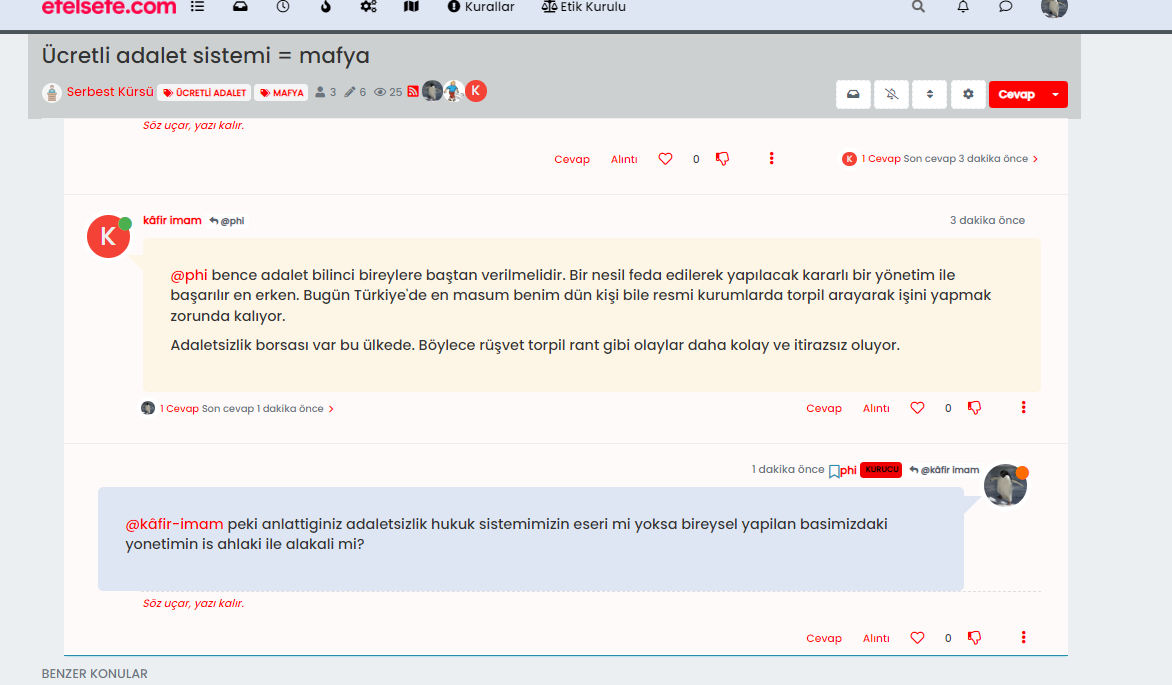
@phenomlab When I post something to the thread, my avatar can be seen on the left side of the post. However, when I refresh the page, avatar goes to the right side.
before f5;
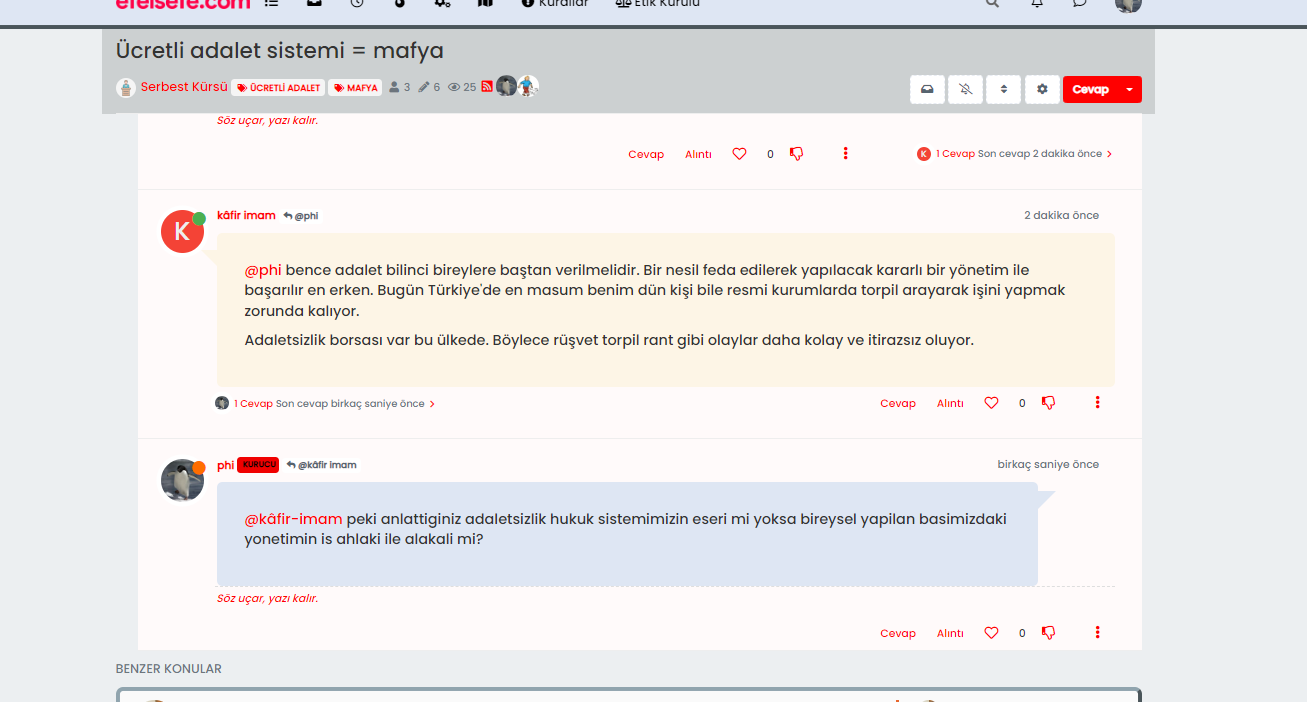
after f5;
-
That’s odd. It looks like the specific class that controls they isn’t being loaded until you perform a hard refresh. I’ll need to have a look at your site to determine why that is.
Mark Cutting also advises organisations as a Fractional CIO, Fractional CISO and Executive Advisor, helping boards improve technology governance, cyber resilience and executive decision making. Learn more at Gratmore Ltd
-
That’s odd. It looks like the specific class that controls they isn’t being loaded until you perform a hard refresh. I’ll need to have a look at your site to determine why that is.
@phenomlab the problem still persist, did you have a look?
-
@phenomlab the problem still persist, did you have a look?
@cagatay Not yet
 Will do so today
Mark Cutting also advises organisations as a Fractional CIO, Fractional CISO and Executive Advisor, helping boards improve technology governance, cyber resilience and executive decision making. Learn more at Gratmore Ltd
-
@phenomlab Sorry for waste one’s your time.
-
@phenomlab new miror problem is when i created new topic the codes are figure out not working. After F5 also…

Maybe we can change the codes just for different color for user not right side avatar etc.
-
 undefined cagatay has marked this topic as unsolved on
-
@phenomlab new miror problem is when i created new topic the codes are figure out not working. After F5 also…
Maybe we can change the codes just for different color for user not right side avatar etc.
@cagatay I’ll have a look at this tomorrow. However, this is the reason why I said to do this in a DEV environment

Mark Cutting also advises organisations as a Fractional CIO, Fractional CISO and Executive Advisor, helping boards improve technology governance, cyber resilience and executive decision making. Learn more at Gratmore Ltd
-
@cagatay I’ll have a look at this tomorrow. However, this is the reason why I said to do this in a DEV environment
@phenomlab users dont feel anything hope so
but i think this way which i m saying easy then current one which you are using in sudonix.my suggest that; just change color type without changing side metod mean right side…
-
@phenomlab users dont feel anything hope so
but i think this way which i m saying easy then current one which you are using in sudonix.my suggest that; just change color type without changing side metod mean right side…
@cagatay yep, I’ll take a look at this tomorrow and we’ll get it resolved.
Mark Cutting also advises organisations as a Fractional CIO, Fractional CISO and Executive Advisor, helping boards improve technology governance, cyber resilience and executive decision making. Learn more at Gratmore Ltd
-
-
@phenomlab thank you waiting your free time

@cagatay Should look a bit better now - just finishing up the
jQuerycode as that is not firing properly. Let me knowMark Cutting also advises organisations as a Fractional CIO, Fractional CISO and Executive Advisor, helping boards improve technology governance, cyber resilience and executive decision making. Learn more at Gratmore Ltd
-
@cagatay Should look a bit better now - just finishing up the
jQuerycode as that is not firing properly. Let me know@phenomlab yes i entered new topic and new post, seems everything is working great. thanks Mark…
-
@phenomlab yes i entered new topic and new post, seems everything is working great. thanks Mark…
@cagatay Thanks for confirming. Just finishing up the jQuery functions so if you are logged in as admin, the page might reload a few times, but this is expected
Mark Cutting also advises organisations as a Fractional CIO, Fractional CISO and Executive Advisor, helping boards improve technology governance, cyber resilience and executive decision making. Learn more at Gratmore Ltd
-
@cagatay Thanks for confirming. Just finishing up the jQuery functions so if you are logged in as admin, the page might reload a few times, but this is expected
-
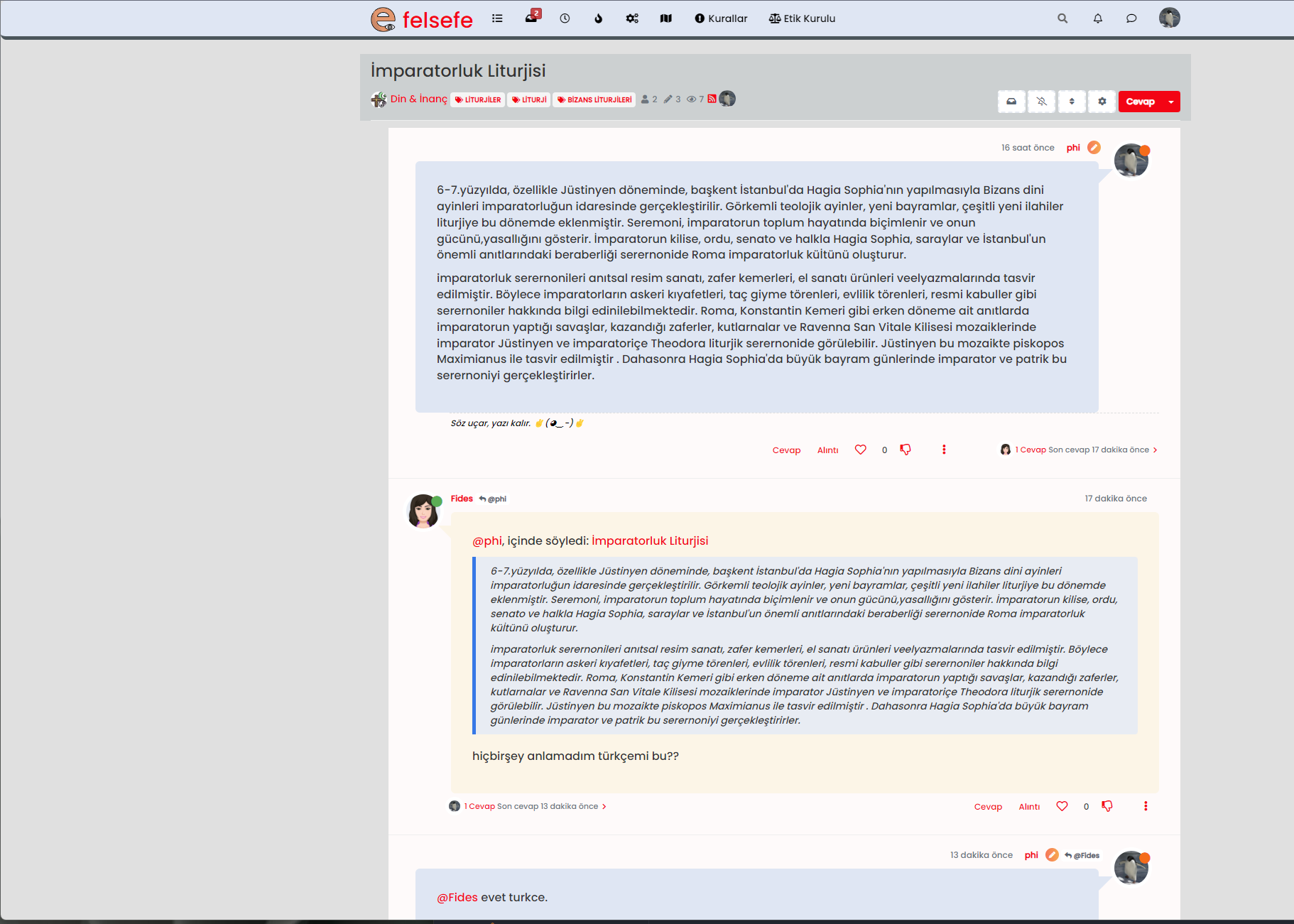
@cagatay Seems fine to me ?
Mark Cutting also advises organisations as a Fractional CIO, Fractional CISO and Executive Advisor, helping boards improve technology governance, cyber resilience and executive decision making. Learn more at Gratmore Ltd
-
-
@phenomlab pls refresh?
@cagatay I have. No issues on my side
Mark Cutting also advises organisations as a Fractional CIO, Fractional CISO and Executive Advisor, helping boards improve technology governance, cyber resilience and executive decision making. Learn more at Gratmore Ltd
-
@phenomlab maybe it depends on me or my web browser. thank you
-
@phenomlab maybe it depends on me or my web browser. thank you
@cagatay No problems. I checked this in an incognito session also, with no issues

-
@phenomlab maybe it depends on me or my web browser. thank you
@cagatay said in Post Style View:
maybe it depends on me or my web browser. thank you
One thing I have noticed is that there are a number of errors on your site in the console. My concern here is that the
jQueryfunctions I added are not being executed. For example, I removed the below function from your site about 30 minutes ago because it’s malformed});ment).ready(function () { function animateTags() { if (ajaxify.data.template.name === 'categories') { var tags = $('.popular-tags .tag-item'); var bar = $('<div class="popular-tags-bar"></div>'); tags.append(bar); var max; setTimeout(function() { tags.each(function() { var bar = $(this).find('.popular-tags-bar'); var val = parseInt(bar.parents('a').find('.tag-topic-count').text(), 10); max = max > val ? max : val; bar.css({ width: val / max * 100 + '%' }); }); }, 100) } } animateTags(); $(window).on('action:ajaxify.end', animateTags); });As you can see, this isn’t right at all. It should be
$(document).ready(function () {
    function animateTags() {
        if (ajaxify.data.template.name === 'categories') {
            var tags = $('.popular-tags .tag-item');
            var bar = $('<div class="popular-tags-bar"></div>');
            tags.append(bar);

            var max;

            setTimeout(function () {
                tags.each(function () {
                    var bar = $(this).find('.popular-tags-bar');
                    var val = parseInt(bar.parents('a').find('.tag-topic-count').text(), 10);
                    max = max > val ? max : val;

                    bar.css({
                        width: val / max * 100 + '%'
                    });
                });
            }, 100);
        }
    }
    animateTags();
    $(window).on('action:ajaxify.end', animateTags);
});
I’ve put this back how it should be, but am curious as to where that came from.
Mark Cutting also advises organisations as a Fractional CIO, Fractional CISO and Executive Advisor, helping boards improve technology governance, cyber resilience and executive decision making. Learn more at Gratmore Ltd

Hello! It looks like you're interested in this conversation, but you don't have an account yet.
Getting fed up of having to scroll through the same posts each visit? When you register for an account, you'll always come back to exactly where you were before, and choose to be notified of new replies (either via email, or push notification). You'll also be able to save bookmarks and upvote posts to show your appreciation to other community members.
With your input, this post could be even better 💗
Register LoginDid this solution help you?
Related Topics
-
-
-
-
-
NodeBB 1.19.3
Solved Performance -
-
-
[NODEBB] CSS Style Sheets SelectBox
Locked Solved Customisation



