Modify the tagging behavior in NodeBB
-
Hi
In Harmony Theme, how can I change the tagging functionality. right now its take user-slug / username. I should take fullname of the user. Actually in my project user’s fullname is automatically added while registering to forum.
VSK
-
Hi
In Harmony Theme, how can I change the tagging functionality. right now its take user-slug / username. I should take fullname of the user. Actually in my project user’s fullname is automatically added while registering to forum.
@Vijay-Kumavat Are you referring to the user assigned at registration?
Mark Cutting also advises organisations as a Fractional CIO, Fractional CISO and Executive Advisor, helping boards improve technology governance, cyber resilience and executive decision making. Learn more at Gratmore Ltd
-
@Vijay-Kumavat Are you referring to the user assigned at registration?
Yes i did this now at the time of user registering it takes fullname with current-time.
Before this it takes
email : abc@xyz.com
username : abc-xyz-com
fullname : abc def.
Now i set it to :
email : abc@xyz.com
username : abc-def-2343423423
fullname : abc def.
This is fine for now.

Now, I want do this with already registered users. Because while tagging user by someone its display user email

VSK
-
Yes i did this now at the time of user registering it takes fullname with current-time.
Before this it takes
email : abc@xyz.com
username : abc-xyz-com
fullname : abc def.
Now i set it to :
email : abc@xyz.com
username : abc-def-2343423423
fullname : abc def.
This is fine for now.
Now, I want do this with already registered users. Because while tagging user by someone its display user email
@Vijay-Kumavat So do you want to tag by email, or by display name?
-
-
By display Name
@Vijay-Kumavat I think an extension to
nodebb-plugin-mentionswould be necessary for this to work. If you look at/admin/plugins/mentionsyou’ll see the available options. -
i dint found in
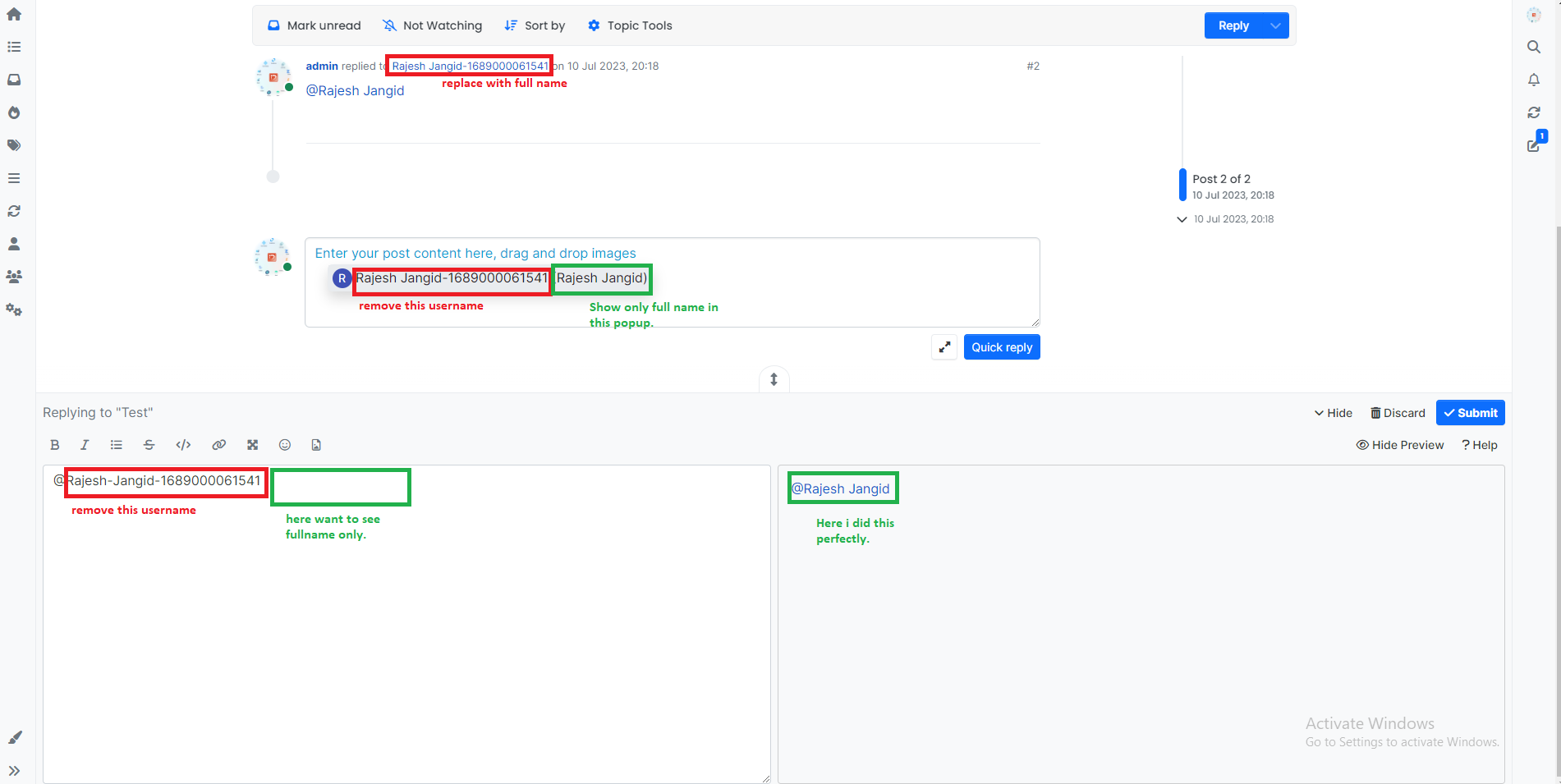
admin/plugins/mentions. But innodebb-plugin-mentions-> library.jsThen after i got result like this. Ref. below image.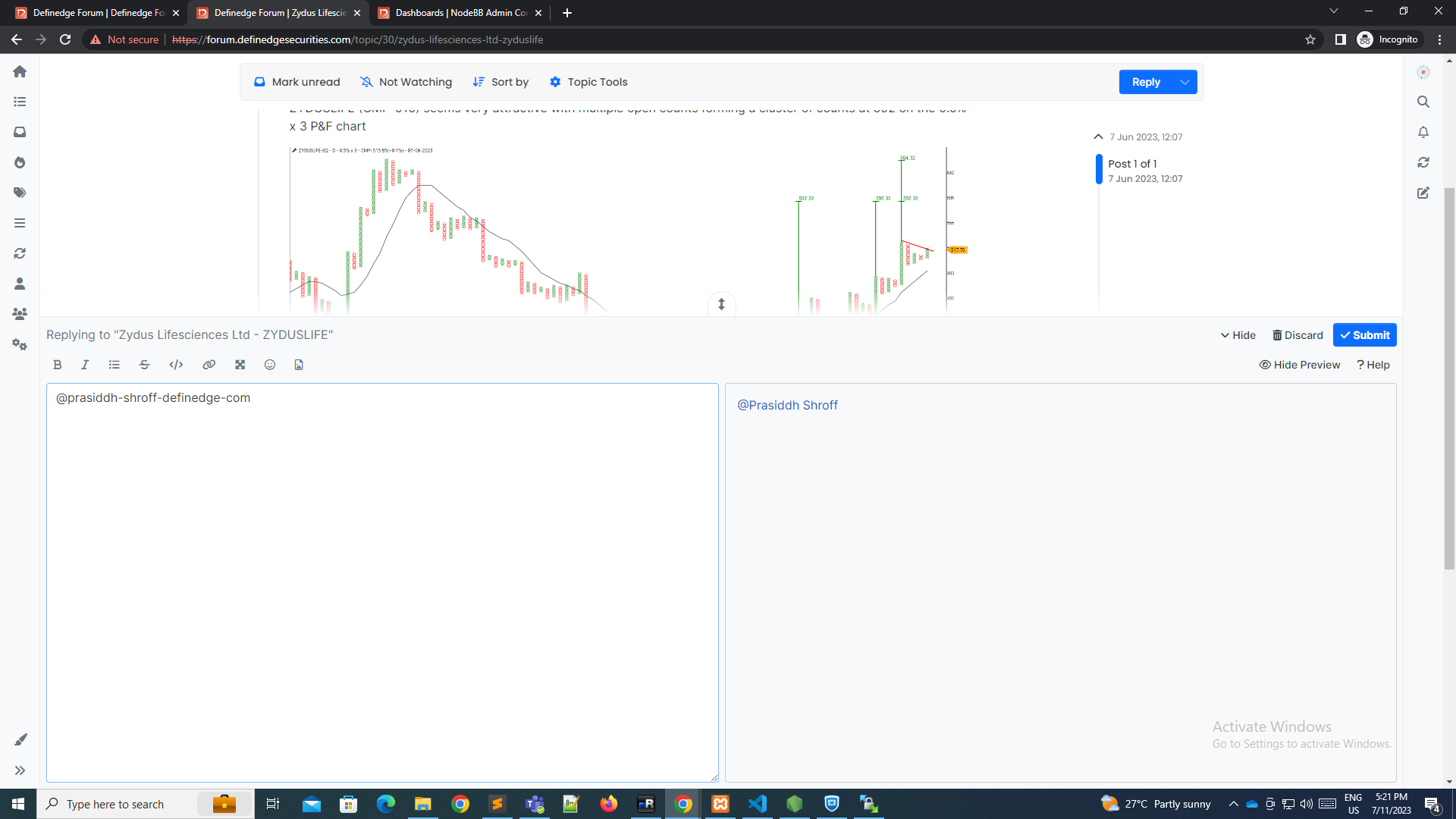
I need to do like this . Ref. below image
VSK
-
i dint found in
admin/plugins/mentions. But innodebb-plugin-mentions-> library.jsThen after i got result like this. Ref. below image.I need to do like this . Ref. below image
@Vijay-Kumavat So is this now working based on modifications you’ve made to
library.js?Mark Cutting also advises organisations as a Fractional CIO, Fractional CISO and Executive Advisor, helping boards improve technology governance, cyber resilience and executive decision making. Learn more at Gratmore Ltd
-
@Vijay-Kumavat So is this now working based on modifications you’ve made to
library.js?@phenomlab yes but only in post preview section only. before submitting post in post section its shows me email-id.
how to replace this with fullname only. ( Also in autocomplete dropdown)
VSK
-
@phenomlab yes but only in post preview section only. before submitting post in post section its shows me email-id.
how to replace this with fullname only. ( Also in autocomplete dropdown)
@Vijay-Kumavat This is likely best answered by the NodeBB core devs themselves. This will require an additional feature which extends the mentions plugin.
-
For anyone else following this thread
https://community.nodebb.org/topic/17402/change-in-reply-to-xxxx-text
And
https://github.com/NodeBB/NodeBB/commit/f2152953cddd3247746ef393516b0a53ba7750a4
-
 undefined phenomlab locked this topic on

Hello! It looks like you're interested in this conversation, but you don't have an account yet.
Getting fed up of having to scroll through the same posts each visit? When you register for an account, you'll always come back to exactly where you were before, and choose to be notified of new replies (either via email, or push notification). You'll also be able to save bookmarks and upvote posts to show your appreciation to other community members.
With your input, this post could be even better 💗
Register LoginRelated Topics
-
navbar
Solved Customisation -
-
-
-
-
-
-
Nodebb Hashtag plugin
Solved General