Why CSS acts different in Desktop?
-
Disclaimer, I’m not a CSS fan. But others on this site are more CSS aware, so I ask this general question.
The Admin side panel on NodeBB vanishes in Desktop mode on mobile. What could be happening to cause that?Its an issue Ive raised on NodeBB site a few times now but its one of those topics that has been ignored.
I thought if I could propose why this is happening, it might help get a fix.
I dont see why it would be so different. Admin side panel works on Desktop, and on mobile (mobile view), so why not mobile (Desktop view)? -
Disclaimer, I’m not a CSS fan. But others on this site are more CSS aware, so I ask this general question.
The Admin side panel on NodeBB vanishes in Desktop mode on mobile. What could be happening to cause that?Its an issue Ive raised on NodeBB site a few times now but its one of those topics that has been ignored.
I thought if I could propose why this is happening, it might help get a fix.
I dont see why it would be so different. Admin side panel works on Desktop, and on mobile (mobile view), so why not mobile (Desktop view)?@Panda What theme are you using? I’m not familiar with a side panel in the admin console. Can you provide a screenshot?
-
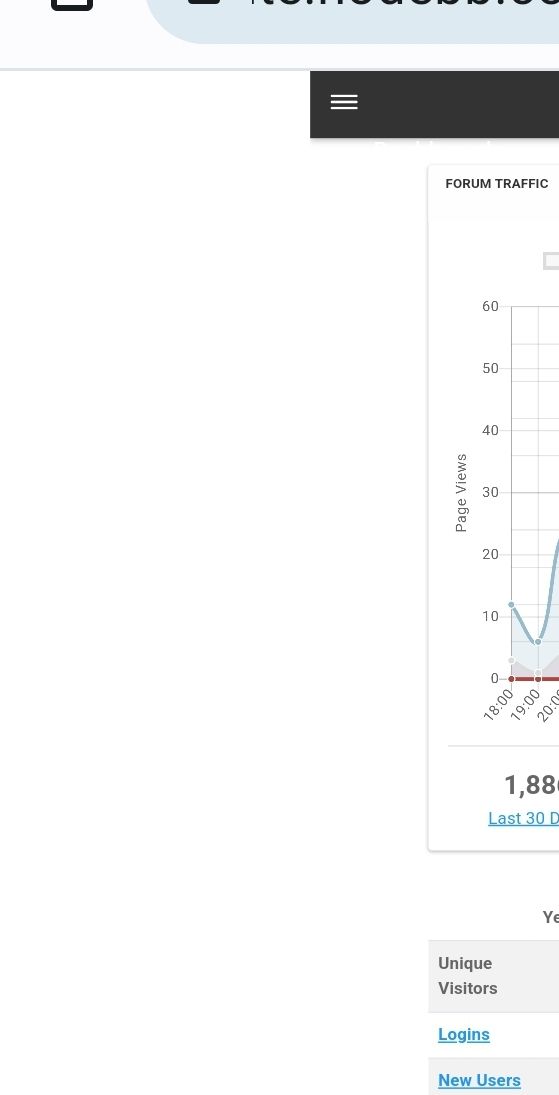
It happens in all themes, if you go into Admin, then click the top left menu (3 lines button) the side panel extends out but is blank
-
It happens in all themes, if you go into Admin, then click the top left menu (3 lines button) the side panel extends out but is blank
@Panda Sorry - understood now - but why would you want to use Desktop Mode on a mobile ?
Mark Cutting also advises organisations as a Fractional CIO, Fractional CISO and Executive Advisor, helping boards improve technology governance, cyber resilience and executive decision making. Learn more at Gratmore Ltd
-
@Panda Sorry - understood now - but why would you want to use Desktop Mode on a mobile ?
@phenomlab
2 situations-
i) as my tablet defaults to it
ii) some things cant be altered in Admin, on mobile in mobile view
That aside, why should panel be blanks just because of the browser view?
Its quite an annoying bug, if you ever need to do any admining on the move!Out of interest, can you replicate this bug? Im wondering if it happens on iPhones too, I only have Android
-
@phenomlab
2 situations-
i) as my tablet defaults to it
ii) some things cant be altered in Admin, on mobile in mobile viewThat aside, why should panel be blanks just because of the browser view?
Its quite an annoying bug, if you ever need to do any admining on the move!Out of interest, can you replicate this bug? Im wondering if it happens on iPhones too, I only have Android
@Panda You make some good points here - I too often need to make changes on the move, but just “accepted” thaty some things (like widgets) can’t be manipulated on mobile devices.
WordPress has always been like that incidentally.
-
@phenomlab
2 situations-
i) as my tablet defaults to it
ii) some things cant be altered in Admin, on mobile in mobile viewThat aside, why should panel be blanks just because of the browser view?
Its quite an annoying bug, if you ever need to do any admining on the move!Out of interest, can you replicate this bug? Im wondering if it happens on iPhones too, I only have Android
@Panda said in Why CSS acts different in Desktop?:
Out of interest, can you replicate this bug? Im wondering if it happens on iPhones too, I only have Android
Yes, I am able to replicate on Android, but on an iPhone, it behaves differently in the sense that you request the desktop site, but it simply defaults to mobile.
-
Yep better to use ACP on Desktop. Not a bug., It is not made to be used on Mobile
PW and WS Spirit alive
-
@DownPW it works for the most part, but anything that utilizes drag and drop like widgets is a non starter.
-
Yes sure, in landscape mode, it’s manageable but I think it’s more of a bonus than anything else.
PW and WS Spirit alive
-
Yes sure, in landscape mode, it’s manageable but I think it’s more of a bonus than anything else.
@DownPW I’d have to agree with that.



Hello! It looks like you're interested in this conversation, but you don't have an account yet.
Getting fed up of having to scroll through the same posts each visit? When you register for an account, you'll always come back to exactly where you were before, and choose to be notified of new replies (either via email, or push notification). You'll also be able to save bookmarks and upvote posts to show your appreciation to other community members.
With your input, this post could be even better 💗
Register LoginRelated Topics
-
-
-
Please help me, I can't install nodebb
Locked Solved Customisation -
Nodebb and emails
Solved Configure -
-
-
-