Skip to content

Why CSS acts different in Desktop?

Bugs
11 3 2.9k 1
  • Disclaimer, I’m not a CSS fan. But others on this site are more CSS aware, so I ask this general question.
    The Admin side panel on NodeBB vanishes in Desktop mode on mobile. What could be happening to cause that?

    Its an issue Ive raised on NodeBB site a few times now but its one of those topics that has been ignored.
    I thought if I could propose why this is happening, it might help get a fix.
    I dont see why it would be so different. Admin side panel works on Desktop, and on mobile (mobile view), so why not mobile (Desktop view)?

    @Panda What theme are you using? I’m not familiar with a side panel in the admin console. Can you provide a screenshot?

  • It happens in all themes, if you go into Admin, then click the top left menu (3 lines button) the side panel extends out but is blank
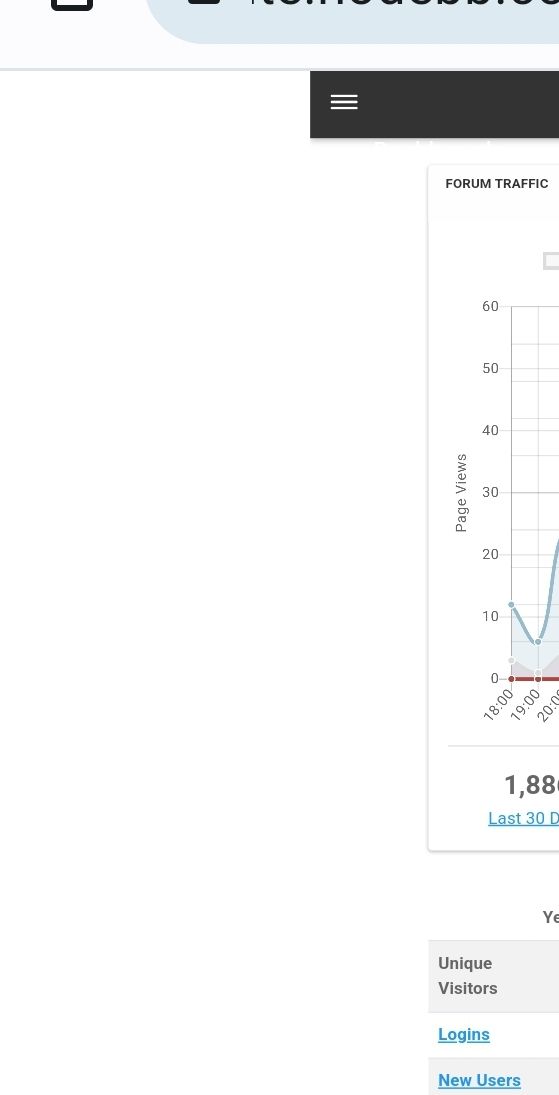
    Screenshot_20230622_174252_Chrome.jpg

  • It happens in all themes, if you go into Admin, then click the top left menu (3 lines button) the side panel extends out but is blank

    Screenshot_20230622_174252_Chrome.jpg

    @Panda Sorry - understood now - but why would you want to use Desktop Mode on a mobile ?

  • @Panda Sorry - understood now - but why would you want to use Desktop Mode on a mobile ?

    @phenomlab
    2 situations-
    i) as my tablet defaults to it
    ii) some things cant be altered in Admin, on mobile in mobile view 😞

    That aside, why should panel be blanks just because of the browser view?
    Its quite an annoying bug, if you ever need to do any admining on the move!

    Out of interest, can you replicate this bug? Im wondering if it happens on iPhones too, I only have Android

  • @phenomlab
    2 situations-
    i) as my tablet defaults to it
    ii) some things cant be altered in Admin, on mobile in mobile view 😞

    That aside, why should panel be blanks just because of the browser view?
    Its quite an annoying bug, if you ever need to do any admining on the move!

    Out of interest, can you replicate this bug? Im wondering if it happens on iPhones too, I only have Android

    @Panda You make some good points here - I too often need to make changes on the move, but just “accepted” thaty some things (like widgets) can’t be manipulated on mobile devices.

    WordPress has always been like that incidentally.

  • @phenomlab
    2 situations-
    i) as my tablet defaults to it
    ii) some things cant be altered in Admin, on mobile in mobile view 😞

    That aside, why should panel be blanks just because of the browser view?
    Its quite an annoying bug, if you ever need to do any admining on the move!

    Out of interest, can you replicate this bug? Im wondering if it happens on iPhones too, I only have Android

    @Panda said in Why CSS acts different in Desktop?:

    Out of interest, can you replicate this bug? Im wondering if it happens on iPhones too, I only have Android

    Yes, I am able to replicate on Android, but on an iPhone, it behaves differently in the sense that you request the desktop site, but it simply defaults to mobile.

  • Yep better to use ACP on Desktop. Not a bug., It is not made to be used on Mobile

  • Yep better to use ACP on Desktop. Not a bug., It is not made to be used on Mobile

    @DownPW it works for the most part, but anything that utilizes drag and drop like widgets is a non starter.

  • Yes sure, in landscape mode, it’s manageable but I think it’s more of a bonus than anything else.

  • Yes sure, in landscape mode, it’s manageable but I think it’s more of a bonus than anything else.

    @DownPW I’d have to agree with that.


Related Topics
  • Nodebb design

    Solved General nodebb
    2
    1 Votes
    2 Posts
    1k Views
    @Panda said in Nodebb design: One negative is not being so good for SEO as more Server side rendered forums, if web crawlers dont run the JS to read the forum. From recollection, Google and Bing have the capability to read and process JS, although it’s not in the same manner as a physical person will consume content on a page. It will be seen as plain text, but will be indexed. However, it’s important to note that Yandex and Baidu will not render JS, although seeing as Google has a 90% share of the content available on the web in terms of indexing, this isn’t something you’ll likely lose sleep over. @Panda said in Nodebb design: The “write api” is preferred for server-to-server interactions. This is mostly based around overall security - you won’t typically want a client machine changing database elements or altering data. This is why you have “client-side” which could be DOM manipulation etc, and “server-side” which performs more complex operations as it can communicate directly with the database whereas the client cannot (and if it can, then you have a serious security flaw). Reading from the API is perfectly acceptable on the client-side, but not being able to write. A paradigm here would be something like SNMP. This protocol exists as a UDP (UDP is very efficient, as it is “fire and forget” and does not wait for a response like TCP does) based service which reads performance data from a remote source, thus enabling an application to parse that data for use in a monitoring application. In all cases, SNMP access should be “RO” (Read Only) and not RW (Read Write). It is completely feasible to assume complete control over a firewall for example by having RW access to SNMP and then exposing it to the entire internet with a weak passphrase. You wouldn’t do it (at least, I hope you wouldn’t) and the same ethic applies to server-side rendering and the execution of commands.
  • adding some console.log to Nodebb

    Solved Customisation nodebb
    4
    1 Votes
    4 Posts
    2k Views
    @eeeee if you’re using the console, you could try node app.js > app.log 2>&1 This would redirect stdout to a file named app.log and redirect stderr to stdout. I’m not sure about standard logging under NodeBB, but there is an error log located at logs/error.log. Failing that, you could always stop the NodeBB service then use ./nodebb dev from the console which would then provide debug output.
  • How to fix size of photos & videos NodeBB

    Solved Customisation nodebb nodebb size
    7
    3 Votes
    7 Posts
    2k Views
    @crazycells pleasure. Using percentages makes much more sense in this case. It’s the same argument with px vs pt vs em with fonts, margins, padding, etc., in the sense that em is generally preferred over px and pt https://stackoverflow.com/questions/609517/why-em-instead-of-px
  • who is read NodeBB

    Customisation read post nodebb
    6
    0 Votes
    6 Posts
    2k Views
    @cagatay You should ask in the NodeBB forums. Perhaps reference this post https://discuss.flarum.org/d/23066-who-read
  • Title on homepage of nodebb forum

    Solved Customisation nodebb
    2
    1 Votes
    2 Posts
    2k Views
    @eveh Welcome board The code you are referring to is custom written as no such functionality exists under NodeBB. However, adding the functionality is relatively trivial. Below are the required steps Navigate to /admin/appearance/customise#custom-header Add the below code to your header, and save once completed <ol id="mainbanner" class="breadcrumb"><li id="addtext">Your Title Goes Here</li></ol> Navigate to /admin/appearance/customise#custom-js and add the below code, then save $(document).ready(function() { $(window).on('action:ajaxify.end', function(data) { // Initialise mainbanner ID, but hide it from view $('#mainbanner').hide(); var pathname = window.location.pathname; if (pathname === "/") { $("#addtext").text("Your Title"); $('#mainbanner').show(); } else {} // If we want to add a title to a sub page, uncomment the below and adjust accordingly //if (pathname === "/yourpath") { //$("#addtext").text("Your Title"); //$('#mainbanner').show(); //} }); }); Navigate to /admin/appearance/customise#custom-css and add the below CSS block .breadcrumb { right: 0; margin-right: auto; text-align: center; background: #0086c4; color: #ffffff; width: 100vw; position: relative; margin-left: -50vw; left: 50%; top: 50px; position: fixed; z-index: 1020; } Note, that you will need to adjust your CSS code to suit your own site / requirements.
  • Recent Cards plugin customization

    Solved Customisation nodebb
    21
    1
    13 Votes
    21 Posts
    10k Views
    @pobojmoks that’s easily done by modifying the code provided here so that it targets background rather than border In essence, the below should work $(document).ready(function() { $(window).on('action:ajaxify.end', function(data) { $('.recent-card-container').each(function(i) { var dataId = $(this).attr("data-cid"); var color = $('[role="presentation"]', this).css("background-color"); console.log("data-cid " + dataId + " is " + color); $('[data-cid="' + dataId + '"] .recent-card').attr("style", "background-color: " + color); }); }); });
  • [NODEBB] Help for my custom CSS

    Solved Customisation nodebb css bugfix
    257
    49 Votes
    257 Posts
    131k Views
    @cagatay sorry for late response. This looks too be one of the widgets, and I’m wondering if you have custom code that targets this. Had this recently happened after an upgrade or other changes?
  • NodeBB vs Discourse

    Chitchat nodebb discourse board
    25
    6 Votes
    25 Posts
    11k Views
    @phenomlab said in NodeBB vs Discourse: Hetzner eh ? I use them also. In fact, Sudonix is hosted in Nuremberg yes i’m also at hetzner, i have been a customer there for years with a reseller account for domains. My VPS that I host there are also in Nuremberg