Skip to content

Easier to read code and pre blocks

Announcements
1 1 635
  • Looking at the pre and code blocks today I realised how difficult they are to read when you switch from light to dark / dark to light mode. Can’t have that ! I’ve now fixed this so that it looks the part when viewed in either mode.

    As code / markup is used extensively here, it’s important we get it right 🙂

    Thought and opinions welcomed…


Related Topics
  • ANNOUCEMENT: New NTFY Server

    Announcements ntfy push alerts
    9
    1
    7 Votes
    9 Posts
    2k Views
    @crazycells that’s as good a test as any
  • Threaded chat support for NodeBB

    Let's Build It threaded chat code
    35
    1
    19 Votes
    35 Posts
    9k Views
    @DownPW said in Threaded chat support for NodeBB: Better like this : add shadow and border-left on self answer Of course - you style to your own requirements and taste I’ll commit that CSS we discussed yesterday also
  • Theme retirement

    Announcements themes switcher
    21
    16 Votes
    21 Posts
    5k Views
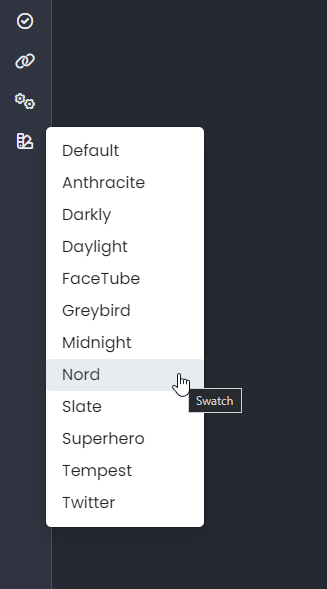
    I relented somewhat here and added another swatch - one I missed, which was previous called “blackout”. This specific one has been adapted to work on the new theming engine, but the others have been reclassified, and renamed to suit. [image: 1693924764891-d7f3a7a1-9702-4238-99bd-5c0e0d53f244-image.png] As a result, the theme you might have had will probably be reflecting something else, so you (might) need to change your themes accordingly. The changes are as follows Light -> No Change Cloudy -> Is now the old “Dim” Dim -> Is now the old “Dark” Dark -> Now a new theme based on the revamped “Blackout”
  • 36 Votes
    43 Posts
    10k Views
    I was experiencing 500 (Internal Server Error) responses from the proxy, visible in the browser console: GET https://proxy.xxx-xxx.net/ogproxy?url=https%3A%2F%2Fzupimages.net%2Fup%2F26%2F16%2Fld8h.jpg 500 (Internal Server Error) After investigation, I found two root causes: 1. Direct image URLs being sent to the proxy The custom JavaScript responsible for detecting links and sending them to the proxy was using the following regex to exclude direct image links: var fileExtensionPattern = /\.(png|jpeg|gif|pdf|docx?|xlsx?|pptx?|zip|rar|svg)$/i; Note that .jpg and .webp were missing from the pattern. As a result, links ending in .jpg were not recognized as direct image URLs and were forwarded to the OGProxy, which then tried to scrape them as web pages using open-graph-scraper — causing a 500 error. The fix was to add the missing extensions: var fileExtensionPattern = /\.(jpg|png|jpeg|gif|pdf|docx?|xlsx?|pptx?|zip|rar|svg|webp)$/i; 2. The proxy not following HTTP redirects Some image hosting services (e.g. zupimages.net) return a 301 redirect from the bare domain to www. When curl follows the redirect manually the image loads fine: curl -IL https://zupimages.net/up/26/16/ld8h.jpg HTTP/2 301 → https://www.zupimages.net/up/26/16/ld8h.jpg HTTP/2 200 However, the proxy’s axios.get() call does not handle this gracefully when open-graph-scraper is involved, resulting in a 500 error being returned to the client. My questions are: Is there a known best practice for handling redirect chains in open-graph-scraper? Would passing maxRedirects or followRedirect options explicitly to axios or ogs fix this reliably? Is there a cleaner way to pre-filter direct image/file URLs before they reach the proxy, ideally at the NodeBB plugin level rather than in custom JS? Thanks in advance.
  • 36 Votes
    55 Posts
    14k Views
    @DownPW I see why. The code relies on the existence of [component="topic/quickreply/container"] However, this by definition means that the below has to be enabled [image: 1679077966615-aeef638f-4188-489d-a9f2-f3a26dbca9d8-image.png] It will then work [image: 1679077992245-7fb38631-e0f3-46ef-b652-00929d927b13-image.png] For some unknown reason, this is hidden in Harmony, and only shows if you select it. In v2, it seems that the <section> is deleted altogether in Persona if “Quick Reply” is disabled, meaning it won’t fire as it can’t locate that specific component. The downside is that you might not want the quick reply function, but I think it’s a PITA to scroll up to the top of the post just to reply, so I have it on
  • Detect if user is admin

    General nodebb javascript code
    2
    0 Votes
    2 Posts
    1k Views
    @pwsincd I think you can use userData.isAdmin = isAdmin; if I’m not mistaken - see https://community.nodebb.org/topic/15128/how-to-hide-whitelist-user-field-only-to-owner-or-admin?_=1648802303112 for an example
  • 3 Votes
    6 Posts
    3k Views
    @phenomlab haha!! You are crazy. In a good way, of course It’s a way of saying you’re awesome !
  • Fancybox now used for image handling

    Announcements fancybox
    16
    6 Votes
    16 Posts
    3k Views
    And it seems to be less conflicting!