NODEBB: Nginx error performance & High CPU


-
@DownPW yes, this is the place to start:
@phenomlab a general but related question. Since opening three ports help, is it possible to increase this number? For example, can we run 5 ports NodeBB at the same time to smooth the web page experience; or is “3” goldilocks number for maximum efficiency?
-
@phenomlab a general but related question. Since opening three ports help, is it possible to increase this number? For example, can we run 5 ports NodeBB at the same time to smooth the web page experience; or is “3” goldilocks number for maximum efficiency?
@crazycells It’s not necessarily the “Goldilocks” standard - it really depends on the system resources you have available. You could easily extend it as long as you allow for the additional port(s) in the
nginx.conffile also.Personally, I don’t see the need for more than 3 though.
Mark – Founder, Phenomlab Ltd
Executive IT & Security Leadership
Phenomlab Ltd -
@crazycells It’s not necessarily the “Goldilocks” standard - it really depends on the system resources you have available. You could easily extend it as long as you allow for the additional port(s) in the
nginx.conffile also.Personally, I don’t see the need for more than 3 though.
Ok redis is ok now. Thanks for your help

I would like know to obtain the connecting clients Real IP on Nginx log.
I read I have need ngx_http_realip_module for nginx but not active by default but I don’t know if virtualmin have this module enabled.
PW and WS Spirit alive
-
Ok redis is ok now. Thanks for your help
I would like know to obtain the connecting clients Real IP on Nginx log.
I read I have need ngx_http_realip_module for nginx but not active by default but I don’t know if virtualmin have this module enabled.
@DownPW said in NODEBB: Nginx error performance & High CPU:
Ok redis is ok now. Thanks for your help
I would like know to obtain the connecting clients Real IP on Nginx log.
I read I have need ngx_http_realip_modulefor nginx but not active by default but I don’t know if virtualmin have this module enabled.
EDIT: OK it will be enabled by default on virtualmin :
nginx -v
PW and WS Spirit alive
-
@DownPW said in NODEBB: Nginx error performance & High CPU:
Ok redis is ok now. Thanks for your help
I would like know to obtain the connecting clients Real IP on Nginx log.
I read I have need ngx_http_realip_modulefor nginx but not active by default but I don’t know if virtualmin have this module enabled.
EDIT: OK it will be enabled by default on virtualmin :
nginx -vI have activate ngx_http_realip_module on /etc/nginx/nginx.conf on http block like this :
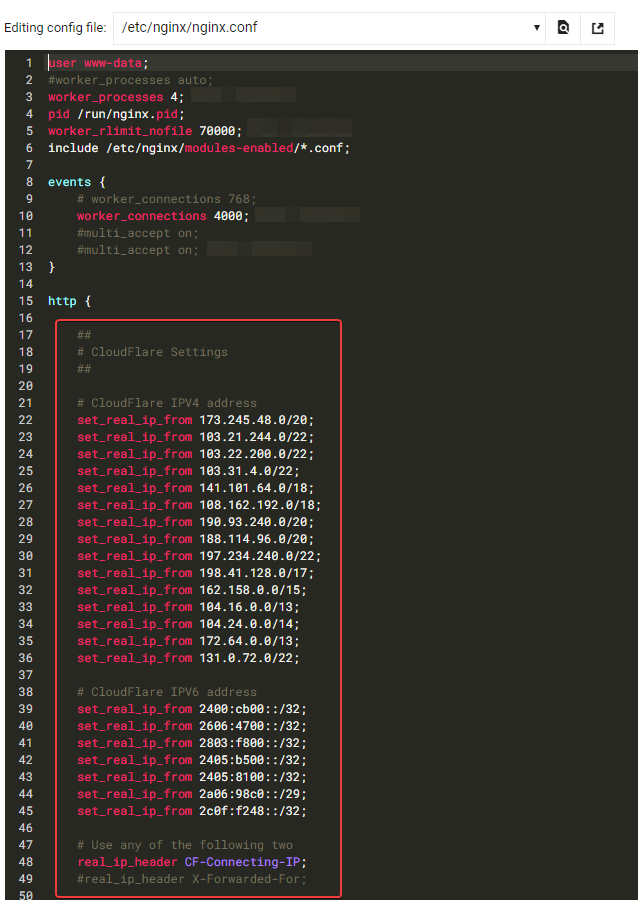
It seems to be good for you ?
PW and WS Spirit alive
-
I have activate ngx_http_realip_module on /etc/nginx/nginx.conf on http block like this :
It seems to be good for you ?
@DownPW yes, that looks fine.
Mark – Founder, Phenomlab Ltd
Executive IT & Security Leadership
Phenomlab Ltd -
PW and WS Spirit alive
-
@DownPW I suspect that’s a failure of the socket server to talk to redis, but the NodeBB Devs would need to confirm.
Mark – Founder, Phenomlab Ltd
Executive IT & Security Leadership
Phenomlab Ltd -
@DownPW I suspect that’s a failure of the socket server to talk to redis, but the NodeBB Devs would need to confirm.
Seems to be better with some scaling fix for redis on redis.conf. I haven’t seen the message yet since the changes I made
# I increase it to the value of /proc/sys/net/core/somaxconn
tcp-backlog 4096


# I'm uncommenting because it can slow down Redis. Uncommented by default !!!!!!!!!!!!!!!!!!!
#save 900 1
#save 300 10
#save 60 10000
If you have other Redis optimizations. I take all your advice
-
 undefined DownPW has marked this topic as solved on



Hello! It looks like you're interested in this conversation, but you don't have an account yet.
Getting fed up of having to scroll through the same posts each visit? When you register for an account, you'll always come back to exactly where you were before, and choose to be notified of new replies (either via email, or push notification). You'll also be able to save bookmarks and upvote posts to show your appreciation to other community members.
With your input, this post could be even better 💗
Register Login