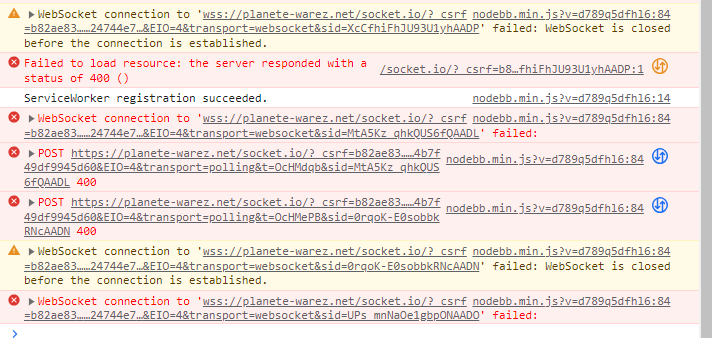
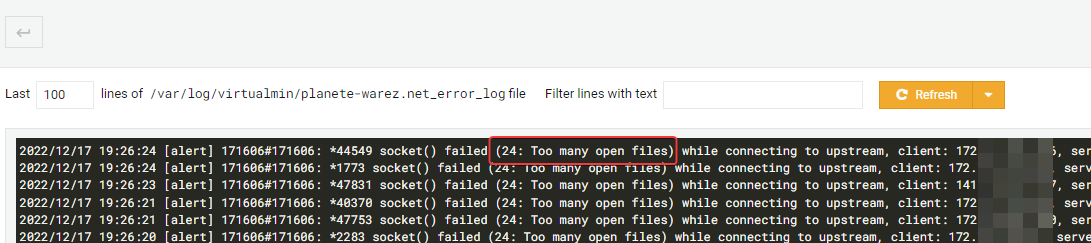
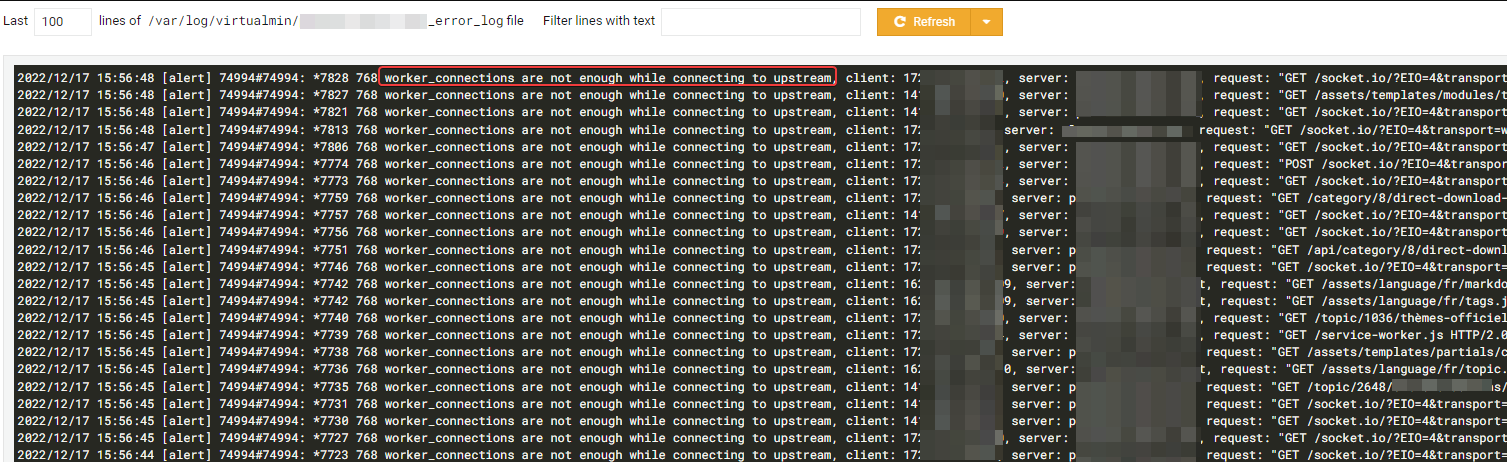
NODEBB: Nginx error performance & High CPU


-
@DownPW I’d add another set of steps here. When you move the sessions away from
mongotoredisyou are going to encounter issues logging in as the session tables will no longer match meaning none of your users will be able to loginTo resolve this issue
Review https://sudonix.com/topic/249/invalid-csrf-on-dev-install and implement all steps - note that you will also need the below string when connecting to
mongodbmongo -u admin -p <password> --authenticationDatabase=adminObviously, substitute <password> with the actual value. So in summary:
- Open the
mondogbconsole - Select your database - in my case
use sudonix; - Issue this command
db.objects.update({_key: "config"}, {$set: {cookieDomain: ""}}); - Press enter and then type
quit()into themongodbshell - Restart NodeBB
- Clear cache on browser
- Try connection again
Hmm ok when perform these steps ?
PW and WS Spirit alive
- Open the
-
Hmm ok when perform these steps ?
@DownPW After you’ve setup the cluster and restarted NodeBB
-
@crazycells said in NODEBB: Nginx error performance & High CPU:
4567, 4568, and 4569… Is your NodeBB set up this way?
It’s not (I set their server up). Sudonix is not configured this way either, but from memory, this also requires
redisto handle the session data. I may configure this site to do exactly that.@phenomlab said in NODEBB: Nginx error performance & High CPU:
@crazycells said in NODEBB: Nginx error performance & High CPU:
4567, 4568, and 4569… Is your NodeBB set up this way?
It’s not (I set their server up). Sudonix is not configured this way either, but from memory, this also requires
redisto handle the session data. I may configure this site to do exactly that.yes, you might be right about the necessity. We have redis installed.
-
@phenomlab said in NODEBB: Nginx error performance & High CPU:
@crazycells said in NODEBB: Nginx error performance & High CPU:
4567, 4568, and 4569… Is your NodeBB set up this way?
It’s not (I set their server up). Sudonix is not configured this way either, but from memory, this also requires
redisto handle the session data. I may configure this site to do exactly that.yep it’s not but it interests me a lot.
I see the documentation but I would have to adapt to our configuration and is it really worth doing?
Where I put ionode directives? on nginx.conf or vhost your_website.conf ? I think on nginx.confAnd where put proxy_pass directive? on nginx.conf or vhost your_website.Conf ?
It’s still pretty blurry but I just took a look at it;
@DownPW yes, this is the place to start:
-
OK.
I resume in details.
1- Stop nodebb
2- Stop iframely
3- Stop nginx
4- Install redis server : sudo apt install redis-server
5- Change nodebb Config.json file (can you verifiy this synthax please ? nodebb documentation tell “database”: 0 and not “database”: 5 - but maybe it’s just a name and i can use the same as mongo like “database”: nodebb , I moved the port directive) :{ "url": "https://XX-XX.net", "secret": "XXXXXXXXXXXXXXXX", "database": "mongo", "port": [4567, 4568,4569], "mongo": { "host": "127.0.0.1", "port": "27017", "username": "XXXXXXXXXXX", "password": "XXXXXXXXXXX", "database": "nodebb", "uri": "" }, "redis": { "host":"127.0.0.1", "port":"6379", "database": 5 } }6- Change nginx.conf :
# add the below block for nodeBB clustering
upstream io_nodes {
    ip_hash;
    server 127.0.0.1:4567;
    server 127.0.0.1:4568;
    server 127.0.0.1:4569;
}

server {
	server_name XX-XX.net www.XX-XX.net;
	listen XX.XX.XX.X;
	listen [XX:XX:XX:XX::];
	root /home/XX-XX/nodebb;
	index index.php index.htm index.html;
	access_log /var/log/virtualmin/XX-XX.net_access_log;
	error_log /var/log/virtualmin/XX-XX.net_error_log;

# add the below block which will force all traffic into the cluster when referenced with @nodebb

location @nodebb {
     proxy_pass http://io_nodes;
    }

        location / {

		limit_req zone=flood burst=100 nodelay;
		limit_conn ddos 10;
		proxy_read_timeout 180;

                proxy_set_header X-Real-IP $remote_addr;
                proxy_set_header X-Forwarded-For $proxy_add_x_forwarded_for;
                proxy_set_header Host $http_host;
                proxy_set_header X-NginX-Proxy true;
               # It's necessary to set @nodebb here so that the clustering works
                proxy_pass @nodebb;
                proxy_redirect off;

                # Socket.IO Support
                proxy_http_version 1.1;
                proxy_set_header Upgrade $http_upgrade;
                proxy_set_header Connection "upgrade";
        }

	listen XX.XX.XX.XX:XXssl http2;
	listen [XX:XX:XX:XX::]:443 ssl http2;
	ssl_certificate /etc/ssl/virtualmin/166195366750642/ssl.cert;
	ssl_certificate_key /etc/ssl/virtualmin/166195366750642/ssl.key;
	if ($scheme = http) {
		rewrite ^/(?!.well-known)(.*) "https://XX-XX.net/$1" break;
	}
}
7- restart redis server systemctl restart redis-server.service
8- Restart nginx
9- Restart iframely
10- Restart nodebb
11- test configuration@DownPW since you pointed it out, I just remembered. Since we know when this crowd will come and be online on our forum, that particular day, we switch off iframely and all preview plugins. That also helps to open the pages faster.
-
@DownPW yes, this is the place to start:
@phenomlab a general but related question. Since opening three ports help, is it possible to increase this number? For example, can we run 5 ports NodeBB at the same time to smooth the web page experience; or is “3” goldilocks number for maximum efficiency?
-
@phenomlab a general but related question. Since opening three ports help, is it possible to increase this number? For example, can we run 5 ports NodeBB at the same time to smooth the web page experience; or is “3” goldilocks number for maximum efficiency?
@crazycells It’s not necessarily the “Goldilocks” standard - it really depends on the system resources you have available. You could easily extend it as long as you allow for the additional port(s) in the
nginx.conffile also.Personally, I don’t see the need for more than 3 though.
Mark Cutting also advises organisations as a Fractional CIO, Fractional CISO and Executive Advisor, helping boards improve technology governance, cyber resilience and executive decision making. Learn more at Gratmore Ltd
-
@crazycells It’s not necessarily the “Goldilocks” standard - it really depends on the system resources you have available. You could easily extend it as long as you allow for the additional port(s) in the
nginx.conffile also.Personally, I don’t see the need for more than 3 though.
Ok redis is ok now. Thanks for your help

I would like know to obtain the connecting clients Real IP on Nginx log.
I read I have need ngx_http_realip_module for nginx but not active by default but I don’t know if virtualmin have this module enabled.
PW and WS Spirit alive
-
Ok redis is ok now. Thanks for your help
I would like know to obtain the connecting clients Real IP on Nginx log.
I read I have need ngx_http_realip_module for nginx but not active by default but I don’t know if virtualmin have this module enabled.
@DownPW said in NODEBB: Nginx error performance & High CPU:
Ok redis is ok now. Thanks for your help
I would like know to obtain the connecting clients Real IP on Nginx log.
I read I have need ngx_http_realip_modulefor nginx but not active by default but I don’t know if virtualmin have this module enabled.
EDIT: OK it will be enabled by default on virtualmin :
nginx -v
PW and WS Spirit alive
-
@DownPW said in NODEBB: Nginx error performance & High CPU:
Ok redis is ok now. Thanks for your help
I would like know to obtain the connecting clients Real IP on Nginx log.
I read I have need ngx_http_realip_modulefor nginx but not active by default but I don’t know if virtualmin have this module enabled.
EDIT: OK it will be enabled by default on virtualmin :
nginx -vI have activate ngx_http_realip_module on /etc/nginx/nginx.conf on http block like this :
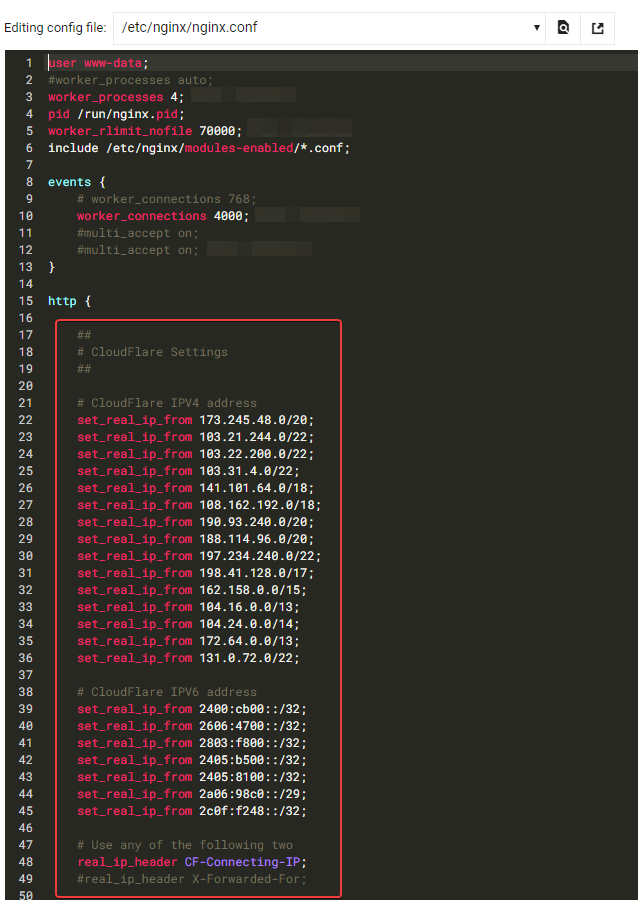
It seems to be good for you ?
PW and WS Spirit alive
-
I have activate ngx_http_realip_module on /etc/nginx/nginx.conf on http block like this :
It seems to be good for you ?
@DownPW yes, that looks fine.
Mark Cutting also advises organisations as a Fractional CIO, Fractional CISO and Executive Advisor, helping boards improve technology governance, cyber resilience and executive decision making. Learn more at Gratmore Ltd
-
PW and WS Spirit alive
-
@DownPW I suspect that’s a failure of the socket server to talk to redis, but the NodeBB Devs would need to confirm.
Mark Cutting also advises organisations as a Fractional CIO, Fractional CISO and Executive Advisor, helping boards improve technology governance, cyber resilience and executive decision making. Learn more at Gratmore Ltd
-
@DownPW I suspect that’s a failure of the socket server to talk to redis, but the NodeBB Devs would need to confirm.
Seems to be better with some scaling fix for redis on redis.conf. I haven’t seen the message yet since the changes I made
# I increase it to the value of /proc/sys/net/core/somaxconn
tcp-backlog 4096


# I'm uncommenting because it can slow down Redis. Uncommented by default !!!!!!!!!!!!!!!!!!!
#save 900 1
#save 300 10
#save 60 10000
If you have other Redis optimizations. I take all your advice
-
 undefined DownPW has marked this topic as solved on



Hello! It looks like you're interested in this conversation, but you don't have an account yet.
Getting fed up of having to scroll through the same posts each visit? When you register for an account, you'll always come back to exactly where you were before, and choose to be notified of new replies (either via email, or push notification). You'll also be able to save bookmarks and upvote posts to show your appreciation to other community members.
With your input, this post could be even better 💗
Register LoginDid this solution help you?
Related Topics
-
-
-
-
-
-
NodeBB 1.19.3
Solved Performance -
nginx can't start again
Moved Solved Configure -