Skip to content

[NODEBB] Reply Button/arrow answer

Solved Customisation
25 2 11.6k 1
  • wrote on last edited by DownPW
    #1

    Hello @all @phenomlab 🙂

    I want to add border-radius on the Reply Button when I reply to a topic.

    I use this code for this:

    .composer .title-container .composer-submit {
       border-radius: 0px 5px 5px 0px !important;
    }
    

    And here the result :
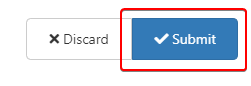
    92941379-4ea0-443c-af4a-98eeb2010d94-image.png

    So far so good. 🙂

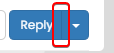
    The problem is that this has an influence on the arrow allowing to ask a question when opening a new topic in a category :
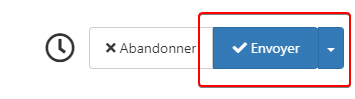
    9731c5b6-9e36-499b-b02a-39f3267958dc-image.png

    How resolve that ?
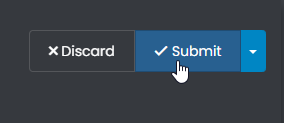
    I would like to get the same result as this:

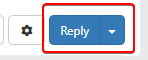
    40e891f4-1493-4cfc-b8a7-a56962e9c5fb-image.png

    08ac878d-c4fa-4ef2-a852-c3ee8b5c4837-image.png

    Thanks in advance 🙂

  • wrote on last edited by DownPW
    #2

    @downpw said in [NODEBB] Reply Button/arrow answer:

    .composer .title-container .composer-submit {
    border-radius: 0px 5px 5px 0px !important;
    }

    Hmmm. If I delete !important on code

    .composer .title-container .composer-submit {
       border-radius: 0px 5px 5px 0px ;
    }
    

    It seems to be good for the arrow :

    6b07cbf8-aaf5-411c-9538-67d0fd4d3fb0-image.png

    But the Reply Button went back to how it was before 😞 :
    05296857-48bc-41ea-9200-28d19cf54013-image.png

    the 2 buttons are linked to the same CSS variables but I can’t tell them apart

  • @downpw said in [NODEBB] Reply Button/arrow answer:

    .composer .title-container .composer-submit {
    border-radius: 0px 5px 5px 0px !important;
    }

    Hmmm. If I delete !important on code

    .composer .title-container .composer-submit {
       border-radius: 0px 5px 5px 0px ;
    }
    

    It seems to be good for the arrow :
    6b07cbf8-aaf5-411c-9538-67d0fd4d3fb0-image.png

    But the Reply Button went back to how it was before 😞 :
    05296857-48bc-41ea-9200-28d19cf54013-image.png

    the 2 buttons are linked to the same CSS variables but I can’t tell them apart

    wrote on last edited by
    #3

    @downpw Something like this should work

    button.btn.btn-primary.composer-submit {
        border-top-right-radius: 4px !important;
        border-bottom-right-radius: 4px !important;
    }
    
  • phenomlab phenomlab has marked this topic as solved on
  • DownPW DownPW has marked this topic as unsolved on
  • wrote on last edited by DownPW
    #4

    @phenomlab

    I’m so sorry, It seem we have the same problem 😞

    Just this :

    button.btn.btn-primary.composer-submit {
        border-top-right-radius: 4px !important;
        border-bottom-right-radius: 4px !important;
    }
    

    Its’ ok for Submit Button when I reply to on existant topic
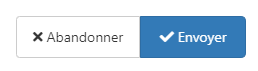
    54629c01-c5eb-4d11-b4de-dc43462b701d-image.png

    But it’s not Ok when I create a New Topic (When you have the arrow button at the right of the Submit Button) :
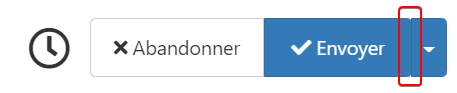
    0393d71b-f011-43c1-9086-346605eedfb0-image.png

    13a482d1-2587-498a-b1a5-736cdf73659d-image.png

  • @phenomlab

    I’m so sorry, It seem we have the same problem 😞

    Just this :

    button.btn.btn-primary.composer-submit {
        border-top-right-radius: 4px !important;
        border-bottom-right-radius: 4px !important;
    }
    

    Its’ ok for Submit Button when I reply to on existant topic
    54629c01-c5eb-4d11-b4de-dc43462b701d-image.png

    But it’s not Ok when I create a New Topic (When you have the arrow button at the right of the Submit Button) :

    0393d71b-f011-43c1-9086-346605eedfb0-image.png

    13a482d1-2587-498a-b1a5-736cdf73659d-image.png

    wrote on last edited by phenomlab
    #5

    @downpw Yes, I see what you mean. I’d “cheat” a little here and use some positioning to create a faux effect. This should do it

    .btn-group>.btn:last-child:not(:first-child), .btn-group>.dropdown-toggle:not(:first-child) {
      margin-left: -3px;
    }
    .btn-group>.btn:not(:first-child):not(:last-child):not(.dropdown-toggle):hover {
      border-top-right-radius: 0px;
      border-bottom-right-radius: 0px;
    }
    button.btn.btn-primary.composer-submit:hover {
        border-top-right-radius: 4px !important;
        border-bottom-right-radius: 4px !important;
    }
    .btn .caret {
      margin-left: 2px;
    }
    .btn-group>.btn:not(:first-child):not(:last-child):not(.dropdown-toggle) {
      border-radius: 0px;
      border-top-right-radius: 4px;
      border-bottom-right-radius: 4px;
      margin-left: 0px;
    }
    

    It’ll look like this on a reply post
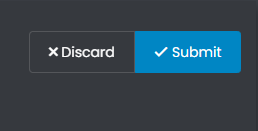
    ea6a7331-a2a9-42c7-93d4-60443f4296fb-image.png

    And like this on a new post

    b0f44193-63db-4c3d-8c98-a85c7344d849-image.png

    I’ve set the CSS here on Sudonix so you can see it in action. Give it a try.

  • wrote on last edited by DownPW
    #6

    @phenomlab

    Yes.

    Just your mouse over on Submit button when you reply to a topic to fix :
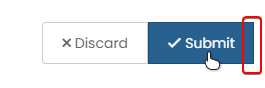
    818eb504-86e7-4ebf-bc0b-8466637811ff-image.png

    Result is great, I will test tonight.
    I’m at work at the moment.

  • @phenomlab

    Yes.

    Just your mouse over on Submit button when you reply to a topic to fix :

    818eb504-86e7-4ebf-bc0b-8466637811ff-image.png

    Result is great, I will test tonight.
    I’m at work at the moment.

    wrote on last edited by
    #7

    @downpw Great. Let me know when back, as I’ll need access to your VM for the fonts issue we need to work on

  • wrote on last edited by DownPW
    #8

    I edit my post just one Fix for reply button on mouse over

    Ok for Font tonight at 17h00 😉

  • I edit my post just one Fix for reply button on mouse over

    Ok for Font tonight at 17h00 😉

    wrote on last edited by
    #9

    @downpw said in [NODEBB] Reply Button/arrow answer:

    I’m edit my post just one Fix for reply button on mouse over

    😕 thanks - completely missed that. I’ll amend the original post.

  • wrote on last edited by
    #10

    Ok wait for fix and test after ^^

  • Ok wait for fix and test after ^^

    wrote on last edited by
    #11

    @downpw Updated the original post, and applied CSS here so you can test.

  • wrote on last edited by
    #12

    Great 😉

  • wrote on last edited by
    #13

    It worked on my default theme. 🙂
    It seem to have border effect on my custom themes 😞

  • It worked on my default theme. 🙂
    It seem to have border effect on my custom themes 😞

    wrote on last edited by
    #14

    @downpw do you have anything in your custom CSS that is overriding this ?

  • wrote on last edited by DownPW
    #15

    Lot of variable. Hard to debug… a little lost
    I’ve been on it for 2 hours !!

    for default theme I must add this for delete border to Reply Putton on topic

    .btn-primary {
        color: #fff;
        background-color: #337ab7;
        border-color: transparent;
    }
    
  • Lot of variable. Hard to debug… a little lost
    I’ve been on it for 2 hours !!

    for default theme I must add this for delete border to Reply Putton on topic

    .btn-primary {
        color: #fff;
        background-color: #337ab7;
        border-color: transparent;
    }
    
    wrote on last edited by
    #16

    @downpw why do you need to delete the border ?

  • wrote on last edited by
    #17

    Because it is visible

    beaee397-4637-4609-b223-7a5b6b0d5034-image.png

  • Because it is visible

    beaee397-4637-4609-b223-7a5b6b0d5034-image.png

    wrote on last edited by
    #18

    @downpw I see. Another hack here is to set the border colour to be the same as the background colour.

  • wrote on last edited by DownPW
    #19

    @downpw said in [NODEBB] Reply Button/arrow answer:

    .btn-primary {
    color: #fff;
    background-color: #337ab7;
    border-color: transparent;
    }

    .btn-primary {
        color: #fff;
        background-color: #337ab7;
        border-color: #337ab7;
    }
    
  • @downpw said in [NODEBB] Reply Button/arrow answer:

    .btn-primary {
    color: #fff;
    background-color: #337ab7;
    border-color: transparent;
    }

    .btn-primary {
        color: #fff;
        background-color: #337ab7;
        border-color: #337ab7;
    }
    
    wrote on last edited by
    #20

    @downpw and does that not work ?


Did this solution help you?
Did you find the suggested solution useful? Support 💗 Sudonix with a coffee ☕
If your organisation needs deeper expertise around infrastructure, security, or technology leadership, learn more about Phenomlab Ltd. Many of the deeper technical guides behind Sudonix are published there.

Related Topics
  • Whitespace fixes in Nodebb

    Solved Customisation nodebb
    18
    2
    7 Votes
    18 Posts
    6k Views
    phenomlab
    @Panda Just circling back here with something of an update (which I think you’ll like). I’ve completely restructured the ranking system. There are now less ranks, with a higher point threshold to reach them. More importantly, if you reload the site, you’ll notice that the ranks are now icons. I also removed the “Author” badge, and made this a single icon, which (to me) looks much better.
  • Adjusting the size of boxes in posts-list class

    Solved Customisation nodebb
    3
    3 Votes
    3 Posts
    2k Views
    crazycells
    @phenomlab thanks a lot, this combination works best .posts-list .posts-list-item .content { overflow: auto; max-height: 600px; }
  • [NODEBB] Scroll Button

    Solved Customisation css javascript html scroll button
    7
    1
    0 Votes
    7 Posts
    3k Views
    phenomlab
    @downpw ooops. Forgot that. Thanks for adding.
  • [NODEBB] Stats

    Unsolved Customisation plugin stats script
    20
    1
    2 Votes
    20 Posts
    6k Views
    JAC
    @phenomlab said in [NODEBB] Stats: @jac or I land up fixing it I wouldn’t put it past you
  • NodeBB Footer

    Solved Customisation footer nodebb
    10
    1 Votes
    10 Posts
    4k Views
    JAC
    @phenomlab said in NodeBB Footer: @jac and you. Hope all is well and you recover quickly Thanks pal
  • [NODEBB] CSS Style Sheets SelectBox

    Locked Solved Customisation css
    112
    24 Votes
    112 Posts
    63k Views
    phenomlab
    @DownPW as discussed in PM Seems to have been solved with the new JS code that you added allowing the version CSS file change!! Cache problem therefore with the JS of the Switcher theme Based on this, I will close this thread and reference https://sudonix.com/topic/207/nodebb-help-for-my-custom-css/27
  • How to set a signature in NodeBB?

    Solved Customisation
    4
    2 Votes
    4 Posts
    2k Views
    JAC
    @phenomlab said in How to set a signature in NodeBB?: @jac No issues at all with copying. This is set using the signature for the user you are posting as. In the case of Hostrisk, it’s set like the below [image: 7bf04183-f6e8-4d72-b0eb-c9a05c9cd24b-image.png] You can set the signature by using https://domain.com/user/theuser/edit Mamy thanks Mark, I’ll set this up later .
  • CSS Help on my Flarum

    Solved Customisation
    5
    2
    2 Votes
    5 Posts
    3k Views
    phenomlab
    @mike-jones Yes, you’ll typically see this type of behaviour if there is another style that has higher priority in the sense that yours will be overridden. Using !important will override the higher preference, but should be used sparingly rather than everywhere.