Skip to content

Quote design CSS

Solved Customisation
15 2 3.1k 1
  • @phenomlab said in Quote design CSS:

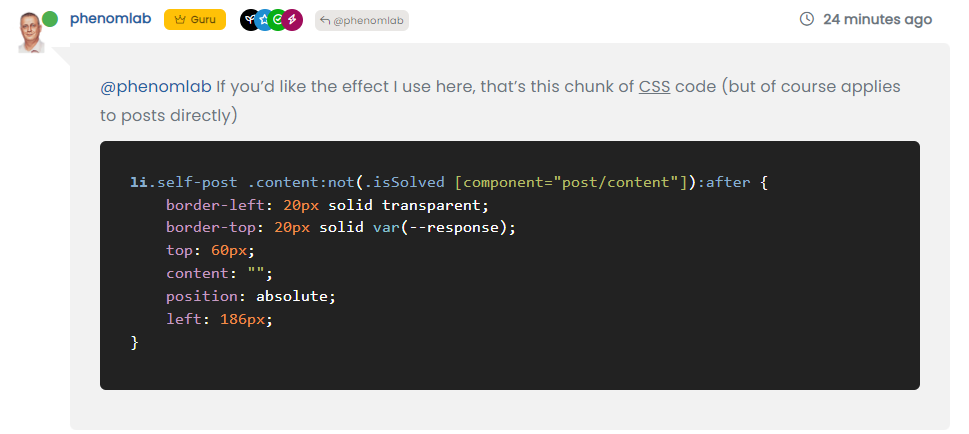
    @phenomlab If you’d like the effect I use here, that’s this chunk of CSS code (but of course applies to posts directly)

    li.self-post .content:not(.isSolved [component="post/content"]):after {
        border-left: 20px solid transparent;
        border-top: 20px solid var(--response);
        top: 60px;
        content: "";
        position: absolute;
        left: 186px;
    }
    

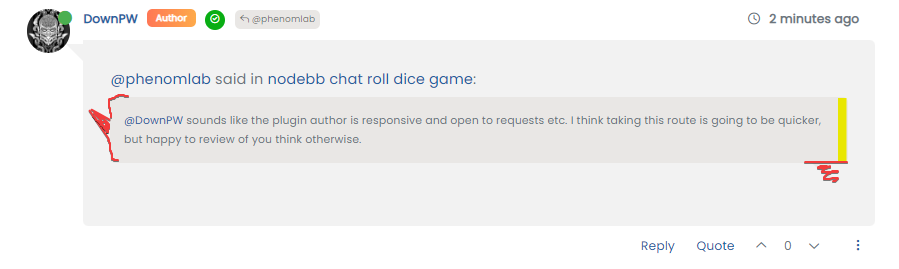
    What does he does ?

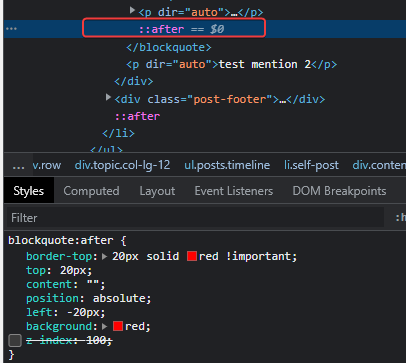
    @DownPW This
    a2a8a94c-bd7e-435c-a356-00191f91f4be-image.png

  • Ak ok 😉
    Thanks Mark !!!

  • phenomlabundefined phenomlab referenced this topic on
  • @phenomlab said in Quote design CSS:

    blockquote:after {
    border-top: 20px solid #eee;
    top: 9px; /* changes to top position negates original bottom /
    content: “”;
    position: absolute;
    left: -19px; /
    changes to left position negates original right /
    }
    blockquote {
    font-size: inherit;
    border-left: 5px solid #eee;
    background: #eeeeee;
    border-radius: 6px;
    margin: 0 auto 40px;
    padding: 15px;
    position: relative;
    margin-left: 50px; /
    move to the right to allow space for speech bubble */
    }

    @phenomlab

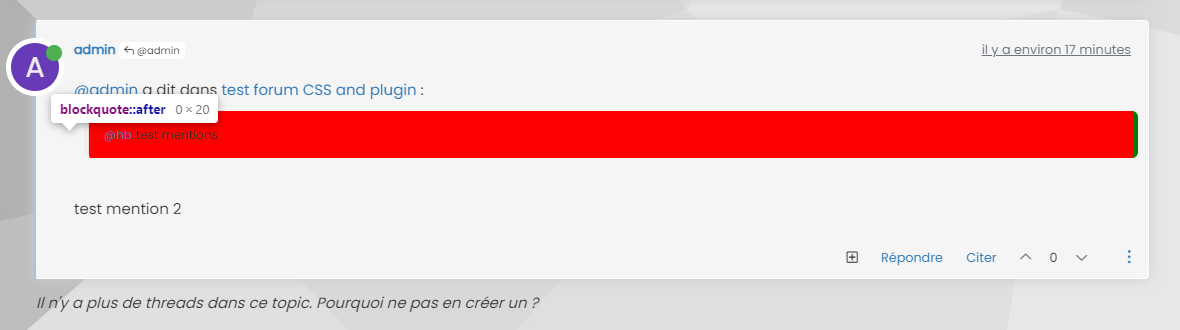
    I can’t move the blockquote:after to the left 😞

    cb76027f-026a-4f5a-838d-1659bc114865-image.png

    6220f944-1394-42c2-b10d-ab4b3f6bfea9-image.png

  • @phenomlab said in Quote design CSS:

    blockquote:after {
    border-top: 20px solid #eee;
    top: 9px; /* changes to top position negates original bottom /
    content: “”;
    position: absolute;
    left: -19px; /
    changes to left position negates original right /
    }
    blockquote {
    font-size: inherit;
    border-left: 5px solid #eee;
    background: #eeeeee;
    border-radius: 6px;
    margin: 0 auto 40px;
    padding: 15px;
    position: relative;
    margin-left: 50px; /
    move to the right to allow space for speech bubble */
    }

    @phenomlab

    I can’t move the blockquote:after to the left 😞
    cb76027f-026a-4f5a-838d-1659bc114865-image.png

    6220f944-1394-42c2-b10d-ab4b3f6bfea9-image.png

    @DownPW did you add this line into blockquote ?

    margin-left: 50px; /* move to the right to allow space for speech bubble */
    

    You have to change this margin otherwise the :after sudonym won’t display as it needs to occupy the space left by the above CSS change.

  • @DownPW did you add this line into blockquote ?

    margin-left: 50px; /* move to the right to allow space for speech bubble */
    

    You have to change this margin otherwise the :after sudonym won’t display as it needs to occupy the space left by the above CSS change.

    @phenomlab

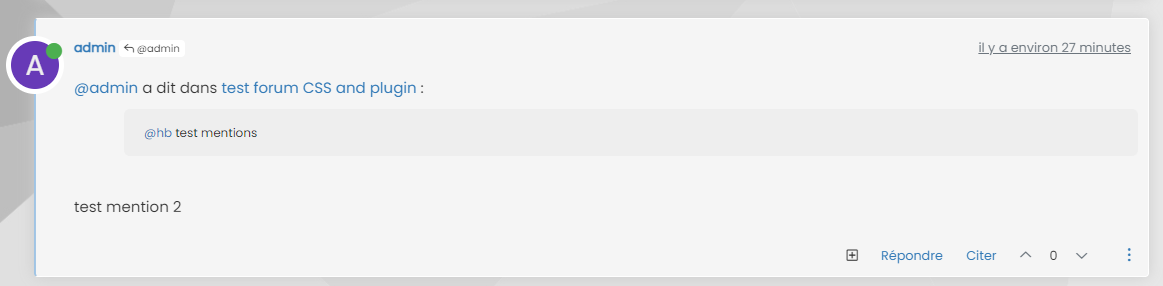
    If I use your code :

    blockquote:after {
        border-top: 20px solid #eee;
        top: 9px; /* changes to top position negates original bottom */
        content: "";
        position: absolute;
        left: -19px; /* changes to left position negates original right */
    }
    blockquote {
        font-size: inherit;
        border-left: 5px solid #eee;
        background: #eeeeee;
        border-radius: 6px;
        margin: 0 auto 40px;
        padding: 15px;
        position: relative;
        margin-left: 50px; /* move to the right to allow space for speech bubble */
    }
    

    I have this :
    d2924d30-19d3-4946-a478-6a2953ed8d6b-image.png

  • @phenomlab

    If I use your code :

    blockquote:after {
        border-top: 20px solid #eee;
        top: 9px; /* changes to top position negates original bottom */
        content: "";
        position: absolute;
        left: -19px; /* changes to left position negates original right */
    }
    blockquote {
        font-size: inherit;
        border-left: 5px solid #eee;
        background: #eeeeee;
        border-radius: 6px;
        margin: 0 auto 40px;
        padding: 15px;
        position: relative;
        margin-left: 50px; /* move to the right to allow space for speech bubble */
    }
    

    I have this :

    d2924d30-19d3-4946-a478-6a2953ed8d6b-image.png

    @DownPW is this in production ?

  • @DownPW is this in production ?

    @phenomlab nope

  • PM to you

  • It’s Ok with this code 🙂

    blockquote {
        font-size: inherit;
        border-left: 5px solid #eee;
        background: #eeeeee;
        border-radius: 6px;
        margin: 0 auto 40px;
        padding: 15px;
        position: relative;
        margin-left: 20px; /* move to the right to allow space for speech bubble */
    }
    
    blockquote:after {
        border-left: 20px solid transparent;
        border-top: 20px solid #eee;
        top: 10px;
        content: "";
        position: absolute;
        left: -20px;
    }
    
  • It’s Ok with this code 🙂

    blockquote {
        font-size: inherit;
        border-left: 5px solid #eee;
        background: #eeeeee;
        border-radius: 6px;
        margin: 0 auto 40px;
        padding: 15px;
        position: relative;
        margin-left: 20px; /* move to the right to allow space for speech bubble */
    }
    
    blockquote:after {
        border-left: 20px solid transparent;
        border-top: 20px solid #eee;
        top: 10px;
        content: "";
        position: absolute;
        left: -20px;
    }
    

    @DownPW yes, that does make sense actually. I forgot to mention the layout of Sudonix is custom so that would have an impact on the positioning.

    Good spot 🙂


Did this solution help you?
Did you find the suggested solution useful? Support 💗 Sudonix with a coffee
If your organisation needs deeper expertise around infrastructure, security, or technology leadership, learn more about Phenomlab Ltd. Many of the deeper technical guides behind Sudonix are published there.

Related Topics
  • 3 Votes
    2 Posts
    1k Views
    Very great
  • 3 Votes
    6 Posts
    2k Views
    @kadir-ay-0 marking as resolved based on https://community.nodebb.org/topic/17109/manual-build-a-night-mode-for-harmony/5 Please do not raise requests in two places - here and the NodeBB forums. All this does is create unnecessary load for both parties.
  • Fixing YouTube videos css

    Solved WordPress css
    8
    2 Votes
    8 Posts
    1k Views
    @phenomlab It looks good, but not anymore. I’ve already lost so much time. Now it’s time to move on
  • New message CSS problem

    Unsolved Customisation css
    11
    1
    2 Votes
    11 Posts
    2k Views
    @DownPW hi. Sorry for digging up an old post, but I’m going through items still unresolved and was looking to get an understanding of where you are currently with this?
  • CSS3: Gradient Generator

    Development css gradient
    1
    1 Votes
    1 Posts
    553 Views
    No one has replied
  • [NODEBB] Help for my custom CSS

    Solved Customisation nodebb css bugfix
    237
    49 Votes
    237 Posts
    86k Views
    @baris said: You should change your selectors so it doesn’t look at the entire document. You probably only want to apply fancybox to stuff inside the #content element which is what changes when the user navigates around the page. So use $('#content a').... for your selectors then the forum logo in the header won’t be selected. I modified the JS Fancybox code now and this code and it seem better // --------------------------------------------- // Fancybox Media Reader (Without Website Logo) // --------------------------------------------- if (top.location.pathname !== '/login') { $(window).on('action:posts.loaded', function(data) { console.log("Polling DOM for lazyLoaded images to apply Fancybox"); $(document).ready(function() { $('#content a').not('.forum-logo').not(".avatar").not(".emoji").not(".bmac-noanimate").each(function() { $('#content a[href*=".jpg"], #content a[href*=".jpeg"], #content a[href*=".png"], #content a[href*=".gif"], #content a[href*=".webp"]').addClass("noanimate"); }); }); }); } if (top.location.pathname !== '/login') { $(document).ready(function() { $(window).on('action:ajaxify.end', function(data) { $('#content a').not('.logo').not(".avatar").not(".emoji").not(".bmac-noanimate").each(function() { $('#content a[href*=".jpg"], #content a[href*=".jpeg"], #content a[href*=".png"], #content a[href*=".gif"], #content a[href*=".webp"]').addClass("noanimate"); data.preventDefault() // Strip out the images contained inside blockquotes as this looks nasty :) $('#content blockquote img').remove(); }); Fancybox.bind( '#content a[href*=".jpg"], #content a[href*=".jpeg"], #content a[href*=".png"], #content a[href*=".gif"], #content a[href*=".webp"]', { groupAll: true, } ); }); }); } // Chat fancybox - fires when chat module loaded and AJAX calls new chat $(document).ready(function() { $(window).on('action:chat.loaded', function(data) { // >>> Se limiter au contenu principal uniquement <<< $('#content img').not('.forum-logo').not(".avatar").not(".emoji").not(".bmac-noanimate").each(function() { var newHref = $(this).attr("src"); $(this).wrap("<a class='fancybox' href='" + newHref + "'/>"); $('#content a[href*=".jpg"], #content a[href*=".jpeg"], #content a[href*=".png"], #content a[href*=".gif"], #content a[href*=".webp"]').addClass("noanimate"); data.preventDefault(); // Strip out the images contained inside blockquotes as this looks nasty :) $('#content blockquote img').remove(); }); Fancybox.bind( '#content a[href*=".jpg"], #content a[href*=".jpeg"], #content a[href*=".png"], #content a[href*=".gif"], #content a[href*=".webp"]', { groupAll: true, } ); }); }); For the logo, I must use overflow: visible !important; on [component="brand/logo"] /* --- Logo --- */ [component="brand/logo"] { max-height: 50px; width: auto; height: auto; max-width: 100%; display: block; object-fit: contain; object-position: left center; overflow: visible !important; } Better result !!
  • [NODEBB] CSS Style Sheets SelectBox

    Locked Solved Customisation css
    112
    24 Votes
    112 Posts
    34k Views
    @DownPW as discussed in PM Seems to have been solved with the new JS code that you added allowing the version CSS file change!! Cache problem therefore with the JS of the Switcher theme Based on this, I will close this thread and reference https://sudonix.com/topic/207/nodebb-help-for-my-custom-css/27
  • NodeBB Design help

    Solved Customisation
    8
    3
    2 Votes
    8 Posts
    2k Views
    @riekmedia I’ve applied some new CSS to your site. Can you reload the page and try again ? For the record, this is what I added #footer { background: #2d343e; border-top: 4px solid #2d343e; font-size: 0.9em; margin-top: 70px; padding: 80px 0 0; position: relative; clear: both; bottom: 0; left: 0; right: 0; z-index: 1000; margin-left: -15px; margin-right: -338px; } The /categories page seems a bit messed up, so looking at that currently EDIT - issued some override CSS in the CATEGORIES widget <!--- CSS fix for overspill on /categories page - DO NOT DELETE --> <style> #footer { margin-right: -45px; } </style> That should resolve the /categories issue.