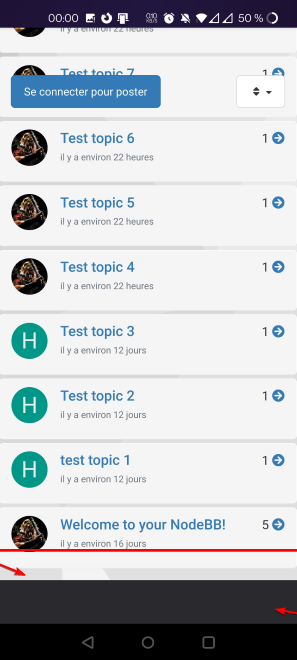
[NODEBB] Reply Button/arrow answer



-
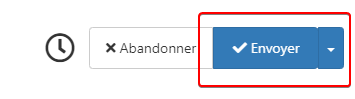
I edit my post just one Fix for reply button on mouse over
Ok for Font tonight at 17h00

PW and WS Spirit alive
-
I edit my post just one Fix for reply button on mouse over
Ok for Font tonight at 17h00
@downpw said in [NODEBB] Reply Button/arrow answer:
I’m edit my post just one Fix for reply button on mouse over
 thanks - completely missed that. I’ll amend the original post.
 -
Ok wait for fix and test after ^^
PW and WS Spirit alive
-
@downpw Updated the original post, and applied CSS here so you can test.
-
Great
-
It worked on my default theme.

It seem to have border effect on my custom themes
PW and WS Spirit alive
-
@downpw do you have anything in your custom CSS that is overriding this ?
-
Lot of variable. Hard to debug… a little lost
I’ve been on it for 2 hours !!for default theme I must add this for delete border to Reply Putton on topic
.btn-primary {
    color: #fff;
    background-color: #337ab7;
    border-color: transparent;
}
PW and WS Spirit alive
-
Lot of variable. Hard to debug… a little lost
I’ve been on it for 2 hours !!for default theme I must add this for delete border to Reply Putton on topic
.btn-primary { color: #fff; background-color: #337ab7; border-color: transparent; }@downpw why do you need to delete the border ?
-
-
@downpw I see. Another hack here is to set the border colour to be the same as the background colour.
-
@downpw said in [NODEBB] Reply Button/arrow answer:
.btn-primary {
color: #fff;
background-color: #337ab7;
border-color: transparent;
}.btn-primary { color: #fff; background-color: #337ab7; border-color: #337ab7; }PW and WS Spirit alive
-
@downpw said in [NODEBB] Reply Button/arrow answer:
.btn-primary {
color: #fff;
background-color: #337ab7;
border-color: transparent;
}.btn-primary { color: #fff; background-color: #337ab7; border-color: #337ab7; }@downpw and does that not work ?
-
Yes that work too
I must do work on bug on other custom CSSPW and WS Spirit alive
-
@downpw good. Sometimes, you have to bend the rules sightly to get to the finish line

-
yes
If I can’t find on the other themes.
Could I give you access to the CSS files to help me on it?PW and WS Spirit alive
-
yes
If I can’t find on the other themes.
Could I give you access to the CSS files to help me on it?@downpw of course
-
 undefined DownPW referenced this topic on
-
undefined DownPW has marked this topic as solved on
-


Hello! It looks like you're interested in this conversation, but you don't have an account yet.
Getting fed up of having to scroll through the same posts each visit? When you register for an account, you'll always come back to exactly where you were before, and choose to be notified of new replies (either via email, or push notification). You'll also be able to save bookmarks and upvote posts to show your appreciation to other community members.
With your input, this post could be even better 💗
Register LoginDid this solution help you?
Related Topics
-
-
-
-
-
-
NodeBB metadata
Solved Configure -
Customising NodeBB
Locked Customisation -