Skip to content

[NODEBB] Reply Button/arrow answer
Solved Customisation
25 2 11.8k 1
  • wrote on last edited by
    #12

    Great 😉

  • wrote on last edited by
    #13

    It worked on my default theme. 🙂
    It seem to have border effect on my custom themes 😞

  • It worked on my default theme. 🙂
    It seem to have border effect on my custom themes 😞

    wrote on last edited by
    #14

    @downpw do you have anything in your custom CSS that is overriding this ?

  • wrote on last edited by DownPW
    #15

    Lot of variable. Hard to debug… a little lost
    I’ve been on it for 2 hours !!

    for default theme I must add this for delete border to Reply Putton on topic

    .btn-primary {
        color: #fff;
        background-color: #337ab7;
        border-color: transparent;
    }
    
  • Lot of variable. Hard to debug… a little lost
    I’ve been on it for 2 hours !!

    for default theme I must add this for delete border to Reply Putton on topic

    .btn-primary {
        color: #fff;
        background-color: #337ab7;
        border-color: transparent;
    }
    
    wrote on last edited by
    #16

    @downpw why do you need to delete the border ?

  • wrote on last edited by
    #17

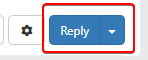
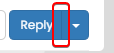
    Because it is visible

    beaee397-4637-4609-b223-7a5b6b0d5034-image.png

  • Because it is visible

    beaee397-4637-4609-b223-7a5b6b0d5034-image.png

    wrote on last edited by
    #18

    @downpw I see. Another hack here is to set the border colour to be the same as the background colour.

  • wrote on last edited by DownPW
    #19

    @downpw said in [NODEBB] Reply Button/arrow answer:

    .btn-primary {
    color: #fff;
    background-color: #337ab7;
    border-color: transparent;
    }

    .btn-primary {
        color: #fff;
        background-color: #337ab7;
        border-color: #337ab7;
    }
    
  • @downpw said in [NODEBB] Reply Button/arrow answer:

    .btn-primary {
    color: #fff;
    background-color: #337ab7;
    border-color: transparent;
    }

    .btn-primary {
        color: #fff;
        background-color: #337ab7;
        border-color: #337ab7;
    }
    
    wrote on last edited by
    #20

    @downpw and does that not work ?

  • wrote on last edited by DownPW
    #21

    Yes that work too 🙂
    I must do work on bug on other custom CSS

  • Yes that work too 🙂
    I must do work on bug on other custom CSS

    wrote on last edited by
    #22

    @downpw good. Sometimes, you have to bend the rules sightly to get to the finish line 😁

  • wrote on last edited by DownPW
    #23

    yes 😉

    If I can’t find on the other themes.
    Could I give you access to the CSS files to help me on it?

  • yes 😉

    If I can’t find on the other themes.
    Could I give you access to the CSS files to help me on it?

    wrote on last edited by
    #24

    @downpw of course

  • DownPW DownPW referenced this topic on
  • DownPW DownPW has marked this topic as solved on
  • wrote on last edited by phenomlab
    #25

Did this solution help you?
Did you find the suggested solution useful? Support 💗 Sudonix with a coffee ☕
If your organisation needs deeper expertise around infrastructure, security, or technology leadership, learn more about Phenomlab Ltd. Many of the deeper technical guides behind Sudonix are published there.

Related Topics
  • Custom Page - nodebb

    Solved Customisation custom-pages nodebb
    13
    2
    5 Votes
    13 Posts
    3k Views
    DownPW
    I’m happy to see this
  • Collapsing blockquotes on Harmony

    General nodebb harmony collapsible quotes
    2
    1
    2 Votes
    2 Posts
    987 Views
    phenomlab
    @dave1904 that’s a really good point actually. I know it was there previously on Persona, but you’re right - no such function exists on harmony. However, putting something in place to mimick the behaviour of Persona won’t be hard from the js standpoint, although I wonder if perhaps we should ask the NodeBB developers is this feature was overlooked?
  • NodeBB v3 Chat Very Slow

    Moved Performance nodebb v3 nodebb chat
    47
    11 Votes
    47 Posts
    21k Views
    phenomlab
    @DownPW Seems fine.
  • NodeBB: Favicon upload issue

    Solved Configure nodebb favicon
    12
    1
    3 Votes
    12 Posts
    4k Views
    mventures
    @phenomlab I am on a Mac, so I used the “Option + Command + I”, and then performed the steps. It loaded my favicon! I checked on Firefox which I haven’t used before, and it showed my favicon also! That’s fantastic and thank you for the help!
  • Changing Background on NodeBB

    Solved Customisation background image nodebb
    4
    0 Votes
    4 Posts
    2k Views
    phenomlab
    @cagatay You’d target the body tag and use the below line of CSS background: url(/assets/customcss/backgrounds/default/default.png) no-repeat center center fixed; Obviously, you need to change the path to suit where your image is being stored. More info around the background property can be found here https://www.w3schools.com/cssref/css3_pr_background.php
  • [NODEBB] CSS Style Sheets SelectBox

    Locked Solved Customisation css
    112
    24 Votes
    112 Posts
    65k Views
    phenomlab
    @DownPW as discussed in PM Seems to have been solved with the new JS code that you added allowing the version CSS file change!! Cache problem therefore with the JS of the Switcher theme Based on this, I will close this thread and reference https://sudonix.com/topic/207/nodebb-help-for-my-custom-css/27
  • NodeBB Design help

    Solved Customisation
    8
    3
    2 Votes
    8 Posts
    4k Views
    phenomlab
    @riekmedia I’ve applied some new CSS to your site. Can you reload the page and try again ? For the record, this is what I added #footer { background: #2d343e; border-top: 4px solid #2d343e; font-size: 0.9em; margin-top: 70px; padding: 80px 0 0; position: relative; clear: both; bottom: 0; left: 0; right: 0; z-index: 1000; margin-left: -15px; margin-right: -338px; } The /categories page seems a bit messed up, so looking at that currently EDIT - issued some override CSS in the CATEGORIES widget <!--- CSS fix for overspill on /categories page - DO NOT DELETE --> <style> #footer { margin-right: -45px; } </style> That should resolve the /categories issue.
  • Customising NodeBB

    Locked Customisation nodebb

    3
    0 Votes
    3 Posts
    3k Views
    phenomlab
    Closing this thread as a duplicate of https://sudonix.com/topic/12/nodebb-customisation