NodeBB customisation
-
@phenomlab said in NodeBB customisation:
@jac I’ve no issues at all with this.
Many thanks as always for this.
Of course the reason I asked was as discussed in our previous chats I didn’t want to copy what you have done although 100% loving your ideas / work.


-
@phenomlab said in NodeBB customisation:
@jac I’ve no issues at all with this.
Many thanks as always for this.
Of course the reason I asked was as discussed in our previous chats I didn’t want to copy what you have done although 100% loving your ideas / work.
@jac all the work in terms of design and layout is open source, so you can take what you want without needing to ask. The only point where I draw the line is where your site becomes a direct replica in terms of appearance to this one.
Mark Cutting also advises organisations as a Fractional CIO, Fractional CISO and Executive Advisor, helping boards improve technology governance, cyber resilience and executive decision making. Learn more at Gratmore Ltd
-
@jac all the work in terms of design and layout is open source, so you can take what you want without needing to ask. The only point where I draw the line is where your site becomes a direct replica in terms of appearance to this one.
@phenomlab said in NodeBB customisation:
@jac all the work in terms of design and layout is open source, so you can take what you want without needing to ask. The only point where I draw the line is where your site becomes a direct replica in terms of appearance to this one.
Absolutely mate, I wouldn’t do that
 .
. -
@phenomlab said in NodeBB customisation:
@jac all the work in terms of design and layout is open source, so you can take what you want without needing to ask. The only point where I draw the line is where your site becomes a direct replica in terms of appearance to this one.
Absolutely mate, I wouldn’t do that
.@jac said in NodeBB customisation:
@phenomlab said in NodeBB customisation:
@jac all the work in terms of design and layout is open source, so you can take what you want without needing to ask. The only point where I draw the line is where your site becomes a direct replica in terms of appearance to this one.
Absolutely mate, I wouldn’t do that
.Certainly interesting how the standard quote image is pretty much a line, it’s well changed and I’d have no clue how you managed to achieve it
 .
. -
@jac said in NodeBB customisation:
@phenomlab said in NodeBB customisation:
@jac all the work in terms of design and layout is open source, so you can take what you want without needing to ask. The only point where I draw the line is where your site becomes a direct replica in terms of appearance to this one.
Absolutely mate, I wouldn’t do that
.Certainly interesting how the standard quote image is pretty much a line, it’s well changed and I’d have no clue how you managed to achieve it
.@jac Standard line ? Not sure I follow
Mark Cutting also advises organisations as a Fractional CIO, Fractional CISO and Executive Advisor, helping boards improve technology governance, cyber resilience and executive decision making. Learn more at Gratmore Ltd
-
@phenomlab said in NodeBB customisation:
@jac Standard line ? Not sure I follow
Apologies I should have explained better.
The image shows a grey line to the left which is the quote, is that right?
What I’m thinking of is how on earth you managed to change it from how it is to what you have now which looks 100000% more professional
 .
.
-
@phenomlab said in NodeBB customisation:
@jac Standard line ? Not sure I follow
Apologies I should have explained better.
The image shows a grey line to the left which is the quote, is that right?
What I’m thinking of is how on earth you managed to change it from how it is to what you have now which looks 100000% more professional
.@jac yes, I understand now. You can replicate what I have here with the below CSS
blockquote {
    font-size: inherit;
    border-left: 5px solid #eee;
    background: #eeeeee;
    border-radius: 4px;
    margin: 0 auto 40px;
    padding: 15px;
    position: relative;
}
blockquote:after {
    border-right: 20px solid transparent;
    border-top: 20px solid #eee;
    bottom: -20px;
    content: "";
    position: absolute;
    left: 20px;
}
Be warned though that this is relatively advanced and any other changes to the
blockquoteclass will impact this.Mark Cutting also advises organisations as a Fractional CIO, Fractional CISO and Executive Advisor, helping boards improve technology governance, cyber resilience and executive decision making. Learn more at Gratmore Ltd
-
@jac yes, I understand now. You can replicate what I have here with the below CSS
blockquote {
    font-size: inherit;
    border-left: 5px solid #eee;
    background: #eeeeee;
    border-radius: 4px;
    margin: 0 auto 40px;
    padding: 15px;
    position: relative;
}
blockquote:after {
    border-right: 20px solid transparent;
    border-top: 20px solid #eee;
    bottom: -20px;
    content: "";
    position: absolute;
    left: 20px;
}
Be warned though that this is relatively advanced and any other changes to the
blockquoteclass will impact this.@phenomlab said in NodeBB customisation:
@jac yes, I understand now. You can replicate what I have here with the below CSS
blockquote {
    font-size: inherit;
    border-left: 5px solid #eee;
    background: #eeeeee;
    border-radius: 4px;
    margin: 0 auto 40px;
    padding: 15px;
    position: relative;
}
blockquote:after {
    border-right: 20px solid transparent;
    border-top: 20px solid #eee;
    bottom: -20px;
    content: "";
    position: absolute;
    left: 20px;
}
Be warned though that this is relatively advanced and any other changes to the
blockquoteclass will impact this.Many thanks mate,
I’ll try this when on the laptop.
-
@phenomlab said in NodeBB customisation:
@jac yes, I understand now. You can replicate what I have here with the below CSS
blockquote {
    font-size: inherit;
    border-left: 5px solid #eee;
    background: #eeeeee;
    border-radius: 4px;
    margin: 0 auto 40px;
    padding: 15px;
    position: relative;
}
blockquote:after {
    border-right: 20px solid transparent;
    border-top: 20px solid #eee;
    bottom: -20px;
    content: "";
    position: absolute;
    left: 20px;
}
Be warned though that this is relatively advanced and any other changes to the
blockquoteclass will impact this.Many thanks mate,
I’ll try this when on the laptop.
Would there be a way to make the background blue and the font white on the quote at all?.
-
Would there be a way to make the background blue and the font white on the quote at all?.
@jac said in NodeBB customisation:
Would there be a way to make the background blue and the font white on the quote at all?.
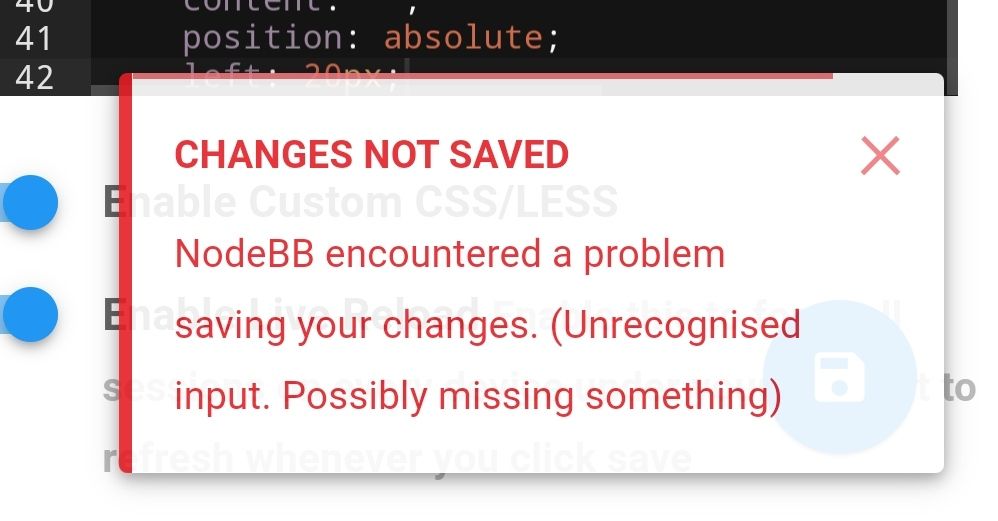
Encountered issue at first hurdle…hmm.
-
@jac said in NodeBB customisation:
Would there be a way to make the background blue and the font white on the quote at all?.
Encountered issue at first hurdle…hmm.
@jac Yes, you’ll get that message if the CSS is incomplete. For example, if you’ve missed a semi colon at the end. Can you paste all of your CSS here for review ?
Mark Cutting also advises organisations as a Fractional CIO, Fractional CISO and Executive Advisor, helping boards improve technology governance, cyber resilience and executive decision making. Learn more at Gratmore Ltd
-
@jac Yes, you’ll get that message if the CSS is incomplete. For example, if you’ve missed a semi colon at the end. Can you paste all of your CSS here for review ?
@phenomlab said in NodeBB customisation:
@jac Yes, you’ll get that message if the CSS is incomplete. For example, if you’ve missed a semi colon at the end. Can you paste all of your CSS here for review ?
Sure,
blockquote {
    font-size: inherit;
    border-left: 5px solid #eee;
    background: #eeeeee;
    border-radius: 4px;
    margin: 0 auto 40px;
    padding: 15px;
    position: relative;
}
blockquote:after {
    border-right: 20px solid transparent;
    border-top: 20px solid #eee;
    bottom: -20px;
    content: "";
    position: absolute;
    left: 20px;
{
That’s what I’ve used mate.
-
@phenomlab said in NodeBB customisation:
@jac Yes, you’ll get that message if the CSS is incomplete. For example, if you’ve missed a semi colon at the end. Can you paste all of your CSS here for review ?
Sure,
blockquote {
    font-size: inherit;
    border-left: 5px solid #eee;
    background: #eeeeee;
    border-radius: 4px;
    margin: 0 auto 40px;
    padding: 15px;
    position: relative;
}
blockquote:after {
    border-right: 20px solid transparent;
    border-top: 20px solid #eee;
    bottom: -20px;
    content: "";
    position: absolute;
    left: 20px;
{
That’s what I’ve used mate.
@jac That last block should be
blockquote:after {
    border-right: 20px solid transparent;
    border-top: 20px solid #eee;
    bottom: -20px;
    content: "";
    position: absolute;
    left: 20px;
}
The curly brace should be the other way round.
Mark Cutting also advises organisations as a Fractional CIO, Fractional CISO and Executive Advisor, helping boards improve technology governance, cyber resilience and executive decision making. Learn more at Gratmore Ltd
-
@jac That last block should be
blockquote:after {
    border-right: 20px solid transparent;
    border-top: 20px solid #eee;
    bottom: -20px;
    content: "";
    position: absolute;
    left: 20px;
}
The curly brace should be the other way round.
@phenomlab said in NodeBB customisation:
@jac That last block should be
blockquote:after {
    border-right: 20px solid transparent;
    border-top: 20px solid #eee;
    bottom: -20px;
    content: "";
    position: absolute;
    left: 20px;
}
The curly brace should be the other way round.
Thanks very much Mark! That has fixed the issue!
Is there any way to change the font on the quote to white with a blue background at all?
Many thanks as always for the free help and advice!
-
@phenomlab said in NodeBB customisation:
@jac That last block should be
blockquote:after {
    border-right: 20px solid transparent;
    border-top: 20px solid #eee;
    bottom: -20px;
    content: "";
    position: absolute;
    left: 20px;
}
The curly brace should be the other way round.
Thanks very much Mark! That has fixed the issue!
Is there any way to change the font on the quote to white with a blue background at all?
Many thanks as always for the free help and advice!
@jac Not sure which type of blue you want, but you could do it with this
.topic .posts .content blockquote {
    font-size: 12px;
    color: #ffffff;
}

blockquote {
    font-size: inherit;
    border-left: 5px solid #194F90;
    background: #194F90;
    border-radius: 4px;
    margin: 0 auto 40px;
    padding: 15px;
    position: relative;
}
blockquote:after {
    border-right: 20px solid transparent;
    border-top: 20px solid #194F90;
    bottom: -20px;
    content: "";
    position: absolute;
    left: 20px;
}
Essentially, you’d be modifying the previous block I provided, and forcing white on
.topic .posts .content blockquoteEssentially, you’ll land up with this
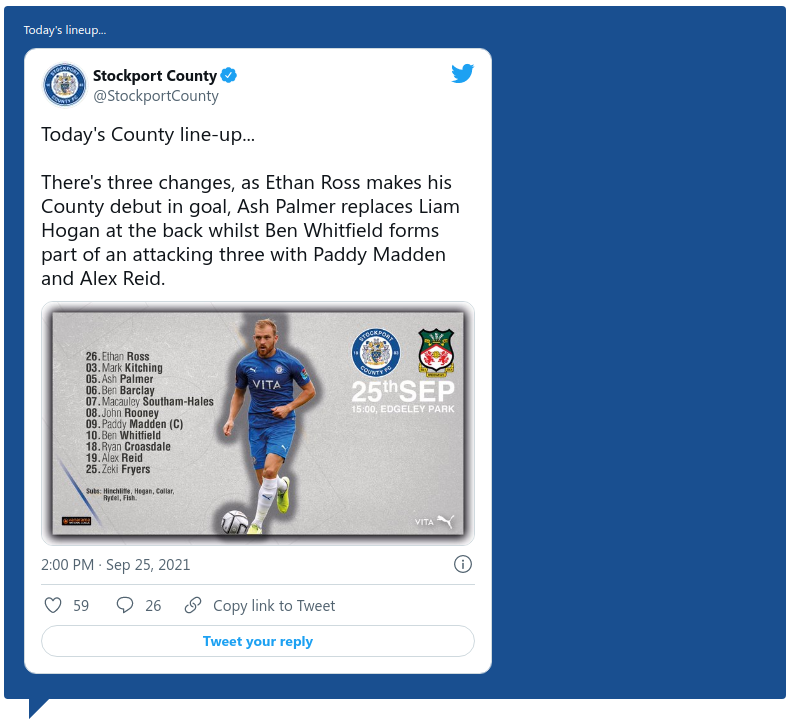
Hope this helps.
Mark Cutting also advises organisations as a Fractional CIO, Fractional CISO and Executive Advisor, helping boards improve technology governance, cyber resilience and executive decision making. Learn more at Gratmore Ltd
-
@jac Not sure which type of blue you want, but you could do it with this
.topic .posts .content blockquote {
    font-size: 12px;
    color: #ffffff;
}

blockquote {
    font-size: inherit;
    border-left: 5px solid #194F90;
    background: #194F90;
    border-radius: 4px;
    margin: 0 auto 40px;
    padding: 15px;
    position: relative;
}
blockquote:after {
    border-right: 20px solid transparent;
    border-top: 20px solid #194F90;
    bottom: -20px;
    content: "";
    position: absolute;
    left: 20px;
}
Essentially, you’d be modifying the previous block I provided, and forcing white on
.topic .posts .content blockquoteEssentially, you’ll land up with this
Hope this helps.
@phenomlab said in NodeBB customisation:
@jac Not sure which type of blue you want, but you could do it with this
.topic .posts .content blockquote {
    font-size: 12px;
    color: #ffffff;
}

blockquote {
    font-size: inherit;
    border-left: 5px solid #194F90;
    background: #194F90;
    border-radius: 4px;
    margin: 0 auto 40px;
    padding: 15px;
    position: relative;
}
blockquote:after {
    border-right: 20px solid transparent;
    border-top: 20px solid #194F90;
    bottom: -20px;
    content: "";
    position: absolute;
    left: 20px;
}
Essentially, you’d be modifying the previous block I provided, and forcing white on
.topic .posts .content blockquoteEssentially, you’ll land up with this
Hope this helps.
Thanks mate, is that just on quotes?
-
@phenomlab said in NodeBB customisation:
@jac Not sure which type of blue you want, but you could do it with this
.topic .posts .content blockquote {
    font-size: 12px;
    color: #ffffff;
}

blockquote {
    font-size: inherit;
    border-left: 5px solid #194F90;
    background: #194F90;
    border-radius: 4px;
    margin: 0 auto 40px;
    padding: 15px;
    position: relative;
}
blockquote:after {
    border-right: 20px solid transparent;
    border-top: 20px solid #194F90;
    bottom: -20px;
    content: "";
    position: absolute;
    left: 20px;
}
Essentially, you’d be modifying the previous block I provided, and forcing white on
.topic .posts .content blockquoteEssentially, you’ll land up with this
Hope this helps.
Thanks mate, is that just on quotes?
@jac yes
-
@phenomlab said in NodeBB customisation:
@jac Not sure which type of blue you want, but you could do it with this
.topic .posts .content blockquote {
    font-size: 12px;
    color: #ffffff;
}

blockquote {
    font-size: inherit;
    border-left: 5px solid #194F90;
    background: #194F90;
    border-radius: 4px;
    margin: 0 auto 40px;
    padding: 15px;
    position: relative;
}
blockquote:after {
    border-right: 20px solid transparent;
    border-top: 20px solid #194F90;
    bottom: -20px;
    content: "";
    position: absolute;
    left: 20px;
}
Essentially, you’d be modifying the previous block I provided, and forcing white on
.topic .posts .content blockquoteEssentially, you’ll land up with this
Hope this helps.
Thanks mate, is that just on quotes?
@jac said in NodeBB customisation:
@phenomlab said in NodeBB customisation:
@jac Not sure which type of blue you want, but you could do it with this
.topic .posts .content blockquote {
    font-size: 12px;
    color: #ffffff;
}

blockquote {
    font-size: inherit;
    border-left: 5px solid #194F90;
    background: #194F90;
    border-radius: 4px;
    margin: 0 auto 40px;
    padding: 15px;
    position: relative;
}
blockquote:after {
    border-right: 20px solid transparent;
    border-top: 20px solid #194F90;
    bottom: -20px;
    content: "";
    position: absolute;
    left: 20px;
}
Essentially, you’d be modifying the previous block I provided, and forcing white on
.topic .posts .content blockquoteEssentially, you’ll land up with this
Hope this helps.
Thanks mate, is that just on quotes?
I like the look of that, either that or a yellow.
Would you be able to share the code for that at all Mark?
. -
@jac said in NodeBB customisation:
@phenomlab said in NodeBB customisation:
@jac Not sure which type of blue you want, but you could do it with this
.topic .posts .content blockquote {
    font-size: 12px;
    color: #ffffff;
}

blockquote {
    font-size: inherit;
    border-left: 5px solid #194F90;
    background: #194F90;
    border-radius: 4px;
    margin: 0 auto 40px;
    padding: 15px;
    position: relative;
}
blockquote:after {
    border-right: 20px solid transparent;
    border-top: 20px solid #194F90;
    bottom: -20px;
    content: "";
    position: absolute;
    left: 20px;
}
Essentially, you’d be modifying the previous block I provided, and forcing white on
.topic .posts .content blockquoteEssentially, you’ll land up with this
Hope this helps.
Thanks mate, is that just on quotes?
I like the look of that, either that or a yellow.
Would you be able to share the code for that at all Mark?
.@jac It’s in the above post
Mark Cutting also advises organisations as a Fractional CIO, Fractional CISO and Executive Advisor, helping boards improve technology governance, cyber resilience and executive decision making. Learn more at Gratmore Ltd
-
@phenomlab said in NodeBB customisation:
@jac It’s in the above post
Apologies!
Worked a treat! Many thanks again
.Am ok to keep posting little tweaks that I am looking to change?


Hello! It looks like you're interested in this conversation, but you don't have an account yet.
Getting fed up of having to scroll through the same posts each visit? When you register for an account, you'll always come back to exactly where you were before, and choose to be notified of new replies (either via email, or push notification). You'll also be able to save bookmarks and upvote posts to show your appreciation to other community members.
With your input, this post could be even better 💗
Register LoginRelated Topics
-
-
-
-
-
NodeBB Footer
Solved Customisation -
-
-
Customising NodeBB
Locked Customisation