Glitch effect when refreshing the home page
-
Hello friends,
It’s been a long time since I’ve been on Sudonix and I’m sorry (lots of things to do and I’ve resumed some studies since I was 38 :))
To make up for it, here is a little script that I managed to create with ChatGpt and other sources. (I’m not a great dev)
I think code it’s correct and don’t hesitate Mark @phenom if you see anything.
I’m looking for ways to improve it but it’s functional.
Here is what I would like to update:
- The effect works almost everywhere except when you are in a topic. It would be that it also works in a topic therefore.
- I would also like the effect to work on the entire page. For the moment the left and right navigation bars are ignored without me really knowing why.
Despite everything, I find the effect quite nice and cool

Mark, if you can make the 2 missing points work, I’m in!!!
See you again!!
here the code :
PW and WS Spirit alive
-
Hello friends,
It’s been a long time since I’ve been on Sudonix and I’m sorry (lots of things to do and I’ve resumed some studies since I was 38 :))
To make up for it, here is a little script that I managed to create with ChatGpt and other sources. (I’m not a great dev)
I think code it’s correct and don’t hesitate Mark @phenom if you see anything.
I’m looking for ways to improve it but it’s functional.
Here is what I would like to update:
- The effect works almost everywhere except when you are in a topic. It would be that it also works in a topic therefore.
- I would also like the effect to work on the entire page. For the moment the left and right navigation bars are ignored without me really knowing why.
Despite everything, I find the effect quite nice and cool
Mark, if you can make the 2 missing points work, I’m in!!!
See you again!!
here the code :
@DownPW can you post some screenshots or perhaps a video so we can see this in action?
-
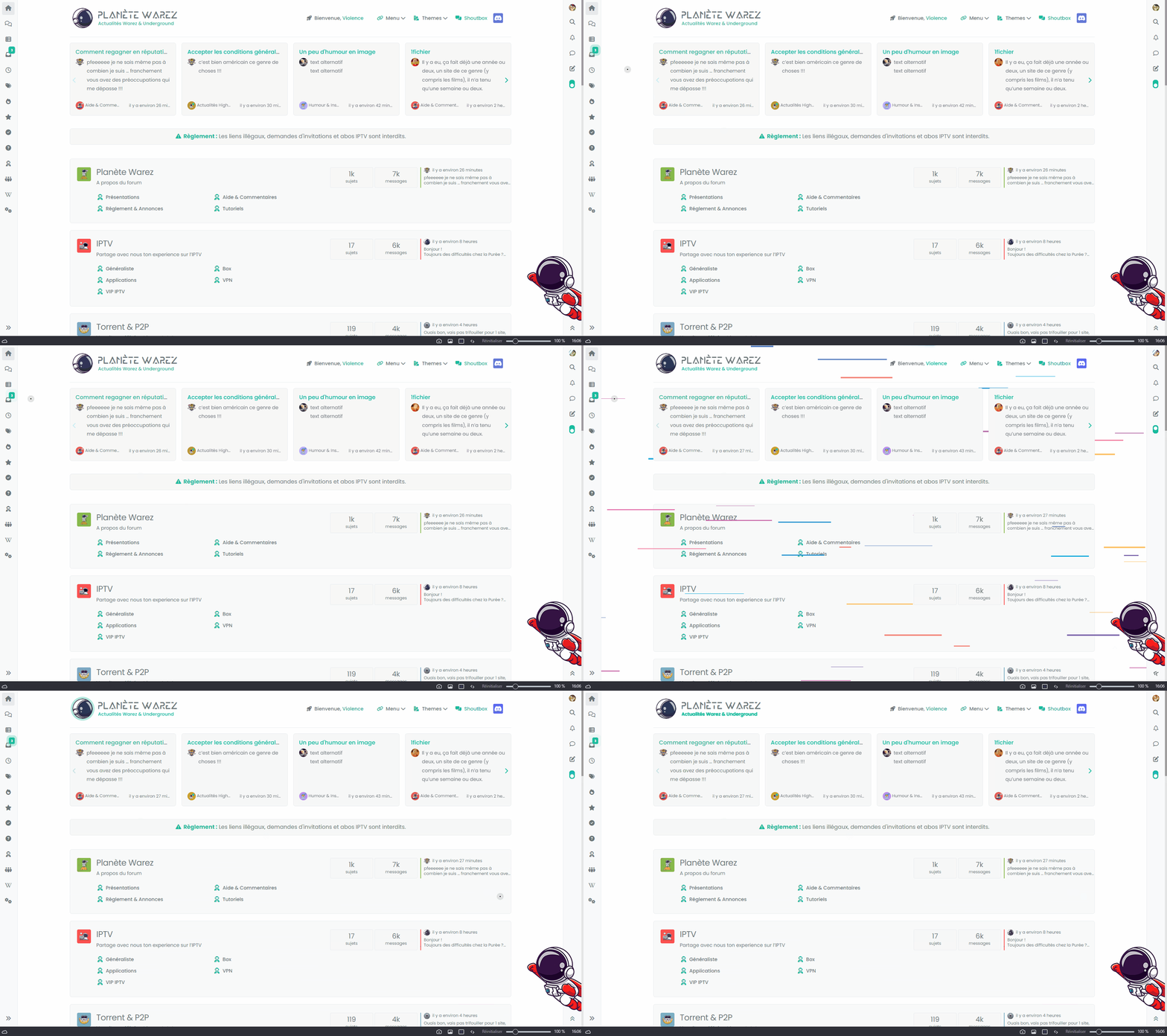
Oh yes sorry, here a gif file (can you copy it to the first post ? I can’t edit my first post) :
-
-
That looks pretty awesome!
@Madchatthew reminds me of the old days when you used to slap the top of your tv if it played up!
Mark Cutting also advises organisations as a Fractional CIO, Fractional CISO and Executive Advisor, helping boards improve technology governance, cyber resilience and executive decision making. Learn more at Gratmore Ltd
-
@Madchatthew reminds me of the old days when you used to slap the top of your tv if it played up!
@phenomlab Baahahahah oh yeah, I remember that and don’t forget sometime with those old crt monitors as well hahahaha
-
ha ha. I have a code too for that

I have add monochrome colors-no colors
-
-
Added a condition in a code function to check if one of the elements necessary for the animation still exists before continuing it. This ensures that the animation does not occur after this element has been removed from the DOM, which can avoid issues where the animation continues indefinitely.
-
Adding comments to the code
-
-
in Firefox, the effect lasts forever or a few seconds, it depends, and when it lasts forever it is on all pages when you navigate through the left bar. A CTRL-F5 makes it go away.
This happens when you quickly move from one page to another before the effect is complete. In this case the effect remains in the DOM and is not deleted and therefore the effect remains indefinitely as long as the page is not refreshed via F5.
@phenomlab If you have an idea for that, it will be very cool !!
-
So it also does it if I press the F5 key several times quickly
PW and WS Spirit alive
-
@DownPW that sounds like the loop is either running endlessly or the animation does not fully complete when it hits the next cycle.
-
@phenomlab maybe you are right but it’s really strange that it only affects Firefox !!
Do you have any ideas for code that might work for it ?
-
I have this code who works better for fast refreshes in Firefox. However, the problem now occurs when clicking on a link which opens in a new tab on firefox.
It would require the same code, the same behavior even when opening a link in a Firefox tab.
// ------------------------------------------------------------------
/* Glitch effect when refreshing the nodebb home page (TEST) */
// ------------------------------------------------------------------

$(document).ready(function() {
    // Variables globales pour le loader
    var glitchInterval;
    var loaderRemoved = false;

    // Get the height and width of the screen
    var screenWidth = $(window).width();
    var screenHeight = $(window).height();

    // Number of glitch boxes to create
    var numBoxes = 50;

    // Create a div to hold the glitch boxes
    var $loader = $("<div>", { id: "DAloader" });

    // Create the glitch boxes and add them to the loader div
    for (var i = 0; i < numBoxes; i++) {
        var $box = $("<div>", { class: "box" });
        $box.css({
            width: Math.floor(Math.random() * 200) + "px",
            height: Math.floor(Math.random() * 5) + "px",
            left: Math.floor(Math.random() * screenWidth) + "px",
            top: Math.floor(Math.random() * screenHeight) + "px",
            backgroundColor: getRandomColor()
        });
        $loader.append($box);
    }

    // Function to get a random color
    function getRandomColor() {
        var colors = ["#444444ff", "#545454ff", "#636363ff", "#737373ff", "#828282ff", "#929292ff", "#A2A2A2ff", "#B1B1B1ff", "#C1C1C1ff", "#D0D0D0ff", "#E0E0E0ff", "#EFEFEFff", "#FFFFFFff"];
        return colors[Math.floor(Math.random() * colors.length)];
    }

    // Function to animate the glitch effect
    function animateGlitch() {
        $(".box").each(function() {
            $(this).css({
                left: Math.floor(Math.random() * screenWidth) + "px",
                top: Math.floor(Math.random() * screenHeight) + "px",
                width: Math.floor(Math.random() * 200) + "px",
                height: Math.floor(Math.random() * 5) + "px"
            });
        });
    }

    // Start the glitch animation with an interval
    glitchInterval = setInterval(animateGlitch, 100);

    // Function to clean up loader and stop the animation
    function cleanUpLoader() {
        if (!loaderRemoved) {
            console.log("Cleaning up loader");
            clearInterval(glitchInterval);
            $("#DAloader").remove();
            loaderRemoved = true;
        }
    }

    // Clean up before navigating away or refreshing the page
    $(window).on("beforeunload pagehide", function() {
        cleanUpLoader();
    });

    // Extra cleanup on unload to handle rapid refreshes
    $(window).on("unload", function() {
        cleanUpLoader();
    });

    // Set styles when the page is fully loaded
    $(window).on("load", function() {
        console.log("Page loaded, fading out loader");
        $("#DAloader").css({
            opacity: 0,
            transition: "opacity 0.75s"
        });
        setTimeout(function() {
            cleanUpLoader();
        }, 750); // Adjust the time as needed
    });

    // Add the loader div to the page only after setting up all event handlers
    $("body").prepend($loader);
});
PW and WS Spirit alive
-
I have this code who works better for fast refreshes in Firefox. However, the problem now occurs when clicking on a link which opens in a new tab on firefox.
It would require the same code, the same behavior even when opening a link in a Firefox tab.
// ------------------------------------------------------------------ /* Glitch effect when refreshing the nodebb home page (TEST) */ // ------------------------------------------------------------------ $(document).ready(function() { // Variables globales pour le loader var glitchInterval; var loaderRemoved = false; // Get the height and width of the screen var screenWidth = $(window).width(); var screenHeight = $(window).height(); // Number of glitch boxes to create var numBoxes = 50; // Create a div to hold the glitch boxes var $loader = $("<div>", { id: "DAloader" }); // Create the glitch boxes and add them to the loader div for (var i = 0; i < numBoxes; i++) { var $box = $("<div>", { class: "box" }); $box.css({ width: Math.floor(Math.random() * 200) + "px", height: Math.floor(Math.random() * 5) + "px", left: Math.floor(Math.random() * screenWidth) + "px", top: Math.floor(Math.random() * screenHeight) + "px", backgroundColor: getRandomColor() }); $loader.append($box); } // Function to get a random color function getRandomColor() { var colors = ["#444444ff", "#545454ff", "#636363ff", "#737373ff", "#828282ff", "#929292ff", "#A2A2A2ff", "#B1B1B1ff", "#C1C1C1ff", "#D0D0D0ff", "#E0E0E0ff", "#EFEFEFff", "#FFFFFFff"]; return colors[Math.floor(Math.random() * colors.length)]; } // Function to animate the glitch effect function animateGlitch() { $(".box").each(function() { $(this).css({ left: Math.floor(Math.random() * screenWidth) + "px", top: Math.floor(Math.random() * screenHeight) + "px", width: Math.floor(Math.random() * 200) + "px", height: Math.floor(Math.random() * 5) + "px" }); }); } // Start the glitch animation with an interval glitchInterval = setInterval(animateGlitch, 100); // Function to clean up loader and stop the animation function cleanUpLoader() { if (!loaderRemoved) { console.log("Cleaning up loader"); clearInterval(glitchInterval); $("#DAloader").remove(); loaderRemoved = true; } } // Clean up before navigating away or refreshing the page $(window).on("beforeunload pagehide", function() { cleanUpLoader(); }); // Extra cleanup on unload to handle rapid refreshes $(window).on("unload", function() { cleanUpLoader(); }); // Set styles when the page is fully loaded $(window).on("load", function() { console.log("Page loaded, fading out loader"); $("#DAloader").css({ opacity: 0, transition: "opacity 0.75s" }); setTimeout(function() { cleanUpLoader(); }, 750); // Adjust the time as needed }); // Add the loader div to the page only after setting up all event handlers $("body").prepend($loader); });@DownPW your css would be better placed inside a css file or in the nodebb global. Whilst the code works, inline css may be causing this issue.
-
I think I have the great code :
$(document).ready(function() {
    var glitchInterval;
    var loaderId = "DAloader";
    var effectDisplayed = false; // Flag to ensure effect is displayed

    // Get the height and width of the screen
    var screenWidth = $(window).width();
    var screenHeight = $(window).height();

    // Function to get a random color
    function getRandomColor() {
        var colors = ["#444444ff", "#545454ff", "#636363ff", "#737373ff", "#828282ff", "#929292ff", "#A2A2A2ff", "#B1B1B1ff", "#C1C1C1ff", "#D0D0D0ff", "#E0E0E0ff", "#EFEFEFff", "#FFFFFFff"];
        return colors[Math.floor(Math.random() * colors.length)];
    }

    // Function to animate the glitch effect
    function animateGlitch() {
        $(".box").each(function() {
            $(this).css({
                left: Math.floor(Math.random() * screenWidth) + "px",
                top: Math.floor(Math.random() * screenHeight) + "px",
                width: Math.floor(Math.random() * 200) + "px",
                height: Math.floor(Math.random() * 5) + "px"
            });
        });
    }

    // Function to clean up loader and stop the animation
    function cleanUpLoader() {
        if (effectDisplayed) {
            console.log("Cleaning up loader");
            clearInterval(glitchInterval);
            $("#" + loaderId).remove();
        }
    }

    // Function to set up the glitch effect
    function setupGlitchEffect() {
        // Create a div to hold the glitch boxes
        var $loader = $("<div>", { id: loaderId });

        // Create the glitch boxes and add them to the loader div
        for (var i = 0; i < 50; i++) {
            var $box = $("<div>", { class: "box" });
            $box.css({
                width: Math.floor(Math.random() * 200) + "px",
                height: Math.floor(Math.random() * 5) + "px",
                left: Math.floor(Math.random() * screenWidth) + "px",
                top: Math.floor(Math.random() * screenHeight) + "px",
                backgroundColor: getRandomColor()
            });
            $loader.append($box);
        }

        // Add the loader div to the page
        $("body").prepend($loader);

        // Start the glitch animation with an interval
        glitchInterval = setInterval(animateGlitch, 100);
    }

    // Set styles when the page is fully loaded
    $(window).on("load", function() {
        setupGlitchEffect();

        // Ensure the effect is visible before fading out
        setTimeout(function() {
            effectDisplayed = true;
            $("#" + loaderId).css({
                opacity: 0,
                transition: "opacity 0.75s"
            });

            // Clean up after fade out transition
            setTimeout(cleanUpLoader, 750); // Time must match transition duration
        }, 0); // Immediate effect display
    });

    // Clean up loader on beforeunload and pagehide
    $(window).on("beforeunload pagehide", function() {
        cleanUpLoader();
    });

    // Extra cleanup on unload to handle rapid refreshes
    $(window).on("unload", function() {
        cleanUpLoader();
    });
});
If you can test it @phenomlab it will be cool !
EDIT : CSS is on nodeBB ACP
Improvement of the code to avoid several bugs affecting Firefox only and improvement for other browsers.
- Added a unique ID for each glitch effect instance and check display status
- Use of a flag to check the display state of the glitch effect.
- Forced DOM cleanup using timers (setTimeout) to ensure the glitch effect is completely removed before new instances can be created.
+Moved effect creation and start to a dedicated function for clarity. - The glitch effect is now immediately displayed upon loading the page.
- The cleanUpLoader now checks if the effect was displayed before cleaning to avoid errors in the DOM.
- The cleanup function is called after a delay to match the duration of the opacity transition.
- Simplified DOM cleanup logic to avoid errors.
- Using local storage via a key in “localStorage” to manage effects and opening links between tabs and in new tabs in Firefox:
- Simplified DOM cleanup logic to avoid errors.
- Improved DOM and animation handling.
PW and WS Spirit alive
-
I think I have the great code :
$(document).ready(function() {
    var glitchInterval;
    var loaderId = "DAloader";
    var effectDisplayed = false; // Flag to ensure effect is displayed

    // Get the height and width of the screen
    var screenWidth = $(window).width();
    var screenHeight = $(window).height();

    // Function to get a random color
    function getRandomColor() {
        var colors = ["#444444ff", "#545454ff", "#636363ff", "#737373ff", "#828282ff", "#929292ff", "#A2A2A2ff", "#B1B1B1ff", "#C1C1C1ff", "#D0D0D0ff", "#E0E0E0ff", "#EFEFEFff", "#FFFFFFff"];
        return colors[Math.floor(Math.random() * colors.length)];
    }

    // Function to animate the glitch effect
    function animateGlitch() {
        $(".box").each(function() {
            $(this).css({
                left: Math.floor(Math.random() * screenWidth) + "px",
                top: Math.floor(Math.random() * screenHeight) + "px",
                width: Math.floor(Math.random() * 200) + "px",
                height: Math.floor(Math.random() * 5) + "px"
            });
        });
    }

    // Function to clean up loader and stop the animation
    function cleanUpLoader() {
        if (effectDisplayed) {
            console.log("Cleaning up loader");
            clearInterval(glitchInterval);
            $("#" + loaderId).remove();
        }
    }

    // Function to set up the glitch effect
    function setupGlitchEffect() {
        // Create a div to hold the glitch boxes
        var $loader = $("<div>", { id: loaderId });

        // Create the glitch boxes and add them to the loader div
        for (var i = 0; i < 50; i++) {
            var $box = $("<div>", { class: "box" });
            $box.css({
                width: Math.floor(Math.random() * 200) + "px",
                height: Math.floor(Math.random() * 5) + "px",
                left: Math.floor(Math.random() * screenWidth) + "px",
                top: Math.floor(Math.random() * screenHeight) + "px",
                backgroundColor: getRandomColor()
            });
            $loader.append($box);
        }

        // Add the loader div to the page
        $("body").prepend($loader);

        // Start the glitch animation with an interval
        glitchInterval = setInterval(animateGlitch, 100);
    }

    // Set styles when the page is fully loaded
    $(window).on("load", function() {
        setupGlitchEffect();

        // Ensure the effect is visible before fading out
        setTimeout(function() {
            effectDisplayed = true;
            $("#" + loaderId).css({
                opacity: 0,
                transition: "opacity 0.75s"
            });

            // Clean up after fade out transition
            setTimeout(cleanUpLoader, 750); // Time must match transition duration
        }, 0); // Immediate effect display
    });

    // Clean up loader on beforeunload and pagehide
    $(window).on("beforeunload pagehide", function() {
        cleanUpLoader();
    });

    // Extra cleanup on unload to handle rapid refreshes
    $(window).on("unload", function() {
        cleanUpLoader();
    });
});
If you can test it @phenomlab it will be cool !
EDIT : CSS is on nodeBB ACP
Improvement of the code to avoid several bugs affecting Firefox only and improvement for other browsers.
- Added a unique ID for each glitch effect instance and check display status
- Use of a flag to check the display state of the glitch effect.
- Forced DOM cleanup using timers (setTimeout) to ensure the glitch effect is completely removed before new instances can be created.
+Moved effect creation and start to a dedicated function for clarity. - The glitch effect is now immediately displayed upon loading the page.
- The cleanUpLoader now checks if the effect was displayed before cleaning to avoid errors in the DOM.
- The cleanup function is called after a delay to match the duration of the opacity transition.
- Simplified DOM cleanup logic to avoid errors.
- Using local storage via a key in “localStorage” to manage effects and opening links between tabs and in new tabs in Firefox:
- Simplified DOM cleanup logic to avoid errors.
- Improved DOM and animation handling.
@DownPW will do so ASAP. I am on annual leave currently and not near a PC.
-
No problem dude !
I hope you have a good vacation. Enjoy your loved ones!
-
 undefined DownPW marked this topic as a regular topic on




Hello! It looks like you're interested in this conversation, but you don't have an account yet.
Getting fed up of having to scroll through the same posts each visit? When you register for an account, you'll always come back to exactly where you were before, and choose to be notified of new replies (either via email, or push notification). You'll also be able to save bookmarks and upvote posts to show your appreciation to other community members.
With your input, this post could be even better 💗
Register Login