Skip to content

World

Topics from outside of this forum. Views and opinions represented here may not reflect those of this forum and its members.

A world of content at your fingertips…

Think of this as your global discovery feed. It brings together interesting discussions from across the web and other communities, all in one place.

While you can browse what's trending now, the best way to use this feed is to make it your own. By creating an account, you can follow specific creators and topics to filter out the noise and see only what matters to you.

Ready to dive in? Create an account to start following others, get notified when people reply to you, and save your favorite finds.

Register Login
  • Panda

    Running nodeBB on v6 of MongoDB and tried to upgrade to v7
    Is there any benefit to upgrading?

    Anyway I did
    sudo apt update
    and saw these lines (which still references v6?)
    …https://repo.mongodb.org/apt/ubuntu jammy/mongodb-org/6.0 InRelease
    Hit:10 https://repo.mongodb.org/apt/ubuntu jammy/mongodb-org/6.0 Release

    Then
    sudo apt upgrade mongodb
    didnt work

    Reading package lists... Done
    Building dependency tree... Done
    Reading state information... Done
    Package mongodb is not available, but is referred to by another package.
    This may mean that the package is missing, has been obsoleted, or
    is only available from another source
    
    E: Package 'mongodb' has no installation candidate
    

    Can anyone explain what failed there?


    @Panda if you used the Ubuntu PPA, I think this only goes as far as 6.x if I recall correctly.
  • DownPW

    A core developer of Nginx, currently the world’s most popular web server, has quit the project, stating that he no longer sees it as “a free and open source project… for the public good.” His fork, freenginx, is “going to be run by developers, and not corporate entities,” writes Maxim Dounin, and will be “free from arbitrary corporate actions.”

    Dounin is one of the earliest and still most active coders on the open source Nginx project and one of the first employees of Nginx, Inc., a company created in 2011 to commercially support the steadily growing web server. Nginx is now used on roughly one-third of the world’s web servers, ahead of Apache.

    A tricky history of creation and ownership

    Nginx Inc. was acquired by Seattle-based networking firm F5 in 2019. Later that year, two of Nginx’s leaders, Maxim Konovalov and Igor Sysoev, were detained and interrogated in their homes by armed Russian state agents. Sysoev’s former employer, Internet firm Rambler, claimed that it owned the rights to Nginx’s source code, as it was developed during Sysoev’s tenure at Rambler (where Dounin also worked). While the criminal charges and rights do not appear to have materialized, the implications of a Russian company’s intrusion into a popular open source piece of the web’s infrastructure caused some alarm.

    Sysoev left F5 and the Nginx project in early 2022. Later that year, due to the Russian invasion of Ukraine, F5 discontinued all operations in Russia. Some Nginx developers still in Russia formed Angie, developed in large part to support Nginx users in Russia. Dounin technically stopped working for F5 at that point, too, but maintained his role in Nginx “as a volunteer,” according to Dounin’s mailing list post.

    Dounin writes in his announcement that “new non-technical management” at F5 “recently decided that they know better how to run open source projects. In particular, they decided to interfere with security policy nginx uses for years, ignoring both the policy and developers’ position.” While it was “quite understandable,” given their ownership, Dounin wrote that it means he was “no longer able to control which changes are made in nginx,” hence his departure and fork.

    The CVEs at the center of the split

    Comments on Hacker News, including one by a purported employee of F5, suggest Dounin opposed the assigning of published CVEs (Common Vulnerabilities and Exposures) to bugs in aspects of QUIC. While QUIC is not enabled in the most default Nginx setup, it is included in the application’s “mainline” version, which, according to the Nginx documentation, contains “the latest features and bug fixes and is always up to date.”

    The commenter from F5, MZMegaZone, seemingly the principal security engineer at F5, notes that “a number of customers/users have the code in production, experimental or not” and adds that F5 is a CVE Numbering Authority (CNA).

    Dounin expanded on F5’s actions in a later mail response.

    The most recent “security advisory” was released despite the fact that the particular bug in the experimental HTTP/3 code is expected to be fixed as a normal bug as per the existing security policy, and all the developers, including me, agree on this.

    And, while the particular action isn’t exactly very bad, the approach in general is quite problematic.

    Asked about the potential for name confusion and trademark issues, Dounin wrote in another response about trademark concerns:

    I believe [they] do not apply here, but IANAL [I am not a lawyer]," and "the name aligns well with project goals.

    MZMegaZone confirmed the relationship between security disclosures and Dounin’s departure.

    All I know is he objected to our decision to assign CVEs, was not happy that we did, and the timing does not appear coincidental,"

    MZMegaZone wrote on Hacker News. He later added,

    I don’t think having the CVEs should reflect poorly on NGINX or Maxim. I’m sorry he feels the way he does, but I hold no ill will toward him and wish him success, seriously.

    Dounin, reached by email, pointed to his mailing list responses for clarification. He added,

    Essentially, F5 ignored both the project policy and joint developers’ position, without any discussion."

    MegaZone wrote to Ars (noting that he only spoke for himself and not F5), stating, “It’s an unfortunate situation, but I think we did the right thing for the users in assigning CVEs and following public disclosure practices. Rational people can disagree and I respect Maxim has his own view on the matter, and hold no ill will toward him or the fork. I wish it hadn’t come to this, but I respect the choice was his to make.”

    A representative for F5 wrote to Ars that:

    F5 is committed to delivering successful open source projects that require a large and diverse community of contributors, as well as applying rigorous industry standards forassigning and scoring identified vulnerabilities. We believe this is the right approach for developing highly secure software for our customers and community, and we encourage the open source community to join us in this effort.

    – Source :

    https://arstechnica.com/information-technology/2024/02/nginx-key-developer-starts-a-freenginx-fork-after-dispute-with-parent-firm/


    @DownPW said in Nginx core developer quits project in security dispute, starts “freenginx” fork: Maybe virtualmin implement it in the future… I don’t think they will - my guess is that they will stick with the current branch of NGINX. I’ve not personally tested it, but the GIT page seems to be very active. This is equally impressive [image: 8ac0d197-68fa-4bd8-bfa3-87237bf8f1f4-image.png] I think the most impressive on here is the native support of HTTP 3
  • Hari

    Hello, I’m interested in testing this WordPress theme, and I’m eager to get started. Could you please provide guidance on how to set up and test this theme? I noticed it involves commands like ‘yarn,’ so I would appreciate your assistance in getting it up and running.

    https://github.com/WordPress/wporg-developer


    @Hari the real issue here is that I don’t think it can be used as a theme for WordPress because of the dependencies it clearly has, including its own Web server. My view here is that this is designed to be a complete development environment outside of the WordPress core.
  • phenomlab

    I wanted to add functionality into Sudonix so that it

    a) Adds a new DIV in the form of a panel/card after the last post if the topic is “solved”
    b) Adds a link that will take you straight to the solution
    c) Scrolls to that particular DIV containing the solution using page scrolling with an offset

    Basically, it would look like this - see video below:

    To my mind, this is a nice touch - a key feature that is missing from the Q&A plugin. I’ve asked for it to be added, although I’m not sure how much of an appetite there is for this, so with some simple HTML, NodeBB Widget areas, and some jQuery, it’s all possible 🙂

    Widget code below:

    https://github.com/phenomlab/nodebb-q-a-extension/blob/main/widget.html

    How to use

    1. Open /admin/extend/widgets
    2. Drag and drop a HTML widget into the topic.tpl template, positioned in the Topic Footer
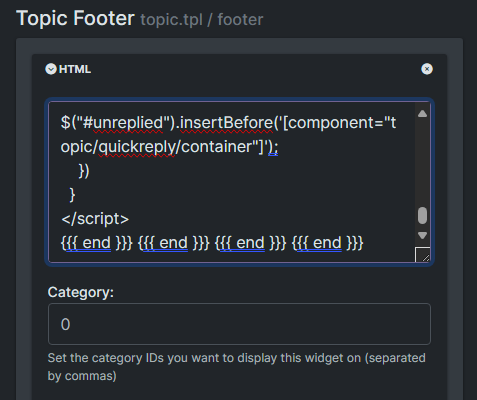
    3. Paste the code from Github into the HTML pane like below

    36a2f2d0-ed7a-4f94-a5fa-1b742c331413-image.png

    1. Save the changes

    Add this into your custom CSS /admin/appearance/customise#custom-css. Note that this is a “starting point” that uses var and so you will need to adjust to fir your own site.

    https://github.com/phenomlab/nodebb-q-a-extension/blob/main/style.css

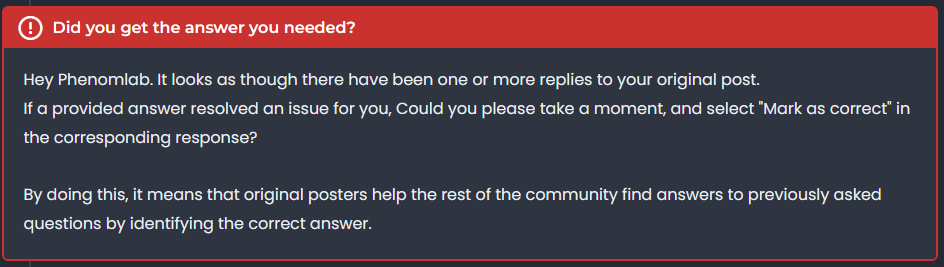
    From now, any topics which are enabled for Q&A and set to a question will look something like the below

    Resolved

    ddbf913b-bb9e-401c-8e15-530b6d2a23c0-image.png

    Unresolved

    6ea90947-30e1-4a0e-a4a8-4305267f9d3a-image.png

    Unanswered

    3d16f558-94f7-49bc-84c2-44f0b14e55f6-image.png

    This makes the Q&A plugin a bit more intuitive - what do you think?


    Very good like always
  • crazycells

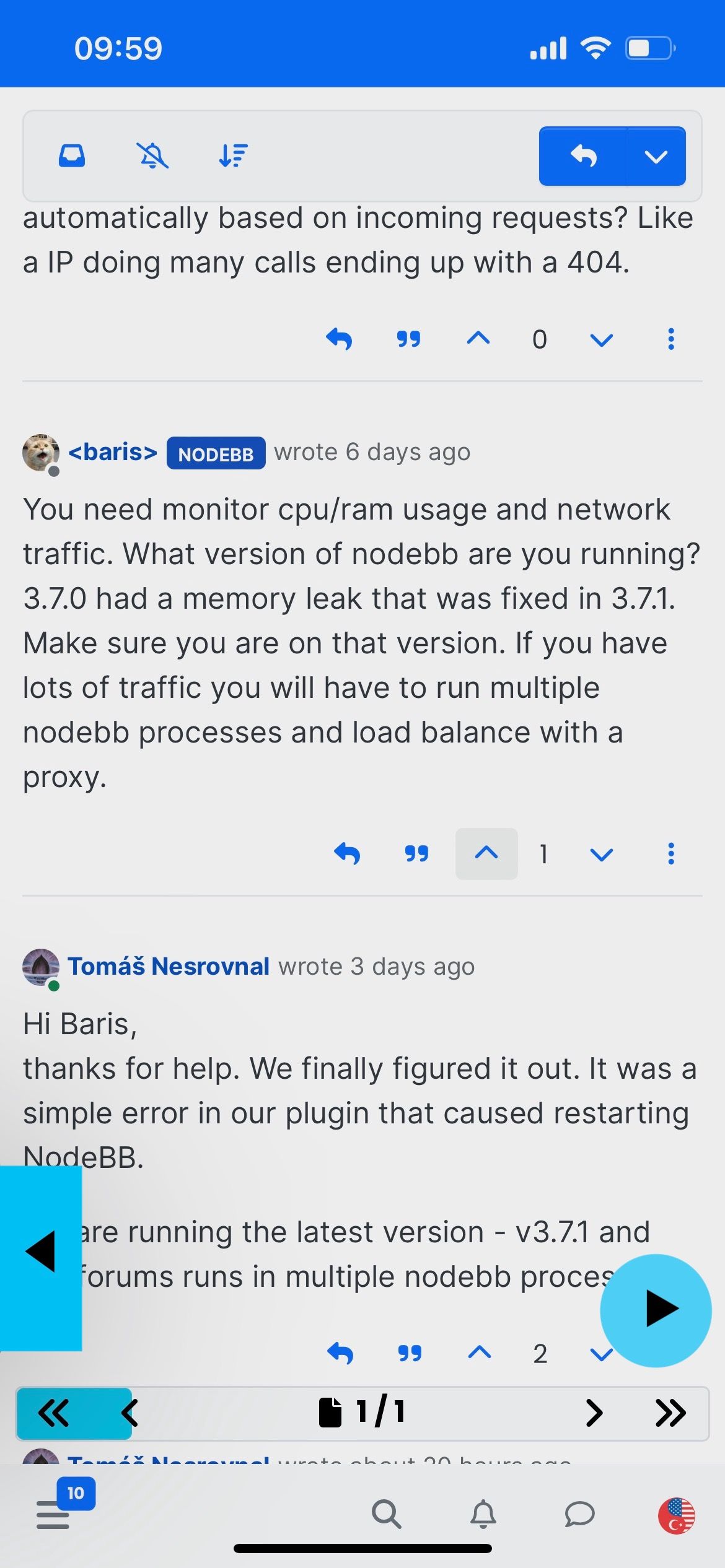
    hi @phenomlab , when the forum is used as PWA, there is no easy way to navigate between pages…

    Several days ago, I was reading a post on a forum that mentioned another topic, I have encountered an issue when attempting to return to the original post. So, after reading the linked topic, I had to go to categories page and retrace my steps to locate the topic I was reading initially…

    Although this can be achieved by page control arrows on destop and mobile browsers, there is no easy way to achieve this on PWA… so I wonder if you can help me adding some page control buttons that appear at the bottom of the page when scrolled up. (maybe it can be integrated to post navigation bar but I believe those buttons should appear in all pages, not only in topics)

    Here is just some suggestions to distinguish them from other arrows…

    alt text

    alternatively the arrows or rewind icons that YouTube uses can be used:

    alt text


    @crazycells it is, yes - I think I’ll leave it as there is no specific PWA CSS classes I know of. Well, you could use something like the below, but this means multiple CSS files for different operating systems. /** * Determine the mobile operating system. * This function returns one of 'iOS', 'Android', 'Windows Phone', or 'unknown'. * * @returns {String} */ function getMobileOperatingSystem() { var userAgent = navigator.userAgent || navigator.vendor || window.opera; // Windows Phone must come first because its UA also contains "Android" if (/windows phone/i.test(userAgent)) { return "Windows Phone"; } if (/android/i.test(userAgent)) { return "Android"; } if (/iPad|iPhone|iPod/.test(userAgent) && !window.MSStream) { return "iOS"; } return "unknown"; // return “Android” - one should either handle the unknown or fallback to a specific platform, let’s say Android } Once you’re in that rabbit hole, it’s impossible to get out of it.
  • phenomlab

    https://www.bbc.co.uk/news/business-68727857

    Seriously Google? For a company that makes billions to charge a premium fee to access it’s AI services is taking the p***. This in my view amounts to nothing more than corporate greed.

    The company, owned by Alphabet Inc, is said to be revamping its business model and looking at putting some of its core product behind a paywall.

    It would be the first time Google had charged for any of its content.

    Google said it did not have anything to announce “right now”.

    But you know for sure they will announce “something” soon. In 2023, Google turned a profit of approximately $305.6bn (£241bn), so it’s not like they need the money. As I said, nothing more than greed 😠


  • phenomlab

    For anyone who has been following the below thread, this is for you in terms of installation on your own forum. As with all good demos and POC’s, this site runs the OGProxy and you’ll see it working as you trawl through this post.

    https://sudonix.org/topic/495/ogproxy-a-replacement-for-iframely

    First things first

    There’s some things we need to cover first before we start to deploy any code. Remember how in the thread above, I mentioned that OGProxy is in fact a server and client, and not a plugin. I could have made the client side a plugin, but to me, there’s little point given the length of code required to actually execute the previewLinks() function.

    That said, there are actually three distinct elements that make up the OGProxy framework. These are

    1. A nodeJS based server that is responsible for working in the background, and makes use of the existing open-graph-scraper package you’ll find in NPM - no point in reinventing the wheel here 🙂

    https://www.npmjs.com/package/open-graph-scraper

    1. A proxy server is required, and needs to run in a subdomain of your parent. For example, if your domain is something.com then you need to setup an A record at your DNS provider for proxy and have it point to the same IP address where your web server sits that hosts NodeBB. You’ll then need to create an nginx config for this new site (see later in this walkthrough), and access that as https://proxy.something.com (the https is an expected standard these days, so don’t be surprised by this).

    2. Client side execution of the previewLinks() function. NodeBB comes with it’s own custom JS panel, and we’ll be making good use of that.

    3. Some custom CSS

    If you are curious as to what each line of the node server is doing, I have provided a detailed explanation here

    ||
    How does the OGProxy work?

    The OGProxy sets up a server using the NodeJS Express framework to handle a route for fetching Open Graph data from a given URL. Let’s go through the code and understand its functionality:

    1. Importing Required Modules:

      • express: The Express framework for creating the server.
      • open-graph-scraper: A module for scraping Open Graph data from a web page.
      • cors: A middleware for enabling Cross-Origin Resource Sharing.
      • url: The built-in Node.js module for working with URLs.
      • memory-cache: A simple in-memory cache for storing and retrieving data.
      • axios: A popular HTTP client for making requests.
      • meta-parser: A module for parsing meta properties from HTML.
      • cheerio: A library for parsing and manipulating HTML.
      • path: The built-in Node.js module for working with file paths.
    2. Creating an Express App and Configuring the Server:

      • express() creates an instance of the Express application.
      • port specifies the port number on which the server will listen.
      • app.use(cors({ origin: 'https://sudonix.org' })) enables Cross-Origin Resource Sharing, allowing requests from the specified origin.
    3. Handling the Route:

      • app.get('/ogproxy', async (req, res) => {...}) defines a route for handling GET requests to ‘/ogproxy’.
      • The callback function is an asynchronous function that receives the request (req) and response (res) objects.
    4. Request Validation:

      • let { url } = req.query; extracts the ‘url’ query parameter from the request.
      • const requestApiKey = req.headers['x-api-key']; retrieves the value of the ‘x-api-key’ header from the request.
      • If the request API key doesn’t match the expected apiKey, a 401 Unauthorized response is sent.
      • If the ‘url’ parameter is missing or doesn’t start with ‘http’, the URL is constructed using the request’s protocol and host.
    5. Caching:

      • The code checks if the requested URL is already cached in the memory-cache. If so, the cached result is returned as a JSON response.
      • If the URL is not cached, the code proceeds to scrape the Open Graph data.
    6. Scraping Open Graph Data:

      • The ogs module is used to scrape Open Graph data from the provided URL asynchronously.
      • If the scraping is successful and the required data is present, the code proceeds to fetch additional data.
    7. Fetching Additional Data:

      • The code uses axios to fetch the content of the website associated with the URL.
      • The fetched HTML content is passed to cheerio for parsing and manipulation.
      • meta-parser is used to extract meta properties from the HTML content.
      • The extracted meta properties and other relevant data are stored in the metadata object.
    8. Handling Favicon:

      • If a favicon URL is present in the metadata, the code resolves the full URL based on the provided URL.
      • The code uses axios to fetch the favicon image as an array buffer.
      • The favicon data is then converted to a base64 string and appended with the appropriate data URL prefix.
      • If an error occurs while fetching the favicon, an error message is logged to the console.
    9. Modifying and Caching the Results:

      • The metaProperties and faviconUrl are added to the results obtained from the Open Graph scraping.
      • The URL and its corresponding results are cached using the memory-cache module.
      • The results are sent as a JSON response.
    10. Error Handling:

      • If any error occurs during the scraping or processing of data, a 500 Internal Server Error response is sent.
    11. Starting the Server:

      • app.listen(port, () => {...}) starts the server and listens on the specified port.
      • A log message is printed to the console indicating the server is running.

    Overall, this code sets up an Express server that acts as a proxy for fetching Open Graph data from a given URL. It includes caching to improve performance and handles additional data retrieval such as website content, meta properties, and favicon images. The server responds to requests with the scraped Open Graph data in a JSON format.||

    1. Build the server

    I’ve simplified this process so that you only need to perform the basic steps to get up and running. At this point. I’m, going to assume you have the directory structure in place already for your subdomain - now navigate to the root path, for example

    cd /home/sudonix.org/domains/proxy.sudonix.org
    

    We are going to be taking the files from my Git Repository located here

    https://github.com/phenomlab/ogproxy

    Once you are in the right place, issue

    git clone https://github.com/phenomlab/ogproxy
    

    You should see something like this being returned

    Cloning into 'ogproxy'...
    remote: Enumerating objects: 28, done.
    remote: Counting objects: 100% (28/28), done.
    remote: Compressing objects: 100% (26/26), done.
    remote: Total 28 (delta 9), reused 0 (delta 0), pack-reused 0
    Unpacking objects: 100% (28/28), 234.21 KiB | 4.78 MiB/s, done.
    

    Now move into the ogproxy directory

    cd ogproxy/
    

    Once you are there, issue

    npm install
    

    This will install the required libraries for the server to work. There may be some messages generated that refer to legacy or outdated libraries - for the time being, this is ok, and you can ignore it

    npm WARN deprecated har-validator@5.1.5: this library is no longer supported
    npm WARN deprecated querystring@0.2.0: The querystring API is considered Legacy. new code should use the URLSearchParams API instead.
    npm WARN deprecated uuid@3.4.0: Please upgrade  to version 7 or higher.  Older versions may use Math.random() in certain circumstances, which is known to be problematic.  See https://v8.dev/blog/math-random for details.
    npm WARN deprecated request@2.88.2: request has been deprecated, see https://github.com/request/request/issues/3142
    
    added 148 packages, and audited 149 packages in 2s
    

    At this point, you could feasibly run

    node server
    

    Which will respond with a message telling you that the service is listening on port 2000 (which you can change if you need to). However, for the time being, leave it - if you’ve already executed this command, kill it 🙂

    Edit the server.js file

    Locate server.js in the same directory structure, and look for these two lines

    const apiKey = 'YOUR_API_KEY_HERE';
    
    app.use(cors({ origin: 'FULL_FQDN_OF_YOUR_ORIGIN_HERE' }));
    

    For the first part, you’ll need to generate an API key. You can do that here

    https://generate-random.org/api-key-generator?count=1&length=64&type=mixed-numbers&prefix=

    64bit is certainly enough to keep the server secured and is the recommendation. Keys of other lengths seem to be truncated in transit.
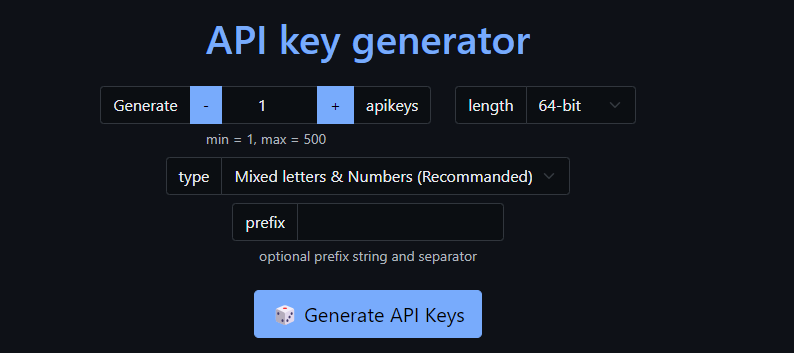
    9e7bf32d-de54-4de2-b187-75dc2fc056db-image.png

    You should land up with a key like the below after you click “Generate API Keys”

    9XWxMB8y8IMv3NXeg4yA58xvfC4Js9AgaqyH28IGfJStcG6kEzNl5QD26j09bV5M

    Save that key in the space where you see YOUR_API_KEY_HERE so it looks like

    const apiKey = '9XWxMB8y8IMv3NXeg4yA58xvfC4Js9AgaqyH28IGfJStcG6kEzNl5QD26j09bV5M';
    

    Now in the origin section, this is the full FQDN (Fully Qualified Domain Name) of your site. For example, if you use https://forum.example.com as your forum’s URL, then you use this etc.

    app.use(cors({ origin: 'https://forum.example.com' }));
    

    Save the server script, and close the editor. Don’t be tempted to touch anything else 🙂

    Create a service so that your Proxy runs unattended

    Let’s create a file called /etc/systemd/system/ogproxy.service

    Inside this new file, paste the below code

    [Unit]
    Description=OGProxy Server
    After=network.target
    
    [Service]
    ExecStart=/usr/bin/node /path/to/your/subdomain/ogproxy/server.js 
    WorkingDirectory=/path/to/your/subdomain/ogproxy
    Restart=always
    RestartSec=3
    
    [Install]
    WantedBy=multi-user.target
    

    Obviously, you’ll need to replace /path/to/your/subdomain/ with the actual path you are using.

    Save the file and exit the editor.

    Now issue

    sudo systemctl start ogproxy
    

    And

    sudo systemctl enable ogproxy
    

    If evrything went well, then your new ogproxy service should be running. You can test this with

    systemctl status ogproxy
    

    You should receive output similar to the below
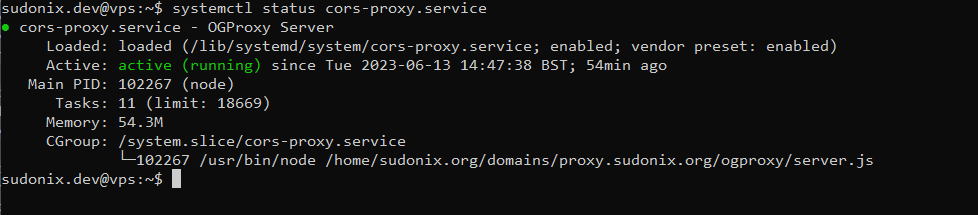
    cdcee78b-5b63-4762-943f-5ae25f3301f2-image.png

    if you see the above (with your settings, and not mine), then the service is running.

    2. Configure the NGINX reverse proxy

    Locate your nginx.conf file that relates to the subdomain you created in step 1. Edit that file

    Your config should be made to look like the below

    server {
    	server_name [YOUR PROXY URL];
    	listen [IP_ADDRESS];
    	root /home/sudonix.org/domains/proxy.sudonix.org/ogproxy;
    	index index.php index.htm index.html;
      location / {
        proxy_set_header Access-Control-Allow-Origin *;
        proxy_set_header Host $host;
        proxy_pass http://localhost:2000;
        proxy_redirect off;
        proxy_set_header Host $host;
        proxy_set_header X-Forwarded-For $proxy_add_x_forwarded_for;
        proxy_set_header X-Api-Key $http_x_api_key;
      }
      location /images {
        index index.php index.htm index.html;
        root /home/sudonix.org/domains/proxy.sudonix.org/ogproxy;
      }
    	fastcgi_split_path_info "^(.+\.php)(/.+)$";
    	listen [IP  ADDRESS]:443 ssl http2;
    	ssl_certificate [PATH TO YOUR SSL CERT]
    	ssl_certificate_key [PATH TO YOUR SSL KEY]
    }


    You obviously need to replace the values below with your own

    [YOUR PROXY URL]
    [IP_ADDRESS]
    [PATH TO YOUR SSL CERT]
    [PATH TO YOUR SSL KEY]
    

    The above is a base config to get things working, and you may require more (for example access and error logging etc) - up to you.

    Save the config, and issue

    nginx -t

    if the config is ok with no errors, restart nginx

    3. Client-side code

    Now for the icing on the cake…

    In NodeBB, navigate to /admin/appearance/customise#custom-js

    Add all of the code you see in the below link at the end of your custom JS file

    https://github.com/phenomlab/ogproxy/blob/main/function.js

    Find the below two lines

            var proxy = "FULL_FQDN_OF_YOUR_OGPROXY_HERE";
            var apiKey = "YOUR_API_KEY_HERE";
    

    So, for example, those two values should be something like this

            var proxy = "https://proxy.mydomain.com";
            var apiKey = "9XWxMB8y8IMv3NXeg4yA58xvfC4Js9AgaqyH28IGfJStcG6kEzNl5QD26j09bV5M";
    

    Save the custom js

    4. Restart the OGProxy service

    sudo systemctl start ogproxy
    

    Verify

    sudo systemctl status ogproxy
    

    4. Custom CSS

    You’ll no doubt want some custom CSS for the classes that this code generates, so feel free to copy these classes in your custom CSS

    .card img.card-favicon {
        max-width: 21px;
        max-height: 21px;
        margin-right: 10px;
    }
    h4.card-site-title {
        color: var(--bs-body-color);
        text-transform: capitalize;
    }
    .card.card-preview {
        margin: 20px 0 20px 0;
        width: 50%;
    }
    .card.card-wrapper {
        background: none;
        width: 450px;
    }
    [component="chat/message"] .card.card-preview {
        margin: 20px 0 20px 0;
        width: 30%;
    }
    .card.card-preview img:not(.card-favicon) {
        object-fit: cover;
        width: 100%;
        max-height: 15rem;
        border-top-left-radius: 0.375rem;
        border-top-right-radius: 0.375rem;
    }
      .card.card-preview .img-fluid {
        max-width: 100% !important;
      }
      .card-preview p.card-text {
        font-size: 80%;
        color: var(--bs-body-color);
      }
      .card-preview h5.card-title {
        font-weight: 600;
        font-size: 120%;
        color: var(--bs-body-color);
    }
    

    Obviously, you’ll need to amend these to suit your site, and tastes 🙂 (and also note the use of variables, so you may need to substitute those where applicable)

    Take a deep breath… And test it!!


    @crazycells said in Setup OGProxy for use in NodeBB: are they cached for each user separately? No. It’s a shared cache @crazycells said in Setup OGProxy for use in NodeBB: additionally, this is also handling youtube videos etc, right? No. This is handled by nodebb-plugin-ns-embed
  • phenomlab

    I decided that Hostrisk, my infosec news site needed a facelift, and given the nature of the information being presented, it didn’t lean itself very well to a forum in my view… So, I changed it 🙂

    Because of the CSS changes, the layout only changes at 1200px so if you’re viewing the site itself on a mobile, you won’t notice any difference. However, the desktop view now looks like this

    35320c81-ab45-4bb1-84d8-e9c3a6e31eee-image.png

    This is all CSS with no js whatsoever.

    NOTE: For the latest stable release, see https://sudonix.org/post/8433

    Enjoy


    @crazycells [image: image.png] [image: image.png]
  • crazycells

    @phenomlab is ntfy working? I have not got any push notifications from sudonix recently…


    @phenomlab thx, the same for us. It sees 1.7.3 as the last version although it is updated to 1.7.4… i will report this to @barisusakli
  • phenomlab

    The European Union has initiated a significant antitrust probe into three of the world’s most influential tech companies: Apple, Meta (formerly Facebook), and Google’s parent company Alphabet. This move underscores the EU’s growing scrutiny of big tech firms and their market dominance, signalling a potentially pivotal moment in the regulation of digital platforms.

    The investigation, announced by the European Commission, focuses on concerns regarding the companies’ practices in the digital advertising market. Margrethe Vestager, the EU’s Executive Vice-President for A Europe Fit for the Digital Age, emphasized the importance of fair competition in the digital sector and the need to ensure that dominant players do not abuse their power to stifle innovation or harm consumers.

    At the heart of the probe lies the question of whether Apple, Meta, and Google have violated EU competition rules by leveraging their control over user data and digital advertising to gain an unfair advantage over competitors. These companies wield enormous influence, with vast user bases and access to extensive troves of personal information, which they use to target advertisements with remarkable precision.

    Apple, through its iOS platform, has introduced privacy measures such as App Tracking Transparency, which allows users to opt out of being tracked across apps for advertising purposes, but while lauded for enhancing user privacy, these measures have raised concerns among app developers and advertisers who rely on targeted advertising for revenue. The EU investigation will likely delve into whether Apple’s privacy measures unfairly disadvantage competitors in the digital advertising ecosystem.

    Meta, the parent company of social media behemoths like Facebook, Instagram, and WhatsApp, faces scrutiny over its data practices and alleged anti-competitive behaviour. The company’s vast user base and comprehensive user profiles make it a dominant player in the digital advertising market. However, Meta has faced criticism and regulatory challenges over issues ranging from data privacy to its handling of misinformation and hate speech on its platforms.

    Google, with its ubiquitous search engine and digital advertising services, also comes under the EU’s microscope. The tech giant’s control over online search and advertising infrastructure gives it immense power in the digital economy. Concerns have been raised about Google’s practices regarding the use of data, the display of search results, and its dominance in the online advertising market.

    The EU’s investigation into these tech giants reflects a broader global trend of increased scrutiny and regulatory action targeting big tech companies. Governments and regulatory bodies worldwide are grappling with how to rein in the power of these corporate giants while fostering competition and innovation in the digital economy.

    Antitrust investigations and regulatory actions have become more common, with tech companies facing fines, lawsuits, and calls for structural reforms. In the United States, lawmakers and regulators have also intensified their scrutiny of big tech, with antitrust lawsuits filed against companies like Google and Meta.

    The outcome of the EU’s investigation could have far-reaching implications for the future of digital competition and regulation. If the European Commission finds evidence of anti-competitive behavior or violations of EU competition rules, it could impose significant fines and require changes to the companies’ business practices. Moreover, the investigation could prompt broader discussions about the need for new regulations to address the unique challenges posed by the digital economy.

    In response to the EU’s investigation, Apple, Meta, and Google have stated their commitment to complying with EU competition rules and cooperating with the European Commission’s inquiry. However, the tech giants are likely to vigorously defend their business practices and challenge any allegations of anti-competitive behavior.

    As the digital economy continues to evolve and reshape industries and societies worldwide, the regulation of big tech companies will remain a contentious and complex issue. The EU’s antitrust investigation into Apple, Meta, and Google underscores the growing recognition among policymakers of the need to ensure that digital markets remain fair, competitive, and conducive to innovation.


    @crazycells if it does indeed materialise, then this could well be a landmark case that sets a precedent. But, I don’t hold much hope to be honest. I’d like to be wrong.
  • ahmed

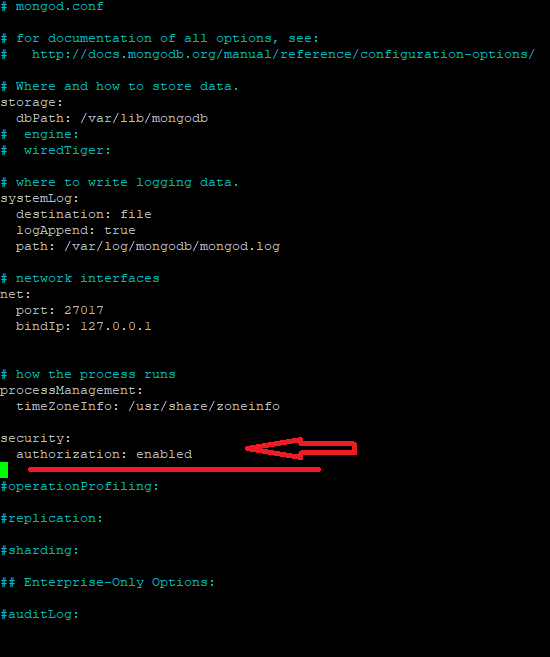
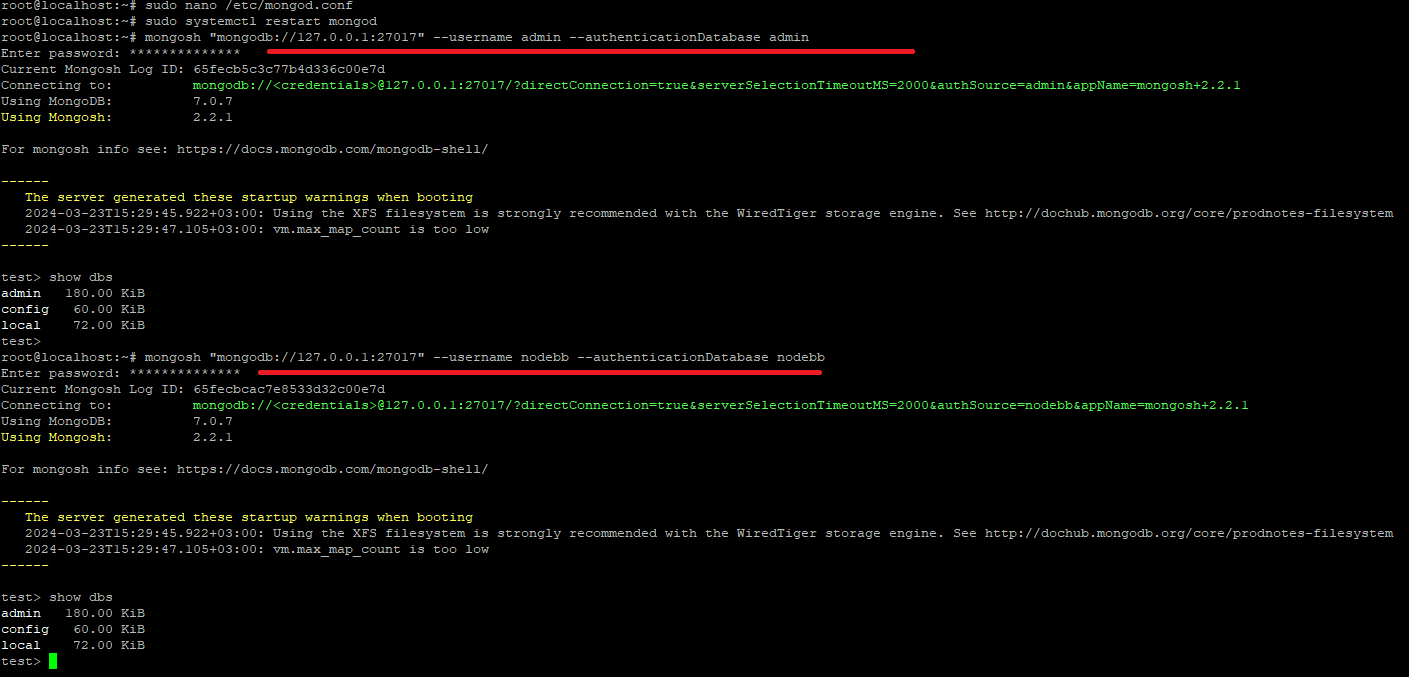
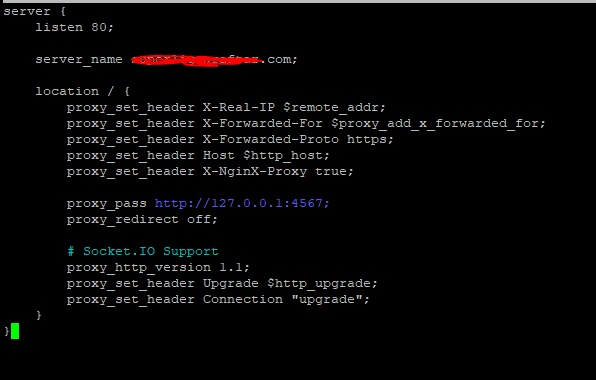
    Hi;
    for nodebb
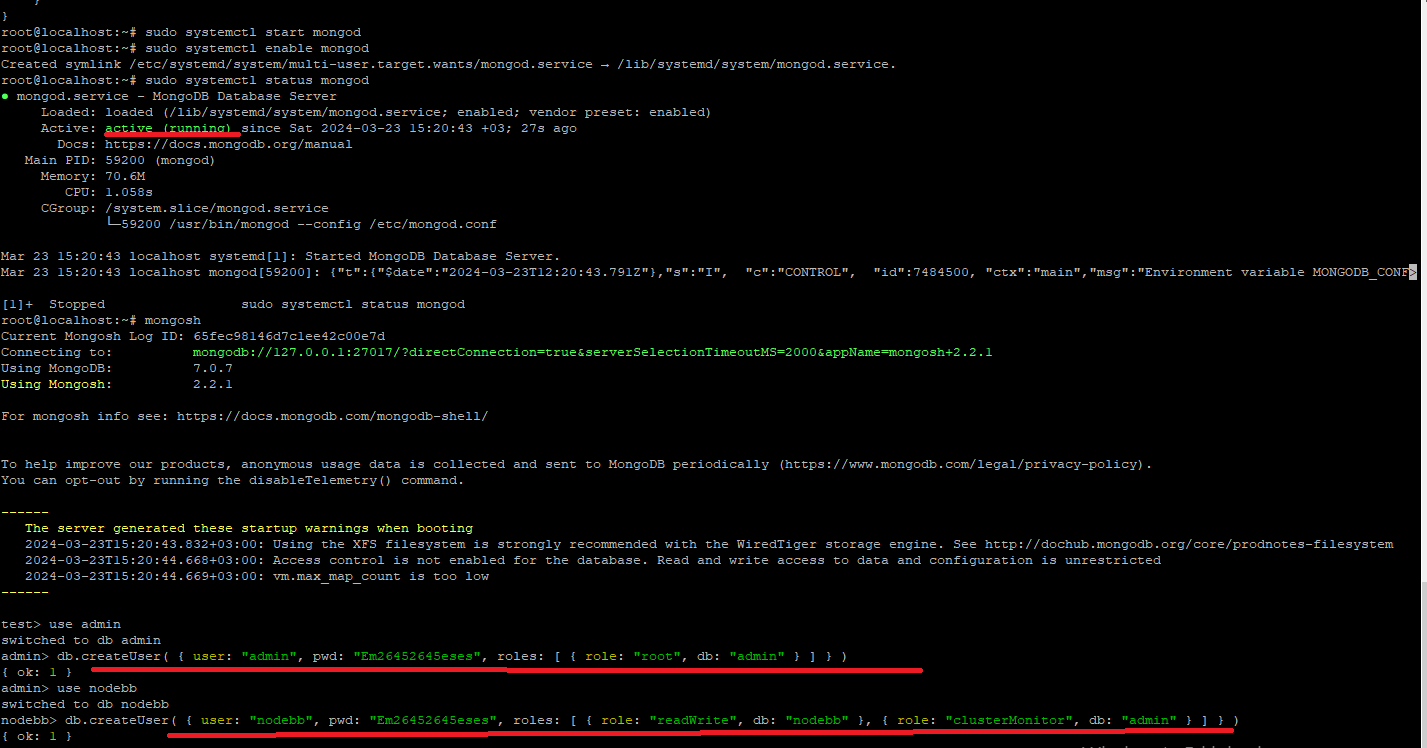
    My Mongodb installation is in the pictures below.
    Do you think my setup is correct?
    sud1.PNG sud2.PNG sud3.PNG sud4.PNG


    [image: yuuuuu.png]
  • crazycells

    Hi @phenomlab , how are you?

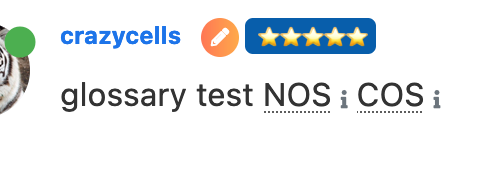
    I have an info icon because of the glossary plugin, however, the icon is not at the place where I want it to be… I made it smaller with this code, however, I also want to change its position, I think I prefer it further above, on the upper right corner of the word. Do you know which codes should I use?

    Screen Shot 2022-01-30 at 4.55.37 PM.png

    .glossary-wrapper {
        .fa-info {
            font-size: .500em;
        }
    }
    

    read more →
    I have just figured it out… it can be targeted with text-decoration-color: I was mistakenly using color
  • crazycells

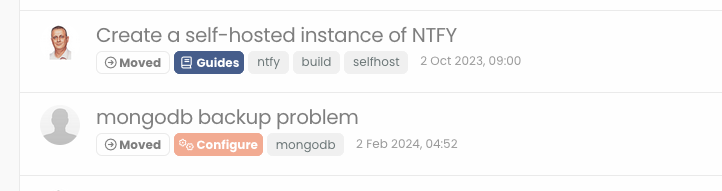
    Hi , I am talking about the moved labels with arrows on the badge that is listed on topics list… how can I target them with CSS?

    Screenshot 2024-03-21 at 15.09.36.png


    @crazycells ah, I see. That makes sense.
  • JAC

    With Facebook, WhatsApp and other dodgy social networks down users have flocked to Sudonix for some general honest chat 😉.


    read more →
    @JAC yeah, I’ve never seen the appeal. I tried to get into LinkedIn a while back and then gave up because it’s just chock full of people who have far too much time on their hands telling anyone who will listen about how great they are and what they have achieved. Actions speak louder than words.
  • crazycells

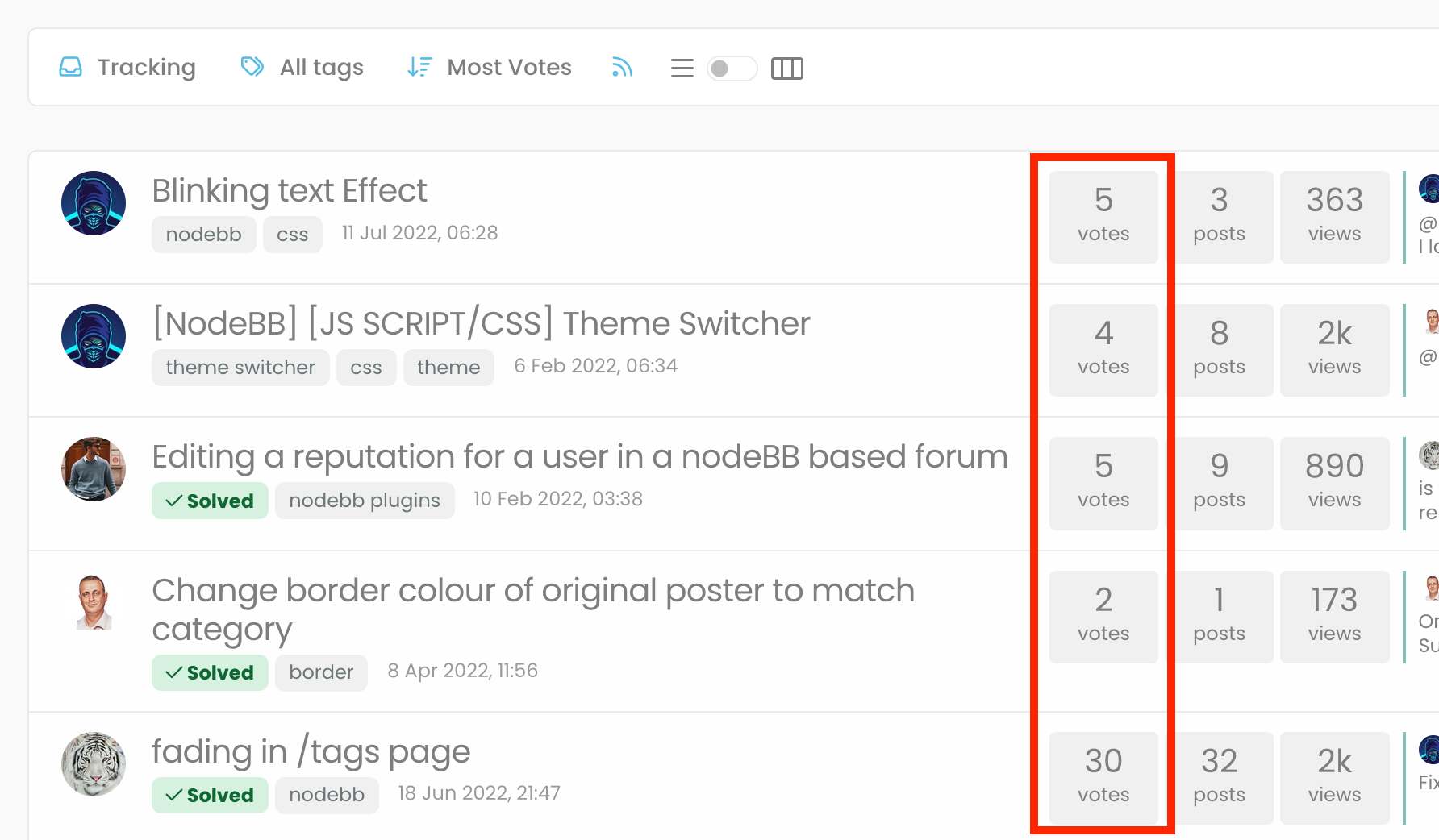
    “most votes” option is ranking the topics according to the votes that the first post got…

    Screenshot 2024-03-16 at 23.42.20.png


    read more →
    @crazycells Agreed. It takes a more sensible approach. Nobody ever upvotes the first post - it’s usually much further down as the conversation progresses.
  • crazycells

    Hello, what would be the CSS codes to prevent voting panel (the one on the right bottom of the posts) to disappear in standard NodeBB? It is annoying that it disappears constantly 😄 You have them very good on sudonix…


    @phenomlab yes, it is thanks a lot…
  • crazycells

    Hi @phenomlab ,

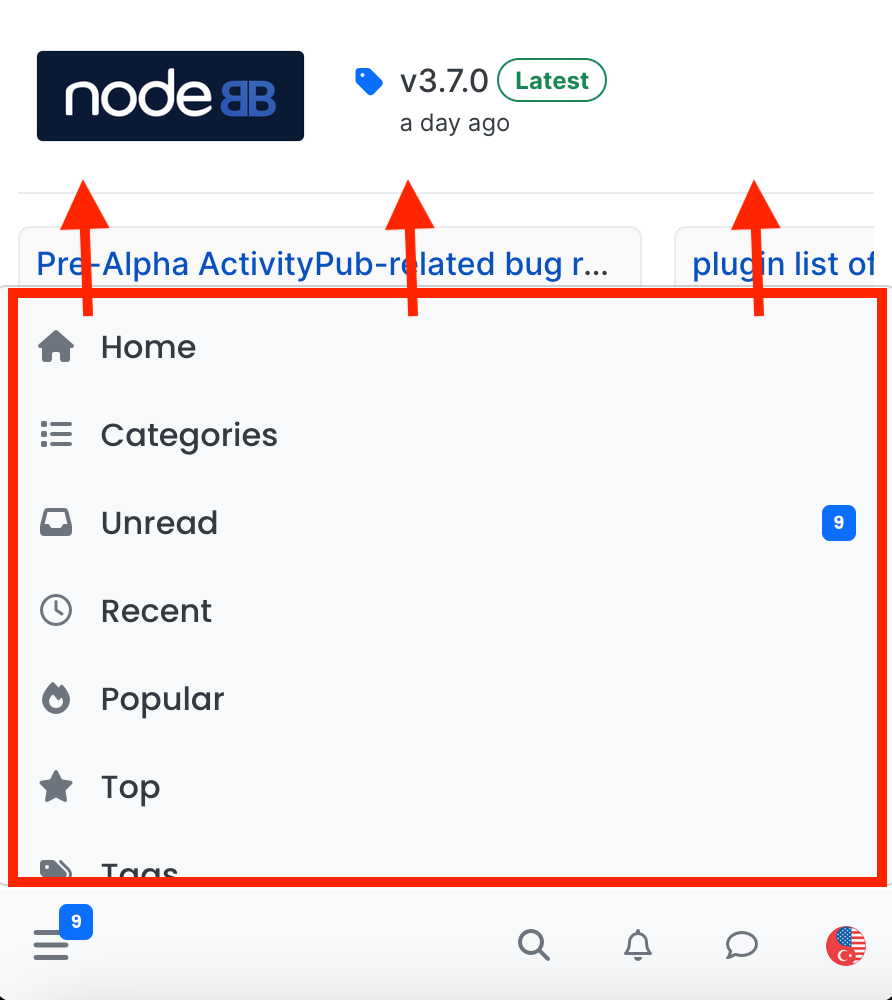
    I am trying to make this menu panel longer… What is the easiest way to do this?

    Screenshot 2024-03-07 at 19.03.19.png


    @crazycells hmm. That’s odd. I haven’t made any changes from recollection but I could be wrong. I’ll need to check. EDIT - very strange. I honestly don’t recall adding the below CSS block to alter the bottom bar, but you’re right… .bottombar-nav { padding: 0px !important; } I’ve removed this so it reflects stock Harmony.
  • phenomlab

    Some of you might have noticed a feature on this forum that further extends the .highlight class in NodeBB from the default of a different colour border such as border-left: 1px solid blue; to something that looks like the below

    57b892b1-296a-4e42-8f05-e0a08efa2068-image.png

    And, as Sudonix has a number of “swatches” or “themes”, these are also colour coordinated to match. For example

    d0368af2-425b-48bf-ad62-f9df5a5450c8-image.png

    9524e9d0-91d7-41e3-9153-2b27aff26a74-image.png

    There are more - try changing the swatch, and then view the last post in each thread, and you’ll see where and how this is being applied.

    I want this effect!!

    Sure you do 🙂 Here’s how to get it. We are going to be extending the .highlight class of NodeBB and will be leveraging the :before pseudonym class as below.

    .highlight:before {
        content: "";
        position: absolute;
        inset: 0;
        border-radius: 0.375rem;
        padding: 3px;
        background: var(--bs-progress-bar-bg);
        -webkit-mask: linear-gradient(var(--bs-body-bg) 0 0) content-box, linear-gradient(var(--bs-body-bg) 0 0);
        -webkit-mask-composite: xor;
        mask-composite: exclude;
        pointer-events: none;
    }
    

    What does this do?

    In summary, this CSS snippet creates a highlighted effect around an element by using an absolutely positioned pseudo-element with a special mask to create an outline or glowing effect. The actual visual appearance would depend on the colours defined by the --bs-progress-bar-bg (note that this is not a NodeBB variable, but one I’ve defined which this forum uses - you’ll need to factor this into your colour scheme) and --bs-body-bg variables, but the technique is quite clever and allows for flexible styling.

    What does your --bs-progress-bar-bg class look like?

    Here’s an example

    --bs-progress-bar-bg: linear-gradient(45deg, #5E81AC, #88C0D0, #8FBCBB, #A3BE8C, #D08770, #BF616A);
    

    Let’s break down the properties to understand how all of this works…

    • content: ""; - This rule sets an empty content for the pseudo-element. This is necessary for the pseudo-element to be rendered.
    • position: absolute; - This rule positions the pseudo-element absolutely within its containing element.
    • inset: 0; - This shorthand rule sets the top, right, bottom, and left properties to 0, effectively making the pseudo-element cover the entire space of its containing element.
    • border-radius: 0.375rem; - This rule sets the border radius of the pseudo-element to create rounded corners. The value “0.375rem” is equivalent to 6 pixels.
    • padding: 3px; - This rule adds padding of 3 pixels to the pseudo-element.
    • background: var(--bs-progress-bar-bg); - This rule sets the background color of the pseudo-element to the value of the CSS custom property “–bs-progress-bar-bg”. Custom properties are a way to define reusable values in CSS.
    • -webkit-mask: linear-gradient(var(--bs-body-bg) 0 0) content-box, linear-gradient(var(--bs-body-bg) 0 0); - This rule applies two linear gradients as masks to the pseudo-element. These gradients essentially create transparent regions in the pseudo-element, revealing the background color underneath.
    • -webkit-mask-composite: xor; - This rule sets the compositing mode for the masks. The “xor” mode combines the two masks using the XOR (exclusive OR) operation.
    • mask-composite: exclude; - This rule sets the compositing mode for the mask to “exclude”. This means that areas where the mask and the content overlap will be excluded, effectively creating a cutout effect.
    • pointer-events: none; - This rule ensures that the pseudo-element does not respond to pointer events, allowing clicks and other interactions to pass through to the underlying elements.

    Using this approach, it’s possible to extend the capabilities of CSS much further than you probably imagined. Obviously, this isn’t something you’d want to overuse, but it can certainly provide a much needed edge for when you are trying to draw attention to a specific object or element.

    Enjoy.


    ah f5 need
  • cagatay

    @phenomlab hi
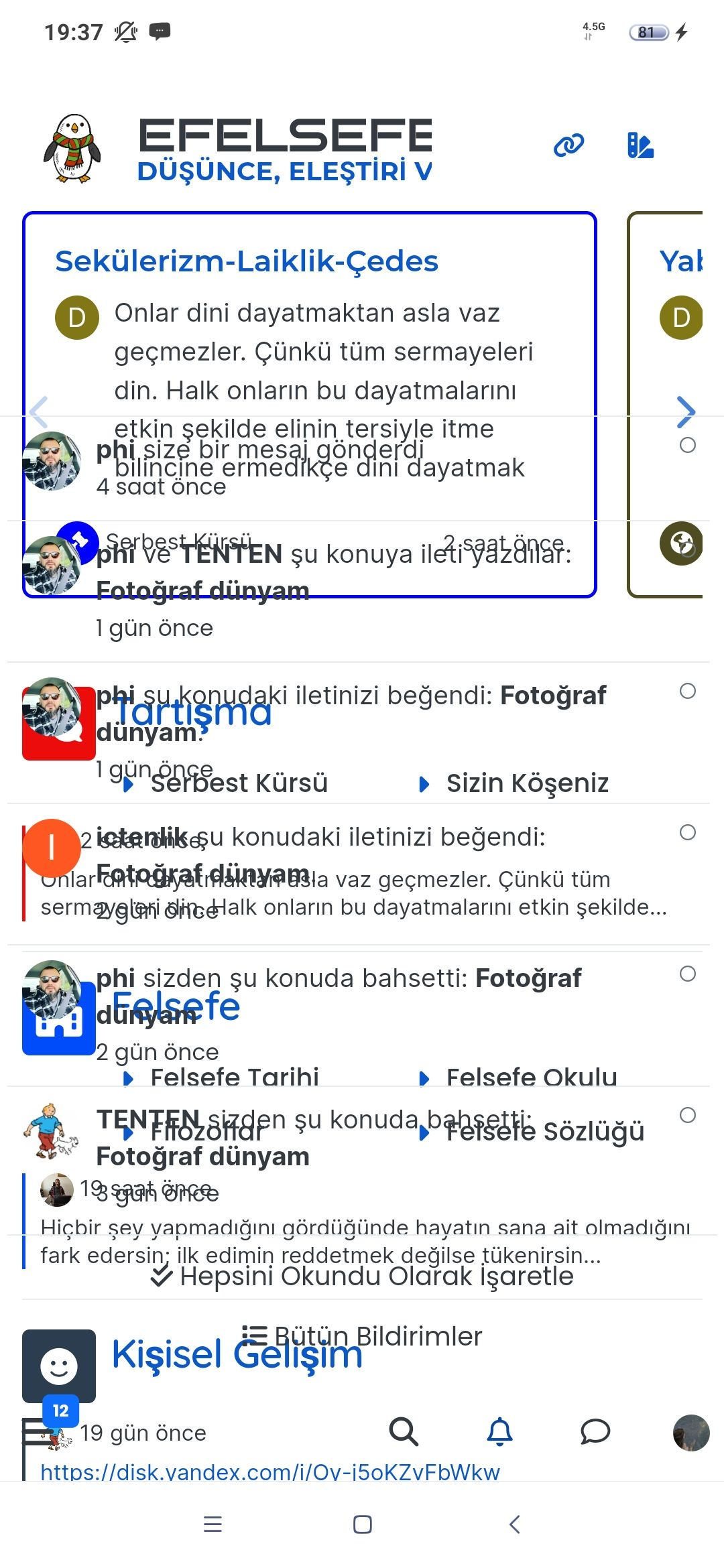
    One of my user sent to me photo and she said that cant see anything, using android mobile.
    What can be problem for her?

    image.png


    @cagatay Those are in /admin/extend/widgets/brand header. Look inside the HTML widget that is there, and you’ll find <div class="socialicons"> <a class="btn-ghost p-2" href="https://github.com/phenomlab" rel="noreferrer noopener"><i style="color: #333;background: #ffffff; width: 26px" class="fa fa-2x fa-github-square"></i></a> <a class="btn-ghost p-2" href="https://linkedin.com/in/phenomlab" rel="noreferrer noopener"><i style="color: #0077B5;background: #ffffff; width: 26px" class="fa fa-2x fa-brands fa-linkedin-square"></i></a> <a class="btn-ghost p-2" href="https://twitter.com/phenomlab" rel="noreferrer noopener"><i style="color: #1DA1F2;background: #ffffff; width: 26px" class="fa fa-2x fa-twitter-square"></i></a> <!-- <a class="btn-ghost p-2" href="https://www.facebook.com/sudonixtech" rel="noreferrer noopener"><i style="color: #4268B2;background: #ffffff; width: 26px" class="fa fa-2x fa-facebook-square"></i></a> --> </div> Remove that block and save.
  • crazycells

    Hi @phenomlab , I cannot click any of the options on the top right side except “tags” button… those buttons cannot be clicked, so I cannot filter the search results…

    Screenshot 2024-03-11 at 19.45.20.png

    additionally, it is not that important, it could be nicer if we can see the top of the “search” title on left top corner…


    read more →
    @phenomlab yes, search page is fixed thanks