Skip to content

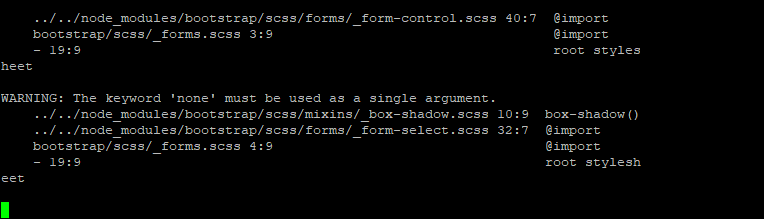
nodebb error logs

Bugs
6 2 1.9k 1

Related Topics
  • What’s going on with NodeBB?

    Performance nodebb script die
    20
    8 Votes
    20 Posts
    3k Views
    @cagatay The most reliable way to upgrade Node.js on Ubuntu depends on how you originally installed it. Method 1: Using NVM (Recommended) If you already use Node Version Manager (NVM), upgrading is simple. NVM allows you to keep both versions and switch between them if needed. Install Node 22: nvm install 22 Switch to Node 22: nvm use 22 Set it as your default: nvm alias default 22 Verify the change: node -v Method 2: Using NodeSource (PPA) If you installed Node.js via apt using the NodeSource repository, you need to update the repository script to point to the new version. Remove the old NodeSource list (optional but cleaner): sudo rm /etc/apt/sources.list.d/nodesource.list Download and run the NodeSource setup script for Node 22: curl -fsSL [https://deb.nodesource.com/setup_22.x](https://deb.nodesource.com/setup_22.x) | sudo -E bash - Install/Upgrade Node.js: sudo apt-get install -y nodejs Verify the installation: node -v Method 3: Using the ‘n’ Package If you have npm installed, you can use the n interactive manager. Clear the npm cache: sudo npm cache clean -f Install the ‘n’ helper: sudo npm install -g n Install Node 22: sudo n 22 Update your shell: hash -r Troubleshooting Permission Denied: If you see permission errors using Method 2 or 3, ensure you are using sudo. Path Issues: If node -v still shows version 20 after upgrading via NVM, restart your terminal or run source ~/.bashrc. Conflicts: Avoid mixing these methods. If you switch from apt to nvm, it is best to sudo apt remove nodejs first to avoid path conflicts.
  • Nodebb 3.2.2

    Bugs nodebb 3.2.2
    27
    1
    11 Votes
    27 Posts
    9k Views
    @crazycells yes, I’ve just seen that and modified the post. It seems to only happen if you have a space between the “greater than” symbol and the actual text. Clearly a markdown thing.
  • Nodebb 3.2.0

    Bugs nodebb nodebb 3.2.0
    20
    1
    2 Votes
    20 Posts
    6k Views
    @crazycells yes, I’m aware of that. Need to fix EDIT- fixed. Caused by the same CSS that is used to absolutely position the “verified” group badge in the posts view. Amended this CSS so that is specifically targets the post stream as below li[component="post"] a[href*="/groups/verified"] { position: absolute !important; left: 8px; z-index: 2; margin-top: 1px; border-radius: 999px !important; line-height: 14px; display: block; height: 22px; margin-left: 0px !important; }
  • Removing blue 'moved' tag from post

    Solved Configure nodebb
    16
    2
    3 Votes
    16 Posts
    4k Views
    @phenomlab Ah, got it working! I reversed the CSS addition to put z index high, and then I could see another error box saying fork title must be at least 3 characters. So made the new fork title longer and button responded.
  • Can you adjust Admin settings on your NodeBB?

    Bugs nodebb
    5
    0 Votes
    5 Posts
    2k Views
    @Panda as, yes, now I understand and that makes 100% sense. It means those who get down voted can still have an opinion and use common services. And yes, you’re right. Rather than down vote, just ignore if you don’t agree.
  • Email validation NodeBB

    Bugs nodebb
    21
    3 Votes
    21 Posts
    8k Views
    @Panda said in Email validation NodeBB: Did you configure that as a custom change to the usual quote icon. How do you do that? I notice on NodeBB site its a solid blue quotes Yes, I changed it. NodeBB by default users the free font awesome library whereas I use the pro (paid) version SDK have access to a wider set of icons, and at different thicknesses etc. The change of colour is just simple CSS.
  • NodeBB: Favicon upload issue

    Solved Configure nodebb favicon
    12
    1
    3 Votes
    12 Posts
    3k Views
    @phenomlab I am on a Mac, so I used the “Option + Command + I”, and then performed the steps. It loaded my favicon! I checked on Firefox which I haven’t used before, and it showed my favicon also! That’s fantastic and thank you for the help!
  • Rotating homepage icons, gifs?

    Solved Configure nodebb
    2
    3 Votes
    2 Posts
    1k Views
    @eveh It’s not a GIF, no. It’s actually a webp file so made much smaller, and uses keyframes to control the rotation on hover. You can easily make your own though The CSS for that is as below @keyframes rotate180 { from { transform: rotate(0deg); } to { transform: rotate(180deg); } } @keyframes rotate0 { from { transform: rotate(180deg); } to { transform: rotate(0deg); } } Your milage may vary on the CSS below, as it’s custom for Sudonix, but this is the class that is used to control the rotate .header .forum-logo, img.forum-logo.head { max-height: 50px; width: auto; height: 30px; margin-top: 9px; max-width: 150px; min-width: 32px; display: inline-block; animation-name: rotate180, rotate0; animation-duration: 1000ms; animation-delay: 0s, 1000ms; animation-iteration-count: 1; animation-timing-function: linear; transition: transform 1000ms ease-in-out; }