Further Widgets question

-
Continuing my Widgets struggle here as although I asked about it on NodeBB forum, I still have remaining areas of confusion.
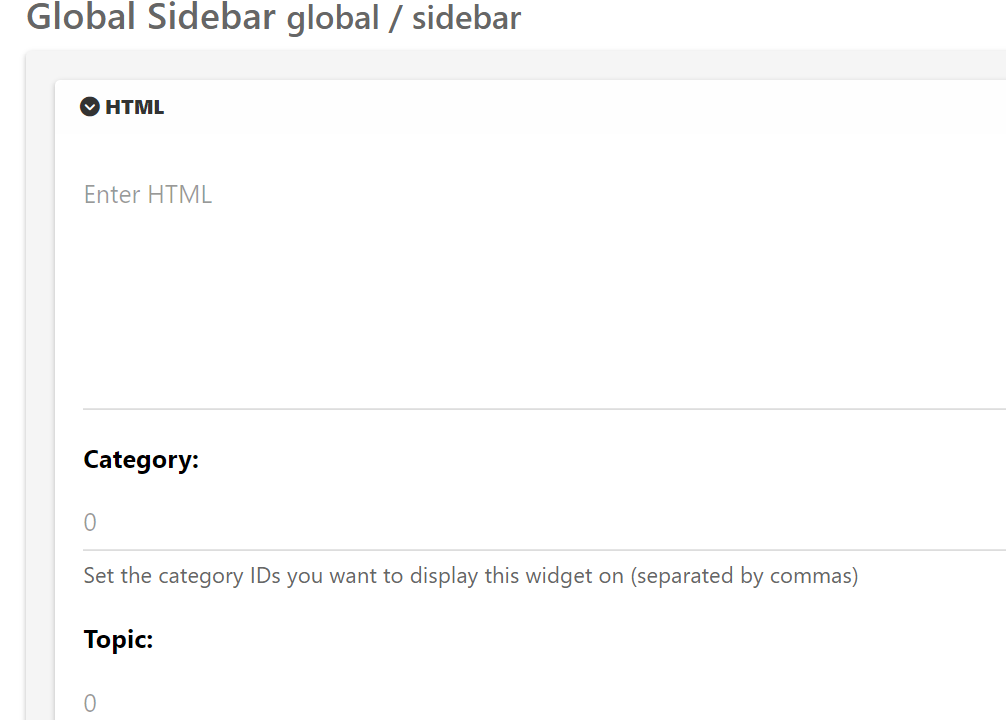
I dont find the menu intuitive. In particular now Ive understood that the global .tpl will apply everywhere, are these Category / Topic settings irrelevant?

Excuse the blurry photo, but what is the point of that
Category 0
Topic 0
If its going to apply globally anyway? -
Continuing my Widgets struggle here as although I asked about it on NodeBB forum, I still have remaining areas of confusion.
I dont find the menu intuitive. In particular now Ive understood that the global .tpl will apply everywhere, are these Category / Topic settings irrelevant?
Excuse the blurry photo, but what is the point of that
Category 0
Topic 0
If its going to apply globally anyway?@Panda is there any reason not to include a screenshot rather than a photo of the screen? It’s a bit hard to decipher a blurry image

-
Apologies, was having technical difficulties with laptop with no PrtSrn button!
Update
There are tpl files for category and categories
It seems this field works under category.tpl and not categories.tplIm confused what the categories.tpl is for, but the category.tpl is working now, so problem solved
-
 undefined Panda has marked this topic as solved on
-
Apologies, was having technical difficulties with laptop with no PrtSrn button!
Update
There are tpl files for category and categories
It seems this field works under category.tpl and not categories.tplIm confused what the categories.tpl is for, but the category.tpl is working now, so problem solved
@Panda category is for a category in its own, so for example, “fruit” whereas categories is the page that contains all categories as a list.

Hello! It looks like you're interested in this conversation, but you don't have an account yet.
Getting fed up of having to scroll through the same posts each visit? When you register for an account, you'll always come back to exactly where you were before, and choose to be notified of new replies (either via email, or push notification). You'll also be able to save bookmarks and upvote posts to show your appreciation to other community members.
With your input, this post could be even better 💗
Register LoginDid this solution help you?
Related Topics
-
-
Smart Widgets
Solved Configure -
-
-
-
-
-