-
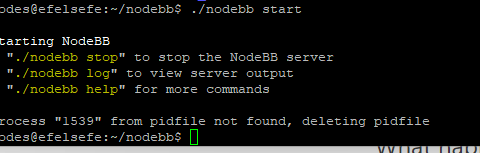
@downpw not work
@justoverclock done, i’ve removed that line and works again
@phenomlab fixed it, removed the two lines and all works again
-
@justoverclock done, i’ve removed that line and works again
@phenomlab fixed it, removed the two lines and all works again
@justoverclock good

What caused the issue ? Was something new added to
nginx.conf? -
@justoverclock you should also change this line
client_max_body_size 5G;That could expose your server to a denial of service if someone decides to upload that large a file.
-
this line ?
    ssl_certificate /home/justoverclock/ssl.combined;
    ssl_certificate_key /home/justoverclock/ssl.key;
PW and WS Spirit alive
-
this line ?
ssl_certificate /home/justoverclock/ssl.combined; ssl_certificate_key /home/justoverclock/ssl.key; -
@downpw yep exactly
@justoverclock those two lines
ssl_certificate /etc/letsencrypt/live/justoverclock.it-0001/fullchain.pem; # managed by Certbot
ssl_certificate_key /etc/letsencrypt/live/justoverclock.it-0001/privkey.pem; # managed by Certbot
Are issued by certbot, but aren’t normally positioned in the
serverblock. Very odd. -
 undefined phenomlab has marked this topic as solved on
-
hello guys again, something odd happened today, i’ve noticed that my website was down, it show
err connection refusedi’ve tried to restart nginx but i get some error that i’m not understand…
root@:~# sudo service nginx restart Job for nginx.service failed because the control process exited with error code. See "systemctl status nginx.service" and "journalctl -xe" for details. root@:~# sudo service nginx start Job for nginx.service failed because the control process exited with error code. See "systemctl status nginx.service" and "journalctl -xe" for details. Jan 22 14:22:43 justoverclock.it systemd[1]: Starting A high performance web server and a reverse proxy server> Jan 22 14:22:43 justoverclock.it nginx[2386]: nginx: [emerg] "ssl_certificate" directive is not allowed here i> Jan 22 14:22:43 justoverclock.it nginx[2386]: nginx: configuration file /etc/nginx/nginx.conf test failed Jan 22 14:22:43 justoverclock.it systemd[1]: nginx.service: Control process exited, code=exited, status=1/FAIL> Jan 22 14:22:43 justoverclock.it systemd[1]: nginx.service: Failed with result 'exit-code'. Jan 22 14:22:43 justoverclock.it systemd[1]: Failed to start A high performance web server and a reverse proxy@justoverclock
I have not yet gone through the comments to see what they answered you,
But never restart Nginx before checking that all the blocks are working properly (this is how you check: sudo nginx -t)
When nginx is restarted with an error it causes all sites (error 521) to shut down until the fault is resolved.
If the test passed successfully you can restart Nginx (how to run: sudo systemctl reload nginx) -
@justoverclock
I have not yet gone through the comments to see what they answered you,
But never restart Nginx before checking that all the blocks are working properly (this is how you check: sudo nginx -t)
When nginx is restarted with an error it causes all sites (error 521) to shut down until the fault is resolved.
If the test passed successfully you can restart Nginx (how to run: sudo systemctl reload nginx)@elhana-fine Also worth noting that
nginx -tis not disruptive, and will not cause your sites to go offline in the event that the test fails.Mark Cutting also advises organisations as a Fractional CIO, Fractional CISO and Executive Advisor, helping boards improve technology governance, cyber resilience and executive decision making. Learn more at Gratmore Ltd
-
@elhana-fine Also worth noting that
nginx -tis not disruptive, and will not cause your sites to go offline in the event that the test fails.@phenomlab
I am writing this from past experience.
Whenever the test failed, all sites on the server were shut down (and returned error 521/502)
Maybe I’m wrong, I write my experiences -
@phenomlab
I am writing this from past experience.
Whenever the test failed, all sites on the server were shut down (and returned error 521/502)
Maybe I’m wrong, I write my experiences@elhana-fine Interesting. That shouldn’t happen with a test. It’s supposed to be a dry run.
Mark Cutting also advises organisations as a Fractional CIO, Fractional CISO and Executive Advisor, helping boards improve technology governance, cyber resilience and executive decision making. Learn more at Gratmore Ltd
-
@elhana-fine Interesting. That shouldn’t happen with a test. It’s supposed to be a dry run.
@phenomlab
I mean when the test failed and I restarted the nginx with the error (sudo systemctl reload nginx)
Apparently an error in one block in Nginx affects all blocks. -
@phenomlab
I mean when the test failed and I restarted the nginx with the error (sudo systemctl reload nginx)
Apparently an error in one block in Nginx affects all blocks.@elhana-fine Yes that will happen of course if you still choose to restart the NGINX service after making a change and the test fails. The test on it’s own will state the error and the line number allowing you to fix that first




Hello! It looks like you're interested in this conversation, but you don't have an account yet.
Getting fed up of having to scroll through the same posts each visit? When you register for an account, you'll always come back to exactly where you were before, and choose to be notified of new replies (either via email, or push notification). You'll also be able to save bookmarks and upvote posts to show your appreciation to other community members.
With your input, this post could be even better 💗
Register LoginDid this solution help you?
Related Topics
-
configure ghost and wordpress combo
Moved Solved WordPress -
-
-
-
-
-
nginx seo urls
Solved Configure -