NodeBB customisation
-
@riekmedia said in NodeBB customisation:
@jac with the css the offline point changes from gray to red
.status.offline {
    color:red;

}
Many thanks for the code that has worked.

 .
.I’ll not be much help technical wise I’m afraid on here but it’s great to see others posting and helping out too
 .
.Is there any way to style this widget at all?
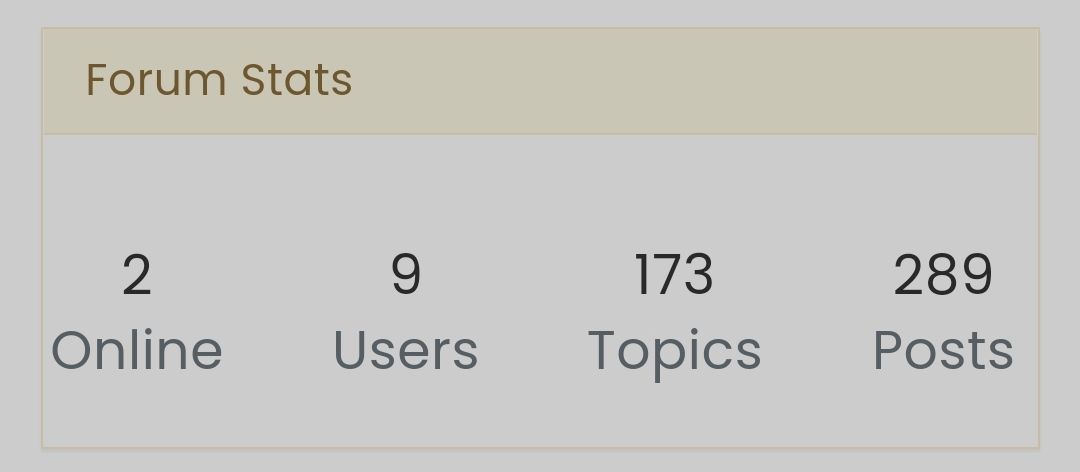
Image uploaded successfully
 .
. -
@jac yes, there is. What do you have in mind ?
-
Unsure if it’s possible but for the title background to be in yellow that’s used throughout the forum and then the main background to be blue with white font?
I’m unsure if this is poss for individual widgets however if this can be achieved that would look great!
Many thanks.
-
Unsure if it’s possible but for the title background to be in yellow that’s used throughout the forum and then the main background to be blue with white font?
I’m unsure if this is poss for individual widgets however if this can be achieved that would look great!
Many thanks.
Basically I’m looking to improve and edit things where I can, so little changes here and there that I think will make a difference
. -
Unsure if it’s possible but for the title background to be in yellow that’s used throughout the forum and then the main background to be blue with white font?
I’m unsure if this is poss for individual widgets however if this can be achieved that would look great!
Many thanks.
@jac said in NodeBB customisation:
I’m unsure if this is poss for individual widgets
Not “out of the box” but absolutely possible with the use of ID attributes once added to the widgets themselves.
Mark Cutting also advises organisations as a Fractional CIO, Fractional CISO and Executive Advisor, helping boards improve technology governance, cyber resilience and executive decision making. Learn more at Gratmore Ltd
-
@jac said in NodeBB customisation:
I’m unsure if this is poss for individual widgets
Not “out of the box” but absolutely possible with the use of ID attributes once added to the widgets themselves.
@phenomlab that definitely sounds great if it is possible
. -
@jac said in NodeBB customisation:
I’m unsure if this is poss for individual widgets
Not “out of the box” but absolutely possible with the use of ID attributes once added to the widgets themselves.
@phenomlab said in NodeBB customisation:
@jac said in NodeBB customisation:
I’m unsure if this is poss for individual widgets
Not “out of the box” but absolutely possible with the use of ID attributes once added to the widgets themselves.
Interested to see how this would look.
-
@phenomlab said in NodeBB customisation:
@jac said in NodeBB customisation:
I’m unsure if this is poss for individual widgets
Not “out of the box” but absolutely possible with the use of ID attributes once added to the widgets themselves.
Interested to see how this would look.
@jac It’ll look like this
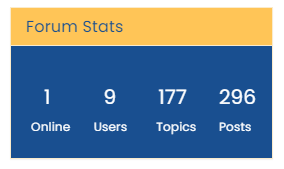
CSS (already applied to your forum)
.panel-heading.custom {
    background: #ffc557;
    color: #194F90;
}
.panel-body.custom2 {
    background: #194F90;
    color: #ffffff;
}
.panel-body.custom2 small {
    color: #ffffff;
    font-size: 40%;
}
.row.forum-stats {
    margin-left: 5px;
    margin-right: 5px;
}
Mark Cutting also advises organisations as a Fractional CIO, Fractional CISO and Executive Advisor, helping boards improve technology governance, cyber resilience and executive decision making. Learn more at Gratmore Ltd
-
@jac It’ll look like this
CSS (already applied to your forum)
.panel-heading.custom { background: #ffc557; color: #194F90; } .panel-body.custom2 { background: #194F90; color: #ffffff; } .panel-body.custom2 small { color: #ffffff; font-size: 40%; } .row.forum-stats { margin-left: 5px; margin-right: 5px; }@phenomlab said in NodeBB customisation:
@jac It’ll look like this
CSS (already applied to your forum)
.panel-heading.custom {
    background: #ffc557;
    color: #194F90;
}
.panel-body.custom2 {
    background: #194F90;
    color: #ffffff;
}
.panel-body.custom2 small {
    color: #ffffff;
    font-size: 40%;
}
.row.forum-stats {
    margin-left: 5px;
    margin-right: 5px;
}
Wow that looks great!!
-
@phenomlab said in NodeBB customisation:
@jac It’ll look like this
CSS (already applied to your forum)
.panel-heading.custom {
    background: #ffc557;
    color: #194F90;
}
.panel-body.custom2 {
    background: #194F90;
    color: #ffffff;
}
.panel-body.custom2 small {
    color: #ffffff;
    font-size: 40%;
}
.row.forum-stats {
    margin-left: 5px;
    margin-right: 5px;
}
Wow that looks great!!
@jac said in NodeBB customisation:
@phenomlab said in NodeBB customisation:
@jac It’ll look like this
CSS (already applied to your forum)
.panel-heading.custom {
    background: #ffc557;
    color: #194F90;
}
.panel-body.custom2 {
    background: #194F90;
    color: #ffffff;
}
.panel-body.custom2 small {
    color: #ffffff;
    font-size: 40%;
}
.row.forum-stats {
    margin-left: 5px;
    margin-right: 5px;
}
Wow that looks great!!
Many thanks Mark incredibly happy with the result!
-
@jac said in NodeBB customisation:
@phenomlab said in NodeBB customisation:
@jac It’ll look like this
CSS (already applied to your forum)
.panel-heading.custom {
    background: #ffc557;
    color: #194F90;
}
.panel-body.custom2 {
    background: #194F90;
    color: #ffffff;
}
.panel-body.custom2 small {
    color: #ffffff;
    font-size: 40%;
}
.row.forum-stats {
    margin-left: 5px;
    margin-right: 5px;
}
Wow that looks great!!
Many thanks Mark incredibly happy with the result!
@jac Good. Thanks for letting me know.
Mark Cutting also advises organisations as a Fractional CIO, Fractional CISO and Executive Advisor, helping boards improve technology governance, cyber resilience and executive decision making. Learn more at Gratmore Ltd
-
-
@phenomlab brilliant mate
 . Thanks again.
I wonder if the slider can be customised with CSS?
Looking to add colour thoughout here and there without overdoing it of course.
-
I wonder if the slider can be customised with CSS?
Looking to add colour thoughout here and there without overdoing it of course.
@jac Can can customise anything with CSS…
Mark Cutting also advises organisations as a Fractional CIO, Fractional CISO and Executive Advisor, helping boards improve technology governance, cyber resilience and executive decision making. Learn more at Gratmore Ltd
-
-
@phenomlab very happy to hear this

@jac said in NodeBB customisation:
@phenomlab very happy to hear this
Yes, but the key here is to not over egg…
Mark Cutting also advises organisations as a Fractional CIO, Fractional CISO and Executive Advisor, helping boards improve technology governance, cyber resilience and executive decision making. Learn more at Gratmore Ltd
-
@jac said in NodeBB customisation:
@phenomlab very happy to hear this
Yes, but the key here is to not over egg…
@phenomlab Absolutely, I’m just looking to do subtle changes which I think you have achieved so far, can’t thank you enough for the help given via Sudonix
. -
@phenomlab Absolutely, I’m just looking to do subtle changes which I think you have achieved so far, can’t thank you enough for the help given via Sudonix
.Is there any way to chance the colour of these at all?
-
@jac I was thinking the boxes to have a blue background with white icons, and for the reply arrow to be a yellow background colour with a white or blue arrow icon.
-
@jac yes, but the css classes used by these are also used elsewhere which may result in undesirable behavior elsewhere.
Mark Cutting also advises organisations as a Fractional CIO, Fractional CISO and Executive Advisor, helping boards improve technology governance, cyber resilience and executive decision making. Learn more at Gratmore Ltd



Hello! It looks like you're interested in this conversation, but you don't have an account yet.
Getting fed up of having to scroll through the same posts each visit? When you register for an account, you'll always come back to exactly where you were before, and choose to be notified of new replies (either via email, or push notification). You'll also be able to save bookmarks and upvote posts to show your appreciation to other community members.
With your input, this post could be even better 💗
Register Login