NodeBB Global Tchat : Forum with many users performance issues
-
Like you know I use glolbal chat plugin
We had a massive influx of registrations and new members which means that they all integrate the chat room of the pluginWe see this topic on github plugin page :
https://github.com/NodeBB/nodebb-plugin-global-chat/issues/5
I see maybe a solution here dating from 2019 : https://github.com/NodeBB/nodebb-plugin-global-chat/issues/5#issuecomment-492242438
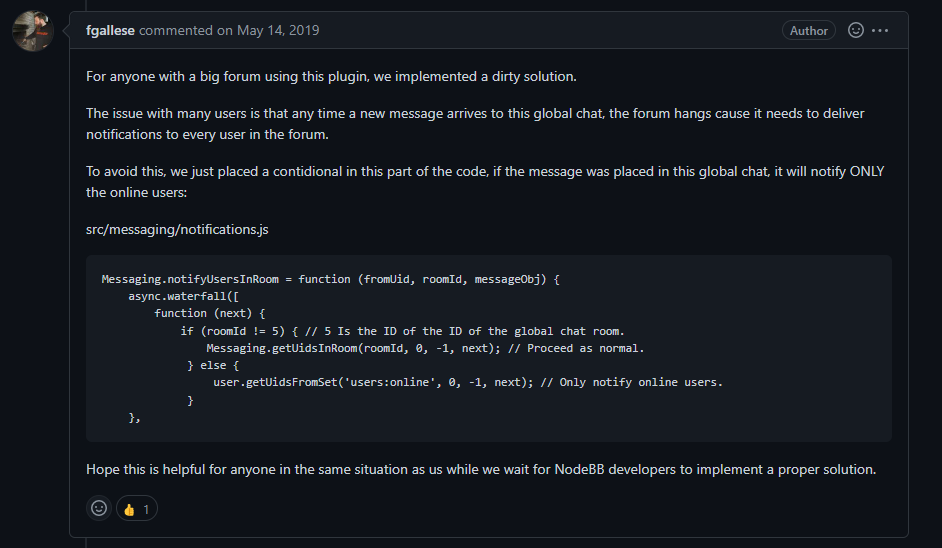
I then asked the question to the staff without an answer :
Is this still relevant?
Where in the file should I put the code?So I’m opening this topic to find out what you think about it with your expert eye

PW and WS Spirit alive
-
Like you know I use glolbal chat plugin
We had a massive influx of registrations and new members which means that they all integrate the chat room of the pluginWe see this topic on github plugin page :
https://github.com/NodeBB/nodebb-plugin-global-chat/issues/5
I see maybe a solution here dating from 2019 : https://github.com/NodeBB/nodebb-plugin-global-chat/issues/5#issuecomment-492242438
I then asked the question to the staff without an answer :
Is this still relevant?
Where in the file should I put the code?So I’m opening this topic to find out what you think about it with your expert eye
@DownPW I’d say that this was still relevant, and would solve the short term issue (in most cases) but if anything, you’ll still experience slowness if you have say 600 users online.
The right way to handle this in my view would be to pass the notification stream to a message queuing service (like RabbitMQ or Redis) and let that process in the back end rather than cause locking on the forum itself. I’m surprised that this is in fact the case as standard emails are being queued and aren’t sent in real time.
I personally don’t use this plugin as you know, so I’d need to review the code first in order to understand it’s structure.
Mark Cutting also advises organisations as a Fractional CIO, Fractional CISO and Executive Advisor, helping boards improve technology governance, cyber resilience and executive decision making. Learn more at Gratmore Ltd
-
@DownPW I’d say that this was still relevant, and would solve the short term issue (in most cases) but if anything, you’ll still experience slowness if you have say 600 users online.
The right way to handle this in my view would be to pass the notification stream to a message queuing service (like RabbitMQ or Redis) and let that process in the back end rather than cause locking on the forum itself. I’m surprised that this is in fact the case as standard emails are being queued and aren’t sent in real time.
I personally don’t use this plugin as you know, so I’d need to review the code first in order to understand it’s structure.
@phenomlab said in NodeBB Global Tchat : Forum with many users performance issues:
I’d say that this was still relevant, and would solve the short term issue (in most cases) but if anything, you’ll still experience slowness if you have say 600 users online.
The right way to handle this in my view would be to pass the notification stream to a message queuing service (like RabbitMQ or Redis) and let that process in the back end rather than cause locking on the forum itself. I’m surprised that this is in fact the case as standard emails are being queued and aren’t sent in real time.
I personally don’t use this plugin as you know, so I’d need to review the code first in order to understand it’s structure.Thank you for your analyse

I would have liked to try the thing all the same, just to see the result
600 users is better than 4000
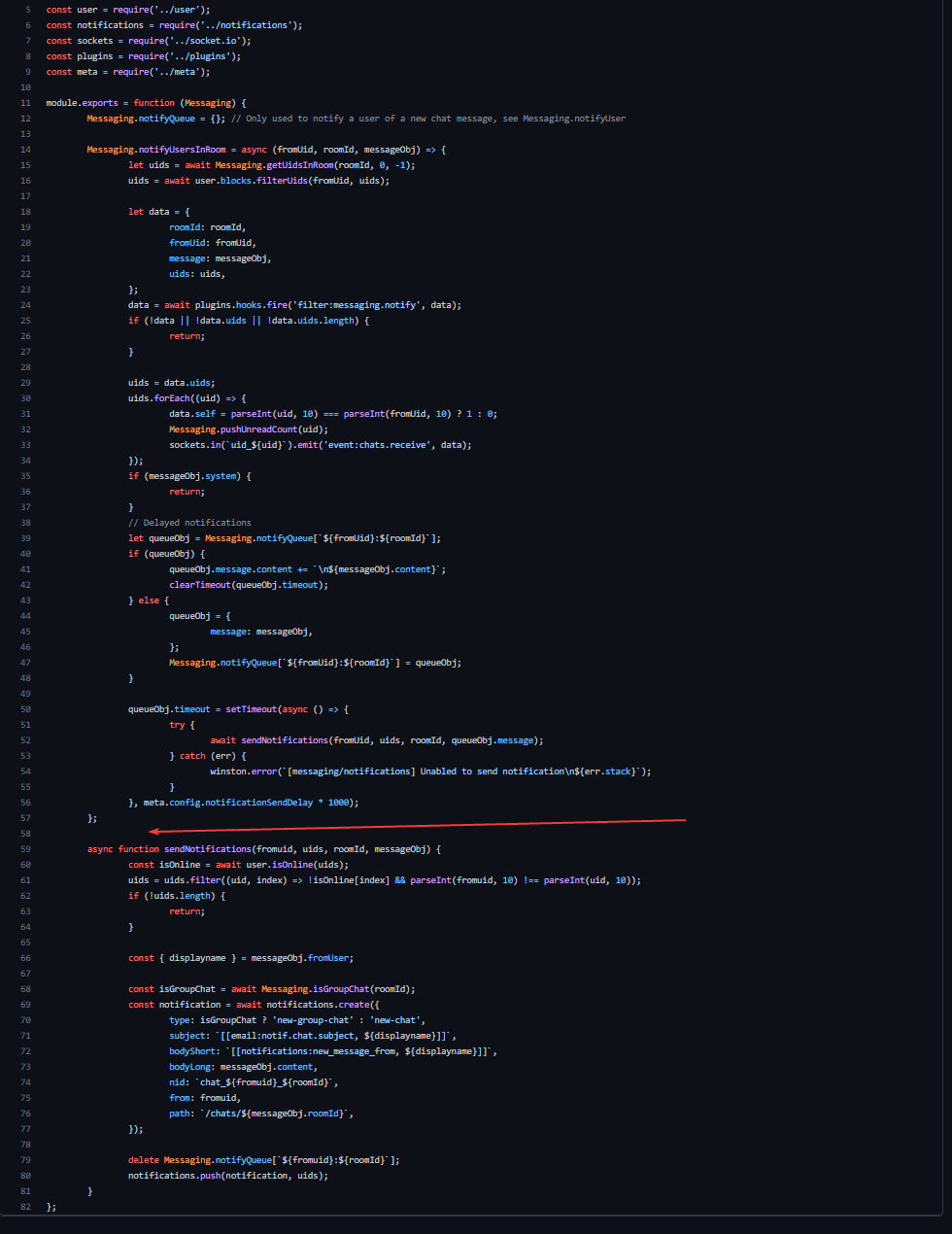
Here is the content of the /src/messsagin/notification.js file
I put it here because I don’t see where to integrate the given code for test :
'use strict';

const winston = require('winston');

const user = require('../user');
const notifications = require('../notifications');
const sockets = require('../socket.io');
const plugins = require('../plugins');
const meta = require('../meta');

module.exports = function (Messaging) {
	Messaging.notifyQueue = {}; // Only used to notify a user of a new chat message, see Messaging.notifyUser

	Messaging.notifyUsersInRoom = async (fromUid, roomId, messageObj) => {
		let uids = await Messaging.getUidsInRoom(roomId, 0, -1);
		uids = await user.blocks.filterUids(fromUid, uids);

		let data = {
			roomId: roomId,
			fromUid: fromUid,
			message: messageObj,
			uids: uids,
		};
		data = await plugins.hooks.fire('filter:messaging.notify', data);
		if (!data || !data.uids || !data.uids.length) {
			return;
		}

		uids = data.uids;
		uids.forEach((uid) => {
			data.self = parseInt(uid, 10) === parseInt(fromUid, 10) ? 1 : 0;
			Messaging.pushUnreadCount(uid);
			sockets.in(`uid_${uid}`).emit('event:chats.receive', data);
		});
		if (messageObj.system) {
			return;
		}
		// Delayed notifications
		let queueObj = Messaging.notifyQueue[`${fromUid}:${roomId}`];
		if (queueObj) {
			queueObj.message.content += `\n${messageObj.content}`;
			clearTimeout(queueObj.timeout);
		} else {
			queueObj = {
				message: messageObj,
			};
			Messaging.notifyQueue[`${fromUid}:${roomId}`] = queueObj;
		}

		queueObj.timeout = setTimeout(async () => {
			try {
				await sendNotifications(fromUid, uids, roomId, queueObj.message);
			} catch (err) {
				winston.error(`[messaging/notifications] Unabled to send notification\n${err.stack}`);
			}
		}, meta.config.notificationSendDelay * 1000);
	};

	async function sendNotifications(fromuid, uids, roomId, messageObj) {
		const isOnline = await user.isOnline(uids);
		uids = uids.filter((uid, index) => !isOnline[index] && parseInt(fromuid, 10) !== parseInt(uid, 10));
		if (!uids.length) {
			return;
		}

		const { displayname } = messageObj.fromUser;

		const isGroupChat = await Messaging.isGroupChat(roomId);
		const notification = await notifications.create({
			type: isGroupChat ? 'new-group-chat' : 'new-chat',
			subject: `email:notif.chat.subject, ${displayname}`,
			bodyShort: `notifications:new_message_from, ${displayname}`,
			bodyLong: messageObj.content,
			nid: `chat_${fromuid}_${roomId}`,
			from: fromuid,
			path: `/chats/${messageObj.roomId}`,
		});

		delete Messaging.notifyQueue[`${fromuid}:${roomId}`];
		notifications.push(notification, uids);
	}
};
PW and WS Spirit alive
-
@phenomlab said in NodeBB Global Tchat : Forum with many users performance issues:
I’d say that this was still relevant, and would solve the short term issue (in most cases) but if anything, you’ll still experience slowness if you have say 600 users online.
The right way to handle this in my view would be to pass the notification stream to a message queuing service (like RabbitMQ or Redis) and let that process in the back end rather than cause locking on the forum itself. I’m surprised that this is in fact the case as standard emails are being queued and aren’t sent in real time.
I personally don’t use this plugin as you know, so I’d need to review the code first in order to understand it’s structure.Thank you for your analyse
I would have liked to try the thing all the same, just to see the result
600 users is better than 4000
Here is the content of the /src/messsagin/notification.js file
I put it here because I don’t see where to integrate the given code for test :
'use strict'; const winston = require('winston'); const user = require('../user'); const notifications = require('../notifications'); const sockets = require('../socket.io'); const plugins = require('../plugins'); const meta = require('../meta'); module.exports = function (Messaging) { Messaging.notifyQueue = {}; // Only used to notify a user of a new chat message, see Messaging.notifyUser Messaging.notifyUsersInRoom = async (fromUid, roomId, messageObj) => { let uids = await Messaging.getUidsInRoom(roomId, 0, -1); uids = await user.blocks.filterUids(fromUid, uids); let data = { roomId: roomId, fromUid: fromUid, message: messageObj, uids: uids, }; data = await plugins.hooks.fire('filter:messaging.notify', data); if (!data || !data.uids || !data.uids.length) { return; } uids = data.uids; uids.forEach((uid) => { data.self = parseInt(uid, 10) === parseInt(fromUid, 10) ? 1 : 0; Messaging.pushUnreadCount(uid); sockets.in(`uid_${uid}`).emit('event:chats.receive', data); }); if (messageObj.system) { return; } // Delayed notifications let queueObj = Messaging.notifyQueue[`${fromUid}:${roomId}`]; if (queueObj) { queueObj.message.content += `\n${messageObj.content}`; clearTimeout(queueObj.timeout); } else { queueObj = { message: messageObj, }; Messaging.notifyQueue[`${fromUid}:${roomId}`] = queueObj; } queueObj.timeout = setTimeout(async () => { try { await sendNotifications(fromUid, uids, roomId, queueObj.message); } catch (err) { winston.error(`[messaging/notifications] Unabled to send notification\n${err.stack}`); } }, meta.config.notificationSendDelay * 1000); }; async function sendNotifications(fromuid, uids, roomId, messageObj) { const isOnline = await user.isOnline(uids); uids = uids.filter((uid, index) => !isOnline[index] && parseInt(fromuid, 10) !== parseInt(uid, 10)); if (!uids.length) { return; } const { displayname } = messageObj.fromUser; const isGroupChat = await Messaging.isGroupChat(roomId); const notification = await notifications.create({ type: isGroupChat ? 'new-group-chat' : 'new-chat', subject: `email:notif.chat.subject, ${displayname}`, bodyShort: `notifications:new_message_from, ${displayname}`, bodyLong: messageObj.content, nid: `chat_${fromuid}_${roomId}`, from: fromuid, path: `/chats/${messageObj.roomId}`, }); delete Messaging.notifyQueue[`${fromuid}:${roomId}`]; notifications.push(notification, uids); } };An idea for where to put this code before I open a thread an NodeBB communauty ?
PW and WS Spirit alive
-
An idea for where to put this code before I open a thread an NodeBB communauty ?
@DownPW not specifically, no, as there is an existing function with the same name. The comma at the end of the revised function would indicate part of an existing array but I’m not entirely sure of where it should be placed - or if it should override the existing function altogether (which I don’t think is the case).
Mark Cutting also advises organisations as a Fractional CIO, Fractional CISO and Executive Advisor, helping boards improve technology governance, cyber resilience and executive decision making. Learn more at Gratmore Ltd
-
@DownPW not specifically, no, as there is an existing function with the same name. The comma at the end of the revised function would indicate part of an existing array but I’m not entirely sure of where it should be placed - or if it should override the existing function altogether (which I don’t think is the case).
PW and WS Spirit alive
-
@DownPW you can always experiment
Mark Cutting also advises organisations as a Fractional CIO, Fractional CISO and Executive Advisor, helping boards improve technology governance, cyber resilience and executive decision making. Learn more at Gratmore Ltd
-
-
@phenomlab no luck

@DownPW what have you tried?
Mark Cutting also advises organisations as a Fractional CIO, Fractional CISO and Executive Advisor, helping boards improve technology governance, cyber resilience and executive decision making. Learn more at Gratmore Ltd
-
-
@phenomlab lot of things
@DownPW can you provide some brief examples?
Mark Cutting also advises organisations as a Fractional CIO, Fractional CISO and Executive Advisor, helping boards improve technology governance, cyber resilience and executive decision making. Learn more at Gratmore Ltd
-
'use strict';

const winston = require('winston');

const user = require('../user');
const notifications = require('../notifications');
const sockets = require('../socket.io');
const plugins = require('../plugins');
const meta = require('../meta');

module.exports = function (Messaging) {
	Messaging.notifyQueue = {}; // Only used to notify a user of a new chat message, see Messaging.notifyUser

	Messaging.notifyUsersInRoom = async (fromUid, roomId, messageObj) => {
		let uids = await Messaging.getUidsInRoom(roomId, 0, -1);
		uids = await user.blocks.filterUids(fromUid, uids);

		let data = {
			roomId: roomId,
			fromUid: fromUid,
			message: messageObj,
			uids: uids,
		};
		data = await plugins.hooks.fire('filter:messaging.notify', data);
		if (!data || !data.uids || !data.uids.length) {
			return;
		}

		uids = data.uids;
		uids.forEach((uid) => {
			data.self = parseInt(uid, 10) === parseInt(fromUid, 10) ? 1 : 0;
			Messaging.pushUnreadCount(uid);
			sockets.in(`uid_${uid}`).emit('event:chats.receive', data);
		});
		if (messageObj.system) {
			return;
		}
		// Delayed notifications
		let queueObj = Messaging.notifyQueue[`${fromUid}:${roomId}`];
		if (queueObj) {
			queueObj.message.content += `\n${messageObj.content}`;
			clearTimeout(queueObj.timeout);
		} else {
			queueObj = {
				message: messageObj,
			};
			Messaging.notifyQueue[`${fromUid}:${roomId}`] = queueObj;
		}

		queueObj.timeout = setTimeout(async () => {
			try {
				await sendNotifications(fromUid, uids, roomId, queueObj.message);
			} catch (err) {
				winston.error(`[messaging/notifications] Unabled to send notification\n${err.stack}`);
			}
		}, meta.config.notificationSendDelay * 1000);


           if (roomId != 11) { // 5 Is the ID of the ID of the global chat room.
               Messaging.getUidsInRoom(roomId, 0, -1); // Proceed as normal.
            } else {
                user.getUidsFromSet('users:online', 0, -1); // Only notify online users.
            }
	};

	async function sendNotifications(fromuid, uids, roomId, messageObj) {
		const isOnline = await user.isOnline(uids);
		uids = uids.filter((uid, index) => !isOnline[index] && parseInt(fromuid, 10) !== parseInt(uid, 10));
		if (!uids.length) {
			return;
		}


		const { displayname } = messageObj.fromUser;

		const isGroupChat = await Messaging.isGroupChat(roomId);
		const notification = await notifications.create({
			type: isGroupChat ? 'new-group-chat' : 'new-chat',
			subject: `email:notif.chat.subject, ${displayname}`,
			bodyShort: `notifications:new_message_from, ${displayname}`,
			bodyLong: messageObj.content,
			nid: `chat_${fromuid}_${roomId}`,
			from: fromuid,
			path: `/chats/${messageObj.roomId}`,
		});

		delete Messaging.notifyQueue[`${fromuid}:${roomId}`];
		notifications.push(notification, uids);
	}


};
nodebb build is ok with this code but I don’t see any diiference of latencies
PW and WS Spirit alive
-
'use strict';

const winston = require('winston');

const user = require('../user');
const notifications = require('../notifications');
const sockets = require('../socket.io');
const plugins = require('../plugins');
const meta = require('../meta');

module.exports = function (Messaging) {
	Messaging.notifyQueue = {}; // Only used to notify a user of a new chat message, see Messaging.notifyUser

	Messaging.notifyUsersInRoom = async (fromUid, roomId, messageObj) => {
		let uids = await Messaging.getUidsInRoom(roomId, 0, -1);
		uids = await user.blocks.filterUids(fromUid, uids);

		let data = {
			roomId: roomId,
			fromUid: fromUid,
			message: messageObj,
			uids: uids,
		};
		data = await plugins.hooks.fire('filter:messaging.notify', data);
		if (!data || !data.uids || !data.uids.length) {
			return;
		}

		uids = data.uids;
		uids.forEach((uid) => {
			data.self = parseInt(uid, 10) === parseInt(fromUid, 10) ? 1 : 0;
			Messaging.pushUnreadCount(uid);
			sockets.in(`uid_${uid}`).emit('event:chats.receive', data);
		});
		if (messageObj.system) {
			return;
		}
		// Delayed notifications
		let queueObj = Messaging.notifyQueue[`${fromUid}:${roomId}`];
		if (queueObj) {
			queueObj.message.content += `\n${messageObj.content}`;
			clearTimeout(queueObj.timeout);
		} else {
			queueObj = {
				message: messageObj,
			};
			Messaging.notifyQueue[`${fromUid}:${roomId}`] = queueObj;
		}

		queueObj.timeout = setTimeout(async () => {
			try {
				await sendNotifications(fromUid, uids, roomId, queueObj.message);
			} catch (err) {
				winston.error(`[messaging/notifications] Unabled to send notification\n${err.stack}`);
			}
		}, meta.config.notificationSendDelay * 1000);


           if (roomId != 11) { // 5 Is the ID of the ID of the global chat room.
               Messaging.getUidsInRoom(roomId, 0, -1); // Proceed as normal.
            } else {
                user.getUidsFromSet('users:online', 0, -1); // Only notify online users.
            }
	};

	async function sendNotifications(fromuid, uids, roomId, messageObj) {
		const isOnline = await user.isOnline(uids);
		uids = uids.filter((uid, index) => !isOnline[index] && parseInt(fromuid, 10) !== parseInt(uid, 10));
		if (!uids.length) {
			return;
		}


		const { displayname } = messageObj.fromUser;

		const isGroupChat = await Messaging.isGroupChat(roomId);
		const notification = await notifications.create({
			type: isGroupChat ? 'new-group-chat' : 'new-chat',
			subject: `email:notif.chat.subject, ${displayname}`,
			bodyShort: `notifications:new_message_from, ${displayname}`,
			bodyLong: messageObj.content,
			nid: `chat_${fromuid}_${roomId}`,
			from: fromuid,
			path: `/chats/${messageObj.roomId}`,
		});

		delete Messaging.notifyQueue[`${fromuid}:${roomId}`];
		notifications.push(notification, uids);
	}


};
nodebb build is ok with this code but I don’t see any diiference of latencies
'use strict'; const winston = require('winston'); const user = require('../user'); const notifications = require('../notifications'); const sockets = require('../socket.io'); const plugins = require('../plugins'); const meta = require('../meta'); module.exports = function (Messaging) { Messaging.notifyQueue = {}; // Only used to notify a user of a new chat message, see Messaging.notifyUser Messaging.notifyUsersInRoom = async (fromUid, roomId, messageObj) => { let uids = await Messaging.getUidsInRoom(roomId, 0, -1); uids = await user.blocks.filterUids(fromUid, uids); let data = { roomId: roomId, fromUid: fromUid, message: messageObj, uids: uids, }; data = await plugins.hooks.fire('filter:messaging.notify', data); if (!data || !data.uids || !data.uids.length) { return; } uids = data.uids; uids.forEach((uid) => { data.self = parseInt(uid, 10) === parseInt(fromUid, 10) ? 1 : 0; Messaging.pushUnreadCount(uid); sockets.in(`uid_${uid}`).emit('event:chats.receive', data); }); if (messageObj.system) { return; } // Delayed notifications let queueObj = Messaging.notifyQueue[`${fromUid}:${roomId}`]; if (queueObj) { queueObj.message.content += `\n${messageObj.content}`; clearTimeout(queueObj.timeout); } else { queueObj = { message: messageObj, }; Messaging.notifyQueue[`${fromUid}:${roomId}`] = queueObj; } queueObj.timeout = setTimeout(async () => { try { await sendNotifications(fromUid, uids, roomId, queueObj.message); } catch (err) { winston.error(`[messaging/notifications] Unabled to send notification\n${err.stack}`); } }, meta.config.notificationSendDelay * 1000); }; async function sendNotifications(fromuid, uids, roomId, messageObj) { const isOnline = await user.isOnline(uids); uids = uids.filter((uid, index) => !isOnline[index] && parseInt(fromuid, 10) !== parseInt(uid, 10)); if (!uids.length) { return; } if (roomId != 11) { // 5 Is the ID of the ID of the global chat room. Messaging.getUidsInRoom(roomId, 0, -1); // Proceed as normal. } else { user.getUidsFromSet('users:online', 0, -1); // Only notify online users. } const { displayname } = messageObj.fromUser; const isGroupChat = await Messaging.isGroupChat(roomId); const notification = await notifications.create({ type: isGroupChat ? 'new-group-chat' : 'new-chat', subject: `email:notif.chat.subject, ${displayname}`, bodyShort: `notifications:new_message_from, ${displayname}`, bodyLong: messageObj.content, nid: `chat_${fromuid}_${roomId}`, from: fromuid, path: `/chats/${messageObj.roomId}`, }); delete Messaging.notifyQueue[`${fromuid}:${roomId}`]; notifications.push(notification, uids); } }; -
 undefined DownPW has marked this topic as solved on

Hello! It looks like you're interested in this conversation, but you don't have an account yet.
Getting fed up of having to scroll through the same posts each visit? When you register for an account, you'll always come back to exactly where you were before, and choose to be notified of new replies (either via email, or push notification). You'll also be able to save bookmarks and upvote posts to show your appreciation to other community members.
With your input, this post could be even better 💗
Register LoginDid this solution help you?
Related Topics
-
Nodebb to Xenforo
Solved Configure -
-
-
-
Gettin Erors NodeBB
Solved Configure -
-
NodeBB metadata
Solved Configure -
Forum not loading
Solved Configure