Skip to content

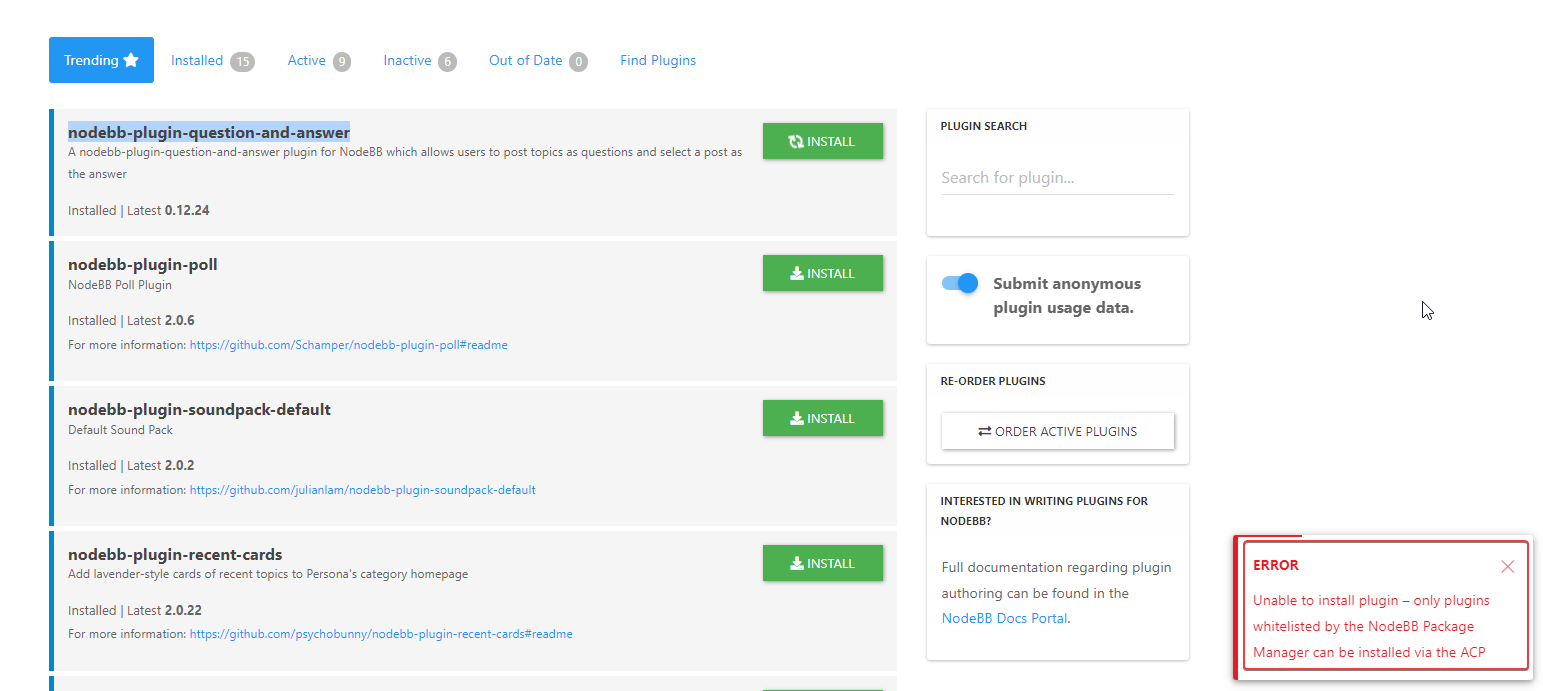
Error install plugin

Solved Customisation
8 3 4.2k 1

Did this solution help you?
Did you find the suggested solution useful? Support 💗 Sudonix with a coffee
If your organisation needs deeper expertise around infrastructure, security, or technology leadership, learn more about Phenomlab Ltd. Many of the deeper technical guides behind Sudonix are published there.

Related Topics
  • What’s going on with NodeBB?

    Performance nodebb script die
    20
    8 Votes
    20 Posts
    2k Views
    @cagatay The most reliable way to upgrade Node.js on Ubuntu depends on how you originally installed it. Method 1: Using NVM (Recommended) If you already use Node Version Manager (NVM), upgrading is simple. NVM allows you to keep both versions and switch between them if needed. Install Node 22: nvm install 22 Switch to Node 22: nvm use 22 Set it as your default: nvm alias default 22 Verify the change: node -v Method 2: Using NodeSource (PPA) If you installed Node.js via apt using the NodeSource repository, you need to update the repository script to point to the new version. Remove the old NodeSource list (optional but cleaner): sudo rm /etc/apt/sources.list.d/nodesource.list Download and run the NodeSource setup script for Node 22: curl -fsSL [https://deb.nodesource.com/setup_22.x](https://deb.nodesource.com/setup_22.x) | sudo -E bash - Install/Upgrade Node.js: sudo apt-get install -y nodejs Verify the installation: node -v Method 3: Using the ‘n’ Package If you have npm installed, you can use the n interactive manager. Clear the npm cache: sudo npm cache clean -f Install the ‘n’ helper: sudo npm install -g n Install Node 22: sudo n 22 Update your shell: hash -r Troubleshooting Permission Denied: If you see permission errors using Method 2 or 3, ensure you are using sudo. Path Issues: If node -v still shows version 20 after upgrading via NVM, restart your terminal or run source ~/.bashrc. Conflicts: Avoid mixing these methods. If you switch from apt to nvm, it is best to sudo apt remove nodejs first to avoid path conflicts.
  • Please help me, I can't install nodebb

    Locked Solved Customisation nodebb
    7
    5 Votes
    7 Posts
    1k Views
    Installation completed, verified, and tested. Correct installation methodology is below https://docs.nodebb.org/installing/os/ubuntu/
  • Whitespace fixes in Nodebb

    Solved Customisation nodebb
    18
    2
    7 Votes
    18 Posts
    4k Views
    @Panda Just circling back here with something of an update (which I think you’ll like). I’ve completely restructured the ranking system. There are now less ranks, with a higher point threshold to reach them. More importantly, if you reload the site, you’ll notice that the ranks are now icons. I also removed the “Author” badge, and made this a single icon, which (to me) looks much better.
  • 14 Votes
    69 Posts
    42k Views
    @phenomlab Seems to be better with some scaling fix for redis on redis.conf. I haven’t seen the message yet since the changes I made # I increase it to the value of /proc/sys/net/core/somaxconn tcp-backlog 4096 # I'm uncommenting because it can slow down Redis. Uncommented by default !!!!!!!!!!!!!!!!!!! #save 900 1 #save 300 10 #save 60 10000 If you have other Redis optimizations. I take all your advice https://severalnines.com/blog/performance-tuning-redis/
  • Q&A Plugin Changes NodeBB

    Solved Customisation nodebb q&a plugin
    25
    1
    6 Votes
    25 Posts
    7k Views
    @phenomlab said in Q&A Plugin Changes NodeBB: float: right; left: 10px; } worked thank you
  • Plugin Install Error

    Solved Customisation plugin error discord
    6
    1
    2 Votes
    6 Posts
    2k Views
    @Sampo2910 no problems. Happy to help. Just remember that this particular method isn’t the best in the sense that it may not get update notifications. The general recommendation here would be to move back to the official npm repo as soon as the GitHub version has been merged. For the meantime, it’ll work fine though.
  • Recent Cards plugin customization

    Solved Customisation nodebb
    21
    1
    13 Votes
    21 Posts
    8k Views
    @pobojmoks that’s easily done by modifying the code provided here so that it targets background rather than border In essence, the below should work $(document).ready(function() { $(window).on('action:ajaxify.end', function(data) { $('.recent-card-container').each(function(i) { var dataId = $(this).attr("data-cid"); var color = $('[role="presentation"]', this).css("background-color"); console.log("data-cid " + dataId + " is " + color); $('[data-cid="' + dataId + '"] .recent-card').attr("style", "background-color: " + color); }); }); });
  • NodeBB metadata

    Solved Configure nodebb
    4
    2 Votes
    4 Posts
    1k Views
    @phenomlab said in NodeBB metadata: @jac Are you sure ? https://www.google.co.uk/search?q=site%3Astockportcounty.fans&sxsrf=AOaemvLwnaZL-PliU_2dBOg_Eo1pMVhBjg%3A1638982328139&source=hp&ei=uOKwYeatBcOsad3yp7AE&iflsig=ALs-wAMAAAAAYbDwyLBSDcG5XYoFCKwQFhgz94wTxOcV&ved=0ahUKEwjm6dX71NT0AhVDVhoKHV35CUYQ4dUDCAk&uact=5&oq=site%3Astockportcounty.fans&gs_lcp=Cgdnd3Mtd2l6EAM6BAgjECc6CwgAEIAEELEDEIMBOg4ILhCABBCxAxDHARCjAjoRCC4QgAQQsQMQgwEQxwEQowI6BQguEIAEOggIABCABBCxAzoFCAAQgAQ6CAguELEDEIMBOgsILhCABBDHARCvAToICC4QgAQQsQM6BQgAELEDOgsILhCABBDHARDRAzoLCAAQgAQQsQMQyQM6BQgAEJIDUABYySZg0CdoAHAAeACAAW2IAa0NkgEEMjMuMpgBAKABAQ&sclient=gws-wiz Fair enough 🤪🤪.