NodeBB 1.19.3
-
nope, i have test the installation for 2 times
this error when access:
internal server error
very odd, I’ve never had any problems when installing nodebb
@DownPW If you issue
./nodebb startdoes this work if you then issue./nodebb log? Sounds like a NGINX issue to me -
No nginx conf
./nodebb sytart = no error
./nodebb log when i access
2022-02-17T15:26:25.097Z [4567/1884] - error: /
Error: Login sessions require session support. Did you forget to use `express-session` middleware?
    at SessionStrategy.authenticate (/home/nodebb/nodebb/node_modules/passport/lib/strategies/session.js:46:41)
    at attempt (/home/nodebb/nodebb/node_modules/passport/lib/middleware/authenticate.js:369:16)
    at authenticate (/home/nodebb/nodebb/node_modules/passport/lib/middleware/authenticate.js:370:7)
    at Layer.handle [as handle_request] (/home/nodebb/nodebb/node_modules/express/lib/router/layer.js:95:5)
    at trim_prefix (/home/nodebb/nodebb/node_modules/express/lib/router/index.js:323:13)
    at /home/nodebb/nodebb/node_modules/express/lib/router/index.js:284:7
    at Function.process_params (/home/nodebb/nodebb/node_modules/express/lib/router/index.js:341:12)
    at next (/home/nodebb/nodebb/node_modules/express/lib/router/index.js:275:10)
    at initialize (/home/nodebb/nodebb/node_modules/passport/lib/middleware/initialize.js:89:5)
    at Layer.handle [as handle_request] (/home/nodebb/nodebb/node_modules/express/lib/router/layer.js:95:5)
TypeError: Cannot read property 'startsWith' of undefined
    at Object.getBaseUrl (/home/nodebb/nodebb/node_modules/nodebb-plugin-emoji/build/lib/base-url.js:7:25)
    at Object.addStylesheet [as method] (/home/nodebb/nodebb/node_modules/nodebb-plugin-emoji/build/lib/index.js:75:32)
    at fireMethod (/home/nodebb/nodebb/src/plugins/hooks.js:137:25)
    at Object.fireFilterHook [as filter] (/home/nodebb/nodebb/src/plugins/hooks.js:168:18)
    at processTicksAndRejections (internal/process/task_queues.js:95:5)
    at async Hooks.fire (/home/nodebb/nodebb/src/plugins/hooks.js:105:17)
    at async Promise.all (index 1)
    at async Tags.parse (/home/nodebb/nodebb/src/meta/tags.js:146:18)
    at async renderMethod (/home/nodebb/nodebb/src/middleware/render.js:49:12)
    at async ServerResponse.renderOverride [as render] (/home/nodebb/nodebb/src/middleware/render.js:92:5)
PW and WS Spirit alive
-
No nginx conf
./nodebb sytart = no error
./nodebb log when i access
2022-02-17T15:26:25.097Z [4567/1884] - error: / Error: Login sessions require session support. Did you forget to use `express-session` middleware? at SessionStrategy.authenticate (/home/nodebb/nodebb/node_modules/passport/lib/strategies/session.js:46:41) at attempt (/home/nodebb/nodebb/node_modules/passport/lib/middleware/authenticate.js:369:16) at authenticate (/home/nodebb/nodebb/node_modules/passport/lib/middleware/authenticate.js:370:7) at Layer.handle [as handle_request] (/home/nodebb/nodebb/node_modules/express/lib/router/layer.js:95:5) at trim_prefix (/home/nodebb/nodebb/node_modules/express/lib/router/index.js:323:13) at /home/nodebb/nodebb/node_modules/express/lib/router/index.js:284:7 at Function.process_params (/home/nodebb/nodebb/node_modules/express/lib/router/index.js:341:12) at next (/home/nodebb/nodebb/node_modules/express/lib/router/index.js:275:10) at initialize (/home/nodebb/nodebb/node_modules/passport/lib/middleware/initialize.js:89:5) at Layer.handle [as handle_request] (/home/nodebb/nodebb/node_modules/express/lib/router/layer.js:95:5) TypeError: Cannot read property 'startsWith' of undefined at Object.getBaseUrl (/home/nodebb/nodebb/node_modules/nodebb-plugin-emoji/build/lib/base-url.js:7:25) at Object.addStylesheet [as method] (/home/nodebb/nodebb/node_modules/nodebb-plugin-emoji/build/lib/index.js:75:32) at fireMethod (/home/nodebb/nodebb/src/plugins/hooks.js:137:25) at Object.fireFilterHook [as filter] (/home/nodebb/nodebb/src/plugins/hooks.js:168:18) at processTicksAndRejections (internal/process/task_queues.js:95:5) at async Hooks.fire (/home/nodebb/nodebb/src/plugins/hooks.js:105:17) at async Promise.all (index 1) at async Tags.parse (/home/nodebb/nodebb/src/meta/tags.js:146:18) at async renderMethod (/home/nodebb/nodebb/src/middleware/render.js:49:12) at async ServerResponse.renderOverride [as render] (/home/nodebb/nodebb/src/middleware/render.js:92:5)@DownPW Potentially dumb question, but why is the path
/home/nodebb/nodebb?Also, why are you trying to install the 18.x branch when you should be using 19.x ?
I see
cd /home/nodebb
git clone -b v1.18.x https://github.com/NodeBB/NodeBB.git nodebb
cd nodebb
This should be
cd /home/nodebb git clone -b v1.19.x https://github.com/NodeBB/NodeBB.git nodebb cd nodebb -
I have test to install 1.19.x too and i have error too
PW and WS Spirit alive
-
@DownPW and you are executing
./nodebb setupfrom the correct directory ?Mark Cutting also advises organisations as a Fractional CIO, Fractional CISO and Executive Advisor, helping boards improve technology governance, cyber resilience and executive decision making. Learn more at Gratmore Ltd
-
yes
-
I think they really have a problem on the github and coincidentally it’s a plugin on which they had big problems that was in question. (emoji)
PW and WS Spirit alive
-
I think they really have a problem on the github and coincidentally it’s a plugin on which they had big problems that was in question. (emoji)
@DownPW Looking at the error message, I’d say you’re right.
-
here a gif for the problem of perf.
On a clean install of nodeBB on a clean install server VMThe problem is just when I refresh the page entierly or ACP access

No problem on 1.18.x or 1.19.2
very odd
PW and WS Spirit alive
-
here a gif for the problem of perf.
On a clean install of nodeBB on a clean install server VMThe problem is just when I refresh the page entierly or ACP access
No problem on 1.18.x or 1.19.2
very odd
@DownPW Looks like that’s waiting for a response from something. Have you run this site through the F12 developer tools -> Network tab to see where the delay is ?
-
PW and WS Spirit alive
-
@DownPW 8ms is nothing - less than one second… ?
-
you not see at the good place

EDIT:
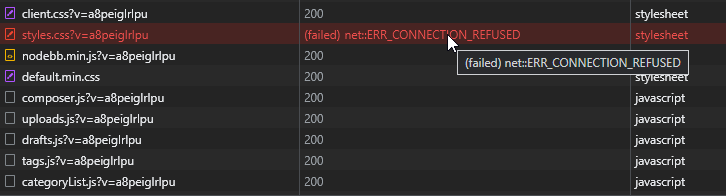
coincidence? Emoji CSS failed !
I don’t believeI think we put the finger on something
PW and WS Spirit alive
-
you not see at the good place
EDIT:coincidence? Emoji CSS failed !
I don’t believeI think we put the finger on something
@DownPW Yes, you’re right. For some strange reason, that CSS file is not being served - but should be on your server if you check the path.
-
yes it still here
EDIT:
I have remove the directory when I have the problem of install with 1.18.x
But when I upgrade to 1.19.3, he have reinstalled by default
PW and WS Spirit alive
-
yes it still here
EDIT:
I have remove the directory when I have the problem of install with 1.18.x
But when I upgrade to 1.19.3, he have reinstalled by default
@DownPW I see this
Mark Cutting also advises organisations as a Fractional CIO, Fractional CISO and Executive Advisor, helping boards improve technology governance, cyber resilience and executive decision making. Learn more at Gratmore Ltd
-
-
@phenomlab on your website ?
@DownPW No - on yours.
-
ha lol ok
-
because you are guest maybe because not me




Hello! It looks like you're interested in this conversation, but you don't have an account yet.
Getting fed up of having to scroll through the same posts each visit? When you register for an account, you'll always come back to exactly where you were before, and choose to be notified of new replies (either via email, or push notification). You'll also be able to save bookmarks and upvote posts to show your appreciation to other community members.
With your input, this post could be even better 💗
Register Login