NodeBB customisation
-
-
Hi Mark,
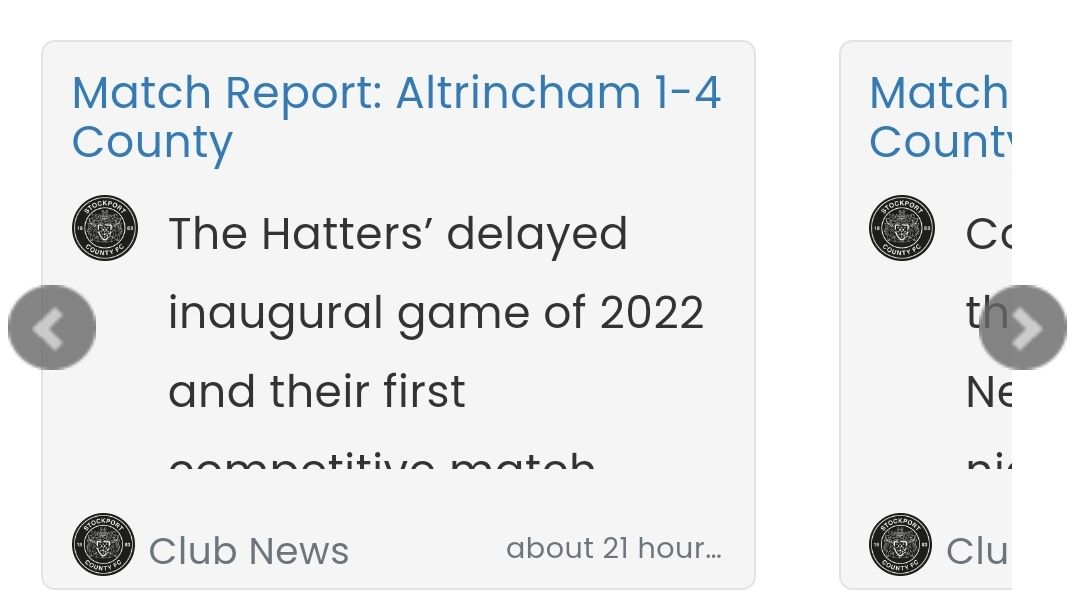
Is there any way to put a borer on these boxes or style them to match the other widgets? So for example like the quote link and hover colour?
Many thanks
-
Hi Mark,
Is there any way to put a borer on these boxes or style them to match the other widgets? So for example like the quote link and hover colour?
Many thanks
@jac also do you know if the “user reading discussion” plugin will enable to view who’s reading the thread on mobile?
-
@jac said in NodeBB customisation:
@phenomlab
Hi Mark,
Is there any way to put a borer on these boxes or style them to match the other widgets? So for example like the quote link and hover colour?Many thanks
Yeah it’s possible
example here for border color, background, or shadow, transparency, border radius :
.recent-cards .recent-card-container .recent-card {
    height: 200px;
    width: 100%;
    padding: 10px;
    position: relative;
    border: 1px solid #YOURCOLOR; /*border color*/
    box-shadow: 0px 0px 8px #YOURCOLOR; /*add a border shadow color*/
    background-color: #YOURCOLOR; /*background color*/
    border-radius: 5px; /*Radius*/
    margin-bottom: 10px;
    color: #YOURCOLOR; /* Text color*/
    opacity: 0.8; /*Opacity, trnasparency*/
}
Other example for categories and time :
.recent-cards .recent-card-container .recent-card .footer .category-item a, .recent-cards .recent-card-container .recent-card .footer .sort-info { color: #YOURCOLOR; white-space: nowrap; text-overflow: ellipsis; display: block; overflow: hidden; }@jac said in NodeBB customisation:
@jac also do you know if the “user reading discussion” plugin will enable to view who’s reading the thread on mobile?
EDIT:
Hmm if you talk about nodebb-plugin-browsing-users, the don’t work on mobile (we don’t see who read or talk at real time like on desktop).
But when a user is on a topic or write a comment, you see him on desktop.I think this is normal because there is not enough free space in the header topic on mobile to display the avatars like on desktop
PW and WS Spirit alive
-
@jac said in NodeBB customisation:
@phenomlab
Hi Mark,
Is there any way to put a borer on these boxes or style them to match the other widgets? So for example like the quote link and hover colour?Many thanks
Yeah it’s possible
example here for border color, background, or shadow, transparency, border radius :
.recent-cards .recent-card-container .recent-card {
    height: 200px;
    width: 100%;
    padding: 10px;
    position: relative;
    border: 1px solid #YOURCOLOR; /*border color*/
    box-shadow: 0px 0px 8px #YOURCOLOR; /*add a border shadow color*/
    background-color: #YOURCOLOR; /*background color*/
    border-radius: 5px; /*Radius*/
    margin-bottom: 10px;
    color: #YOURCOLOR; /* Text color*/
    opacity: 0.8; /*Opacity, trnasparency*/
}
Other example for categories and time :
.recent-cards .recent-card-container .recent-card .footer .category-item a, .recent-cards .recent-card-container .recent-card .footer .sort-info { color: #YOURCOLOR; white-space: nowrap; text-overflow: ellipsis; display: block; overflow: hidden; }@jac said in NodeBB customisation:
@jac also do you know if the “user reading discussion” plugin will enable to view who’s reading the thread on mobile?
EDIT:
Hmm if you talk about nodebb-plugin-browsing-users, the don’t work on mobile (we don’t see who read or talk at real time like on desktop).
But when a user is on a topic or write a comment, you see him on desktop.I think this is normal because there is not enough free space in the header topic on mobile to display the avatars like on desktop
@downpw said in NodeBB customisation:
@jac said in NodeBB customisation:
@phenomlabHi Mark,
Is there any way to put a borer on these boxes or style them to match the other widgets? So for example like the quote link and hover colour?Many thanks
Yeah it’s possible
example here for border color, background, or shadow, transparency, border radius :
.recent-cards .recent-card-container .recent-card {
    height: 200px;
    width: 100%;
    padding: 10px;
    position: relative;
    border: 1px solid #YOURCOLOR; /*border color*/
    box-shadow: 0px 0px 8px #YOURCOLOR; /*add a border shadow color*/
    background-color: #YOURCOLOR; /*background color*/
    border-radius: 5px; /*Radius*/
    margin-bottom: 10px;
    color: #YOURCOLOR; /* Text color*/
    opacity: 0.8; /*Opacity, trnasparency*/
}
Other example for categories and time :
.recent-cards .recent-card-container .recent-card .footer .category-item a, .recent-cards .recent-card-container .recent-card .footer .sort-info { color: #YOURCOLOR; white-space: nowrap; text-overflow: ellipsis; display: block; overflow: hidden; }@jac said in NodeBB customisation:
@jac also do you know if the “user reading discussion” plugin will enable to view who’s reading the thread on mobile?
Hmm if you talk about nodebb-plugin-browsing-users, the don’t work on mobile
Brilliant thank you very much for the information @DownPW

-
@downpw said in NodeBB customisation:
@jac said in NodeBB customisation:
@phenomlabHi Mark,
Is there any way to put a borer on these boxes or style them to match the other widgets? So for example like the quote link and hover colour?Many thanks
Yeah it’s possible
example here for border color, background, or shadow, transparency, border radius :
.recent-cards .recent-card-container .recent-card {
    height: 200px;
    width: 100%;
    padding: 10px;
    position: relative;
    border: 1px solid #YOURCOLOR; /*border color*/
    box-shadow: 0px 0px 8px #YOURCOLOR; /*add a border shadow color*/
    background-color: #YOURCOLOR; /*background color*/
    border-radius: 5px; /*Radius*/
    margin-bottom: 10px;
    color: #YOURCOLOR; /* Text color*/
    opacity: 0.8; /*Opacity, trnasparency*/
}
Other example for categories and time :
.recent-cards .recent-card-container .recent-card .footer .category-item a, .recent-cards .recent-card-container .recent-card .footer .sort-info { color: #YOURCOLOR; white-space: nowrap; text-overflow: ellipsis; display: block; overflow: hidden; }@jac said in NodeBB customisation:
@jac also do you know if the “user reading discussion” plugin will enable to view who’s reading the thread on mobile?
Hmm if you talk about nodebb-plugin-browsing-users, the don’t work on mobile
Brilliant thank you very much for the information @DownPW
@jac said in NodeBB customisation:
@downpw said in NodeBB customisation:
@jac said in NodeBB customisation:
@phenomlabHi Mark,
Is there any way to put a borer on these boxes or style them to match the other widgets? So for example like the quote link and hover colour?Many thanks
Yeah it’s possible
example here for border color, background, or shadow, transparency, border radius :
.recent-cards .recent-card-container .recent-card {
    height: 200px;
    width: 100%;
    padding: 10px;
    position: relative;
    border: 1px solid #YOURCOLOR; /*border color*/
    box-shadow: 0px 0px 8px #YOURCOLOR; /*add a border shadow color*/
    background-color: #YOURCOLOR; /*background color*/
    border-radius: 5px; /*Radius*/
    margin-bottom: 10px;
    color: #YOURCOLOR; /* Text color*/
    opacity: 0.8; /*Opacity, trnasparency*/
}
Other example for categories and time :
.recent-cards .recent-card-container .recent-card .footer .category-item a, .recent-cards .recent-card-container .recent-card .footer .sort-info { color: #YOURCOLOR; white-space: nowrap; text-overflow: ellipsis; display: block; overflow: hidden; }@jac said in NodeBB customisation:
@jac also do you know if the “user reading discussion” plugin will enable to view who’s reading the thread on mobile?
Hmm if you talk about nodebb-plugin-browsing-users, the don’t work on mobile
Brilliant thank you very much for the information @DownPW
How to do this
 .
. -
@downpw said in NodeBB customisation:
Hmm if you talk about nodebb-plugin-browsing-users, the don’t work on mobile (we don’t see who read or talk at real time like on desktop).
I think that’s just CSS set to hide on mobile viewport ?
Mark Cutting also advises organisations as a Fractional CIO, Fractional CISO and Executive Advisor, helping boards improve technology governance, cyber resilience and executive decision making. Learn more at Gratmore Ltd
-
@jac said in NodeBB customisation:
@downpw said in NodeBB customisation:
@jac said in NodeBB customisation:
@phenomlabHi Mark,
Is there any way to put a borer on these boxes or style them to match the other widgets? So for example like the quote link and hover colour?Many thanks
Yeah it’s possible
example here for border color, background, or shadow, transparency, border radius :
.recent-cards .recent-card-container .recent-card {
    height: 200px;
    width: 100%;
    padding: 10px;
    position: relative;
    border: 1px solid #YOURCOLOR; /*border color*/
    box-shadow: 0px 0px 8px #YOURCOLOR; /*add a border shadow color*/
    background-color: #YOURCOLOR; /*background color*/
    border-radius: 5px; /*Radius*/
    margin-bottom: 10px;
    color: #YOURCOLOR; /* Text color*/
    opacity: 0.8; /*Opacity, trnasparency*/
}
Other example for categories and time :
.recent-cards .recent-card-container .recent-card .footer .category-item a, .recent-cards .recent-card-container .recent-card .footer .sort-info { color: #YOURCOLOR; white-space: nowrap; text-overflow: ellipsis; display: block; overflow: hidden; }@jac said in NodeBB customisation:
@jac also do you know if the “user reading discussion” plugin will enable to view who’s reading the thread on mobile?
Hmm if you talk about nodebb-plugin-browsing-users, the don’t work on mobile
Brilliant thank you very much for the information @DownPW
How to do this
.@jac said in NodeBB customisation:
How to do this
You should be able to use the (example) CSS provided by @DownPW
-
@downpw said in NodeBB customisation:
Hmm if you talk about nodebb-plugin-browsing-users, the don’t work on mobile (we don’t see who read or talk at real time like on desktop).
I think that’s just CSS set to hide on mobile viewport ?
@phenomlab said in NodeBB customisation:
@downpw said in NodeBB customisation:
Hmm if you talk about nodebb-plugin-browsing-users, the don’t work on mobile (we don’t see who read or talk at real time like on desktop).
I think that’s just CSS set to hide on mobile viewport ?
Yeah maybe

@phenomlab said in NodeBB customisation:
@jac said in NodeBB customisation:
How to do this
You should be able to use the (example) CSS provided by @DownPW
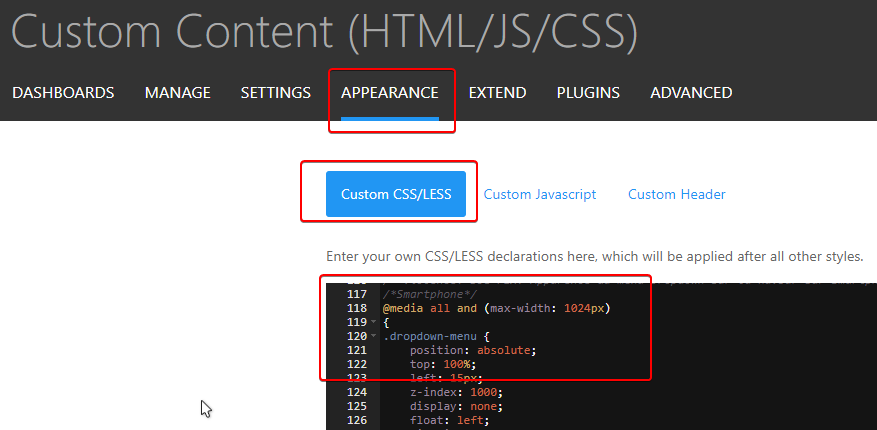
Like said @phenomlab, you can use this CSS code on ACP/APPEARANCE/Custom CSS/LESS :
PW and WS Spirit alive
-
@phenomlab said in NodeBB customisation:
@downpw said in NodeBB customisation:
Hmm if you talk about nodebb-plugin-browsing-users, the don’t work on mobile (we don’t see who read or talk at real time like on desktop).
I think that’s just CSS set to hide on mobile viewport ?
Yeah maybe
@phenomlab said in NodeBB customisation:
@jac said in NodeBB customisation:
How to do this
You should be able to use the (example) CSS provided by @DownPW
Like said @phenomlab, you can use this CSS code on ACP/APPEARANCE/Custom CSS/LESS :
@downpw said in NodeBB customisation:
@phenomlab said in NodeBB customisation:
@downpw said in NodeBB customisation:
Hmm if you talk about nodebb-plugin-browsing-users, the don’t work on mobile (we don’t see who read or talk at real time like on desktop).
I think that’s just CSS set to hide on mobile viewport ?
Yeah maybe
@phenomlab said in NodeBB customisation:
@jac said in NodeBB customisation:
How to do this
You should be able to use the (example) CSS provided by @DownPW
Like said @phenomlab, you can use this CSS code on ACP/APPEARANCE/Custom CSS/LESS :
Many thanks to both
-
@downpw said in NodeBB customisation:
@phenomlab said in NodeBB customisation:
@downpw said in NodeBB customisation:
Hmm if you talk about nodebb-plugin-browsing-users, the don’t work on mobile (we don’t see who read or talk at real time like on desktop).
I think that’s just CSS set to hide on mobile viewport ?
Yeah maybe
@phenomlab said in NodeBB customisation:
@jac said in NodeBB customisation:
How to do this
You should be able to use the (example) CSS provided by @DownPW
Like said @phenomlab, you can use this CSS code on ACP/APPEARANCE/Custom CSS/LESS :
Many thanks to both
@jac said in NodeBB customisation:
@downpw said in NodeBB customisation:
@phenomlab said in NodeBB customisation:
@downpw said in NodeBB customisation:
Hmm if you talk about nodebb-plugin-browsing-users, the don’t work on mobile (we don’t see who read or talk at real time like on desktop).
I think that’s just CSS set to hide on mobile viewport ?
Yeah maybe
@phenomlab said in NodeBB customisation:
@jac said in NodeBB customisation:
How to do this
You should be able to use the (example) CSS provided by @DownPW
Like said @phenomlab, you can use this CSS code on ACP/APPEARANCE/Custom CSS/LESS :
Many thanks to both
Must try this tomorrow


-
@jac said in NodeBB customisation:
@downpw said in NodeBB customisation:
@phenomlab said in NodeBB customisation:
@downpw said in NodeBB customisation:
Hmm if you talk about nodebb-plugin-browsing-users, the don’t work on mobile (we don’t see who read or talk at real time like on desktop).
I think that’s just CSS set to hide on mobile viewport ?
Yeah maybe
@phenomlab said in NodeBB customisation:
@jac said in NodeBB customisation:
How to do this
You should be able to use the (example) CSS provided by @DownPW
Like said @phenomlab, you can use this CSS code on ACP/APPEARANCE/Custom CSS/LESS :
Many thanks to both
Must try this tomorrow
@jac said in NodeBB customisation:
@jac said in NodeBB customisation:
@downpw said in NodeBB customisation:
@phenomlab said in NodeBB customisation:
@downpw said in NodeBB customisation:
Hmm if you talk about nodebb-plugin-browsing-users, the don’t work on mobile (we don’t see who read or talk at real time like on desktop).
I think that’s just CSS set to hide on mobile viewport ?
Yeah maybe
@phenomlab said in NodeBB customisation:
@jac said in NodeBB customisation:
How to do this
You should be able to use the (example) CSS provided by @DownPW
Like said @phenomlab, you can use this CSS code on ACP/APPEARANCE/Custom CSS/LESS :
Many thanks to both
Must try this tomorrow
Would there be any reason why the colour shows differently in the nav bar and card slider?
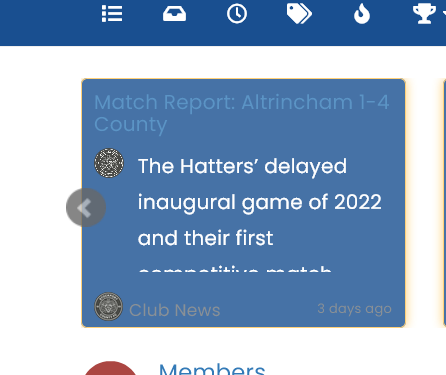
Obviously needs a lot of work with the link colours etc.
-
@jac said in NodeBB customisation:
@jac said in NodeBB customisation:
@downpw said in NodeBB customisation:
@phenomlab said in NodeBB customisation:
@downpw said in NodeBB customisation:
Hmm if you talk about nodebb-plugin-browsing-users, the don’t work on mobile (we don’t see who read or talk at real time like on desktop).
I think that’s just CSS set to hide on mobile viewport ?
Yeah maybe
@phenomlab said in NodeBB customisation:
@jac said in NodeBB customisation:
How to do this
You should be able to use the (example) CSS provided by @DownPW
Like said @phenomlab, you can use this CSS code on ACP/APPEARANCE/Custom CSS/LESS :
Many thanks to both
Must try this tomorrow
Would there be any reason why the colour shows differently in the nav bar and card slider?
Obviously needs a lot of work with the link colours etc.
@jac Yes, because they are links that sit inside another DIV, so they will auto inherit from the
a hrefCSS. You can override that with this (as an example - choose the colour you prefer).recent-card-body a { color: #ffffff; }Mark Cutting also advises organisations as a Fractional CIO, Fractional CISO and Executive Advisor, helping boards improve technology governance, cyber resilience and executive decision making. Learn more at Gratmore Ltd
-
@jac Yes, because they are links that sit inside another DIV, so they will auto inherit from the
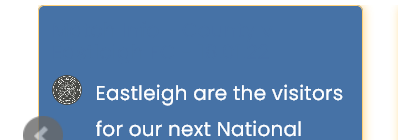
a hrefCSS. You can override that with this (as an example - choose the colour you prefer).recent-card-body a { color: #ffffff; }@phenomlab Thanks Mark for the fast response.
Unfortunately the above change only changes the title colour?
-
or just
a {
    color: #YOURCOLOR;
    text-decoration: none;
}
but this code change other things like title of topic or a hlink for example.
It all depends on what you want to get but the phenomlab method is better
For the difference of color you must use the same color code than the navbar
Here a good link for color code I use: https://htmlcolorcodes.com
PW and WS Spirit alive
-
or just
a {
    color: #YOURCOLOR;
    text-decoration: none;
}
but this code change other things like title of topic or a hlink for example.
It all depends on what you want to get but the phenomlab method is better
For the difference of color you must use the same color code than the navbar
Here a good link for color code I use: https://htmlcolorcodes.com
@downpw Exactly - this is a bit more specific
.footer .pull-right span, .recent-cards .recent-card-container .recent-card .footer .category-item a { color: #ffffff !important; } -
or just
a {
    color: #YOURCOLOR;
    text-decoration: none;
}
but this code change other things like title of topic or a hlink for example.
It all depends on what you want to get but the phenomlab method is better
For the difference of color you must use the same color code than the navbar
Here a good link for color code I use: https://htmlcolorcodes.com
@downpw said in NodeBB customisation:
Here a good link for color code
One of my favourites along with this beauty
https://coolors.co/4381c1-bdadea-bea2c2-a37871-4e4b5cMark Cutting also advises organisations as a Fractional CIO, Fractional CISO and Executive Advisor, helping boards improve technology governance, cyber resilience and executive decision making. Learn more at Gratmore Ltd
-
@downpw said in NodeBB customisation:
Here a good link for color code
One of my favourites along with this beauty
https://coolors.co/4381c1-bdadea-bea2c2-a37871-4e4b5cOh yeah he looks like very good

PW and WS Spirit alive
-
Oh yeah he looks like very good
@downpw @phenomlab thanks all.
if you go to link you’ll see I now have sorted most of it, although I am still unable to match the nav bar colour to the hover cards colour despite this being the same colour hex. Am I doing something wrong?

-
@downpw @phenomlab thanks all.
if you go to link you’ll see I now have sorted most of it, although I am still unable to match the nav bar colour to the hover cards colour despite this being the same colour hex. Am I doing something wrong?
@jac When you say
navbarare you referring to this ?
Mark Cutting also advises organisations as a Fractional CIO, Fractional CISO and Executive Advisor, helping boards improve technology governance, cyber resilience and executive decision making. Learn more at Gratmore Ltd



Hello! It looks like you're interested in this conversation, but you don't have an account yet.
Getting fed up of having to scroll through the same posts each visit? When you register for an account, you'll always come back to exactly where you were before, and choose to be notified of new replies (either via email, or push notification). You'll also be able to save bookmarks and upvote posts to show your appreciation to other community members.
With your input, this post could be even better 💗
Register LoginRelated Topics
-
-
-
-
-
-
-
-
Customising NodeBB
Locked Customisation