Planned sunset of NTFY plugin
-
Those of you who regularly visit the NodeBB forums have problably noticed this
https://community.nodebb.org/topic/18279/native-push-notifications-support-for-nodebb
And as a result, this new commit
https://github.com/NodeBB/NodeBB/commit/aa060d31d130cd54d18cd8dc2f25ba7de58f4fea
@julian now has the native push notifications working, and as a result, Sudonix now has them also - see screenshot of how to enable this feature here
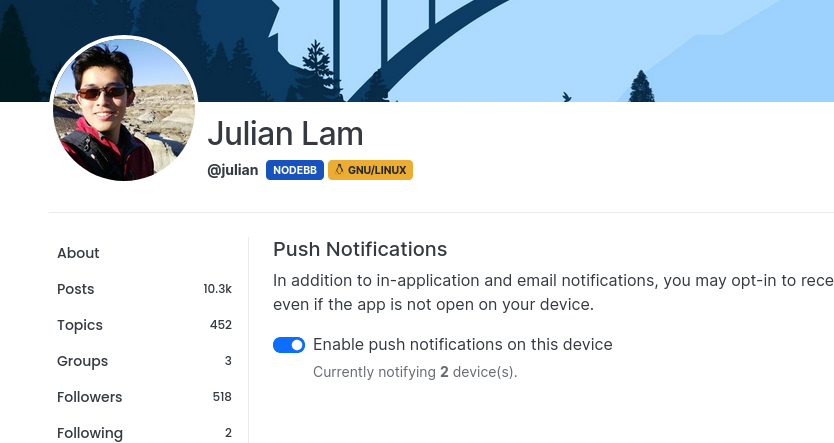
As you can see, you need to enable the notification before it will work. There is a test button located underneath the slider switch (although not present in this screenshot) and this will enable you to test to make sure it is working.
Quoting Julian
I’m particularly excited about this new development because it opens the door for richer integration between NodeBB and the push notifications themselves.
With (probably) every iteration prior, when you clicked on the notification, it likely opened a new window. With direct access to the Push API and service worker, we can now accurately detect whether the site is already open (in another tab), and open it there.
In the future, we’ll also be able to add in things like icons, pictures, and custom actions, right from the notification itself.
One particular nice-to-have is the ability to update notifications. Being able to merge notifications (like they already do in NodeBB) or potentially rescind notifications would be a nice step forward in usability as well.
This works very well in my testing - however, if you use NordVPN, it does not work at all unless you disable the VPN. I have an open ticket with them presently to see if there is in fact any workaround.
I have taken the decision to now disable
nodebb-plugin-ntfyas with the4.0train, this plugin is considered legacy.Mark Cutting also advises organisations as a Fractional CIO, Fractional CISO and Executive Advisor, helping boards improve technology governance, cyber resilience and executive decision making. Learn more at Gratmore Ltd
-
 undefined phenomlab pinned this topic on
-
Those of you who regularly visit the NodeBB forums have problably noticed this
https://community.nodebb.org/topic/18279/native-push-notifications-support-for-nodebb
And as a result, this new commit
https://github.com/NodeBB/NodeBB/commit/aa060d31d130cd54d18cd8dc2f25ba7de58f4fea
@julian now has the native push notifications working, and as a result, Sudonix now has them also - see screenshot of how to enable this feature here
As you can see, you need to enable the notification before it will work. There is a test button located underneath the slider switch (although not present in this screenshot) and this will enable you to test to make sure it is working.
Quoting Julian
I’m particularly excited about this new development because it opens the door for richer integration between NodeBB and the push notifications themselves.
With (probably) every iteration prior, when you clicked on the notification, it likely opened a new window. With direct access to the Push API and service worker, we can now accurately detect whether the site is already open (in another tab), and open it there.
In the future, we’ll also be able to add in things like icons, pictures, and custom actions, right from the notification itself.
One particular nice-to-have is the ability to update notifications. Being able to merge notifications (like they already do in NodeBB) or potentially rescind notifications would be a nice step forward in usability as well.
This works very well in my testing - however, if you use NordVPN, it does not work at all unless you disable the VPN. I have an open ticket with them presently to see if there is in fact any workaround.
I have taken the decision to now disable
nodebb-plugin-ntfyas with the4.0train, this plugin is considered legacy.@phenomlab That is awesome that they integrated that feature. Now it will be even more awesome if they fix it so it will go through your VPN.
-
@phenomlab That is awesome that they integrated that feature. Now it will be even more awesome if they fix it so it will go through your VPN.
@Madchatthew yes, but this isn’t a NodeBB issue - more of a NordVPN one. And the response I got from them was lacklustre to say the least.
We’ll do our best to help, but, to solve this faster, we need some additional information. Can you please let us know:
The device and operating system you are using with our service (Windows/Android/macOS/iOS/Linux);
The country you are currently in;
If you’re using the >latest version< of our application and if not - have you tried updating the application;
Your Internet Service Provider and the network that you are connecting from (home/public);
If you’re getting any error message(s), please attach a >screenshot< to the reply;
Have you tried any troubleshooting steps so far? If you have, could you clarify which ones?
Let us know if you’re using any type of antivirus, ad blocker, or different VPN software alongside NordVPN, as they might be interfering with our service.
Looking forward to hearing from you!
Mark Cutting also advises organisations as a Fractional CIO, Fractional CISO and Executive Advisor, helping boards improve technology governance, cyber resilience and executive decision making. Learn more at Gratmore Ltd
-
@Madchatthew yes, but this isn’t a NodeBB issue - more of a NordVPN one. And the response I got from them was lacklustre to say the least.
We’ll do our best to help, but, to solve this faster, we need some additional information. Can you please let us know:
The device and operating system you are using with our service (Windows/Android/macOS/iOS/Linux);
The country you are currently in;
If you’re using the >latest version< of our application and if not - have you tried updating the application;
Your Internet Service Provider and the network that you are connecting from (home/public);
If you’re getting any error message(s), please attach a >screenshot< to the reply;
Have you tried any troubleshooting steps so far? If you have, could you clarify which ones?
Let us know if you’re using any type of antivirus, ad blocker, or different VPN software alongside NordVPN, as they might be interfering with our service.
Looking forward to hearing from you!
@phenomlab Ooohhh you got the ole classic response of tell us everything about your system and internet access along with when everything was made and who programmed and designed it and after we have all of that information it won’t be our software but whatever software you are using or your internet connection because your grandma’s third cousins borther’s aunt’s nephew didn’t put enough gas in the car and then had to thumb it home to get the gas container and go to the gas station to fill it up and by the time they get back to the car to fill the tank, someone had come along and jacked the car up and stole the tires and took the sparkplugs and cables out along with the carberater and oil filter.
Cause heaven forbid they just ask what protocol are you using to send those notifications and lets check our software to see why it might be doing that so we can change the function and make it work.
-
@phenomlab Ooohhh you got the ole classic response of tell us everything about your system and internet access along with when everything was made and who programmed and designed it and after we have all of that information it won’t be our software but whatever software you are using or your internet connection because your grandma’s third cousins borther’s aunt’s nephew didn’t put enough gas in the car and then had to thumb it home to get the gas container and go to the gas station to fill it up and by the time they get back to the car to fill the tank, someone had come along and jacked the car up and stole the tires and took the sparkplugs and cables out along with the carberater and oil filter.
Cause heaven forbid they just ask what protocol are you using to send those notifications and lets check our software to see why it might be doing that so we can change the function and make it work.
@Madchatthew Brilliant. This really made me chuckle. So true, and definitely the default response.
Mark Cutting also advises organisations as a Fractional CIO, Fractional CISO and Executive Advisor, helping boards improve technology governance, cyber resilience and executive decision making. Learn more at Gratmore Ltd
-
undefined phenomlab referenced this topic on
-
Those of you who regularly visit the NodeBB forums have problably noticed this
https://community.nodebb.org/topic/18279/native-push-notifications-support-for-nodebb
And as a result, this new commit
https://github.com/NodeBB/NodeBB/commit/aa060d31d130cd54d18cd8dc2f25ba7de58f4fea
@julian now has the native push notifications working, and as a result, Sudonix now has them also - see screenshot of how to enable this feature here
As you can see, you need to enable the notification before it will work. There is a test button located underneath the slider switch (although not present in this screenshot) and this will enable you to test to make sure it is working.
Quoting Julian
I’m particularly excited about this new development because it opens the door for richer integration between NodeBB and the push notifications themselves.
With (probably) every iteration prior, when you clicked on the notification, it likely opened a new window. With direct access to the Push API and service worker, we can now accurately detect whether the site is already open (in another tab), and open it there.
In the future, we’ll also be able to add in things like icons, pictures, and custom actions, right from the notification itself.
One particular nice-to-have is the ability to update notifications. Being able to merge notifications (like they already do in NodeBB) or potentially rescind notifications would be a nice step forward in usability as well.
This works very well in my testing - however, if you use NordVPN, it does not work at all unless you disable the VPN. I have an open ticket with them presently to see if there is in fact any workaround.
I have taken the decision to now disable
nodebb-plugin-ntfyas with the4.0train, this plugin is considered legacy.@phenomlab said in Planned sunset of NTFY plugin:
Those of you who regularly visit the NodeBB forums have problably noticed this
Interesting my friend, long may NodeBB & Sudonix continue to thrive
 .
. -
I’ve noticed that I’m the only one subscribed to the push notifications on this site. If you were using NTFY previously, and have noticed that you’ve not had any alerts for a while, it’s because this feature has been disabled.
You’ll now need to use the push notification to replace NTFY as mentioned in the first post.




Hello! It looks like you're interested in this conversation, but you don't have an account yet.
Getting fed up of having to scroll through the same posts each visit? When you register for an account, you'll always come back to exactly where you were before, and choose to be notified of new replies (either via email, or push notification). You'll also be able to save bookmarks and upvote posts to show your appreciation to other community members.
With your input, this post could be even better 💗
Register LoginRelated Topics
-
Spam spam spam
Solved Configure -
-
-
-
-
-
-