Custom badges

-
@phenomlab said in Custom badges:
@crazycells @DownPW something of a “fresher” approach. Have a look at the below
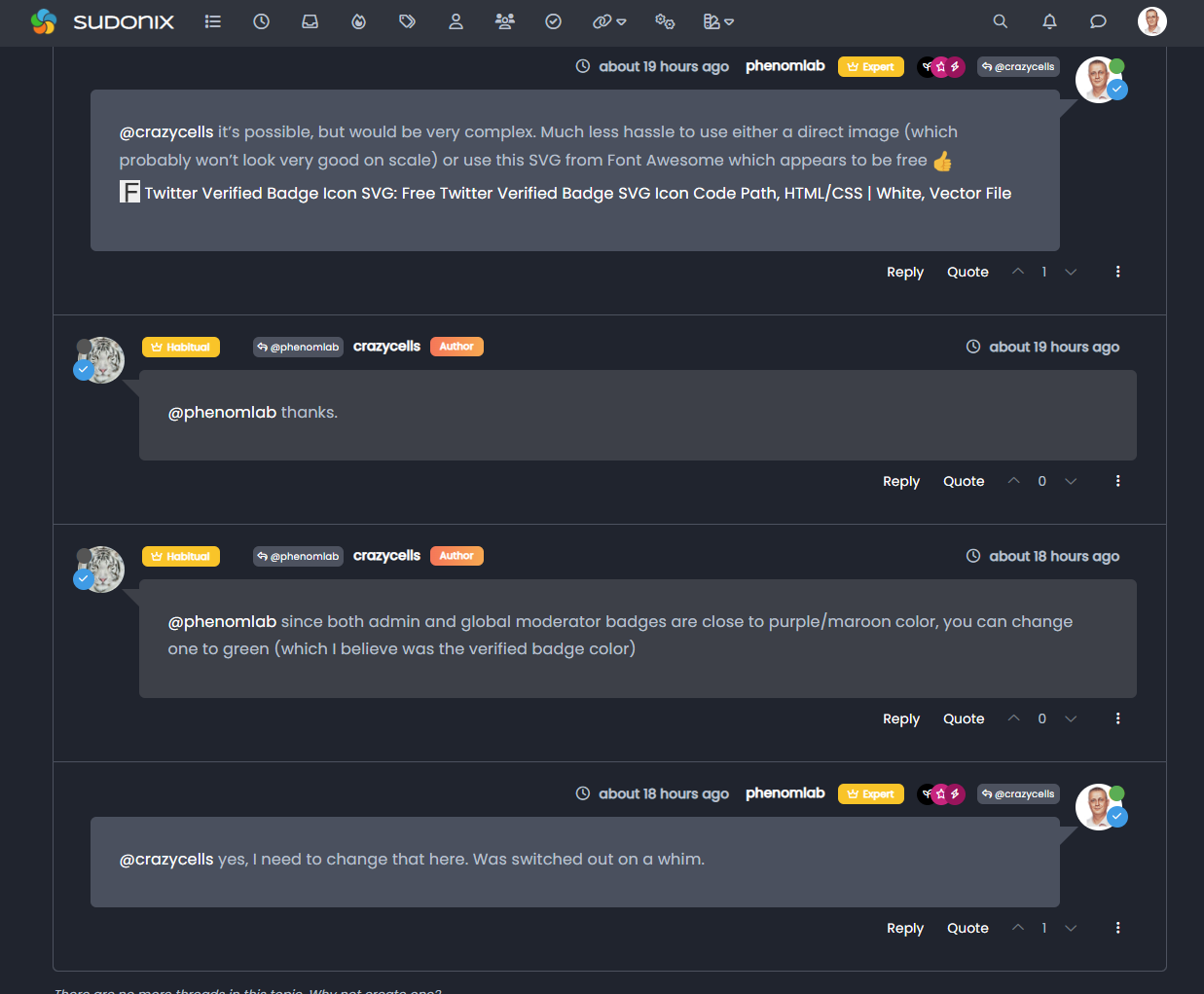
Using the messenger type view I created, it then becomes possible to place the “verified” group according to the style from the same view.
This does mean some new CSS
.self-post a[href*="/groups/verified"] .group-label {
    position: absolute !important;
    right: 51px;
    top: 44px;
}
.topic-response-post a[href*="/groups/verified"] .group-label {
    position: absolute !important;
    left: 20px;
    top: 44px;
}
.topic-response-post i[component="user/status"] {
    position: absolute;
    left: -1px;
}
And, more importantly, I found a more efficient way of adding classes in the messenger view
js. The revised code is below// Target those elements already loaded in the DOM $(document).ready(function() { $(window).on('action:ajaxify.end', function(data) { $('li[component="post"]').each(function(i, obj) { if (!$(this).hasClass('self-post') || (!$(this).hasClass('self-post'))) { console.log("Adding required classes for messenger type view"); $(this).addClass('topic-response-post'); } }); }); }); // Target elements dynamically added to the DOM on post load $(document).ready(function() { $(window).on('action:ajaxify.loaded', function(data) { $('li[component="post"]').each(function(i, obj) { if (!$(this).hasClass('self-post') || (!$(this).hasClass('self-post'))) { console.log("Adding required classes for messenger type view"); $(this).addClass('topic-response-post'); } }); }); });My style looks like it with those codes. There isjust seems some blue color of my checked icon

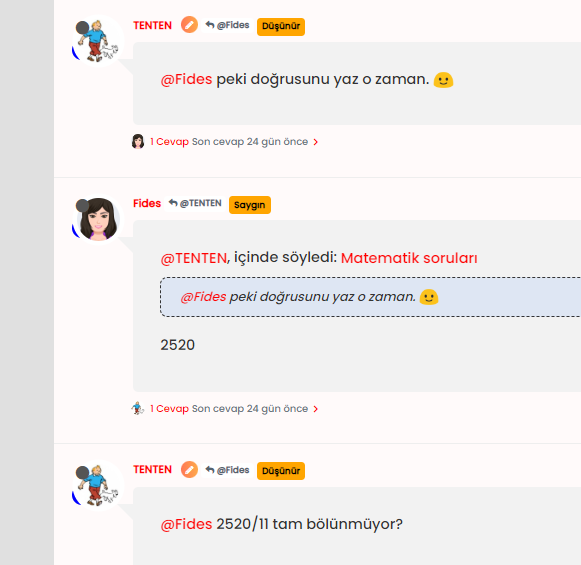
@cagatay you should remove those two CSS blocks your referenced as that’s what’s causing the odd looking blue circles over the avatar.
Mark Cutting also advises organisations as a Fractional CIO, Fractional CISO and Executive Advisor, helping boards improve technology governance, cyber resilience and executive decision making. Learn more at Gratmore Ltd
-
@cagatay you should remove those two CSS blocks your referenced as that’s what’s causing the odd looking blue circles over the avatar.
-
@phenomlab which one i should remove?
@cagatay These
.self-post a[href*="/groups/verified"] .group-label {
    position: absolute !important;
    right: 51px;
    top: 44px;
}
.topic-response-post a[href*="/groups/verified"] .group-label {
    position: absolute !important;
    left: 20px;
    top: 44px;
}
.topic-response-post i[component="user/status"] {
    position: absolute;
    left: -1px;
}
Mark Cutting also advises organisations as a Fractional CIO, Fractional CISO and Executive Advisor, helping boards improve technology governance, cyber resilience and executive decision making. Learn more at Gratmore Ltd
-
@cagatay These
.self-post a[href*="/groups/verified"] .group-label { position: absolute !important; right: 51px; top: 44px; } .topic-response-post a[href*="/groups/verified"] .group-label { position: absolute !important; left: 20px; top: 44px; } .topic-response-post i[component="user/status"] { position: absolute; left: -1px; }@phenomlab its not work, nothing changed when i deleted those css.
-
@phenomlab its not work, nothing changed when i deleted those css.
@cagatay what isn’t working?
Mark Cutting also advises organisations as a Fractional CIO, Fractional CISO and Executive Advisor, helping boards improve technology governance, cyber resilience and executive decision making. Learn more at Gratmore Ltd
-
@phenomlab there is no changes after deleted css code;
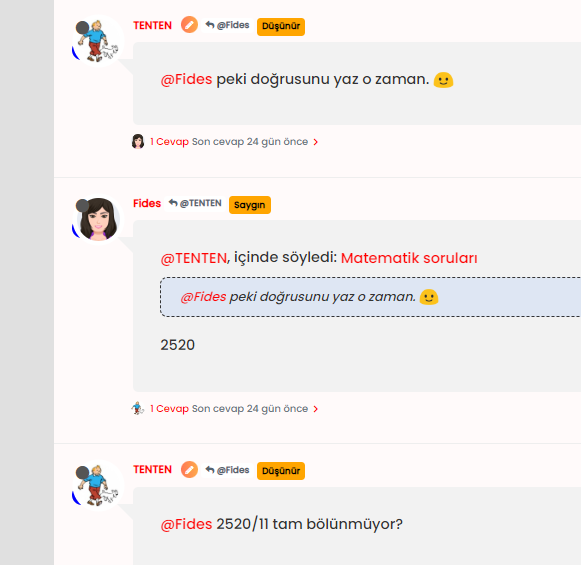
-
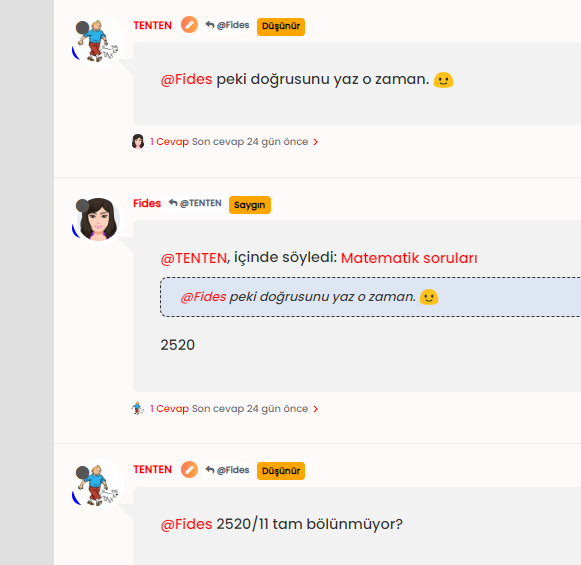
@phenomlab how can i set blue tick like sudonix to my own? coz codes which you are shared, it not look like yours;
-
@phenomlab how can i set blue tick like sudonix to my own? coz codes which you are shared, it not look like yours;
@cagatay It’s documented here
https://sudonix.com/topic/386/custom-badges/18?_=1669196219630Mark Cutting also advises organisations as a Fractional CIO, Fractional CISO and Executive Advisor, helping boards improve technology governance, cyber resilience and executive decision making. Learn more at Gratmore Ltd
-
 undefined phenomlab referenced this topic on
-
@cagatay It’s documented here
https://sudonix.com/topic/386/custom-badges/18?_=1669196219630@phenomlab i read it and did it what you wrote. but result as below;
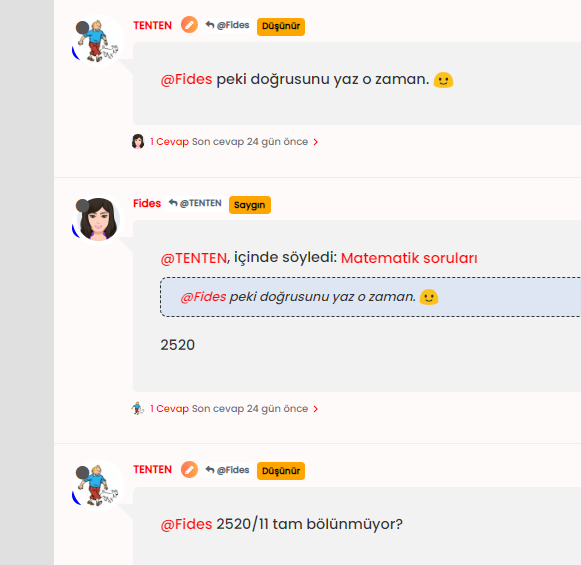
blue icon not seen, it hide by avatar
-
@phenomlab i read it and did it what you wrote. but result as below;
blue icon not seen, it hide by avatar
@cagatay Yes, having checked, I see what you mean. I’ve fixed this on your site.
This is the new applied code
.post-header a[href*="/groups/onaylı-üyeler"] {
    margin-right: 3px;
    margin-top: 1px;
    border-radius: 50%;
    line-height: 20px;
    display: inline-block;
    vertical-align: middle;
    text-align: center;
    overflow: hidden;
}
small.label.group-label.inline-block i {
    margin-top: 1px;
    margin-left: 0px;
    vertical-align: middle;
    justify-content: center;
    display: flex;
}
.post-header a[href*="/groups/onaylı-üyeler"] .group-label {
    min-width: 20px;
    display: flex;
    justify-content: center;
}
.self-post a[href*="/groups/onaylı-üyeler"] .group-label {
    position: absolute !important;
    right: 51px;
    top: 44px;
    z-index: 2;
}
.topic-response-post a[href*="/groups/onaylı-üyeler"] .group-label {
    position: absolute !important;
    left: 20px;
    top: 44px;
    z-index: 2;
}
.topic-response-post i[component="user/status"] {
    position: absolute;
    left: -1px;
}
.group-label {
    vertical-align: -6px;
}
However, there were some errors on your part. You were correct in renaming the actual group in CSS (good call) because of the language not being English, but the path was incorrect. You used the below, which was customized for @crazycells install
/forum/groups/onaylı-üyelerIt should be
/groups/onaylı-üyelerYou also have some overriding CSS somewhere that defines a lower
z-indexvalue which forces the “verified” icon behind the avatar, so I’ve added an adjustment for thatz-index: 2;Mark Cutting also advises organisations as a Fractional CIO, Fractional CISO and Executive Advisor, helping boards improve technology governance, cyber resilience and executive decision making. Learn more at Gratmore Ltd
-
@cagatay Yes, having checked, I see what you mean. I’ve fixed this on your site.
This is the new applied code
.post-header a[href*="/groups/onaylı-üyeler"] {
    margin-right: 3px;
    margin-top: 1px;
    border-radius: 50%;
    line-height: 20px;
    display: inline-block;
    vertical-align: middle;
    text-align: center;
    overflow: hidden;
}
small.label.group-label.inline-block i {
    margin-top: 1px;
    margin-left: 0px;
    vertical-align: middle;
    justify-content: center;
    display: flex;
}
.post-header a[href*="/groups/onaylı-üyeler"] .group-label {
    min-width: 20px;
    display: flex;
    justify-content: center;
}
.self-post a[href*="/groups/onaylı-üyeler"] .group-label {
    position: absolute !important;
    right: 51px;
    top: 44px;
    z-index: 2;
}
.topic-response-post a[href*="/groups/onaylı-üyeler"] .group-label {
    position: absolute !important;
    left: 20px;
    top: 44px;
    z-index: 2;
}
.topic-response-post i[component="user/status"] {
    position: absolute;
    left: -1px;
}
.group-label {
    vertical-align: -6px;
}
However, there were some errors on your part. You were correct in renaming the actual group in CSS (good call) because of the language not being English, but the path was incorrect. You used the below, which was customized for @crazycells install
/forum/groups/onaylı-üyelerIt should be
/groups/onaylı-üyelerYou also have some overriding CSS somewhere that defines a lower
z-indexvalue which forces the “verified” icon behind the avatar, so I’ve added an adjustment for thatz-index: 2;@phenomlab ah okey Mark
you as always better then me so there is no word in my side for the explaniton thank you again.
-
@phenomlab ah okey Mark
you as always better then me so there is no word in my side for the explaniton thank you again.
@cagatay said in Custom badges:
@phenomlab ah okey Mark
you as always better then me so there is no word in my side for the explaniton thank you again.
hi @cagatay , as a first step you have to create a group called “verified” , then everything is as it is written on this thread… but since your group name was different, it gave an error…
I am writing this explicitly so that others can be aware.
-
@cagatay said in Custom badges:
@phenomlab ah okey Mark
you as always better then me so there is no word in my side for the explaniton thank you again.
hi @cagatay , as a first step you have to create a group called “verified” , then everything is as it is written on this thread… but since your group name was different, it gave an error…
I am writing this explicitly so that others can be aware.
@crazycells said in Custom badges:
I am writing this explicitly so that others can be aware.
Good point. Thanks
Mark Cutting also advises organisations as a Fractional CIO, Fractional CISO and Executive Advisor, helping boards improve technology governance, cyber resilience and executive decision making. Learn more at Gratmore Ltd
-
@crazycells said in Custom badges:
I am writing this explicitly so that others can be aware.
Good point. Thanks
@phenomlab i have problem with my badges for ios and android users.
i can secret all of from mobile users?
-
@phenomlab i have problem with my badges for ios and android users.
i can secret all of from mobile users?
@cagatay Are they showing on mobile ? Can you send a screenshot ?
Mark Cutting also advises organisations as a Fractional CIO, Fractional CISO and Executive Advisor, helping boards improve technology governance, cyber resilience and executive decision making. Learn more at Gratmore Ltd
-
-
@phenomlab sure,
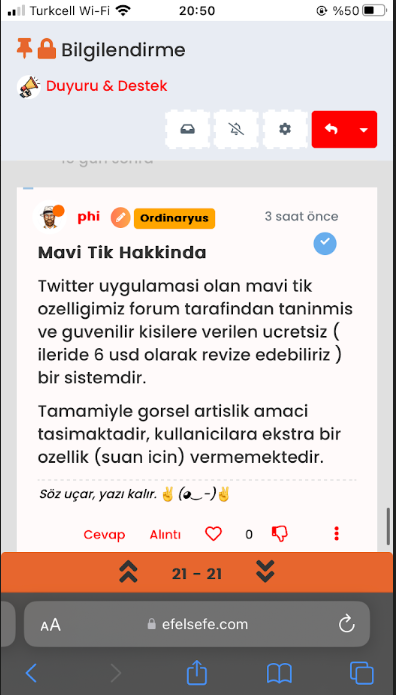
@cagatay Do you want the icon to show? Because of the size of the screen estate, I think it makes more sense to hide it?
Mark Cutting also advises organisations as a Fractional CIO, Fractional CISO and Executive Advisor, helping boards improve technology governance, cyber resilience and executive decision making. Learn more at Gratmore Ltd
-
@cagatay Do you want the icon to show? Because of the size of the screen estate, I think it makes more sense to hide it?
-
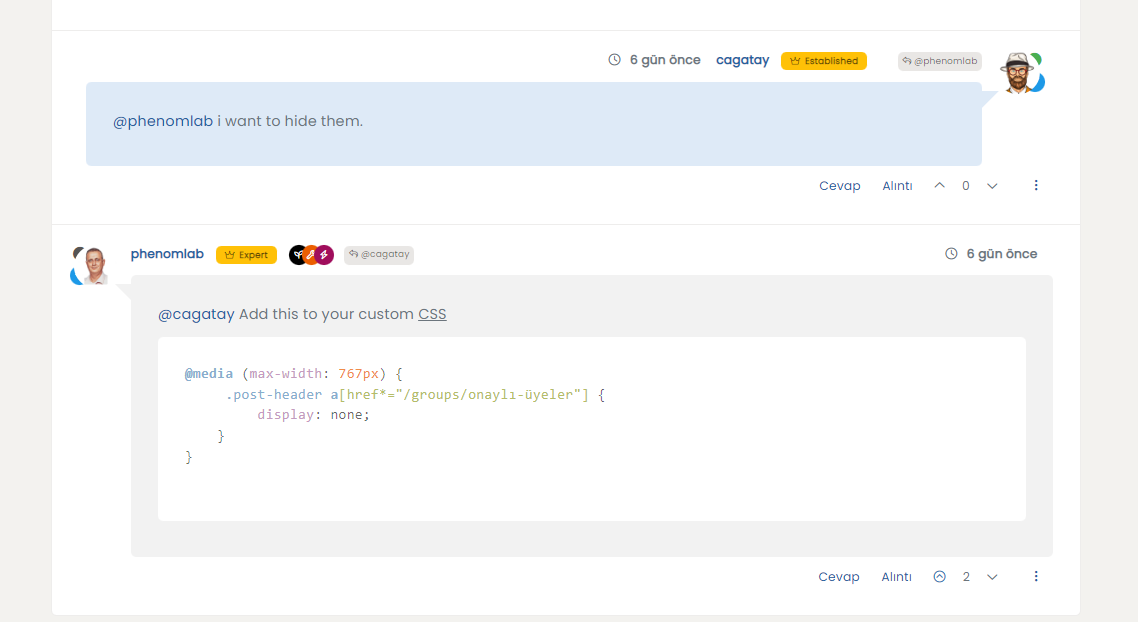
@phenomlab i want to hide them.
@cagatay Add this to your custom CSS
@media (max-width: 767px) {
     .post-header a[href*="/groups/onaylı-üyeler"] {
         display: none;
    }
}
Mark Cutting also advises organisations as a Fractional CIO, Fractional CISO and Executive Advisor, helping boards improve technology governance, cyber resilience and executive decision making. Learn more at Gratmore Ltd
-
@cagatay Add this to your custom CSS
@media (max-width: 767px) {
     .post-header a[href*="/groups/onaylı-üyeler"] {
         display: none;
    }
}


Hello! It looks like you're interested in this conversation, but you don't have an account yet.
Getting fed up of having to scroll through the same posts each visit? When you register for an account, you'll always come back to exactly where you were before, and choose to be notified of new replies (either via email, or push notification). You'll also be able to save bookmarks and upvote posts to show your appreciation to other community members.
With your input, this post could be even better 💗
Register LoginDid this solution help you?
Related Topics
-
-
-
NodeBB: Consent page
Solved Configure -
-
-
-
-