[NODEBB] Reply Button/arrow answer
-
Hello @all @phenomlab

I want to add border-radius on the Reply Button when I reply to a topic.
I use this code for this:
.composer .title-container .composer-submit {
   border-radius: 0px 5px 5px 0px !important;
}
And here the result :

So far so good.
The problem is that this has an influence on the arrow allowing to ask a question when opening a new topic in a category :
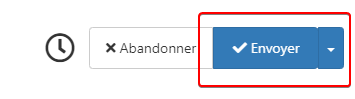
How resolve that ?
I would like to get the same result as this:
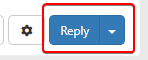
Thanks in advance
-
@downpw said in [NODEBB] Reply Button/arrow answer:
.composer .title-container .composer-submit {
border-radius: 0px 5px 5px 0px !important;
}Hmmm. If I delete !important on code
.composer .title-container .composer-submit {
   border-radius: 0px 5px 5px 0px ;
}
It seems to be good for the arrow :

But the Reply Button went back to how it was before
 :
:

the 2 buttons are linked to the same CSS variables but I can’t tell them apart
PW and WS Spirit alive
-
@downpw said in [NODEBB] Reply Button/arrow answer:
.composer .title-container .composer-submit {
border-radius: 0px 5px 5px 0px !important;
}Hmmm. If I delete !important on code
.composer .title-container .composer-submit {
   border-radius: 0px 5px 5px 0px ;
}
It seems to be good for the arrow :
But the Reply Button went back to how it was before
:
the 2 buttons are linked to the same CSS variables but I can’t tell them apart
@downpw Something like this should work
button.btn.btn-primary.composer-submit { border-top-right-radius: 4px !important; border-bottom-right-radius: 4px !important; } -
 undefined phenomlab has marked this topic as solved on
-
 undefined DownPW has marked this topic as unsolved on
-
I’m so sorry, It seem we have the same problem
Just this :
button.btn.btn-primary.composer-submit {
    border-top-right-radius: 4px !important;
    border-bottom-right-radius: 4px !important;
}
Its’ ok for Submit Button when I reply to on existant topic

But it’s not Ok when I create a New Topic (When you have the arrow button at the right of the Submit Button) :
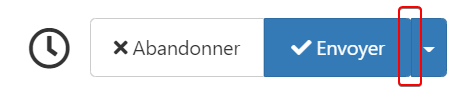
PW and WS Spirit alive
-
I’m so sorry, It seem we have the same problem
Just this :
button.btn.btn-primary.composer-submit {
    border-top-right-radius: 4px !important;
    border-bottom-right-radius: 4px !important;
}
Its’ ok for Submit Button when I reply to on existant topic
But it’s not Ok when I create a New Topic (When you have the arrow button at the right of the Submit Button) :
@downpw Yes, I see what you mean. I’d “cheat” a little here and use some positioning to create a faux effect. This should do it
.btn-group>.btn:last-child:not(:first-child), .btn-group>.dropdown-toggle:not(:first-child) {
  margin-left: -3px;
}
.btn-group>.btn:not(:first-child):not(:last-child):not(.dropdown-toggle):hover {
  border-top-right-radius: 0px;
  border-bottom-right-radius: 0px;
}
button.btn.btn-primary.composer-submit:hover {
    border-top-right-radius: 4px !important;
    border-bottom-right-radius: 4px !important;
}
.btn .caret {
  margin-left: 2px;
}
.btn-group>.btn:not(:first-child):not(:last-child):not(.dropdown-toggle) {
  border-radius: 0px;
  border-top-right-radius: 4px;
  border-bottom-right-radius: 4px;
  margin-left: 0px;
}
It’ll look like this on a reply post
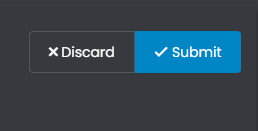
And like this on a new post
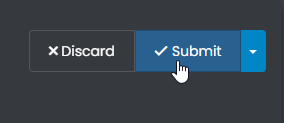
I’ve set the CSS here on Sudonix so you can see it in action. Give it a try.
-
Yes.
Just your mouse over on Submit button when you reply to a topic to fix :

Result is great, I will test tonight.
I’m at work at the moment.PW and WS Spirit alive
-
Yes.
Just your mouse over on Submit button when you reply to a topic to fix :
Result is great, I will test tonight.
I’m at work at the moment.@downpw Great. Let me know when back, as I’ll need access to your VM for the fonts issue we need to work on
-
I edit my post just one Fix for reply button on mouse over
Ok for Font tonight at 17h00

PW and WS Spirit alive
-
I edit my post just one Fix for reply button on mouse over
Ok for Font tonight at 17h00
@downpw said in [NODEBB] Reply Button/arrow answer:
I’m edit my post just one Fix for reply button on mouse over
 thanks - completely missed that. I’ll amend the original post.
 -
Ok wait for fix and test after ^^
PW and WS Spirit alive
-
@downpw Updated the original post, and applied CSS here so you can test.
-
Great
-
It worked on my default theme.
It seem to have border effect on my custom themesPW and WS Spirit alive
-
@downpw do you have anything in your custom CSS that is overriding this ?
-
Lot of variable. Hard to debug… a little lost
I’ve been on it for 2 hours !!for default theme I must add this for delete border to Reply Putton on topic
.btn-primary {
    color: #fff;
    background-color: #337ab7;
    border-color: transparent;
}
PW and WS Spirit alive
-
Lot of variable. Hard to debug… a little lost
I’ve been on it for 2 hours !!for default theme I must add this for delete border to Reply Putton on topic
.btn-primary { color: #fff; background-color: #337ab7; border-color: transparent; }@downpw why do you need to delete the border ?
-
-
@downpw I see. Another hack here is to set the border colour to be the same as the background colour.
-
@downpw said in [NODEBB] Reply Button/arrow answer:
.btn-primary {
color: #fff;
background-color: #337ab7;
border-color: transparent;
}.btn-primary { color: #fff; background-color: #337ab7; border-color: #337ab7; }PW and WS Spirit alive
-
@downpw said in [NODEBB] Reply Button/arrow answer:
.btn-primary {
color: #fff;
background-color: #337ab7;
border-color: transparent;
}.btn-primary { color: #fff; background-color: #337ab7; border-color: #337ab7; }@downpw and does that not work ?

Hello! It looks like you're interested in this conversation, but you don't have an account yet.
Getting fed up of having to scroll through the same posts each visit? When you register for an account, you'll always come back to exactly where you were before, and choose to be notified of new replies (either via email, or push notification). You'll also be able to save bookmarks and upvote posts to show your appreciation to other community members.
With your input, this post could be even better 💗
Register LoginDid this solution help you?
Related Topics
-
-
-
-
-
NodeBB templates
Locked Chitchat -
-
Customising NodeBB
Locked Customisation -