NodeBB customisation
-
@jac not in front of a pc currently, but will get this to you later. In the meantime, You can always right click the element you’re interested in changing then left click inspect.
Make sure the elements tab is selected at the bottom of the screen and you’ll be able to see the underlying css on the right (depending where you’re developer console is docked in your browser). The css object you want to change to will be
colour: #ffffff;@phenomlab said in NodeBB customisation:
@jac not in front of a pc currently, but will get this to you later. In the meantime, You can always right click the element you’re interested in changing then left click inspect.
Make sure the elements tab is selected at the bottom of the screen and you’ll be able to see the underlying css on the right (depending where you’re developer console is docked in your browser). The css object you want to change to will be
colour: #ffffff;Thanks Mark, I’ll have a crack at this later on once back from work, although if it can be done on mobile I’m happy to try that also.
-
@phenomlab said in NodeBB customisation:
@jac not in front of a pc currently, but will get this to you later. In the meantime, You can always right click the element you’re interested in changing then left click inspect.
Make sure the elements tab is selected at the bottom of the screen and you’ll be able to see the underlying css on the right (depending where you’re developer console is docked in your browser). The css object you want to change to will be
colour: #ffffff;Thanks Mark, I’ll have a crack at this later on once back from work, although if it can be done on mobile I’m happy to try that also.
@jac Just took a look at your site. Here’s what you’ll need
.navbar-default .navbar-brand, .navbar-default .navbar-nav>li>a {
    color: #ffffff;
}
That in turn will show

Mark Cutting also advises organisations as a Fractional CIO, Fractional CISO and Executive Advisor, helping boards improve technology governance, cyber resilience and executive decision making. Learn more at Gratmore Ltd
-
@jac Just took a look at your site. Here’s what you’ll need
.navbar-default .navbar-brand, .navbar-default .navbar-nav>li>a {
    color: #ffffff;
}
That in turn will show
@phenomlab Thanks very much, just applied the code.
 .
. -
@phenomlab Thanks very much, just applied the code.
.@phenomlab I notice that in mobile view the above change only changes the forum heading to white, but leaves the icons in grey (is there any fix for this?).
Meanwhile on desktop it changes everything to white (as I wanted), but hovering over the icons it turns them to grey, is there any way to change this so they change to #FFC557?
Many thanks as always
 .
. -
@phenomlab I notice that in mobile view the above change only changes the forum heading to white, but leaves the icons in grey (is there any fix for this?).
Meanwhile on desktop it changes everything to white (as I wanted), but hovering over the icons it turns them to grey, is there any way to change this so they change to #FFC557?
Many thanks as always
.@phenomlab I do have a few changes I have in mind to be made, but am aware of posting them all at once ;).
-
@phenomlab I notice that in mobile view the above change only changes the forum heading to white, but leaves the icons in grey (is there any fix for this?).
Meanwhile on desktop it changes everything to white (as I wanted), but hovering over the icons it turns them to grey, is there any way to change this so they change to #FFC557?
Many thanks as always
.@jac said in NodeBB customisation:
I notice that in mobile view the above change only changes the forum heading to white, but leaves the icons in grey (is there any fix for this?).
Yes, it’s probably being overridden with another class that is a closer match. Try this
@media screen (min-width: 767px) {
 .navbar-default .navbar-brand, .navbar-default .navbar-nav>li>a {
color: #ffffff; }
 }
Mark Cutting also advises organisations as a Fractional CIO, Fractional CISO and Executive Advisor, helping boards improve technology governance, cyber resilience and executive decision making. Learn more at Gratmore Ltd
-
@phenomlab I do have a few changes I have in mind to be made, but am aware of posting them all at once ;).
@jac said in NodeBB customisation:
I do have a few changes I have in mind to be made, but am aware of posting them all at once ;).
You can post them all at once, no issues. You might want to create screenshots and identify the areas that you’d like changed. I have your site URL so it won’t be too tough to accomplish
Mark Cutting also advises organisations as a Fractional CIO, Fractional CISO and Executive Advisor, helping boards improve technology governance, cyber resilience and executive decision making. Learn more at Gratmore Ltd
-
@jac said in NodeBB customisation:
I do have a few changes I have in mind to be made, but am aware of posting them all at once ;).
You can post them all at once, no issues. You might want to create screenshots and identify the areas that you’d like changed. I have your site URL so it won’t be too tough to accomplish
@phenomlab said in NodeBB customisation:
@jac said in NodeBB customisation:
I do have a few changes I have in mind to be made, but am aware of posting them all at once ;).
You can post them all at once, no issues. You might want to create screenshots and identify the areas that you’d like changed. I have your site URL so it won’t be too tough to accomplish
Thanks
-
@jac said in NodeBB customisation:
I notice that in mobile view the above change only changes the forum heading to white, but leaves the icons in grey (is there any fix for this?).
Yes, it’s probably being overridden with another class that is a closer match. Try this
@media screen (min-width: 767px) { .navbar-default .navbar-brand, .navbar-default .navbar-nav>li>a { color: #ffffff; } }@phenomlab said in NodeBB customisation:
@media screen (min-width: 767px) {
.navbar-default .navbar-brand, .navbar-default .navbar-nav>li>a {
color: #ffffff; }
}Thanks Mark, will try this as soon as possible
-
Is there any way to remove the footer code?

-
change Nav hover colour to #FFC557

-
@jac said in NodeBB customisation:
change Nav hover colour to #FFC557
I hope it’s ok just firing things into the thread once I find something I may want to change?
-
@jac Yep. Go into the ACP->Widgets, and you’ll see it under the footer in “Global”
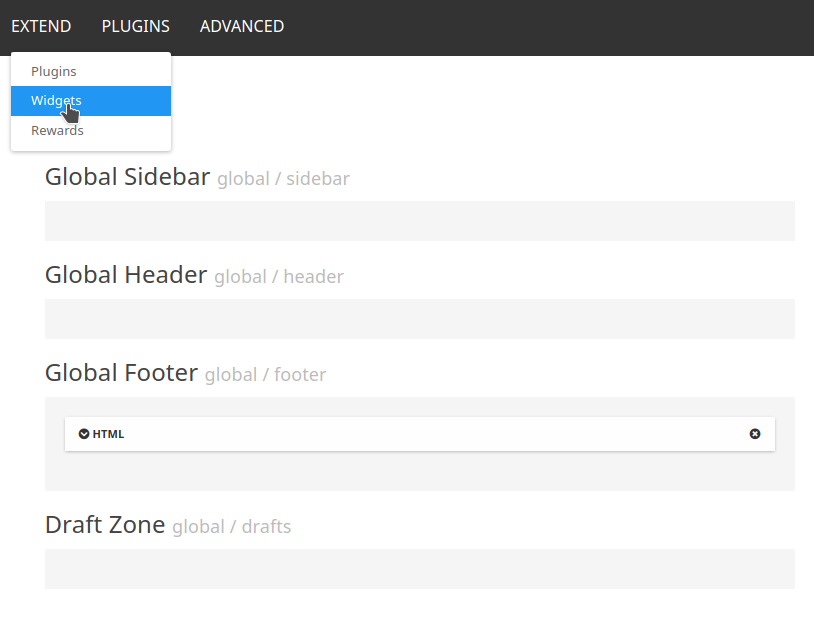
See the “x” on the global footer HTML widget ? Delete that, and confirm, then it’ll disappear.
-
@jac said in NodeBB customisation:
change Nav hover colour to #FFC557
.navbar-default .navbar-brand, .navbar-default .navbar-nav>li>a:hover {
    color: #FFC557;
}
Mark Cutting also advises organisations as a Fractional CIO, Fractional CISO and Executive Advisor, helping boards improve technology governance, cyber resilience and executive decision making. Learn more at Gratmore Ltd
-
@phenomlab said in NodeBB customisation:
@jac said in NodeBB customisation:
I do have a few changes I have in mind to be made, but am aware of posting them all at once ;).
You can post them all at once, no issues. You might want to create screenshots and identify the areas that you’d like changed. I have your site URL so it won’t be too tough to accomplish
Thanks
@jac said in NodeBB customisation:
@phenomlab said in NodeBB customisation:
@jac said in NodeBB customisation:
I do have a few changes I have in mind to be made, but am aware of posting them all at once ;).
You can post them all at once, no issues. You might want to create screenshots and identify the areas that you’d like changed. I have your site URL so it won’t be too tough to accomplish
Thanks
I can confirm this has indeed work
thank you very much1 -
@jac said in NodeBB customisation:
change Nav hover colour to #FFC557
.navbar-default .navbar-brand, .navbar-default .navbar-nav>li>a:hover { color: #FFC557; }@phenomlab said in NodeBB customisation:
@jac said in NodeBB customisation:
change Nav hover colour to #FFC557
.navbar-default .navbar-brand, .navbar-default .navbar-nav>li>a:hover {
    color: #FFC557;
}
Is there any way to change the tag colours in the post?

with white writing and a blue background (#255A9F)
something I’m looking to do with the quotes block, admittedly like you have done yourself (it looks very smart indeed
 )
) -
@jac said in NodeBB customisation:
@phenomlab said in NodeBB customisation:
@jac said in NodeBB customisation:
I do have a few changes I have in mind to be made, but am aware of posting them all at once ;).
You can post them all at once, no issues. You might want to create screenshots and identify the areas that you’d like changed. I have your site URL so it won’t be too tough to accomplish
Thanks
I can confirm this has indeed work
thank you very much1 @jac said in NodeBB customisation:
@jac said in NodeBB customisation:
@phenomlab said in NodeBB customisation:
@jac said in NodeBB customisation:
I do have a few changes I have in mind to be made, but am aware of posting them all at once ;).
You can post them all at once, no issues. You might want to create screenshots and identify the areas that you’d like changed. I have your site URL so it won’t be too tough to accomplish
Thanks
I can confirm this has indeed work
thank you very much1 Has the mobile view nav font changed to white? Would you mind checking, using two browsers one is definitely grey and one looks a little lighter but it’s hard to tell.
-
@jac said in NodeBB customisation:
@jac said in NodeBB customisation:
@phenomlab said in NodeBB customisation:
@jac said in NodeBB customisation:
I do have a few changes I have in mind to be made, but am aware of posting them all at once ;).
You can post them all at once, no issues. You might want to create screenshots and identify the areas that you’d like changed. I have your site URL so it won’t be too tough to accomplish
Thanks
I can confirm this has indeed work
thank you very much1 Has the mobile view nav font changed to white? Would you mind checking, using two browsers one is definitely grey and one looks a little lighter but it’s hard to tell.
@jac No, it hasn’t. You’ll need this
.navbar-default .navbar-toggle {
    color: #ffffff;
}
Mark Cutting also advises organisations as a Fractional CIO, Fractional CISO and Executive Advisor, helping boards improve technology governance, cyber resilience and executive decision making. Learn more at Gratmore Ltd
-
@phenomlab said in NodeBB customisation:
@jac said in NodeBB customisation:
change Nav hover colour to #FFC557
.navbar-default .navbar-brand, .navbar-default .navbar-nav>li>a:hover {
    color: #FFC557;
}
Is there any way to change the tag colours in the post?
with white writing and a blue background (#255A9F)
something I’m looking to do with the quotes block, admittedly like you have done yourself (it looks very smart indeed
)@jac said in NodeBB customisation:
with white writing and a blue background (#255A9F)
You’ll need this
.tag-list .tag {
    background: #255A9F;
    color: #ffffff;
}
Mark Cutting also advises organisations as a Fractional CIO, Fractional CISO and Executive Advisor, helping boards improve technology governance, cyber resilience and executive decision making. Learn more at Gratmore Ltd
-
@jac No, it hasn’t. You’ll need this
.navbar-default .navbar-toggle { color: #ffffff; }@phenomlab said in NodeBB customisation:
@jac No, it hasn’t. You’ll need this
.navbar-default .navbar-toggle {
    color: #ffffff;
}
Many thanks mate that has worked


Hello! It looks like you're interested in this conversation, but you don't have an account yet.
Getting fed up of having to scroll through the same posts each visit? When you register for an account, you'll always come back to exactly where you were before, and choose to be notified of new replies (either via email, or push notification). You'll also be able to save bookmarks and upvote posts to show your appreciation to other community members.
With your input, this post could be even better 💗
Register LoginRelated Topics
-
-
-
-
-
-
-
NodeBB Discord Plugins
Unsolved Customisation -