NodeBB customisation
-
@jac said in NodeBB customisation:
Itz probably a longshot anyway, but is there any way to change the link colour on the quotes to yellow?
Like this ?
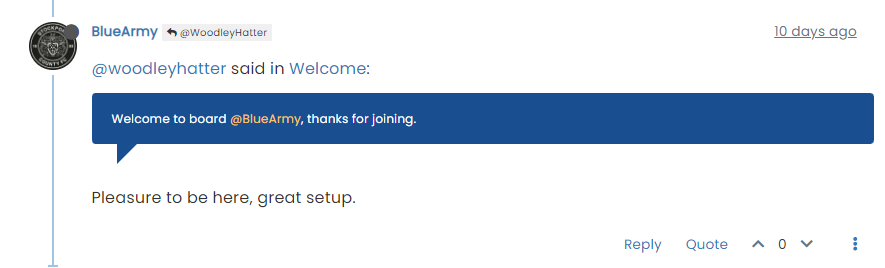
blockquote .plugin-mentions-user.plugin-mentions-a { color: #ffc557; }@phenomlab said in NodeBB customisation:
@jac said in NodeBB customisation:
Itz probably a longshot anyway, but is there any way to change the link colour on the quotes to yellow?
Like this ?
blockquote .plugin-mentions-user.plugin-mentions-a {
    color: #ffc557;
}
Yes mate, brilliant mate, will apply these changes later.
Great to see how a few changes make it look a lot better

-
@phenomlab said in NodeBB customisation:
@jac said in NodeBB customisation:
Itz probably a longshot anyway, but is there any way to change the link colour on the quotes to yellow?
Like this ?
blockquote .plugin-mentions-user.plugin-mentions-a {
    color: #ffc557;
}
Yes mate, brilliant mate, will apply these changes later.
Great to see how a few changes make it look a lot better
@jac Yep. Admittedly, I’ve taken some of the theming from Sudonix, but I’m ok with that.
-
@jac said in NodeBB customisation:
look a bit more professional and cleaner
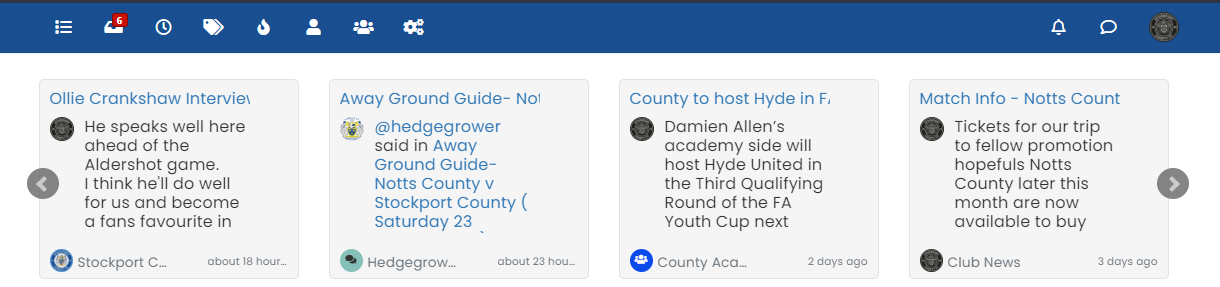
Had another go at this. The best I’ve come up with is
.recent-cards .recent-card-container .recent-card .recent-card-body {
    height: 143px;
    overflow: hidden;
    text-overflow: ellipsis;
    width: 200px;
    max-width: 200px;
    line-height: 1.2;
    white-space: nowrap;
}
Which looks like the below
@phenomlab said in NodeBB customisation:
@jac said in NodeBB customisation:
look a bit more professional and cleaner
Had another go at this. The best I’ve come up with is
.recent-cards .recent-card-container .recent-card .recent-card-body {
    height: 143px;
    overflow: hidden;
    text-overflow: ellipsis;
    width: 200px;
    max-width: 200px;
    line-height: 1.2;
    white-space: nowrap;
}
Which looks like the below
Thanks mate for all the efforts. I’ll leave it how it is for now and wait and see if it can be fixed sometime. Thank you for the efforts mate
. -
@phenomlab said in NodeBB customisation:
@jac said in NodeBB customisation:
look a bit more professional and cleaner
Had another go at this. The best I’ve come up with is
.recent-cards .recent-card-container .recent-card .recent-card-body {
    height: 143px;
    overflow: hidden;
    text-overflow: ellipsis;
    width: 200px;
    max-width: 200px;
    line-height: 1.2;
    white-space: nowrap;
}
Which looks like the below
Thanks mate for all the efforts. I’ll leave it how it is for now and wait and see if it can be fixed sometime. Thank you for the efforts mate
.Going to implement all of the above now…
As for the footer widget I can’t remove the NodeBB text as I’m not on the laptop you, I’m happy to include phenomlab on there for all your efforts and continued help?
Maybe something live Version 1 in the footer and then when a significant change is made the version number can be updated.
-
Going to implement all of the above now…
As for the footer widget I can’t remove the NodeBB text as I’m not on the laptop you, I’m happy to include phenomlab on there for all your efforts and continued help?
Maybe something live Version 1 in the footer and then when a significant change is made the version number can be updated.
@jac said in NodeBB customisation:
As for the footer widget I can’t remove the NodeBB text as I’m not on the laptop you, I’m happy to include phenomlab on there for all your efforts and continued help?
Done

-
@jac said in NodeBB customisation:
Itz probably a longshot anyway, but is there any way to change the link colour on the quotes to yellow?
Like this ?
blockquote .plugin-mentions-user.plugin-mentions-a { color: #ffc557; }@phenomlab said in NodeBB customisation:
@jac said in NodeBB customisation:
Itz probably a longshot anyway, but is there any way to change the link colour on the quotes to yellow?
Like this ?
blockquote .plugin-mentions-user.plugin-mentions-a {
    color: #ffc557;
}
For some reason this didn’t appear to work, would this change make any URLs in a quote yellow too?
Many thanks.
-
@phenomlab said in NodeBB customisation:
@jac said in NodeBB customisation:
Itz probably a longshot anyway, but is there any way to change the link colour on the quotes to yellow?
Like this ?
blockquote .plugin-mentions-user.plugin-mentions-a {
    color: #ffc557;
}
For some reason this didn’t appear to work, would this change make any URLs in a quote yellow too?
Many thanks.
@jac No - that just targets the mention name.
Mark Cutting also advises organisations as a Fractional CIO, Fractional CISO and Executive Advisor, helping boards improve technology governance, cyber resilience and executive decision making. Learn more at Gratmore Ltd
-
@phenomlab said in NodeBB customisation:
@jac No - that just targets the mention name.
For some reason it hasn’t worked mate?
Would there be a way to change the URL colour in quote to stand out or is that too difficult?
Many thanks as always!
-
@phenomlab said in NodeBB customisation:
@jac No - that just targets the mention name.
For some reason it hasn’t worked mate?
Would there be a way to change the URL colour in quote to stand out or is that too difficult?
Many thanks as always!
@jac said in NodeBB customisation:
@phenomlab said in NodeBB customisation:
@jac No - that just targets the mention name.
For some reason it hasn’t worked mate?
Would there be a way to change the URL colour in quote to stand out or is that too difficult?
Many thanks as always!
I think it’s because the mentions colour is set to white, I’ll find the other colour and change it.
-
@jac said in NodeBB customisation:
@phenomlab said in NodeBB customisation:
@jac No - that just targets the mention name.
For some reason it hasn’t worked mate?
Would there be a way to change the URL colour in quote to stand out or is that too difficult?
Many thanks as always!
I think it’s because the mentions colour is set to white, I’ll find the other colour and change it.
@jac said in NodeBB customisation:
I think it’s because the mentions colour is set to white, I’ll find the other colour and change it.
Use this
blockquote .plugin-mentions-user.plugin-mentions-a {
    color: #ffc557 !important;
}
Mark Cutting also advises organisations as a Fractional CIO, Fractional CISO and Executive Advisor, helping boards improve technology governance, cyber resilience and executive decision making. Learn more at Gratmore Ltd
-
@phenomlab said in NodeBB customisation:
@jac No - that just targets the mention name.
For some reason it hasn’t worked mate?
Would there be a way to change the URL colour in quote to stand out or is that too difficult?
Many thanks as always!
@jac said in NodeBB customisation:
Would there be a way to change the URL colour in quote to stand out or is that too difficult?
Can you send me a URL where this is an issue to save me trawling through your forum ?
Mark Cutting also advises organisations as a Fractional CIO, Fractional CISO and Executive Advisor, helping boards improve technology governance, cyber resilience and executive decision making. Learn more at Gratmore Ltd
-
@jac said in NodeBB customisation:
I think it’s because the mentions colour is set to white, I’ll find the other colour and change it.
Use this
blockquote .plugin-mentions-user.plugin-mentions-a { color: #ffc557 !important; }@phenomlab said in NodeBB customisation:
@jac said in NodeBB customisation:
I think it’s because the mentions colour is set to white, I’ll find the other colour and change it.
Use this
blockquote .plugin-mentions-user.plugin-mentions-a {
    color: #ffc557 !important;
}
Fantastic mate, that’s sorted it
-
@jac said in NodeBB customisation:
Would there be a way to change the URL colour in quote to stand out or is that too difficult?
Can you send me a URL where this is an issue to save me trawling through your forum ?
@phenomlab said in NodeBB customisation:
@jac said in NodeBB customisation:
Would there be a way to change the URL colour in quote to stand out or is that too difficult?
Can you send me a URL where this is an issue to save me trawling through your forum ?
Sure… here
-
@phenomlab said in NodeBB customisation:
@jac said in NodeBB customisation:
Would there be a way to change the URL colour in quote to stand out or is that too difficult?
Can you send me a URL where this is an issue to save me trawling through your forum ?
Sure… here
It’s probably my fault as I’ve chosen a background colour that natively clashes, would you prefer me to change the quote colour instead?
-
@phenomlab said in NodeBB customisation:
@jac said in NodeBB customisation:
Would there be a way to change the URL colour in quote to stand out or is that too difficult?
Can you send me a URL where this is an issue to save me trawling through your forum ?
Sure… here
@jac Use this
blockquote a {
    color: #ffc557;
}
You’ll need a hover class as well otherwise the text will disappear when hovered over - use this
blockquote a:hover {
    color: #db9716;
}
Mark Cutting also advises organisations as a Fractional CIO, Fractional CISO and Executive Advisor, helping boards improve technology governance, cyber resilience and executive decision making. Learn more at Gratmore Ltd
-
@jac Use this
blockquote a {
    color: #ffc557;
}
You’ll need a hover class as well otherwise the text will disappear when hovered over - use this
blockquote a:hover { color: #db9716; }@phenomlab said in NodeBB customisation:
@jac Use this
blockquote a {
    color: #ffc557;
}
You’ll need a hover class as well otherwise the text will disappear when hovered over - use this
blockquote a:hover {
    color: #db9716;
}
Worked a treat mate, thank you very much as always, a massive help!
-
@phenomlab said in NodeBB customisation:
@jac Use this
blockquote a {
    color: #ffc557;
}
You’ll need a hover class as well otherwise the text will disappear when hovered over - use this
blockquote a:hover {
    color: #db9716;
}
Worked a treat mate, thank you very much as always, a massive help!
@jac said in NodeBB customisation:
@phenomlab said in NodeBB customisation:
@jac Use this
blockquote a {
    color: #ffc557;
}
You’ll need a hover class as well otherwise the text will disappear when hovered over - use this
blockquote a:hover {
    color: #db9716;
}
Worked a treat mate, thank you very much as always, a massive help!
I think all the changes may have affected this.
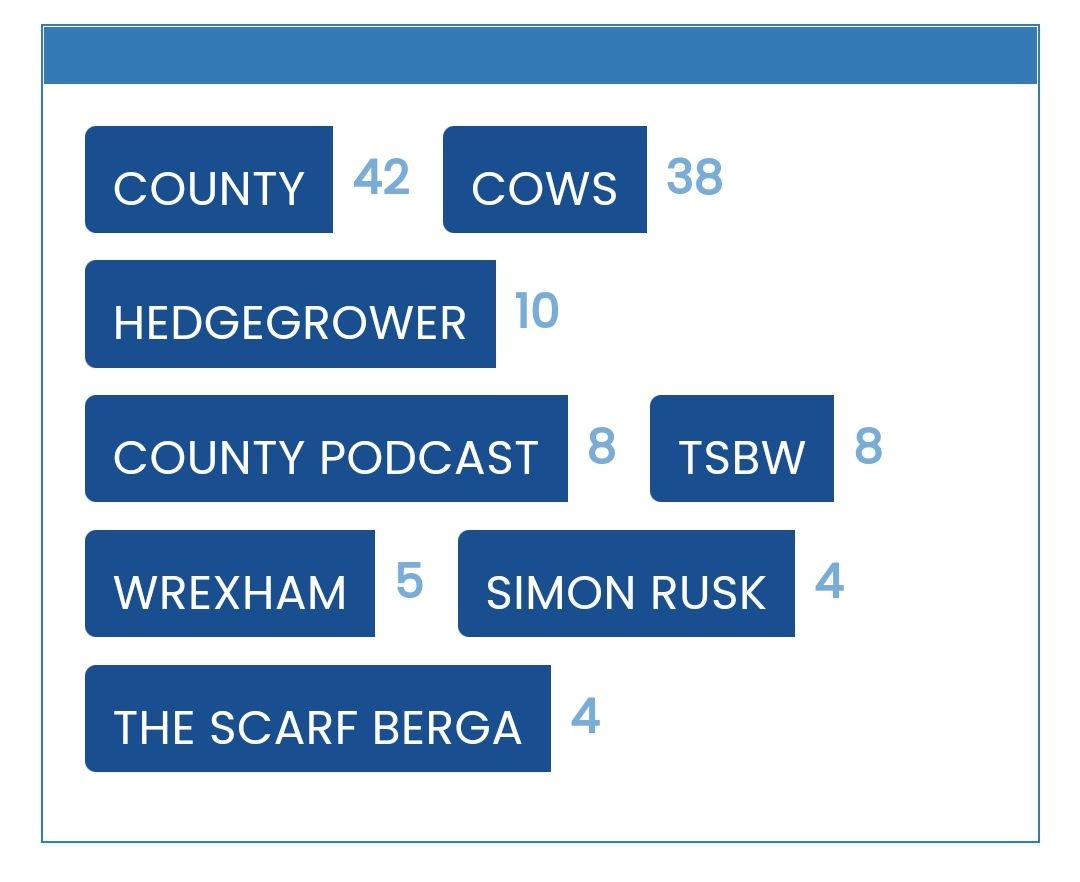
Is there any way to replicate colours on the tags page for the widget?
Sorry to be a pain…

-
@jac said in NodeBB customisation:
@phenomlab said in NodeBB customisation:
@jac Use this
blockquote a {
    color: #ffc557;
}
You’ll need a hover class as well otherwise the text will disappear when hovered over - use this
blockquote a:hover {
    color: #db9716;
}
Worked a treat mate, thank you very much as always, a massive help!
I think all the changes may have affected this.
Is there any way to replicate colours on the tags page for the widget?
Sorry to be a pain…
@jac Can you provide a screenshot ? Sorry. Not entirely sure I understand.
Mark Cutting also advises organisations as a Fractional CIO, Fractional CISO and Executive Advisor, helping boards improve technology governance, cyber resilience and executive decision making. Learn more at Gratmore Ltd
-
@phenomlab said in NodeBB customisation:
@jac Can you provide a screenshot ? Sorry. Not entirely sure I understand.
-
@phenomlab said in NodeBB customisation:
@jac Can you provide a screenshot ? Sorry. Not entirely sure I understand.
@jac did you add any additional CSS other than what I provided ? I’m surprised this is impacted as the classes are completely different.
Mark Cutting also advises organisations as a Fractional CIO, Fractional CISO and Executive Advisor, helping boards improve technology governance, cyber resilience and executive decision making. Learn more at Gratmore Ltd


Hello! It looks like you're interested in this conversation, but you don't have an account yet.
Getting fed up of having to scroll through the same posts each visit? When you register for an account, you'll always come back to exactly where you were before, and choose to be notified of new replies (either via email, or push notification). You'll also be able to save bookmarks and upvote posts to show your appreciation to other community members.
With your input, this post could be even better 💗
Register LoginRelated Topics
-
-
Forum Icons NodeBB
Solved Customisation -
-
-
-
-
NodeBB Footer
Solved Customisation -