[NODEBB] Help for my custom CSS
-
Hello @phenomlab
I come back here with a little problem.
I created a donation button in the custom footbar that works well.
It looks like this with the following code:

<div id="floatright"> <div class="d-flex justify-content-center mt-2 mb-2"> <a href="https://ko-fi.com/K3K519RHI6" class="btn btn-primary d-flex align-items-center btn-donation" target="_blank"> <img src="https://storage.ko-fi.com/cdn/logomarkLogo.png" alt="Icône café" class="me-2"> Faire un don </a> </div> <a class="feedback-menu-far-right" target="_blank" href="/politique">Politique </a> ...However, as soon as I go to a profile page, the users page, the group page, it is broken like this :

possible to see it on production server
Any idea to resolve this ?
@DownPW Looking at the code, it seems to come down to this
<img src="https://storage.ko-fi.com/cdn/logomarkLogo.png" alt="Icône café" class="me-2 img-fluid">
If you remove the
img-fluidclass, it works as intended
The question is where the
img-fluidclass is being added.Mark Cutting also advises organisations as a Fractional CIO, Fractional CISO and Executive Advisor, helping boards improve technology governance, cyber resilience and executive decision making. Learn more at Gratmore Ltd
-
@DownPW Looking at the code, it seems to come down to this
<img src="https://storage.ko-fi.com/cdn/logomarkLogo.png" alt="Icône café" class="me-2 img-fluid">If you remove the
img-fluidclass, it works as intendedThe question is where the
img-fluidclass is being added.@phenomlab said in [NODEBB] Help for my custom CSS:
The question is where the img-fluid class is being added.
I don’t know
Not in the code…I don’t explain why this class is added in these pages
-
I use this CSS code for control the button in the custom bar :
.btn-donation { font-size: 12px; /* Taille du texte */ padding: 2px 5px 2px 5px; /* Marges internes pour agrandir le bouton */ border-radius: 8px; /* Coins arrondis */ margin-top: -8.8px !important; color: #ffffff !important; } .btn-donation img { width: 18px; /* Taille de l’icône */ height: 16px; } -
Find him :

But I use this code for control image on topics and Shoutbox

EDIT: I disabled this code and it seems to be OK
Thanks @phenomlab
-
Hello @phenomlab
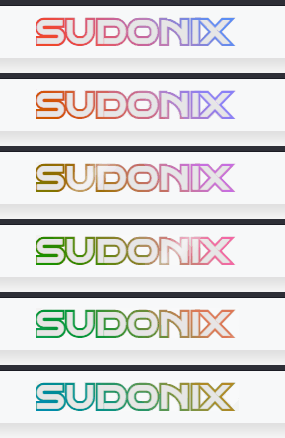
Love your new Glass effect on tittle site.
Possible to adapt it to my site/share the code ?
PW and WS Spirit alive
-
Hello @phenomlab
Love your new Glass effect on tittle site.
Possible to adapt it to my site/share the code ?
@DownPW Possible, yes, although this particular effect uses CSS only for both the text itself, and the shine rollover. It’s actually quite complex in setup and takes several adjustments to get it to look right.
It’s also important to understand if you are using this on a logo, or just text?
Mark Cutting also advises organisations as a Fractional CIO, Fractional CISO and Executive Advisor, helping boards improve technology governance, cyber resilience and executive decision making. Learn more at Gratmore Ltd
-
@DownPW Possible, yes, although this particular effect uses CSS only for both the text itself, and the shine rollover. It’s actually quite complex in setup and takes several adjustments to get it to look right.
It’s also important to understand if you are using this on a logo, or just text?
@phenomlab said in [NODEBB] Help for my custom CSS:
It’s also important to understand if you are using this on a logo, or just text?
just text; logo on the left is separate
PW and WS Spirit alive
-
@phenomlab said in [NODEBB] Help for my custom CSS:
It’s also important to understand if you are using this on a logo, or just text?
just text; logo on the left is separate
@DownPW And the hue animation? Or just the glass effect?
-
I’d like to try it without HUE to start.
But I’m always keen to try lots of things

You could always explain both to me, so I can apply them separately.
PW and WS Spirit alive
-
I’d like to try it without HUE to start.
But I’m always keen to try lots of things
You could always explain both to me, so I can apply them separately.
@DownPW Ok. No problems. Let me get back to you. In real life calling presently.
-
OK
Wait News
-
Yeah I also like the looks and effect of the Sudonix logo at the top. Looks very awesome!
-
-
@DownPW coming soon…
Mark Cutting also advises organisations as a Fractional CIO, Fractional CISO and Executive Advisor, helping boards improve technology governance, cyber resilience and executive decision making. Learn more at Gratmore Ltd
-
@phenomlab said in [NODEBB] Help for my custom CSS:
@DownPW coming soon…
No problem, I like to annoy you, you know that
French expression: He who loves well, chastises well !
PW and WS Spirit alive
-
@phenomlab said in [NODEBB] Help for my custom CSS:
@DownPW coming soon…
No problem, I like to annoy you, you know that
French expression: He who loves well, chastises well !
@DownPW I made some final alterations to the master code for this effect, and will release very soon.
-
-
Ohh super ^^
Thank you Mark -
-
@cagatay That looks like you didn’t define a label for the icon. Have a look at
/admin/settings/navigation, and you’ll see what I mean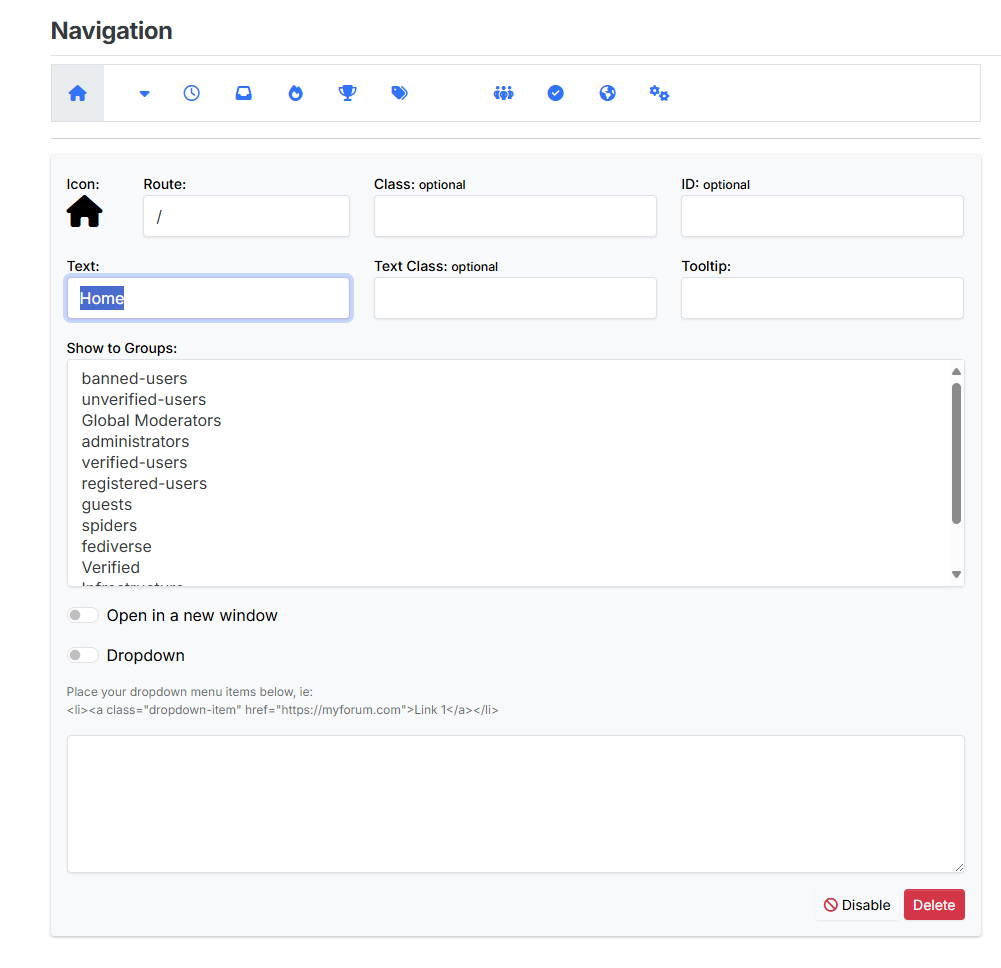
Mark Cutting also advises organisations as a Fractional CIO, Fractional CISO and Executive Advisor, helping boards improve technology governance, cyber resilience and executive decision making. Learn more at Gratmore Ltd






Hello! It looks like you're interested in this conversation, but you don't have an account yet.
Getting fed up of having to scroll through the same posts each visit? When you register for an account, you'll always come back to exactly where you were before, and choose to be notified of new replies (either via email, or push notification). You'll also be able to save bookmarks and upvote posts to show your appreciation to other community members.
With your input, this post could be even better 💗
Register LoginDid this solution help you?
Related Topics
-
-
-
-
-
-
-
-
[NODEBB] CSS Style Sheets SelectBox
Locked Solved Customisation