Skip to content

What’s going on with NodeBB?

Performance
20 3 2.0k 1
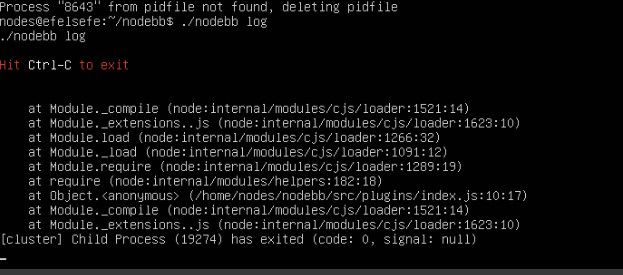
  • After the latest update, my entire system crashed and I’m unable to bring it back up.

    @cagatay what is in the nodebb log?

  • 070b5b55-d31b-4c03-820e-88145a1af601-image.jpeg

  • I downgraded the version, and now it is working. I think the issue is related to the version.

  • I downgraded the version, and now it is working. I think the issue is related to the version.

    @cagatay said:

    I downgraded the version, and now it is working. I think the issue is related to the version.

    Maybe yes, maybe no. it can be plugins compatibility, nodejs, npm etc.

    I don’t upgrade for now. I still waiting a little before upgrade.
    I’m on 4.10.3

  • @cagatay said:

    I downgraded the version, and now it is working. I think the issue is related to the version.

    Maybe yes, maybe no. it can be plugins compatibility, nodejs, npm etc.

    I don’t upgrade for now. I still waiting a little before upgrade.
    I’m on 4.10.3

    @DownPW I tend to stay at least one release behind intentionally to ensure maturity before upgrading - unless there is a good reason to do so immediately - such as identified vulnerabilities

  • That’s exactly our approach on PW now. Learned it the hard way , upgraded too early once or twice and paid the price. Actually sitting two releases behind at the moment, not just one. Stability over bleeding edge, unless a vulnerability forces the hand. Solid policy.

  • To be honest, I really regret moving to NodeBB. I should have stayed with XenForo. 😞

  • Honestly, I don’t regret the move at all on my side but I get that the experience can be very different depending on how comfortable you are with the technical side. XenForo is definitely more forgiving if you don’t want to deal with the server.

    One thing worth keeping in mind though: your install has some custom code on it, and need to know what it does or stay to stock nodebb witout modification

    What’s actually frustrating you the most right now? If it’s day-to-day admin stuff, there might be simpler fixes than rebuilding everything on XenForo.

  • I don’t want to keep worrying about whether the script will break with every update. Yes, we invested a lot of effort, yes, I have custom code, and yes, everything works well but somehow I end up facing issues after every update. And honestly, I think they have a development approach that doesn’t really listen to users. They just add or remove things based on their own ideas. The social plugins were a complete disaster

  • how to upgrade nodejs v20 to v22?

  • how to upgrade nodejs v20 to v22?

    @cagatay The most reliable way to upgrade Node.js on Ubuntu depends on how you originally installed it.

    Method 1: Using NVM (Recommended)

    If you already use Node Version Manager (NVM), upgrading is simple. NVM allows you to keep both versions and switch between them if needed.

    1. Install Node 22:
      nvm install 22
    2. Switch to Node 22:
      nvm use 22
    3. Set it as your default:
      nvm alias default 22
    4. Verify the change:
      node -v

    Method 2: Using NodeSource (PPA)

    If you installed Node.js via apt using the NodeSource repository, you need to update the repository script to point to the new version.

    1. Remove the old NodeSource list (optional but cleaner):
      sudo rm /etc/apt/sources.list.d/nodesource.list
    2. Download and run the NodeSource setup script for Node 22:
      curl -fsSL [https://deb.nodesource.com/setup_22.x](https://deb.nodesource.com/setup_22.x) | sudo -E bash -
    3. Install/Upgrade Node.js:
      sudo apt-get install -y nodejs
    4. Verify the installation:
      node -v

    Method 3: Using the ‘n’ Package

    If you have npm installed, you can use the n interactive manager.

    1. Clear the npm cache:
      sudo npm cache clean -f
    2. Install the ‘n’ helper:
      sudo npm install -g n
    3. Install Node 22:
      sudo n 22
    4. Update your shell:
      hash -r

    Troubleshooting

    • Permission Denied: If you see permission errors using Method 2 or 3, ensure you are using sudo.
    • Path Issues: If node -v still shows version 20 after upgrading via NVM, restart your terminal or run source ~/.bashrc.
    • Conflicts: Avoid mixing these methods. If you switch from apt to nvm, it is best to sudo apt remove nodejs first to avoid path conflicts.

Related Topics
  • 4 Votes
    3 Posts
    481 Views
    thanks @DownPW ! this is definitely very helpful.
  • Spam spam spam

    Solved Configure nodebb
    6
    2 Votes
    6 Posts
    1k Views
    @Panda said in Spam spam spam: ok, yes Ive seen the queue, it shows IP, but doesnt have a field for comments from registrant. It’s not designed for that. It merely serves as a gateway between posts appearing on your form or not. @Panda said in Spam spam spam: It would be better if nodebb had this plugin included in ACP list, as not only then do you know its approved and should work, but many people cant or dont want to use CLI on the server That’s a question for the NodeBB devs but in all honesty you can’t not use the CLI when installing nodebb so to be this isn’t a big deal.
  • Opening links in nodebb widget

    Solved Configure nodebb
    6
    4 Votes
    6 Posts
    2k Views
    A more efficient way of including this would be to not over complicate it and leverage a standard iframe (providing the CSP headers of the remote site permit this) like below <iframe src="https://www.classmarker.com/online-test/start/?quiz=gag66aea7922f0a5" width="700" height="800"></iframe> This works first time every time on your site as intended.
  • 3 Votes
    6 Posts
    2k Views
    @kadir-ay-0 marking as resolved based on https://community.nodebb.org/topic/17109/manual-build-a-night-mode-for-harmony/5 Please do not raise requests in two places - here and the NodeBB forums. All this does is create unnecessary load for both parties.
  • 0 Votes
    5 Posts
    2k Views
    @qwinter this particular site uses the code I wrote if you want to see it in action. It’s a information and intelligence gatherer I designed for collecting various information security articles from around the globe and consolidating them in one place. Essentially, each “post” is in fact generated by the script, and the NodeBB API. https://hostrisk.com/
  • NodeBB slow after DB recovery

    Solved Performance performance nodebb
    1
    5 Votes
    1 Posts
    718 Views
    No one has replied
  • [NODEBB] Help for my custom CSS

    Solved Customisation nodebb css bugfix
    237
    49 Votes
    237 Posts
    107k Views
    @baris said: You should change your selectors so it doesn’t look at the entire document. You probably only want to apply fancybox to stuff inside the #content element which is what changes when the user navigates around the page. So use $('#content a').... for your selectors then the forum logo in the header won’t be selected. I modified the JS Fancybox code now and this code and it seem better // --------------------------------------------- // Fancybox Media Reader (Without Website Logo) // --------------------------------------------- if (top.location.pathname !== '/login') { $(window).on('action:posts.loaded', function(data) { console.log("Polling DOM for lazyLoaded images to apply Fancybox"); $(document).ready(function() { $('#content a').not('.forum-logo').not(".avatar").not(".emoji").not(".bmac-noanimate").each(function() { $('#content a[href*=".jpg"], #content a[href*=".jpeg"], #content a[href*=".png"], #content a[href*=".gif"], #content a[href*=".webp"]').addClass("noanimate"); }); }); }); } if (top.location.pathname !== '/login') { $(document).ready(function() { $(window).on('action:ajaxify.end', function(data) { $('#content a').not('.logo').not(".avatar").not(".emoji").not(".bmac-noanimate").each(function() { $('#content a[href*=".jpg"], #content a[href*=".jpeg"], #content a[href*=".png"], #content a[href*=".gif"], #content a[href*=".webp"]').addClass("noanimate"); data.preventDefault() // Strip out the images contained inside blockquotes as this looks nasty :) $('#content blockquote img').remove(); }); Fancybox.bind( '#content a[href*=".jpg"], #content a[href*=".jpeg"], #content a[href*=".png"], #content a[href*=".gif"], #content a[href*=".webp"]', { groupAll: true, } ); }); }); } // Chat fancybox - fires when chat module loaded and AJAX calls new chat $(document).ready(function() { $(window).on('action:chat.loaded', function(data) { // >>> Se limiter au contenu principal uniquement <<< $('#content img').not('.forum-logo').not(".avatar").not(".emoji").not(".bmac-noanimate").each(function() { var newHref = $(this).attr("src"); $(this).wrap("<a class='fancybox' href='" + newHref + "'/>"); $('#content a[href*=".jpg"], #content a[href*=".jpeg"], #content a[href*=".png"], #content a[href*=".gif"], #content a[href*=".webp"]').addClass("noanimate"); data.preventDefault(); // Strip out the images contained inside blockquotes as this looks nasty :) $('#content blockquote img').remove(); }); Fancybox.bind( '#content a[href*=".jpg"], #content a[href*=".jpeg"], #content a[href*=".png"], #content a[href*=".gif"], #content a[href*=".webp"]', { groupAll: true, } ); }); }); For the logo, I must use overflow: visible !important; on [component="brand/logo"] /* --- Logo --- */ [component="brand/logo"] { max-height: 50px; width: auto; height: auto; max-width: 100%; display: block; object-fit: contain; object-position: left center; overflow: visible !important; } Better result !!
  • nodebb dropdown menu

    Solved Configure nodebb
    5
    1
    0 Votes
    5 Posts
    2k Views
    @phenomlab said in nodebb dropdown menu: @kurulumu-net You set it like the below example taken from this site [image: 1637939951821-aae36790-3257-4bb2-ad5a-0d744309876a-image.png] Which presents this [image: 1637939983445-77f47260-2941-4afe-9614-8e17dcfc8c19-image.png] Very interesting… I actually thought this wasn’t possible, as I remember it being asked in the NodeBB forum. Is this something new that’s been implemented? I’ll 100% be doing that when I’m on the laptop over the weekend.