Skip to content

Killing Linux Zombie Processes

Tips
3 2 1.1k 1
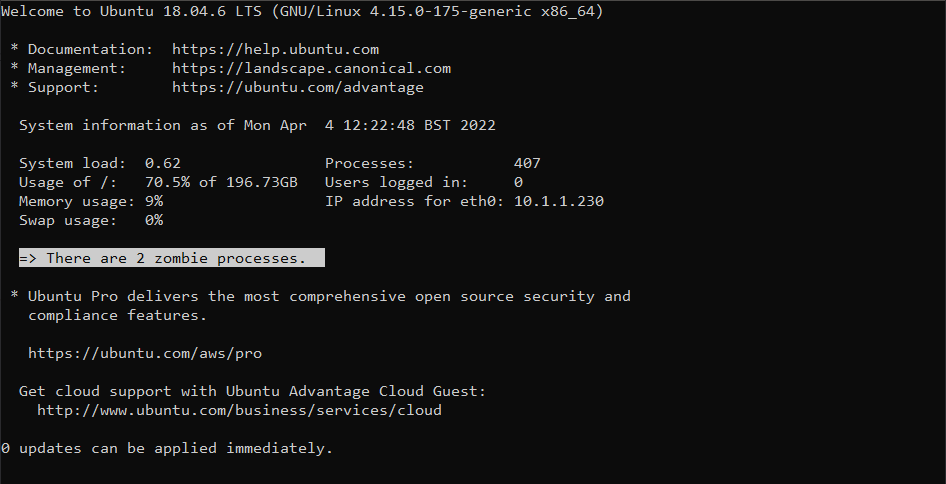
  • Periodically, when logging into any Linux based server, you may be met with the below
    32fbb04c-7cf3-4c4a-92df-7c62748f7d07-image.png

    In a typical Linux scenario, a process (or sub process) notifies its parent when it has completed its execution and has exited. The parent process should remove the process from process table. However, if the parent process is unable to read the process status from its child (the completing process or sub process), it won’t be able to remove the this from memory which causes the supposedly dead process to still continue to exist in the process table. The end result of this issue is a “zombie process” - one that has no reason to be running, and should have been terminated.

    Before you can terminate a process, you need to be able to identify it. Run the below in the terminal

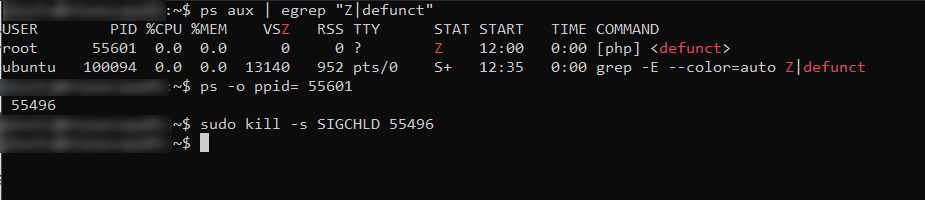
    ps aux | egrep "Z|defunct"
    

    Here’s the result

    20274412-e1e1-4ddb-8a94-a659a649c21b-image.png

    Now, you can’t actually “kill” something that is already dead, but you can notify the parent process that it should check again to see if the sub or child process is still running or not

    ps -o ppid= <Child PID>
    

    As an example

    e4df563a-8b5d-4f27-b6db-dd7810fd0689-image.png

    This tells us that the process ID we need to target is 55496. Based on this, we then use

    kill -s SIGCHLD <Parent PID>
    

    49de9c15-e0d1-4077-bab0-801cc13a5c4e-image.png

    And with all the commands together

    5ccb9788-d260-483b-90eb-506ab28c4091-image.png

    Now run

    ps aux | egrep "Z|defunct"
    

    If you still see zombie processes, you’ll need to target the parent process. Please be aware that killing a parent process will automatically kill all child processes, so use with caution.

    21d7cfad-46e9-4638-89e0-32233d7168ad-image.png

    kill -9 <Parent PID>
    

    a4846b3f-fe78-43a2-8169-21e84c181735-image.png

  • @phenomlab

    I test to kill a zombie process on SSH

    ps -o ppid= <Child PID>
    

    the command does not return me any parent process

    167fb778-eb83-49e5-a5a5-45ce03e87504-image.png

    EDIT: Strange things

    When I log into SSH I see the zombie process message
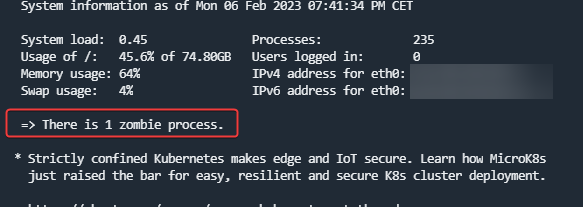
    e26541d3-4fe6-4345-a0ac-aa8e8eb6dd27-image.png

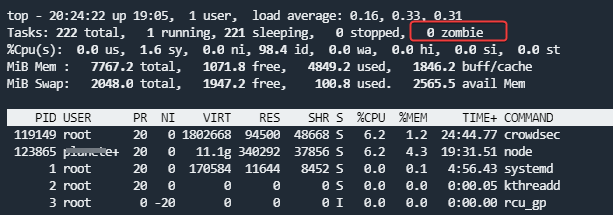
    but not in top :

    3198cec2-e888-4542-9ca9-598803657d58-image.png

    And the zombie process number change with each order cli commands :
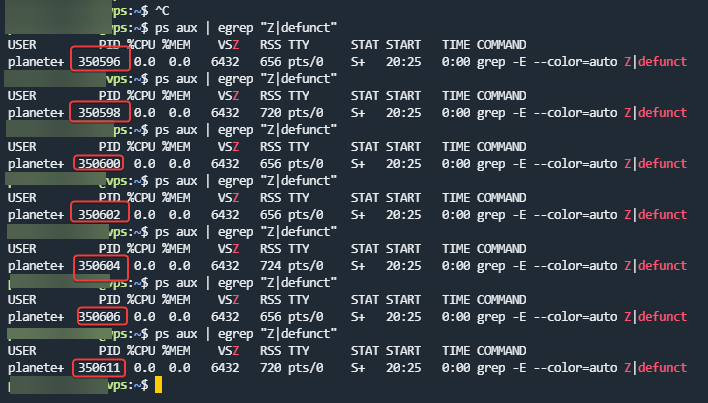
    593e5a88-b108-4f56-bf30-e2e4af9346c2-image.png

  • @phenomlab

    I test to kill a zombie process on SSH

    ps -o ppid= <Child PID>
    

    the command does not return me any parent process

    167fb778-eb83-49e5-a5a5-45ce03e87504-image.png

    EDIT: Strange things

    When I log into SSH I see the zombie process message

    e26541d3-4fe6-4345-a0ac-aa8e8eb6dd27-image.png

    but not in top :

    3198cec2-e888-4542-9ca9-598803657d58-image.png

    And the zombie process number change with each order cli commands :

    593e5a88-b108-4f56-bf30-e2e4af9346c2-image.png

    @DownPW odd indeed. Looks like it’s spawning, immediately dying, then spawning again.


Related Topics
  • To the Window to the Linux . . .

    Pinned Linux arch linux windows endoflife
    22
    19 Votes
    22 Posts
    3k Views
    @phenomlab said: @Madchatthew ouch. Sounds nasty. Did you get to the bottom of why it happened? I believe it is due to not everything getting upgraded because i wasn’t checking on the different packages I had installed from the AUR. Then when I ran yay it was like, hey would you like to update all of these things that you haven’t updated in months, perhaps years or ever for that matter and I was like yes please If you don’t have yay there are no notifications that you need more updates than what you realize. Chrome was staying updated because it would give me a notification, but there was the nvidia package that needed to be upgraded as well and I had never upgraded it. I didn’t realize it and should have. Then some of those packages use cmake and that needed to be updated as well. So using yay is beneficial to make sure you get all the updates you need.
  • Windows 10 End of Life

    General windows linux arch end of life
    10
    2 Votes
    10 Posts
    1k Views
    @phenomlab this looks very nice as well. It is nice that they keep the KDE Neon a rolling release so you will get those updated apps even though Ubuntu isn’t a rolling release. Is it a rolling distro? KDE neon is rolling for KDE software. The Ubuntu base OS is not, but certain packages will be updated as needed to support KDE software requiring newer library versions than what is provided by Ubuntu. Apps from the main repositories are not rolling either, and therefore can be up to two years old. Users are encouraged not to use them, and to instead get apps from Snap or Flatpak using KDE’s Discover app store. In neon, Discover is set up to only show apps from these sources, filtering out apps from the repositories.
  • Linux on a Stick

    Linux linux usb arch
    29
    16 Votes
    29 Posts
    4k Views
    @DownPW I haven’t tried either of those, I am sure they run fast as well. Linux is so versatile it is awesome!
  • Linux Certification

    Linux linux certs
    4
    2 Votes
    4 Posts
    834 Views
    @Madchatthew You might be sorry you asked This is the mentoring category below. Presently, it’s unused, but we have a dedicated area for it. https://sudonix.org/category/8/mentoring Other services https://sudonix.org/services
  • 2 Votes
    2 Posts
    907 Views
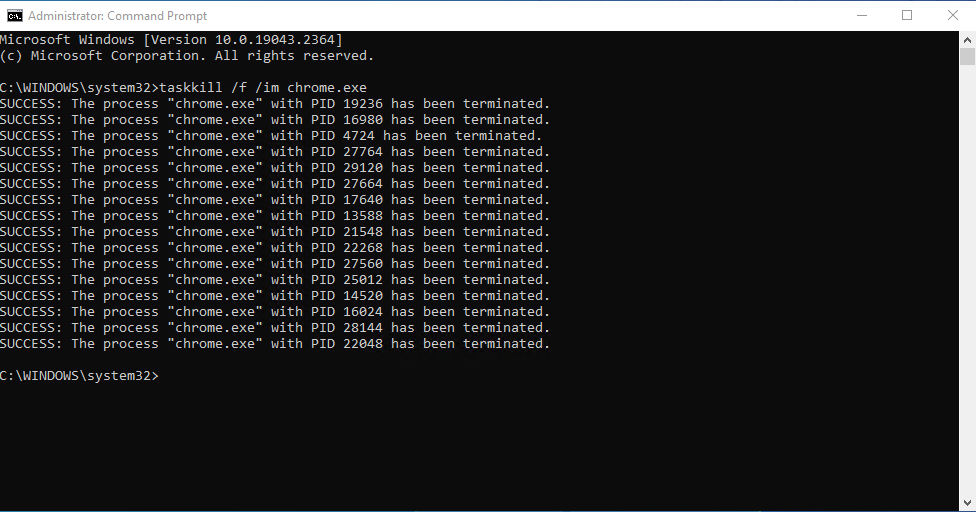
    As an aside to this, there is also the command of tasklist which will provide a list of processes running on your machine, or a remote machine you are looking to query. [image: 1678806102692-000a408c-cc7e-450f-8e5e-bed9a4238a05-image.png] There is also a useful list of switches below, plus the ability to format into a table, or CSV. https://ss64.com/nt/tasklist.html
  • SASL LOGIN authentication failed: generic failure

    Moved Solved Linux
    5
    0 Votes
    5 Posts
    2k Views
    @Ash3T I’m going to mark this post as solved as I’ve not heard from you in a while. Let me know if this isn’t the case and you need more help.
  • help me configuring cron job for fof/sitemap - flarum

    Solved Configure
    36
    18 Votes
    36 Posts
    7k Views
    you are too fast
  • 2 Votes
    28 Posts
    7k Views
    @phenomlab said in Advantages and disadvantages of changing to Ubuntu?: @jac Yeah, I wouldn’t just leap into it unless you have a valid reason (such as the laptop no longer working and needing to be reinstalled). Probably better the devil you know currently. Absolutely mate, and generally as discussed that is the only time I have changed over to Ubuntu once the laptop has got slower. For now I will carry on with Windows, purchase the VPN & BitDefender in later October / early November and then see how all that runs for a few more months .