Virtualmin Setup DigitalOcean
-
Hi, today i am setting up a new DO droplet and i was trying to refer old discussion and i could not find it. i opened phenomlab and metabullet both websites are not working
I am referring to this doc https://www.digitalocean.com/community/tutorials/how-to-install-virtualmin-with-webmin-lamp-bind-and-postfix-on-ubuntu-16-04
I’m hoping it will work as expected
@Hari both of those sites were taken down some time ago. I can put metabullet.com back up without too much issue if necessary, but most of the content there was superseded by Sudonix.
Was there anything in particular you needed ?
Mark Cutting also advises organisations as a Fractional CIO, Fractional CISO and Executive Advisor, helping boards improve technology governance, cyber resilience and executive decision making. Learn more at Gratmore Ltd
-
@Hari both of those sites were taken down some time ago. I can put metabullet.com back up without too much issue if necessary, but most of the content there was superseded by Sudonix.
Was there anything in particular you needed ?
@phenomlab no need to bring those sites back. i am just documenting here

I’m already seeing the virtualmin login page. now need to update and add domains
-
@phenomlab no need to bring those sites back. i am just documenting here
I’m already seeing the virtualmin login page. now need to update and add domains
@Hari good. What’s this going to be for out of curiosity ?
Mark Cutting also advises organisations as a Fractional CIO, Fractional CISO and Executive Advisor, helping boards improve technology governance, cyber resilience and executive decision making. Learn more at Gratmore Ltd
-
@phenomlab we have bunch of subdirectories (domain.com/ask, news…) moving them to subdomains (news.domain.com)
once everything works perfectly we may stop using CW
-
@phenomlab we have bunch of subdirectories (domain.com/ask, news…) moving them to subdomains (news.domain.com)
once everything works perfectly we may stop using CW
@Hari sounds like a good plan.
Mark Cutting also advises organisations as a Fractional CIO, Fractional CISO and Executive Advisor, helping boards improve technology governance, cyber resilience and executive decision making. Learn more at Gratmore Ltd
-
@phenomlab this gonna be a production build. which mySQL option do you suggest? flarum, and 3 to 4 wordpress sites should i go with 1GB MySQL option? we can change this later right?
4GB ram 2vCPU AMD

Edit: i went forward with 1GB MySQL allocation option
-
@phenomlab this gonna be a production build. which mySQL option do you suggest? flarum, and 3 to 4 wordpress sites should i go with 1GB MySQL option? we can change this later right?
4GB ram 2vCPU AMD
Edit: i went forward with 1GB MySQL allocation option
@Hari yes, this should be fine.
Mark Cutting also advises organisations as a Fractional CIO, Fractional CISO and Executive Advisor, helping boards improve technology governance, cyber resilience and executive decision making. Learn more at Gratmore Ltd
-
@phenomlab one quick question
host.domain.com virtualmin main domain used during setup (host)
site.domain.com virtual server created in virtualmini have lets encrypt certificates for both subdomains
CF A name record is proxed, both sites are opening
but when i try to access Virtualmin panel by using host.domain.com:10000 it is not opening
but IP:10000 is working
what am i missing?
is CF preventing port access?
-
@phenomlab one quick question
host.domain.com virtualmin main domain used during setup (host)
site.domain.com virtual server created in virtualmini have lets encrypt certificates for both subdomains
CF A name record is proxed, both sites are opening
but when i try to access Virtualmin panel by using host.domain.com:10000 it is not opening
but IP:10000 is working
what am i missing?
is CF preventing port access?
@Hari said in Virtualmin Setup DigitalOcean:
is CF preventing port access?
Yes, but not at the port level. The reason for this is that CF is handling the DNS side of things so when you try to access using your browser, it’s going to resolve to the address in DNS that resolves to CF.
There’s a number of choices depending on your scenario.
The most common approach is to create a page page rule that bypass the CF proxy and allows direct access. The issue here of course is that the free plan on CF only allows a small amount of ports, so you’d need to change the VirtualMin listener port to something else dish as 8443 which is routable in the free plan. You can change the VirtualMin port as explained here
Another approach is to use a management station that has access, and then create a HOSTS file entry that contains a mapping from hostname to IP that overrides the DNS but only for your machine. The preferred order of resolution means host files are read before DNS, and if a match is found then that is used and DNS is ignored.
The drawback with this is that you’d need to make this change on every single machine where you wanted to gain access. Not insurmountable, but quite clunky if you frequently used multiple machine or your phone to get access.
The last method, which is by far optimum is to use a vacant or unused domain to access VirtualMin. I do this myself, and it just means that this domain has no other purpose other than to manage the VPS. In other words, it’s not used for web hosting etc. You can still host the DNS in CF, but you’d then need to ensure the proxy is disabled.
Mark Cutting also advises organisations as a Fractional CIO, Fractional CISO and Executive Advisor, helping boards improve technology governance, cyber resilience and executive decision making. Learn more at Gratmore Ltd
-
@Hari said in Virtualmin Setup DigitalOcean:
is CF preventing port access?
Yes, but not at the port level. The reason for this is that CF is handling the DNS side of things so when you try to access using your browser, it’s going to resolve to the address in DNS that resolves to CF.
There’s a number of choices depending on your scenario.
The most common approach is to create a page page rule that bypass the CF proxy and allows direct access. The issue here of course is that the free plan on CF only allows a small amount of ports, so you’d need to change the VirtualMin listener port to something else dish as 8443 which is routable in the free plan. You can change the VirtualMin port as explained here
Another approach is to use a management station that has access, and then create a HOSTS file entry that contains a mapping from hostname to IP that overrides the DNS but only for your machine. The preferred order of resolution means host files are read before DNS, and if a match is found then that is used and DNS is ignored.
The drawback with this is that you’d need to make this change on every single machine where you wanted to gain access. Not insurmountable, but quite clunky if you frequently used multiple machine or your phone to get access.
The last method, which is by far optimum is to use a vacant or unused domain to access VirtualMin. I do this myself, and it just means that this domain has no other purpose other than to manage the VPS. In other words, it’s not used for web hosting etc. You can still host the DNS in CF, but you’d then need to ensure the proxy is disabled.
@phenomlab as suggested i have made a few changes
changed my port
changed my host domain from host.domain.com to hos.domain2.com for extra CF page ruleshow can i disable others accessing my IP?
instead of using hos.domain2.com to manage virutalmin can i directly use my IP to access virtualmin?
if i proxy or deny direct access to my IP how to give FTP access to one of my admin? as currently we use IP
they need to access using FTP:hos.domain2.com?should i proxy hos.domain2.com at CF? currently i can not access Virtualmin using port how to add page rule to allow my port
-
@phenomlab as suggested i have made a few changes
changed my port
changed my host domain from host.domain.com to hos.domain2.com for extra CF page ruleshow can i disable others accessing my IP?
instead of using hos.domain2.com to manage virutalmin can i directly use my IP to access virtualmin?
if i proxy or deny direct access to my IP how to give FTP access to one of my admin? as currently we use IP
they need to access using FTP:hos.domain2.com?should i proxy hos.domain2.com at CF? currently i can not access Virtualmin using port how to add page rule to allow my port
@Hari said in Virtualmin Setup DigitalOcean:
how can i disable others accessing my IP?
Can you clarify this part ? Are you looking to hide the real IP behind CF ?
@Hari said in Virtualmin Setup DigitalOcean:
instead of using hos.domain2.com to manage virutalmin can i directly use my IP to access virtualmin?
Yes, if you aren’t worried about certificate errors
@Hari said in Virtualmin Setup DigitalOcean:
should i proxy hos.domain2.com at CF? currently i can not access Virtualmin using port how to add page rule to allow my port
No, do not proxy it. As soon as you do that, DNS will resolve at CF and not the actual server itself.
Mark Cutting also advises organisations as a Fractional CIO, Fractional CISO and Executive Advisor, helping boards improve technology governance, cyber resilience and executive decision making. Learn more at Gratmore Ltd
-
@Hari said in Virtualmin Setup DigitalOcean:
how can i disable others accessing my IP?
Can you clarify this part ? Are you looking to hide the real IP behind CF ?
@Hari said in Virtualmin Setup DigitalOcean:
instead of using hos.domain2.com to manage virutalmin can i directly use my IP to access virtualmin?
Yes, if you aren’t worried about certificate errors
@Hari said in Virtualmin Setup DigitalOcean:
should i proxy hos.domain2.com at CF? currently i can not access Virtualmin using port how to add page rule to allow my port
No, do not proxy it. As soon as you do that, DNS will resolve at CF and not the actual server itself.
@phenomlab i thought once i set up the host domain i no longer need to access Virtualmin using IP. later realized that is not how it works.
how do i install PHPmyadmin to all servers (domains)? … right now i had to do it manually for each and every domain
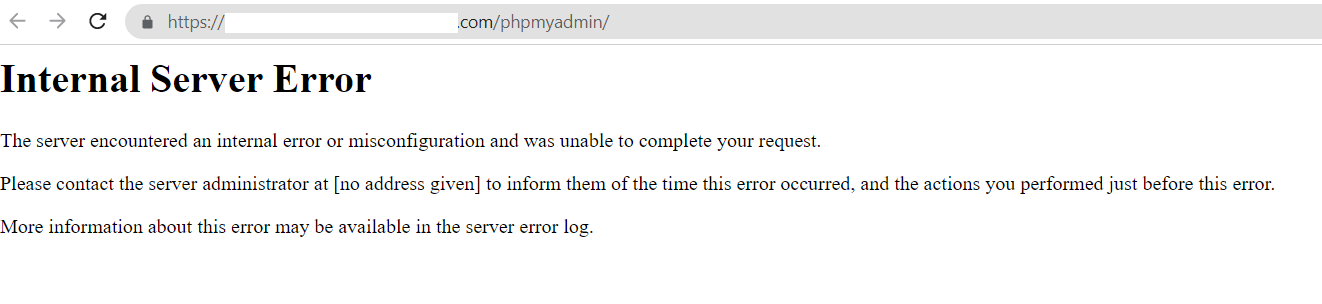
though i install phpmyadmin for one domain it is not working, i have tired restarting server and all.
-
@phenomlab i thought once i set up the host domain i no longer need to access Virtualmin using IP. later realized that is not how it works.
how do i install PHPmyadmin to all servers (domains)? … right now i had to do it manually for each and every domain
though i install phpmyadmin for one domain it is not working, i have tired restarting server and all.
@Hari What is in the error log ? Typically, you’d only need to install phpMyAdmin once and as long as it can see your MySQL server and databases, this should be fine.
That’s a HTTP 500 error which indicates an issue on your side.
Mark Cutting also advises organisations as a Fractional CIO, Fractional CISO and Executive Advisor, helping boards improve technology governance, cyber resilience and executive decision making. Learn more at Gratmore Ltd
-
@Hari What is in the error log ? Typically, you’d only need to install phpMyAdmin once and as long as it can see your MySQL server and databases, this should be fine.
That’s a HTTP 500 error which indicates an issue on your side.
@phenomlab i messed the server, now i can not delete and reinstall.
i have created subdomain1, 2, 3 as main servers instead of creating domain and adding them as sub servers. during this process, i requested for more than 5 let’s encrypt certificates and reached the daily limit. Now i have manually bought one certificate from CF Origin Certificate for 15years and installed it for the main domain
moved all servers as sub servers now i see 403 error
i hope i do not have any SSL issues all i get is 403 for 3 subdomains how can i fix it?
Forbidden
You don'\t have permission to access this resource.
i did not move my main domain yet - planned to move after 1week
-
@phenomlab i messed the server, now i can not delete and reinstall.
i have created subdomain1, 2, 3 as main servers instead of creating domain and adding them as sub servers. during this process, i requested for more than 5 let’s encrypt certificates and reached the daily limit. Now i have manually bought one certificate from CF Origin Certificate for 15years and installed it for the main domain
moved all servers as sub servers now i see 403 error
i hope i do not have any SSL issues all i get is 403 for 3 subdomains how can i fix it?
Forbidden
You don'\t have permission to access this resource.
i did not move my main domain yet - planned to move after 1week
@Hari what’s in the NGINX error logs for each of these domains ? Looks like a permissions issue to me
Mark Cutting also advises organisations as a Fractional CIO, Fractional CISO and Executive Advisor, helping boards improve technology governance, cyber resilience and executive decision making. Learn more at Gratmore Ltd
-
@Hari what’s in the NGINX error logs for each of these domains ? Looks like a permissions issue to me
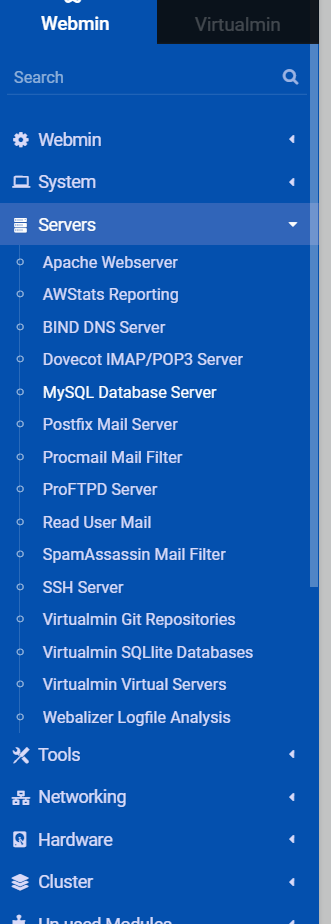
@phenomlab where do i find it? i think i am not using it
-
@phenomlab where do i find it? i think i am not using it
@Hari you have the apache build. In that case, can you post one of the
virtualhostconfigs (for one of the domains)Mark Cutting also advises organisations as a Fractional CIO, Fractional CISO and Executive Advisor, helping boards improve technology governance, cyber resilience and executive decision making. Learn more at Gratmore Ltd
-
@Hari you have the apache build. In that case, can you post one of the
virtualhostconfigs (for one of the domains) -
@phenomlab where can i find it? sent PM
-
Can you post the configs here remembering to redact sensitive information, and also use the code markers (three backticks) as this makes it much easier to read rather than standard text in a PM.
Mark Cutting also advises organisations as a Fractional CIO, Fractional CISO and Executive Advisor, helping boards improve technology governance, cyber resilience and executive decision making. Learn more at Gratmore Ltd


Hello! It looks like you're interested in this conversation, but you don't have an account yet.
Getting fed up of having to scroll through the same posts each visit? When you register for an account, you'll always come back to exactly where you were before, and choose to be notified of new replies (either via email, or push notification). You'll also be able to save bookmarks and upvote posts to show your appreciation to other community members.
With your input, this post could be even better 💗
Register LoginDid this solution help you?
Related Topics
-
-
-
-
-
-
Blog Setup
Solved Customisation -
-