WordPress site
-
@phenomlab said in WordPress site:
@jac that will backup the entire machine, so if you decide to use the server for something else (and I’m guessing this is going to be the case) and then you decide you need the files or database from that snapshot, you’ll need to recover it into another instance.
This isn’t the optimum way. It’s better to backup the database and the files individually.
Thanks mate. Is that via FTP?
@jac yes, or better, via VirtualMin
Mark Cutting also advises organisations as a Fractional CIO, Fractional CISO and Executive Advisor, helping boards improve technology governance, cyber resilience and executive decision making. Learn more at Gratmore Ltd
-
@phenomlab said in WordPress site:
@jac yes, or better, via VirtualMin
Thanks mate. I’ll do this tomorrow. Ideally save the files to a zip file?
-
@phenomlab said in WordPress site:
@jac yes, or better, via VirtualMin
Thanks mate. I’ll do this tomorrow. Ideally save the files to a zip file?
@jac you’ll need a script to backup the database as this won’t be included in the files by default.
Mark Cutting also advises organisations as a Fractional CIO, Fractional CISO and Executive Advisor, helping boards improve technology governance, cyber resilience and executive decision making. Learn more at Gratmore Ltd
-
@jac you’ll need a script to backup the database as this won’t be included in the files by default.
@phenomlab said in WordPress site:
@jac you’ll need a script to backup the database as this won’t be included in the files by default.
I see mate, unfortunately you’ve lost me there, I do apologise. I’m sure tomorrow I can achieve this.
-
@phenomlab said in WordPress site:
@jac you’ll need a script to backup the database as this won’t be included in the files by default.
I see mate, unfortunately you’ve lost me there, I do apologise. I’m sure tomorrow I can achieve this.
@jac I can help you of course.
Mark Cutting also advises organisations as a Fractional CIO, Fractional CISO and Executive Advisor, helping boards improve technology governance, cyber resilience and executive decision making. Learn more at Gratmore Ltd
-
@phenomlab said in WordPress site:
@jac I can help you of course.
Many thanks Mark!
Happy to proceed…


-
@phenomlab said in WordPress site:
@jac I can help you of course.
Many thanks Mark!
Happy to proceed…
@jac Final DB backup completed
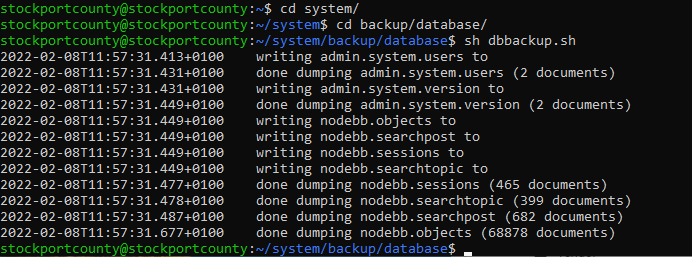
I’ve also created a bundled archive of the entire site - all files, folders, and database, located here
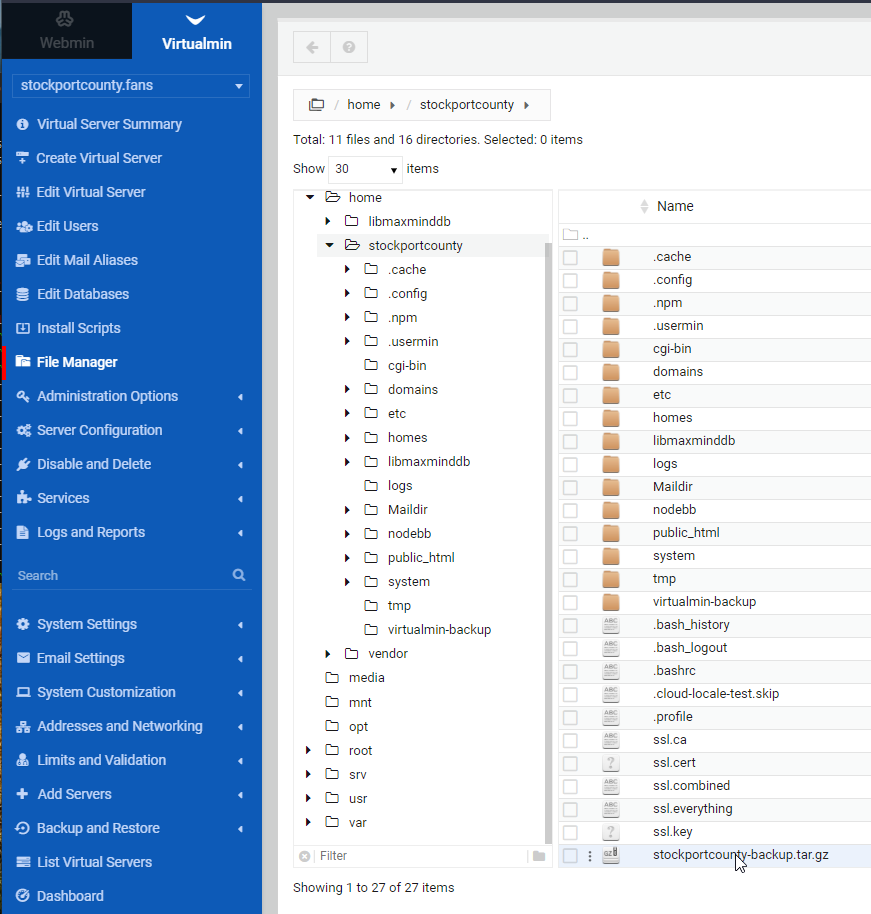
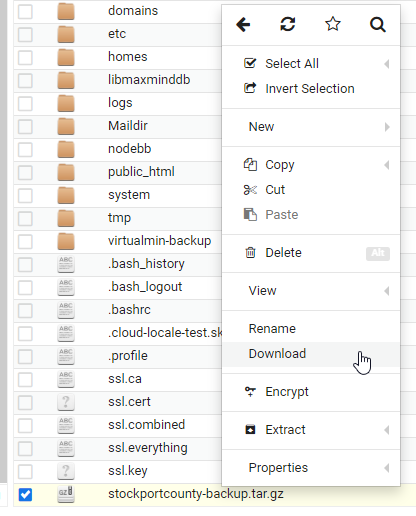
You should download this file for backup and storage purposes (right-click the file and then you can download it)
The server can remain as is - unless you are looking to shut that down altogether which kind of defeats the object if you want to continue with another project and domain. I personally would take a snapshot of the server, and also check the backup status - from memory, I set this to backup each night and if that is the case, you’re good to go once you’ve downloaded the
.tar.gzfile (which can be opened with 7Zip by the way)Mark Cutting also advises organisations as a Fractional CIO, Fractional CISO and Executive Advisor, helping boards improve technology governance, cyber resilience and executive decision making. Learn more at Gratmore Ltd
-
@jac Final DB backup completed
I’ve also created a bundled archive of the entire site - all files, folders, and database, located here
You should download this file for backup and storage purposes (right-click the file and then you can download it)
The server can remain as is - unless you are looking to shut that down altogether which kind of defeats the object if you want to continue with another project and domain. I personally would take a snapshot of the server, and also check the backup status - from memory, I set this to backup each night and if that is the case, you’re good to go once you’ve downloaded the
.tar.gzfile (which can be opened with 7Zip by the way)@phenomlab said in WordPress site:
You should download this file for backup and storage purposes (right-click the file and then you can download it)
Done

-
@jac Final DB backup completed
I’ve also created a bundled archive of the entire site - all files, folders, and database, located here
You should download this file for backup and storage purposes (right-click the file and then you can download it)
The server can remain as is - unless you are looking to shut that down altogether which kind of defeats the object if you want to continue with another project and domain. I personally would take a snapshot of the server, and also check the backup status - from memory, I set this to backup each night and if that is the case, you’re good to go once you’ve downloaded the
.tar.gzfile (which can be opened with 7Zip by the way)@phenomlab said in WordPress site:
I personally would take a snapshot of the server, and also check the backup status - from memory, I set this to backup each night and if that is the case, you’re good to go once you’ve downloaded the .tar.gz file (which can be opened with 7Zip by the way)
Thank you very much Mark, just checking this now.
I don’t think there are any backups made, but I’ll check now.
-
@phenomlab said in WordPress site:
I personally would take a snapshot of the server, and also check the backup status - from memory, I set this to backup each night and if that is the case, you’re good to go once you’ve downloaded the .tar.gz file (which can be opened with 7Zip by the way)
Thank you very much Mark, just checking this now.
I don’t think there are any backups made, but I’ll check now.
@jac said in WordPress site:
@phenomlab said in WordPress site:
I personally would take a snapshot of the server, and also check the backup status - from memory, I set this to backup each night and if that is the case, you’re good to go once you’ve downloaded the .tar.gz file (which can be opened with 7Zip by the way)
Thank you very much Mark, just checking this now.
I don’t think there are any backups made, but I’ll check now.
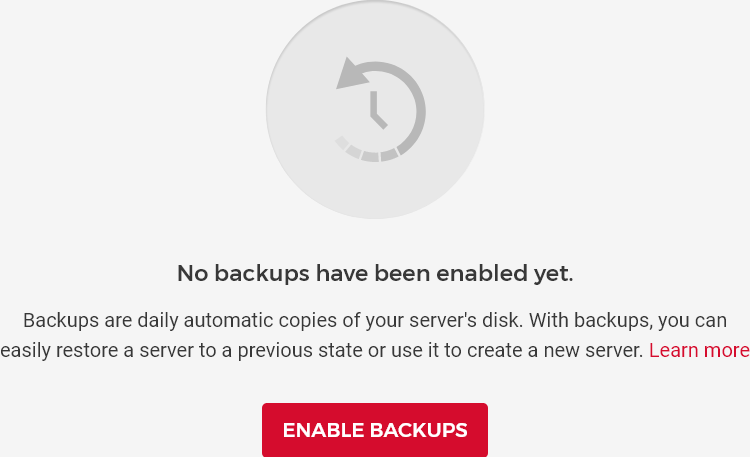
There is a snapshot but no backup.

-
@jac said in WordPress site:
@phenomlab said in WordPress site:
I personally would take a snapshot of the server, and also check the backup status - from memory, I set this to backup each night and if that is the case, you’re good to go once you’ve downloaded the .tar.gz file (which can be opened with 7Zip by the way)
Thank you very much Mark, just checking this now.
I don’t think there are any backups made, but I’ll check now.
There is a snapshot but no backup.
@jac Let’s click “Enable Backups”. This way, you don’t need to worry about it, and they are very cheap.
Mark Cutting also advises organisations as a Fractional CIO, Fractional CISO and Executive Advisor, helping boards improve technology governance, cyber resilience and executive decision making. Learn more at Gratmore Ltd
-
@jac Let’s click “Enable Backups”. This way, you don’t need to worry about it, and they are very cheap.
@phenomlab said in WordPress site:
@jac Let’s click “Enable Backups”. This way, you don’t need to worry about it, and they are very cheap.
Even though it won’t be using that backup anymore?
-
@phenomlab said in WordPress site:
@jac Let’s click “Enable Backups”. This way, you don’t need to worry about it, and they are very cheap.
Even though it won’t be using that backup anymore?
@jac said in WordPress site:
@phenomlab said in WordPress site:
@jac Let’s click “Enable Backups”. This way, you don’t need to worry about it, and they are very cheap.
Even though it won’t be using that backup anymore?
What I’m saying is if I won’t be using it I don’t want to pay for it
 .
.As in realistically my County forum is finished unfortunately.
-
@jac said in WordPress site:
@phenomlab said in WordPress site:
@jac Let’s click “Enable Backups”. This way, you don’t need to worry about it, and they are very cheap.
Even though it won’t be using that backup anymore?
What I’m saying is if I won’t be using it I don’t want to pay for it
.As in realistically my County forum is finished unfortunately.
@jac said in WordPress site:
@jac said in WordPress site:
@phenomlab said in WordPress site:
@jac Let’s click “Enable Backups”. This way, you don’t need to worry about it, and they are very cheap.
Even though it won’t be using that backup anymore?
What I’m saying is if I won’t be using it I don’t want to pay for it
.As in realistically my County forum is finished unfortunately.
Would that not be the same as the backup I downloaded?
-
@jac said in WordPress site:
@jac said in WordPress site:
@phenomlab said in WordPress site:
@jac Let’s click “Enable Backups”. This way, you don’t need to worry about it, and they are very cheap.
Even though it won’t be using that backup anymore?
What I’m saying is if I won’t be using it I don’t want to pay for it
.As in realistically my County forum is finished unfortunately.
Would that not be the same as the backup I downloaded?
@jac If you don’t want to pay for it anymore, then you’ll need to power off and delete the instance also. Hetzner will still charge you for a powered-off instance, and the only way to stop that charge is to delete.
Mark Cutting also advises organisations as a Fractional CIO, Fractional CISO and Executive Advisor, helping boards improve technology governance, cyber resilience and executive decision making. Learn more at Gratmore Ltd
-
@jac said in WordPress site:
@jac said in WordPress site:
@phenomlab said in WordPress site:
@jac Let’s click “Enable Backups”. This way, you don’t need to worry about it, and they are very cheap.
Even though it won’t be using that backup anymore?
What I’m saying is if I won’t be using it I don’t want to pay for it
.As in realistically my County forum is finished unfortunately.
Would that not be the same as the backup I downloaded?
@jac No. This is just the backup for the domain itself. Backup at server level means you can recover the entire machine.
Mark Cutting also advises organisations as a Fractional CIO, Fractional CISO and Executive Advisor, helping boards improve technology governance, cyber resilience and executive decision making. Learn more at Gratmore Ltd
-
@jac If you don’t want to pay for it anymore, then you’ll need to power off and delete the instance also. Hetzner will still charge you for a powered-off instance, and the only way to stop that charge is to delete.
@phenomlab said in WordPress site:
If you don’t want to pay for it anymore, then you’ll need to power off and delete the instance also. Hetzner will still charge you for a powered-off instance, and the only way to stop that charge is to delete.
I understand mate…
That may be the best option until I come up with something else, do you think?
-
@jac No. This is just the backup for the domain itself. Backup at server level means you can recover the entire machine.
@phenomlab said in WordPress site:
No. This is just the backup for the domain itself. Backup at server level means you can recover the entire machine.
Ah I see. thanks Mark
 .
. -
@phenomlab said in WordPress site:
If you don’t want to pay for it anymore, then you’ll need to power off and delete the instance also. Hetzner will still charge you for a powered-off instance, and the only way to stop that charge is to delete.
I understand mate…
That may be the best option until I come up with something else, do you think?
@jac agreed. Particularly if you intend to leave it for an extended period of time, then yes, that makes the most sense. Just remember that if you do decide to embark on that same journey again, the server itself, plus Webmin, Virtualmin, etc, all has to be created from scratch.
Mark Cutting also advises organisations as a Fractional CIO, Fractional CISO and Executive Advisor, helping boards improve technology governance, cyber resilience and executive decision making. Learn more at Gratmore Ltd
-
@jac agreed. Particularly if you intend to leave it for an extended period of time, then yes, that makes the most sense. Just remember that if you do decide to embark on that same journey again, the server itself, plus Webmin, Virtualmin, etc, all has to be created from scratch.
@phenomlab said in WordPress site:
@jac agreed. Particularly if you intend to leave it for an extended period of time, then yes, that makes the most sense. Just remember that if you do decide to embark on that same journey again, the server itself, plus Webmin, Virtualmin, etc, all has to be created from scratch.
Thanks for the advice.
Unfortunately yes, I think that would be the best solution.
A blog & forum about Stockport may be hard to do possibly in terms of content, & a church based website and forum could get messy
 it just depends how it was done.
If it’s for a single church then it wouldn’t work out in my eyes, it would have to be for anyone to view.


Hello! It looks like you're interested in this conversation, but you don't have an account yet.
Getting fed up of having to scroll through the same posts each visit? When you register for an account, you'll always come back to exactly where you were before, and choose to be notified of new replies (either via email, or push notification). You'll also be able to save bookmarks and upvote posts to show your appreciation to other community members.
With your input, this post could be even better 💗
Register LoginRelated Topics
-
-
configure ghost and wordpress combo
Moved Solved WordPress -
-
-
-
-
-