
[NODEBB] Help for my custom CSS
-
Hello @phenomlab
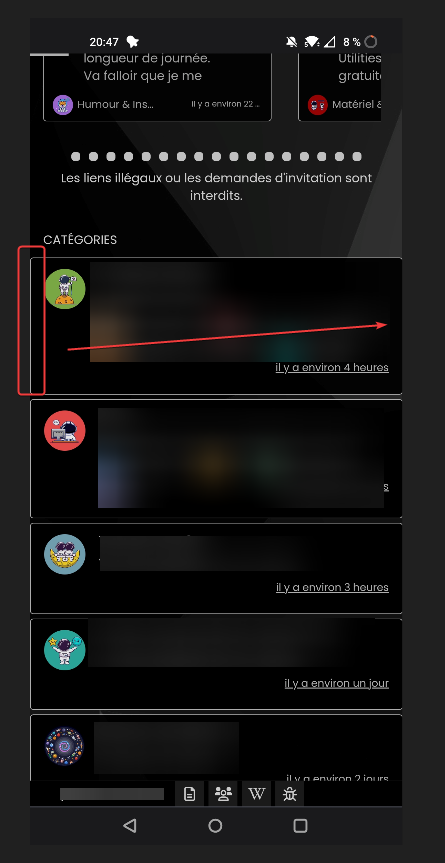
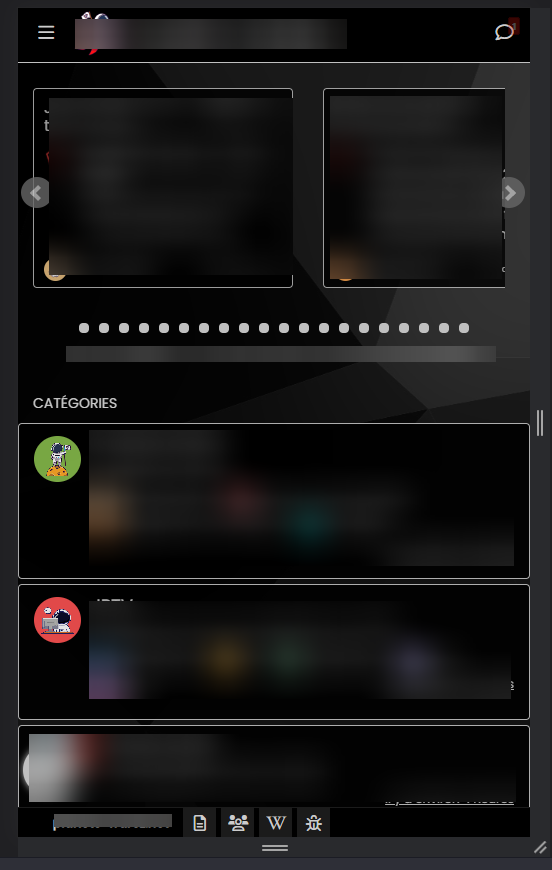
I have a odd littlebug only on Smartphone chrome based browsers (chrome, vivaldi, brave) only (it’s ok on firefox mobile)
the right border of categories /topic is not visible
Here a screenshot of the problem on chrome based browsers:
And a good result on firefox mobile (it’s OK) :
odd

PW and WS Spirit alive
-
Hello @phenomlab
I have a odd littlebug only on Smartphone chrome based browsers (chrome, vivaldi, brave) only (it’s ok on firefox mobile)
the right border of categories /topic is not visible
Here a screenshot of the problem on chrome based browsers:
And a good result on firefox mobile (it’s OK) :
odd
@DownPW odd indeed. Can you send me the CSS you are using for this ?
Mark Cutting also advises organisations as a Fractional CIO, Fractional CISO and Executive Advisor, helping boards improve technology governance, cyber resilience and executive decision making. Learn more at Gratmore Ltd
-
.categories > li, .category > ul > li {
    border: 1px solid silver;
    border-radius: 4px;
    margin-top: 5px;
    background: black;
    opacity: 0.9;
}
PW and WS Spirit alive
-
.categories > li, .category > ul > li { border: 1px solid silver; border-radius: 4px; margin-top: 5px; background: black; opacity: 0.9; }@DownPW change the
silverfor a hex value.Mark Cutting also advises organisations as a Fractional CIO, Fractional CISO and Executive Advisor, helping boards improve technology governance, cyber resilience and executive decision making. Learn more at Gratmore Ltd
-
-
@phenomlab Doesn’t work
@DownPW can you also change background from
blackto#000000 -
yes I have test too…
I have test too to disable all custom CSS on nodebb acp and delete all css code on file css theme with just
.categories > li, .category > ul > li {
active and it’s the same…delete cache too and logout/login
PW and WS Spirit alive
-
yes I have test too…
I have test too to disable all custom CSS on nodebb acp and delete all css code on file css theme with just
.categories > li, .category > ul > li {
active and it’s the same…delete cache too and logout/login
@DownPW is there a URL where I can check this ? Might not be this evening, but definitely tomorrow am.
-
-
@DownPW Try this
@media (max-width: 768px) {
.slideout-panel {
    margin-right: 1px;
}
}
The issue here is how other mobile browsers interpret the padding on the slideout panel, so we need to “patch” it so that those browsers can use the forced margin instead.
-
great it works great

You had to see this stuff !!
You are too strong as usual Mark.
Many Thanks

-
Hello Mark

I use this css code for reduce the image size :
.topic .posts .content .img-responsive {
    max-width: 45%;
    width: auto;
    padding: 1px;
    border-radius: 4px;
    border: 1px solid #c3c3c3;
    background-color: #F5F5F5;
    margin-top: 5px;
    margin-bottom: 5px;
}
Would it be possible to have a separate max size just for GIFs extension files (.gif) ?
I would like the gifs to be smaller than the imagesThanks in advance @phenomlab
PW and WS Spirit alive
-
Hello Mark
I use this css code for reduce the image size :
.topic .posts .content .img-responsive {
    max-width: 45%;
    width: auto;
    padding: 1px;
    border-radius: 4px;
    border: 1px solid #c3c3c3;
    background-color: #F5F5F5;
    margin-top: 5px;
    margin-bottom: 5px;
}
Would it be possible to have a separate max size just for GIFs extension files (.gif) ?
I would like the gifs to be smaller than the imagesThanks in advance @phenomlab
@DownPW Possible, yes, but it may be a little on the “greedy” side.
Try this - obviously, remove the red border I used for testing and add your own code
img[src$="gif"] {
    border: 10px solid red !important;
}
This is also very useful as a reference
Mark Cutting also advises organisations as a Fractional CIO, Fractional CISO and Executive Advisor, helping boards improve technology governance, cyber resilience and executive decision making. Learn more at Gratmore Ltd
-
@DownPW Possible, yes, but it may be a little on the “greedy” side.
Try this - obviously, remove the red border I used for testing and add your own code
img[src$="gif"] {
    border: 10px solid red !important;
}
This is also very useful as a reference
@phenomlab said in [NODEBB] Help for my custom CSS:
@DownPW Possible, yes, but it may be a little on the “greedy” side.
Try this - obviously, remove the red border I used for testing and add your own code
img[src$="gif"] {
    border: 10px solid red !important;
}
This is also very useful as a reference
–> it seem to work with this code:
/* max-width for IMG Files */
.topic .posts .content .img-responsive {
    max-width: 45%;
}

/* max-width for GIF Files */
.topic .posts .content .img-responsive[src$="gif"] {
    max-width: 10% !important;
}
Thanks @phenomlab for the attribute that I don’t find
-
Hello @phenomlab
It’s possible to add video background (mp4 for example)on nodebb for one theme and not for the other?
PW and WS Spirit alive
-
Hello @phenomlab
It’s possible to add video background (mp4 for example)on nodebb for one theme and not for the other?
@DownPW yes, but you have to be careful with performance. This can impact the loading of the site depending on the size of the MP4 file and where it is being accessed from.
Mark Cutting also advises organisations as a Fractional CIO, Fractional CISO and Executive Advisor, helping boards improve technology governance, cyber resilience and executive decision making. Learn more at Gratmore Ltd
-
@DownPW yes, but you have to be careful with performance. This can impact the loading of the site depending on the size of the MP4 file and where it is being accessed from.
@phenomlab said in [NODEBB] Help for my custom CSS:
@DownPW yes, but you have to be careful with performance. This can impact the loading of the site depending on the size of the MP4 file and where it is being accessed from.
File accessible on the server and 22.6 mo
How can I 'm doing this for testing?
PW and WS Spirit alive
-
@phenomlab said in [NODEBB] Help for my custom CSS:
@DownPW yes, but you have to be careful with performance. This can impact the loading of the site depending on the size of the MP4 file and where it is being accessed from.
File accessible on the server and 22.6 mo
How can I 'm doing this for testing?
@DownPW Something like this would work
<video autoplay muted loop id="bg-video">
  <source src="file.mp4" type="video/mp4">
  Your browser does not support HTML5 video.
</video>
Then some CSS which you’ll need to play with (this is an example)
#bg-video{ position: fixed; right: 0; bottom: 0; min-width: 100%; min-height: 100%; } -
hello @phenomlab
I have a very odd bug that I didn’t have before
I have images and background color defined for each category
when I open a new topic, the fa icon on the bottom left taskbar does not appear like when I reply to a topic
Here a gif too see the problem :

And here is the result I want:

I have tried to play with the color or z-index variable in css but nothing works
I tried disabling the custom CSS on ACP but it’s the same. clear the cache = same
Have you an idea ?
You can test on production forum
PW and WS Spirit alive
-
hello @phenomlab
I have a very odd bug that I didn’t have before
I have images and background color defined for each category
when I open a new topic, the fa icon on the bottom left taskbar does not appear like when I reply to a topic
Here a gif too see the problem :
And here is the result I want:
I have tried to play with the color or z-index variable in css but nothing works
I tried disabling the custom CSS on ACP but it’s the same. clear the cache = same
Have you an idea ?
You can test on production forum
@DownPW I can’t see the images or videos, but I’ll have a look on your production site.


Hello! It looks like you're interested in this conversation, but you don't have an account yet.
Getting fed up of having to scroll through the same posts each visit? When you register for an account, you'll always come back to exactly where you were before, and choose to be notified of new replies (either via email, or push notification). You'll also be able to save bookmarks and upvote posts to show your appreciation to other community members.
With your input, this post could be even better 💗
Register LoginDid this solution help you?
Related Topics
-
-
Please help me, I can't install nodebb
Locked Solved Customisation -
Nodebb and emails
Solved Configure -
-
NodeBB upgrade now cant post
Solved Bugs -
-
NodeBB Discord Plugins
Unsolved Customisation -





