move out from flarum to wordpress
-
@hari good luck ! Let me know if you need any help. 1 2k posts isn’t much and you can batch create the users
Mark Cutting also advises organisations as a Fractional CIO, Fractional CISO and Executive Advisor, helping boards improve technology governance, cyber resilience and executive decision making. Learn more at Gratmore Ltd
-
@hari good luck ! Let me know if you need any help. 1 2k posts isn’t much and you can batch create the users
 this is not a good decision, moving flarum to subdomain
it is something we want to move out and we miss a few features + a huge migration process.


a few hours ago flarum released v1.2.0 now setting up a new digital ocean droplet
-
this is not a good decision, moving flarum to subdomain
it is something we want to move out and we miss a few features + a huge migration process.
a few hours ago flarum released v1.2.0 now setting up a new digital ocean droplet
@hari said in move out from flarum to wordpress:
a few hours ago flarum released v1.2.0 now setting up a new digital ocean droplet
Looking at the release, I doubt there’s anything in there that will address your specific issues.
Mark Cutting also advises organisations as a Fractional CIO, Fractional CISO and Executive Advisor, helping boards improve technology governance, cyber resilience and executive decision making. Learn more at Gratmore Ltd
-
@hari said in move out from flarum to wordpress:
a few hours ago flarum released v1.2.0 now setting up a new digital ocean droplet
Looking at the release, I doubt there’s anything in there that will address your specific issues.
@phenomlab moving away from the existing ecosystem, migration time, the development time of new gatsby based forum = lot of time-consuming and expensive (this is what my friend told me and convinced to move to the subdomain)
-
@phenomlab moving away from the existing ecosystem, migration time, the development time of new gatsby based forum = lot of time-consuming and expensive (this is what my friend told me and convinced to move to the subdomain)
@hari I’d agree with that statement and sentiment. In essence, moving Flarum to a subdomain IS actually the right way of doing things, and you should let WordPress handle the login and registration process.
-
*i know its a bit old post but I wanted people to find solution

i moved my forum flarum to WordPress.
here is the importing script we used flarum -> wordpress
https://gist.github.com/sinanisler/39a193ab1e074049026294f3b971a847
it is basically connecting the flarum db selecting tables and putting them on wordpress post/users/categories
code a bit messy but my friend will clean it up soon hopefully
https://github.com/serkanalgur/flarum-to-wordpressI am developing the theme rightnow it is almost ready .
when it is finished I will release here free and open source.
https://github.com/sinanisler/SiForumhere some sexy sexy looks from Wordpress
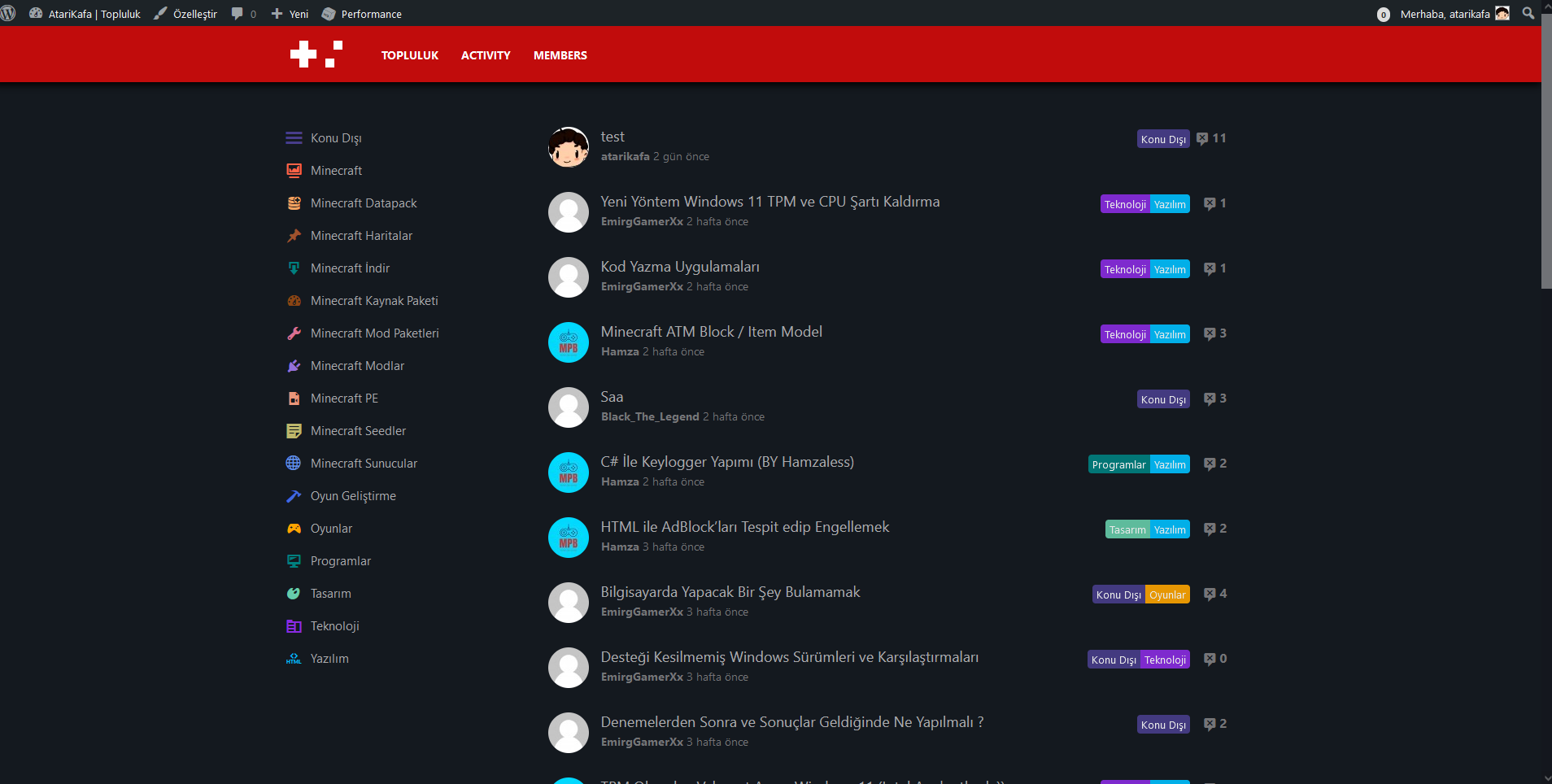
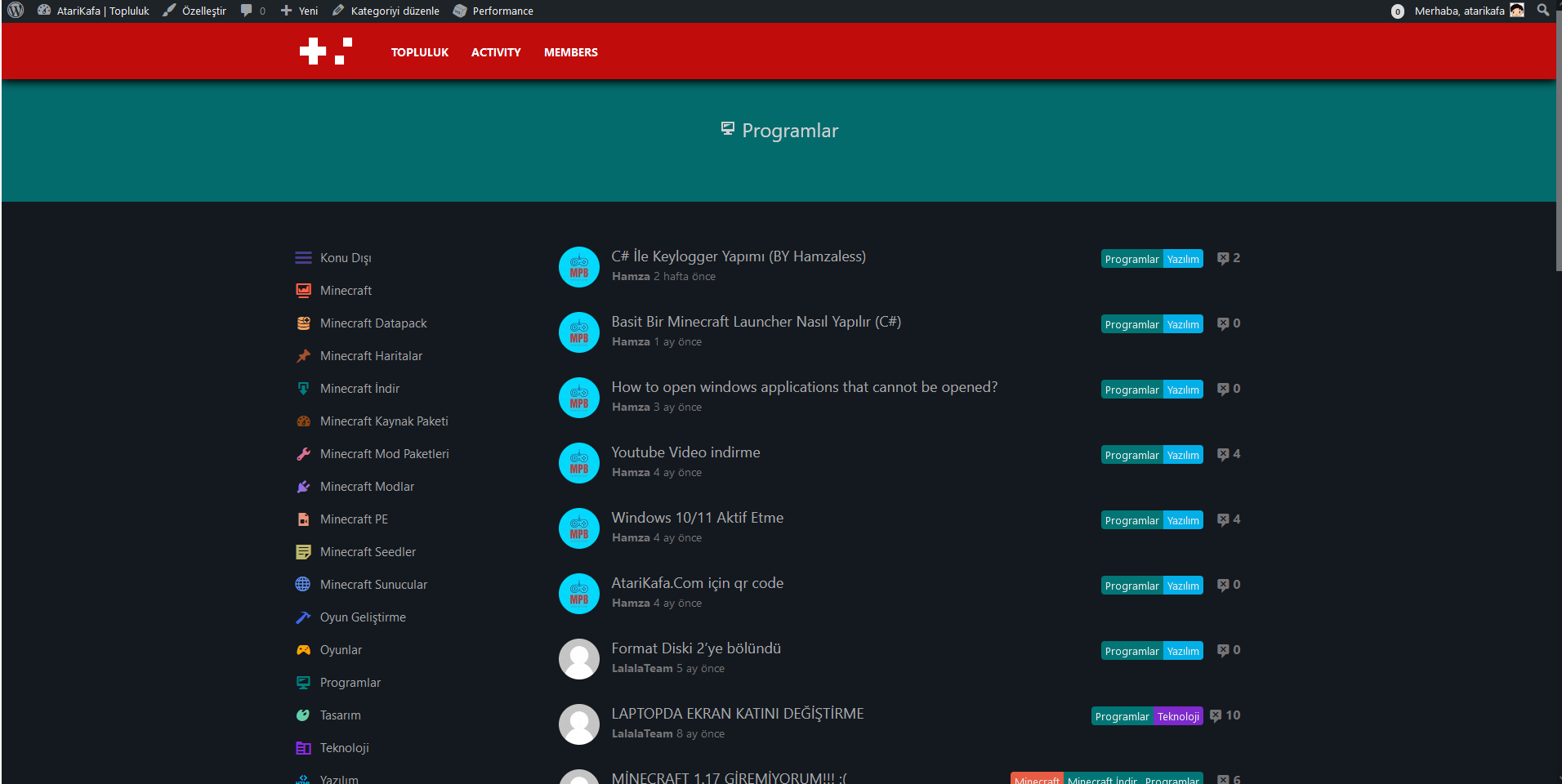
-
*i know its a bit old post but I wanted people to find solution
i moved my forum flarum to WordPress.
here is the importing script we used flarum -> wordpress
https://gist.github.com/sinanisler/39a193ab1e074049026294f3b971a847
it is basically connecting the flarum db selecting tables and putting them on wordpress post/users/categories
code a bit messy but my friend will clean it up soon hopefully
https://github.com/serkanalgur/flarum-to-wordpressI am developing the theme rightnow it is almost ready .
when it is finished I will release here free and open source.
https://github.com/sinanisler/SiForumhere some sexy sexy looks from Wordpress
@sinanisler nice work ! Welcome to Sudonix

-
@hari you might want to check back here in this thread and review the work that @sinanisler has done in terms of converting Flarum to WordPress.
Impressive stuff.
-
@sinanisler as a side note, the below GIST appears to include your database password. I’d strongly recommend remove this sensitive information, and also changing the password if this is actually used on any production installation
https://gist.github.com/sinanisler/39a193ab1e074049026294f3b971a847
Mark Cutting also advises organisations as a Fractional CIO, Fractional CISO and Executive Advisor, helping boards improve technology governance, cyber resilience and executive decision making. Learn more at Gratmore Ltd
-
@sinanisler as a side note, the below GIST appears to include your database password. I’d strongly recommend remove this sensitive information, and also changing the password if this is actually used on any production installation
https://gist.github.com/sinanisler/39a193ab1e074049026294f3b971a847
@phenomlab its ok
i always make my passes random and that server/db already shutdown.thanks

-
@phenomlab its ok
i always make my passes random and that server/db already shutdown.thanks
@sinanisler Good.
-
*i know its a bit old post but I wanted people to find solution
i moved my forum flarum to WordPress.
here is the importing script we used flarum -> wordpress
https://gist.github.com/sinanisler/39a193ab1e074049026294f3b971a847
it is basically connecting the flarum db selecting tables and putting them on wordpress post/users/categories
code a bit messy but my friend will clean it up soon hopefully
https://github.com/serkanalgur/flarum-to-wordpressI am developing the theme rightnow it is almost ready .
when it is finished I will release here free and open source.
https://github.com/sinanisler/SiForumhere some sexy sexy looks from Wordpress
@sinanisler OMG this is great news for me.
i have a WordPress flarum like theme if you want i can send the theme files, we almost worked for 3months on it [on and off]. (i am not a dev someone in the past worked for it.)
it has deep integration with wpDiscuzz with features like move post and few other important features.
in fact i was thinking to share it to the public but it is still buggy.
as you are already working and saying it is at the final stage i am not going to miss this.

wpdiscuz.com/demo/

gvectors.com/product-category/wpdiscuz/
after all, this being minimalist is very important to stay close to the updates. wpdisuczz is something interesting but it is complicated to maintain a theme.
This is WordPress
https://raw.githubusercontent.com/sinanisler/SiForum/main/gigi.gif
We have also implemented the YARPP related post with CRPT custom related post type
i will try to bring that project online and share URL here so you can review . it is bit slow but i will share the code which will be helpful to build related post.
i am all in on this

@phenomlab said in move out from flarum to wordpress:
@hari you might want to check back here
i regret for not subscribing to the email notifications of sudonix
-
@sinanisler OMG this is great news for me.
i have a WordPress flarum like theme if you want i can send the theme files, we almost worked for 3months on it [on and off]. (i am not a dev someone in the past worked for it.)
it has deep integration with wpDiscuzz with features like move post and few other important features.
in fact i was thinking to share it to the public but it is still buggy.
as you are already working and saying it is at the final stage i am not going to miss this.
wpdiscuz.com/demo/

gvectors.com/product-category/wpdiscuz/
after all, this being minimalist is very important to stay close to the updates. wpdisuczz is something interesting but it is complicated to maintain a theme.
This is WordPress
https://raw.githubusercontent.com/sinanisler/SiForum/main/gigi.gif
We have also implemented the YARPP related post with CRPT custom related post type
i will try to bring that project online and share URL here so you can review . it is bit slow but i will share the code which will be helpful to build related post.
i am all in on this
@phenomlab said in move out from flarum to wordpress:
@hari you might want to check back here
i regret for not subscribing to the email notifications of sudonix
@Hari said in move out from flarum to wordpress:
i regret for not subscribing to the email notifications of sudonix
You might want to reconsider that
Mark Cutting also advises organisations as a Fractional CIO, Fractional CISO and Executive Advisor, helping boards improve technology governance, cyber resilience and executive decision making. Learn more at Gratmore Ltd
-
@Hari said in move out from flarum to wordpress:
i regret for not subscribing to the email notifications of sudonix
You might want to reconsider that
@phenomlab I could not find the email settings, I am setting this page as my home page

thanks to @sinanisler for stepping in.
-
@phenomlab I could not find the email settings, I am setting this page as my home page
thanks to @sinanisler for stepping in.
@Hari click the bell icon at the top and set the watching status. That will trigger an email for this particular topic at least.
-
//update i started migrating files into this domain 123forum.tk
i will list all features that we have implemented there and we will figure out which features we can take from the 123forum
-
//update i started migrating files into this domain 123forum.tk
i will list all features that we have implemented there and we will figure out which features we can take from the 123forum
@Hari keep us posted.
-
123forum theme is an identical flarum them with all features. it is fully built though it is not deployed due to load issues. the reason i am sharing is you can consider taking CSS or JS from it . i am aware about reusing doesn’t always work for our needs but consider it as a visual prototype
- Menu
- Search integration with ajax search pro + CSS
Notifications - Pending Discussions page
- Profile (sub: posts, discussions, mentions, settings)
- Profile thumbnail modification (Leira Letter Avatar plugin medication) https://wordpress.org/plugins/leira-letter-avatar/
(achieve flarum like auto thumbnail for user profile pics) - Following
- Dedicated all categories page (This is called Tags in flarum)
- All Categories display in the home page
Home page
-
Sorting - latest, new, old …etc
-
Home page “load more” discussions
-
at home page Front end moderation of discussions (for admins only)
-
Start Discussion Composer Window
-
Composer window WYSIWYG editor with various options (bold, font styles …etc)
Discussion page
-
Composer - text editor
-
Reply feature
-
follow discussion feature
-
front end moderation for admin (low priority)
-
Scroll indicator (we have implemented this differently using CSS, basically it is just regular indicator of page, page top, page bottom)
https://codepen.io/paulobrien/pen/JWdoXmRelated posts
- YARP + Custom Post Types Relationships (CPTR)
where we can select as many related discussions manually
10 related discussion will be shown automatically
using CPTR if we set 2 discussions rest of the 8disucssions will be shown from YARPPThe biggest reason for us to start this project is related posts and flarum doesn’t support Dravid languages like hindi, telugu (they recently fixed major bug on this)
https://wordpress.org/plugins/custom-post-types-relationships-cptr/ - custom-post-types-relationships-cptr
https://www.cssigniter.com/custom-post-types-relationships/#download
wpDiscuz priemum extenstions integration
mostly all plugins are integrated their icons are changed to flarum
features like upload files and embed posts also integratedhttps://gvectors.com/product-category/wpdiscuz/- Best answer Schema
-
the reason we did not go for buddy boss is it has these weird slugs
https://www.buddyboss.com/support-forums/topic/group-members-are-not-being-displayed/what we wanted is
domain.com/forum/this-is-my-questionwe never wanted subpages like
domain.comforum/this-is-my-question/topic/nature/this-is-my-question/10default WordPress comment link is acceptable for example
domain.comforum/this-is-my-question#10of course, this is not suitable for large threads but I make sure to close any discussion under 10 comments so there will be no need for pagination or lazy loading.
CloudWays+Cloudflare enterprise will help me to achieve after load speeds + Redis for WordPress will handle the extra load.
are you building a WordPress block theme? if that is the case it would be easy to use with a regular WordPress theme without diving into buddy press
-
the reason we did not go for buddy boss is it has these weird slugs
https://www.buddyboss.com/support-forums/topic/group-members-are-not-being-displayed/what we wanted is
domain.com/forum/this-is-my-questionwe never wanted subpages like
domain.comforum/this-is-my-question/topic/nature/this-is-my-question/10default WordPress comment link is acceptable for example
domain.comforum/this-is-my-question#10of course, this is not suitable for large threads but I make sure to close any discussion under 10 comments so there will be no need for pagination or lazy loading.
CloudWays+Cloudflare enterprise will help me to achieve after load speeds + Redis for WordPress will handle the extra load.
are you building a WordPress block theme? if that is the case it would be easy to use with a regular WordPress theme without diving into buddy press
@Hari thanks for the scrool indicator codepen i was looking for that one
I couldn’t find it I will add this on posts for sure.edit:
 scroll not realtime it is calculating coordinates when you stop scrolling. sadge…
it is simple Wordpress theme I am cutting lots of features because we don’t need it and ofc you can add plugins later.
here is the forum https://atarikafa.com/toplulukk/
( it will move here soon https://atarikafa.com/topluluk/ )for the permalink you can make any permalink you want because it is main posts and categories and everything will work no SEO problem. for my case only users u/user links will change to members/user I will just make a 301 on htacsess for this.
I tried wpdisqus and similar ones but I wanted to focus on theme design first. i am making the theme simple so it supports any plugin. i may even upload this to wp.org if I make the time for it
only ajax posting/topic starting feature missing
but here is the first commit for you
https://github.com/sinanisler/SiForum



Hello! It looks like you're interested in this conversation, but you don't have an account yet.
Getting fed up of having to scroll through the same posts each visit? When you register for an account, you'll always come back to exactly where you were before, and choose to be notified of new replies (either via email, or push notification). You'll also be able to save bookmarks and upvote posts to show your appreciation to other community members.
With your input, this post could be even better 💗
Register LoginRelated Topics
-
configure ghost and wordpress combo
Moved Solved WordPress -
-
-
-
-
-
-